MTConnect Model Dictionary
Definitions from MTConnect 2.8. Follow a term to read its properties, parts, subclasses, enumeration values, and related model terms.
A
- abstract element (class)
Glossary / XML Terms
element that defines a set of common characteristics that are shared by a group of elements. An abstract entity cannot appear in a document. In a specific implementation, an abstract entity is replaced by a derived element that is itself not an abstract entity. The characteristics for the derived element are inherited from the abstract entity.
- AbstractAxis (class)
Device Information Model / Configurations / Motion
axis along or around which the
Componentmoves relative to a coordinate system.- AbstractDataItemRelationship (class)
Device Information Model / DataItems / Properties of DataItem / Relationship Types for DataItem
association between a
DataItemand another entity.Description
AbstractDataItemRelationship is an abstract entity and hence will be realized by specific AbstractDataItemRelationship types in an MTConnectDevices entity. See Relationship Types for DataItem.
- AbstractFile (class)
Asset Information Model / Files
abstract
Assetthat contains the common properties of the File and FileArchetype types.- AbstractOrigin (class)
Device Information Model / Configurations / CoordinateSystems
coordinates of the origin position of a coordinate system.
- AbstractRotation (class)
Device Information Model / Configurations / CoordinateSystems
rotations about X, Y, and Z axes are expressed in A, B, and C respectively within a 3-dimensional vector.
- AbstractScale (class)
Device Information Model / Configurations / SolidModel
either a single multiplier applied to all three dimensions or a three space multiplier given in the X, Y, and Z dimensions in the coordinate system used for the SolidModel.
- AbstractTranslation (class)
Device Information Model / Configurations / CoordinateSystems
translations along X, Y, and Z axes are expressed as x,y, and z respectively within a 3-dimensional vector.
- Acceleration (class)
Observation Information Model / Observation Types / Sample Types
ACCELERATION
- Acceleration.Actual (class)
Observation Information Model / Observation Types / Sample Types
measured or reported value of an observation.
- Acceleration.Commanded (class)
Observation Information Model / Observation Types / Sample Types
directive value including adjustments such as an offset or overrides.
- Acceleration.Programmed (class)
Observation Information Model / Observation Types / Sample Types
directive value without offsets and adjustments.
- AccumulatedTime (class)
Observation Information Model / Observation Types / Sample Types
ACCUMULATED_TIME
- ActivationCount (class)
Observation Information Model / Observation Types / Event Types
ACTIVATION_COUNT
- ActivationCount.Aborted (class)
Observation Information Model / Observation Types / Event Types
accumulation of actions or activities that were attempted, but terminated before they could be completed.
- ActivationCount.All (class)
Observation Information Model / Observation Types / Event Types
accumulation of all actions, items, or activities being counted independent of the outcome.
- ActivationCount.Bad (class)
Observation Information Model / Observation Types / Event Types
accumulation of actions, items, or activities being counted that do not conform to specification or expectation.
- ActivationCount.Complete (class)
Observation Information Model / Observation Types / Event Types
accumulation of actions, items, or activities that have been completed, independent of the outcome.
- ActivationCount.Failed (class)
Observation Information Model / Observation Types / Event Types
accumulation of actions or activities that were attempted, but failed to complete or resulted in an unexpected or unacceptable outcome.
- ActivationCount.Good (class)
Observation Information Model / Observation Types / Event Types
accumulation of actions, items, or activities being counted that conform to specification or expectation.
- ActivationCount.Remaining (class)
Observation Information Model / Observation Types / Event Types
accumulation of actions, items, or activities yet to be counted.
- ActivationCount.Target (class)
Observation Information Model / Observation Types / Event Types
goal of the operation or process.
- ActiveAxes (class)
Observation Information Model / Observation Types / Event Types
ACTIVE_AXES
- ActivePowerSource (class)
Observation Information Model / Observation Types / Event Types
ACTIVE_POWER_SOURCE
- Activity (class)
Asset Information Model / Process
smallest unit of task or action within a process step
- ActivityGroup (class)
Asset Information Model / Process
group of Activitys organized for a common objective within a process step
- Actors (package)
WIP: Use Cases
Review the MTConnect definition and model details for Actors, an MTConnect package.
- Actuator (class)
Device Information Model / Components / Component Types
Componentcomposed of a physical apparatus that moves or controls a mechanism or system.Description
It takes energy usually provided by air, electric current, or liquid and converts the energy into some kind of motion.
- Actuator (class)
Observation Information Model / Observation Types / Condition Types
ACTUATOR
- ActuatorState (class)
Observation Information Model / Observation Types / Event Types
ACTUATOR_STATE
- ActuatorStateEnum (enumeration)
DataTypes
Review the MTConnect definition and model details for ActuatorStateEnum, an MTConnect enumeration.
- Adapter (class)
Device Information Model / Components / Component Types
Componentthat provides information about the data source for an MTConnect Agent.Description
It MAY contain connectivity state of the data source and additional telemetry about the data source and source-specific information.
- adapter (class)
Glossary
optional piece of hardware or software that transforms information provided by a piece of equipment into a form that can be received by an agent.
- AdapterDataSource (class)
Reference Agent Architecture / Source
Review the MTConnect definition and model details for AdapterDataSource, an MTConnect class.
- Adapters (class)
Device Information Model / Components / Component Types / Component Organizer Types
Componentthat organizesAdaptertypes.- AdapterSoftwareVersion (class)
Observation Information Model / Observation Types / Event Types
ADAPTER_SOFTWARE_VERSION
- AdapterURI (class)
Observation Information Model / Observation Types / Event Types
ADAPTER_URI
- Additional Observation Terms (package)
Glossary / MTConnect Terms
Review the MTConnect definition and model details for Additional Observation Terms, an MTConnect package.
- Agent (class)
Device Information Model / Components / Devices
Devicecomposed of an MTConnect Agent and all its connected data sources.Description
An
AgentMUST be provided by all MTConnect Agent implementations.An
AgentMUST provide notifications when devices are added or changed.An
AgentMUST provide connection information for each data source currently supplying data to the MTConnect Agent.An
AgentMAY provide information about telemetry relating to data sources.An
AgentMAY provide information about the MTConnect Agent resource utilization.- Agent (class)
Fundamentals / MTConnect Protocol / REST Protocol
agent.
An agent MUST perform the following tasks:
- Collect data from manufacturing equipment.
- Generate response documents.
- Provide a REST interface using HTTP.
In addition to XML and HTTP, An agent MAY provide additional protocols and representations. Some representations MAY have companion specifications.
- agent (class)
Glossary
software that collects data published from one or more piece(s) of equipment, organizes that data in a structured manner, and responds to requests for data from client software systems by providing a structured response in the form of a response document that is constructed using the semantic data model of a Standard.
- Agent (class)
Reference Agent Architecture
Review the MTConnect definition and model details for Agent, an MTConnect class.
- AirHandler (class)
Device Information Model / Components / Component Types
system that circulates air or regulates airflow without altering temperature or humidity.
- Alarm (class)
Observation Information Model / Observation Types / Event Types
ALARM
- alarm limit (class)
Glossary
limit used to trigger warning or alarm indicators.
- AlarmCodeEnum (enumeration)
DataTypes
Review the MTConnect definition and model details for AlarmCodeEnum, an MTConnect enumeration.
- AlarmLimit (class)
Observation Information Model / Observation Types / Event Types
ALARM_LIMIT
- AlarmLimitResult (class)
DataTypes
Review the MTConnect definition and model details for AlarmLimitResult, an MTConnect class.
- AlarmLimits (class)
Device Information Model / Configurations / Specifications
set of limits that is used to trigger warning or alarm indicators.
- AlarmLimits (class)
Observation Information Model / Observation Types / Event Types
ALARM_LIMITS
- AlarmSeverityEnum (enumeration)
DataTypes
Review the MTConnect definition and model details for AlarmSeverityEnum, an MTConnect enumeration.
- AlarmStateEnum (enumeration)
DataTypes
Review the MTConnect definition and model details for AlarmStateEnum, an MTConnect enumeration.
- Amperage (class)
Observation Information Model / Observation Types / Sample Types
AMPERAGE
- Amperage.Actual (class)
Observation Information Model / Observation Types / Sample Types
measured or reported value of an observation.
DEPRECATED in Version 1.6.
- Amperage.Alternating (class)
Observation Information Model / Observation Types / Sample Types
measurement of alternating voltage or current.
If not specified further in statistic, defaults to RMS voltage.
DEPRECATED in Version 1.6.
- Amperage.Direct (class)
Observation Information Model / Observation Types / Sample Types
measurement of DC current or voltage.
DEPRECATED in Version 1.6.
- Amperage.Target (class)
Observation Information Model / Observation Types / Sample Types
goal of the operation or process.
DEPRECATED in Version 1.6.
- AmperageAC (class)
Observation Information Model / Observation Types / Sample Types
AMPERAGE_AC
- AmperageAC.Actual (class)
Observation Information Model / Observation Types / Sample Types
measured or reported value of an observation.
- AmperageAC.Commanded (class)
Observation Information Model / Observation Types / Sample Types
directive value including adjustments such as an offset or overrides.
- AmperageAC.Programmed (class)
Observation Information Model / Observation Types / Sample Types
directive value without offsets and adjustments.
- AmperageDC (class)
Observation Information Model / Observation Types / Sample Types
AMPERAGE_DC
- AmperageDC.Actual (class)
Observation Information Model / Observation Types / Sample Types
measured or reported value of an observation.
- AmperageDC.Commanded (class)
Observation Information Model / Observation Types / Sample Types
directive value including adjustments such as an offset or overrides.
- AmperageDC.Programmed (class)
Observation Information Model / Observation Types / Sample Types
directive value without offsets and adjustments.
- Amplifier (class)
Device Information Model / Components / Component Types
leaf
Componentcomposed of an electronic component or circuit that amplifies power, electric current, or voltage.- Angle (class)
Observation Information Model / Observation Types / Sample Types
ANGLE
- Angle (class)
WIP: Device Examples / Kinematics Simulation / XArm7Model
Review the MTConnect definition and model details for Angle, an MTConnect class.
- Angle.Actual (class)
Observation Information Model / Observation Types / Sample Types
measured or reported value of an observation.
- Angle.Commanded (class)
Observation Information Model / Observation Types / Sample Types
directive value including adjustments such as an offset or overrides.
- AngularAcceleration (class)
Observation Information Model / Observation Types / Sample Types
ANGULAR_ACCELERATION
- AngularAcceleration.Actual (class)
Observation Information Model / Observation Types / Sample Types
measured or reported value of an observation.
- AngularAcceleration.Commanded (class)
Observation Information Model / Observation Types / Sample Types
directive value including adjustments such as an offset or overrides.
- AngularAcceleration.Programmed (class)
Observation Information Model / Observation Types / Sample Types
directive value without offsets and adjustments.
- AngularDeceleration (class)
Observation Information Model / Observation Types / Sample Types
ANGULAR_DECELERATION
- AngularDeceleration.Actual (class)
Observation Information Model / Observation Types / Sample Types
measured or reported value of an observation.
- AngularDeceleration.Commanded (class)
Observation Information Model / Observation Types / Sample Types
directive value including adjustments such as an offset or overrides.
- AngularDeceleration.Programmed (class)
Observation Information Model / Observation Types / Sample Types
directive value without offsets and adjustments.
- AngularVelocity (class)
Observation Information Model / Observation Types / Sample Types
ANGULAR_VELOCITY
- application (class)
Glossary
software or a program that is specific to the solution of an application problem. ISO/IEC 20944-1:2013
- Application (class)
Observation Information Model / Observation Types / Event Types
APPLICATION
- Application.InstallDate (class)
Observation Information Model / Observation Types / Event Types
date the hardware or software was installed.
- Application.License (class)
Observation Information Model / Observation Types / Event Types
license code to validate or activate the hardware or software.
- Application.Manufacturer (class)
Observation Information Model / Observation Types / Event Types
corporate identity for the maker of the hardware or software.
- Application.ReleaseDate (class)
Observation Information Model / Observation Types / Event Types
date the hardware or software was released for general use.
- Application.Version (class)
Observation Information Model / Observation Types / Event Types
version of the hardware or software.
- ApplicationCategoryEnum (enumeration)
DataTypes
Review the MTConnect definition and model details for ApplicationCategoryEnum, an MTConnect enumeration.
- ApplicationTypeEnum (enumeration)
DataTypes
Review the MTConnect definition and model details for ApplicationTypeEnum, an MTConnect enumeration.
- archetype (class)
Glossary
archetype provides the requirements, constraints, and common properties for a type of Asset.
- Asset (class)
Asset Information Model
abstract Asset.
Description
It is used in the manufacturing process, but is not permanently associated with a single piece of equipment. It can be removed from the piece of equipment without compromising its function, and can be associated with other pieces of equipment during its lifecycle.
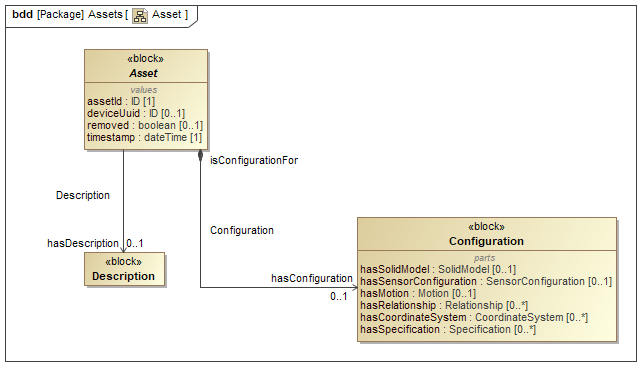
Note: See Assets Schema Diagrams for XML schema.
- asset (class)
Glossary / Industrial Terms
item, thing or entity that has potential or actual value to an organization. ISO 55000:2014
Note 1 to entry: Value can be tangible or intangible, financial or non-financial, and includes consideration of risks and liabilities. It can be positive or negative at different stages of the asset life.
Note 2 to entry: Physical assets usually refer to equipment, inventory and properties owned by the organization. Physical assets are the opposite of intangible assets, which are non-physical assets such as leases, brands, digital assets, use rights, licences, intellectual property rights, reputation or agreements.
Note 3 to entry: A grouping of assets referred to as an asset system could also be considered as an asset.
- Asset (class)
Glossary / MTConnect Terms
asset that is used by the manufacturing process to perform tasks.
Note 1 to entry: An Asset relies upon an Device to provide observations and information about itself and the Device revises the information to reflect changes to the Asset during their interaction. Examples of Assets are cutting tools, Part Information, Manufacturing Processes, Fixtures, and Files.
Note 2 to entry: A singular
assetIduniquely identifies an Asset throughout its lifecycle and is used to track and relate the Asset to other Devices and entities.Note 3 to entry: Assets are temporally associated with a device and can be removed from the device without damage or alteration to its primary functions.
- asset buffer (class)
Glossary
buffer for Assets.
- Asset Information Model (package)
The MTConnect Standard supports a simple distributed storage mechanism that allows applications and equipment to share and exchange complex information models in a similar way to a distributed data store. The Asset Information Model associates each MTConnectAssets entity with a unique identifier and allows for some predefined mechanisms to find, create, request, update, and delete these electronic documents in a way that provides for consistency across multiple pieces of equipment.
The protocol provides a limited mechanism of accessing Assets using the following properties:
assetId, asset type (element name of asset root), and the piece of equipment associated with the asset. These access strategies will provide the following services and answer the following questions: What assets are from a particular piece of equipment? What are the assets of a particular type? What asset is stored for a givenassetId?Although these mechanisms are provided, an agent should not be considered a data store or a system of reference. The agent is providing an ephemeral storage capability that will temporarily manage the data for applications wishing to communicate and manage data as needed by the various processes. An application cannot rely on an agent for long term persistence or durability since the agent is only required to temporarily store the asset data and may require another system to provide the source data upon initialization. An agent is always providing the best-known equipment centric view of the data given the limitations of that piece of equipment.
The MTConnect Standard has two data item types to support change notification when an Asset is added, updated or removed. AssetChanged states the
assetIdof the Asset that has been added or updated. AssetRemoved states theassetIdof the Asset that has been removed. See Observation Information Model for more details.Assets Appendix
XML Schema Diagrams
See XML schemas for the MTConnect standard here: https://schemas.mtconnect.org/.
Assets Schema Diagrams
See
Assetelement inMTConnectAssetsschema.See
Descriptionelement inMTConnectAssetsschema.CuttingTool Schema Diagrams
See
CuttingToolelement inMTConnectAssetsschema.See
CuttingToolDefinitionelement inMTConnectAssetsschema.See
CuttingToolArchetypeReferenceelement inMTConnectAssetsschema.CuttingToolLifeCycle Schema Diagrams
See
CuttingToolLifeCycleelement inMTConnectAssetsschema.See
CutterStatuselement inMTConnectAssetsschema.See
Locationelement inMTConnectAssetsschema.See
Measurementelement inMTConnectAssetsschema.See
ProcessFeedRateelement inMTConnectAssetsschema.See
ProcessSpindleSpeedelement inMTConnectAssetsschema.See
ReconditionCountelement inMTConnectAssetsschema.See
ToolLifeelement inMTConnectAssetsschema.CuttingItem Schema Diagrams
See
CuttingItemselement inMTConnectAssetsschema.See
CuttingItemelement inMTConnectAssetsschema.See
ItemLifeelement inMTConnectAssetsschema.ISO 13399 Diagrams
Measurement Diagrams
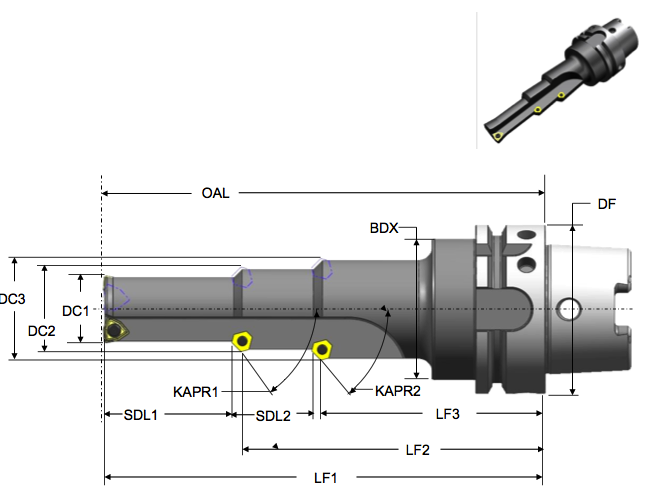
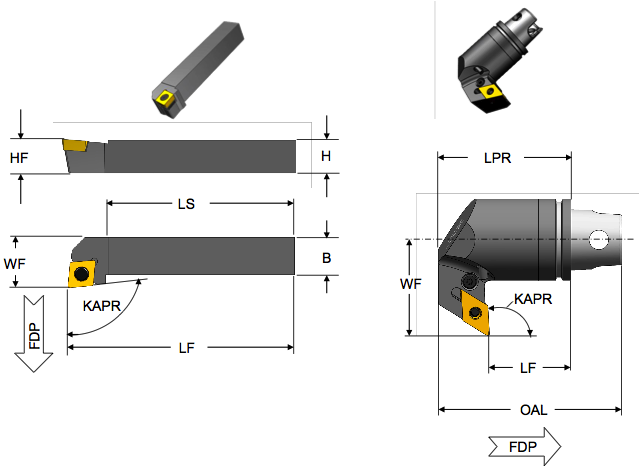
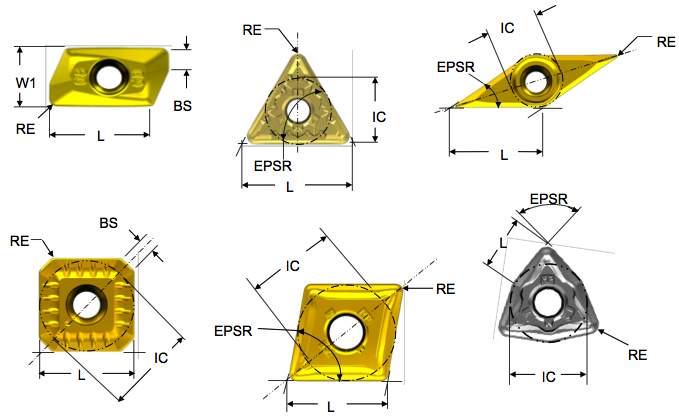
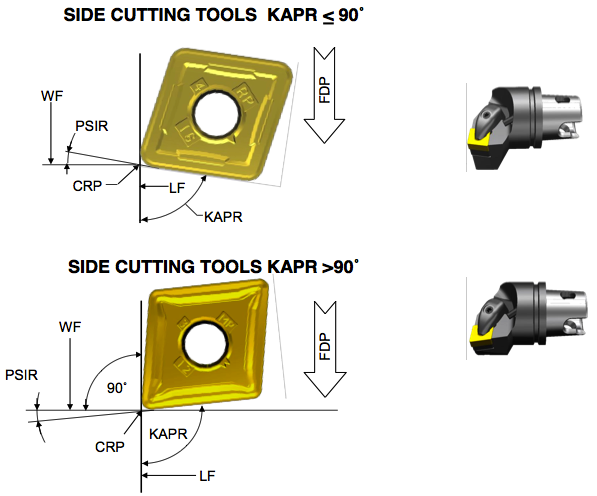
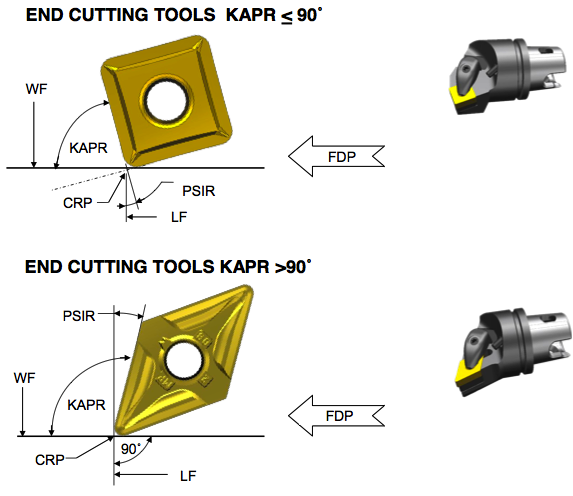
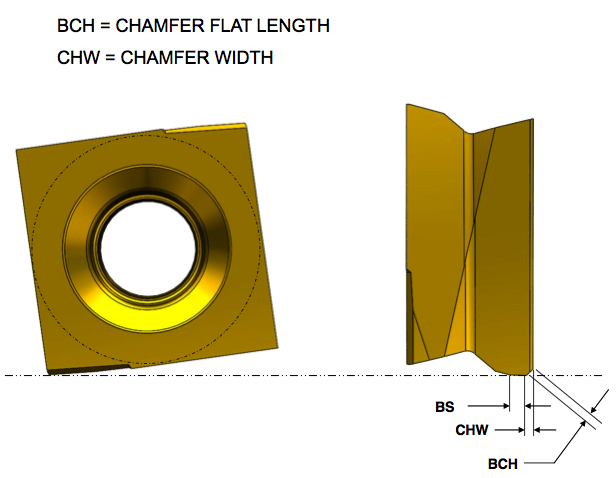
Cutting Tool Examples
Shell Mill
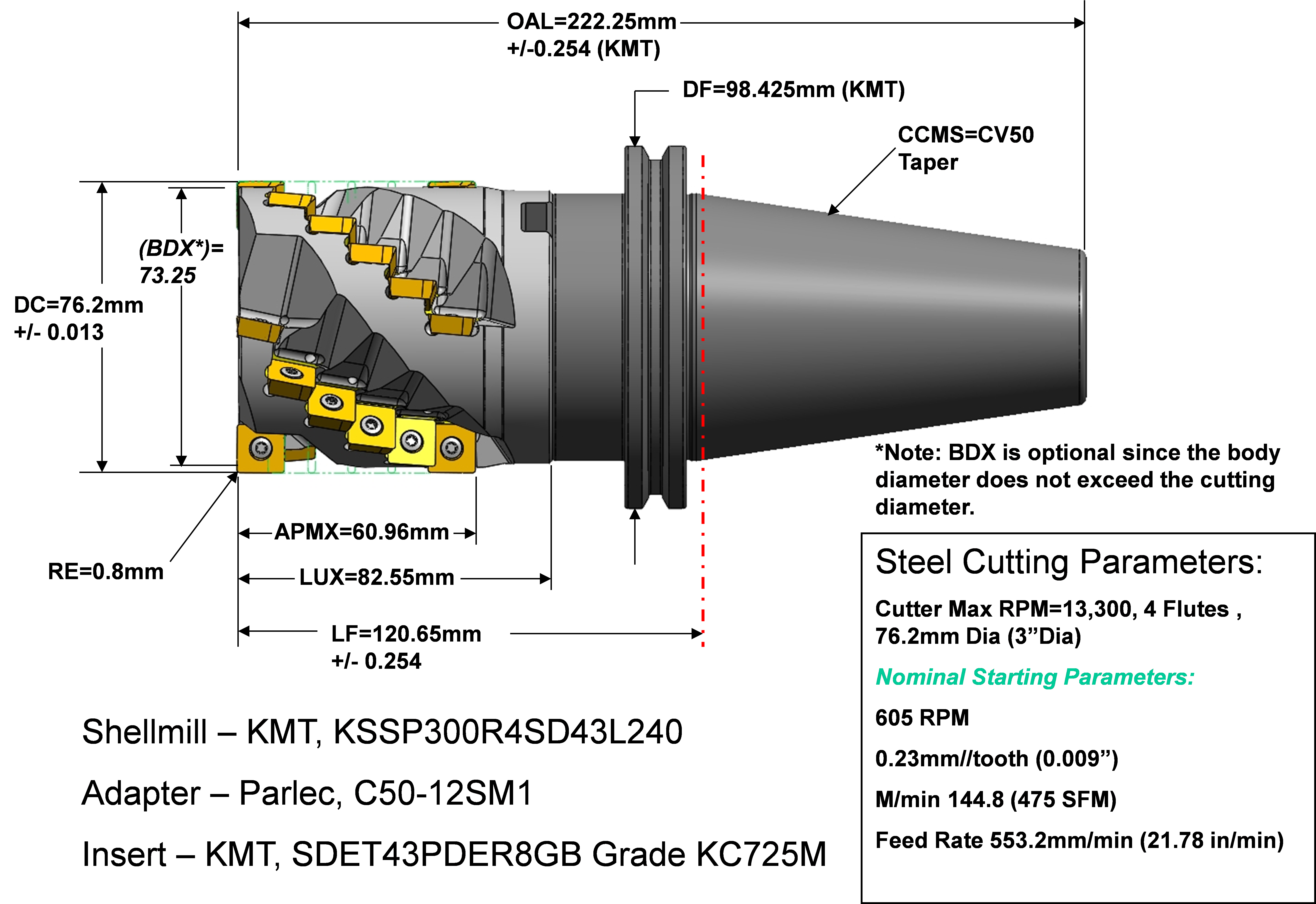
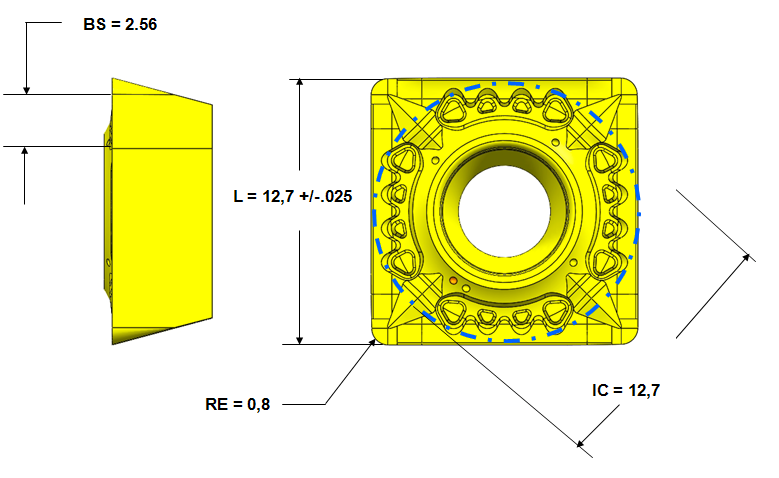
<?xml version="1.0" encoding="UTF-8"?>
<MTConnectAssets
xmlns:m="urn:mtconnect.org:MTConnectAssets:1.2"
xmlns="urn:mtconnect.org:MTConnectAssets:1.2"
xmlns:xsi="http://www.w3.org/2001/XMLSchema-instance"
xsi:schemaLocation="urn:mtconnect.org:MTConnectAssets:1.2
http://mtconnect.org/schemas/MTConnectAssets\\_1.2.xsd">
  <Header creationTime="2011-05-11T13:55:22"
  assetBufferSize="1024" sender="localhost"
  assetCount="2" version="1.2" instanceId="1234"/>
  <Assets>
  <CuttingTool serialNumber="1" toolId="KSSP300R4SD43L240"
  timestamp="2011-05-11T13:55:22" assetId="KSSP300R4SD43L240.1"
  manufacturers="KMT,Parlec">
    <CuttingToolLifeCycle>
    <CutterStatus><Status>NEW</Status></CutterStatus>
    <ProcessSpindleSpeed maximum="13300"
    nominal="605">10000</ProcessSpindleSpeed>
    <ProcessFeedRate
    nominal="9.22">9.22</ProcessSpindleSpeed>
    <ConnectionCodeMachineSide>CV50
    </ConnectionCodeMachineSide>
    <Measurements>
      <BodyDiameterMax code="BDX">73.25
      </BodyDiameterMax>
      <OverallToolLength nominal="222.25"
        minimum="221.996" maximum="222.504"
        code="OAL">222.25</OverallToolLength>
      <UsableLengthMax code="LUX" nominal="82.55">82.55
      </UsableLengthMax>
      <CuttingDiameterMax code="DC" nominal="76.2"
        maximum="76.213" minimum="76.187">76.2
      </CuttingDiameterMax>
      <BodyLengthMax code="LF" nominal="120.65"
        maximum="120.904" minimum="120.404">120.65
      </BodyLengthMax>
      <DepthOfCutMax code="APMX"
      nominal="60.96">60.95</DepthOfCutMax>
      <FlangeDiameterMax code="DF"
        nominal="98.425">98.425</FlangeDiameterMax>
    </Measurements>
    <CuttingItems count="24">
      <CuttingItem indices="1-24" itemId="SDET43PDER8GB"
        manufacturers="KMT" grade="KC725M">
        <Measurements>
          <CuttingEdgeLength code="L" nominal="12.7"
            minimum="12.675" maximum="12.725">12.7
          </CuttingEdgeLength>
        <WiperEdgeLength code="BS" nominal=
          "2.56">2.56</WiperEdgeLength>
        <IncribedCircleDiameter code="IC"
          nominal="12.7">12.7
        </IncribedCircleDiameter>
        <CornerRadius code="RE" nominal="0.8">
          0.8</CornerRadius>
      </Measurements>
      </CuttingItem>
    </CuttingItems>
    </CuttingToolLifeCycle>
    </CuttingTool>
  </Assets>
</MTConnectAssets>
Example for Indexable Insert Measurements
Step Drill
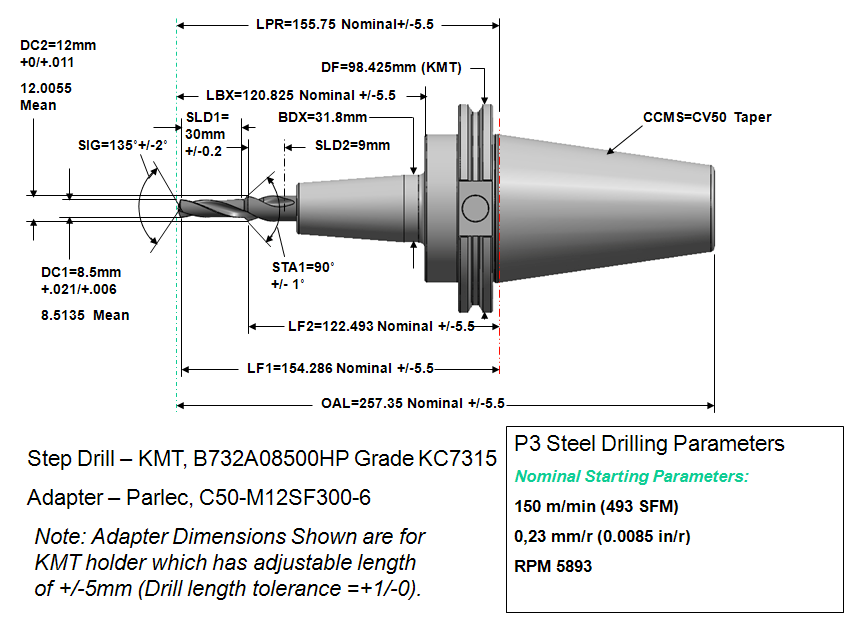
<?xml version="1.0" encoding="UTF-8"?>
<MTConnectAssets xmlns:m="urn:mtconnect.org:MTConnectAssets:1.2"
xmlns="urn:mtconnect.org:MTConnectAssets:1.2"
xmlns:xsi="http://www.w3.org/2001/XMLSchema-instance"
xsi:schemaLocation="urn:mtconnect.org:MTConnectAssets:1.2
http://mtconnect.org/schemas/MTConnectAssets\\_1.2.xsd">
  <Header creationTime="2011-05-
  11T13:55:22" assetBufferSize="1024"
  sender="localhost" assetCount="2" version="1.2" instanceId="1234"/>
  <Assets>
    <CuttingTool serialNumber="1 " toolId="B732A08500HP"
    timestamp="2011-05-11T13:55:22" assetId="B732A08500HP "
    manufacturers="KMT,Parlec">
      <Description>
        Step Drill - KMT, B732A08500HP Grade KC7315
        Adapter - Parlec, C50-M12SF300-6
      </Description>
      <CuttingToolLifeCycle>
        <CutterStatus><Status>NEW</Status></CutterStatus>
        <ProcessSpindleSpeed nominal="5893">5893</ProcessSpindleSpeed>
        <ProcessFeedRate nominal="2.5">2.5</ProcessFeedRate>
        <ConnectionCodeMachineSide>CV50 Taper</ConnectionCodeMachineSide>
        <Measurements>
          <BodyDiameterMax code="BDX">31.8</BodyDiameterMax>
          <BodyLengthMax code="LBX" nominal="120.825" maximum="126.325"
          minimum="115.325">120.825</BodyLengthMax>
          <ProtrudingLength code="LPR" nominal="155.75" maximum="161.25"
          minimum="150.26">155.75</ProtrudingLength>
          <FlangeDiameterMax code="DF"
          nominal="98.425">98.425</FlangeDiameterMax>
          <OverallToolLength nominal="257.35" minimum="251.85"
          maximum="262.85" code="OAL">257.35</OverallToolLength>
        </Measurements>
        <CuttingItems count="2">
          <CuttingItem indices="1" manufacturers="KMT" grade="KC7315">>
            <Measurements>
              <CuttingDiameter code="DC1" nominal="8.5" maximum="8.521"
              minimum="8.506">8.5135</CuttingDiameter>
              <StepIncludedAngle code="STA1" nominal="90" maximum="91"
              minimum="89">90</StepIncludedAngle>
              <FunctionalLength code="LF1" nominal="154.286"
              minimum="148.786"
              maximum="159.786">154.286</FunctionalLength>
              <StepDiameterLength code="SDL1"
              nominal="9">9</StepDiameterLength>
              <PointAngle code="SIG" nominal="135" minimum="133"
              maximum="137">135</PointAngle>
            </Measurements>
          </CuttingItem>
          <CuttingItem indices="2" manufacturers="KMT" grade="KC7315">>
            <Measurements>
              <CuttingDiameter code="DC2" nominal="12" maximum="12.011"
              minimum="12">12</CuttingDiameter>
              <FunctionalLength code="LF2" nominal="122.493"
              maximum="127.993"
              minimum="116.993">122.493</FunctionalLength>
              <StepDiameterLength code="SDL2"
              nominal="9">9</StepDiameterLength>
            </Measurements>
          </CuttingItem>
        </CuttingItems>
      </CuttingToolLifeCycle>
    </CuttingTool>
  </Assets>
</MTConnectAssets>
Example for Step Mill Side View
Shell Mill with Individual Loci
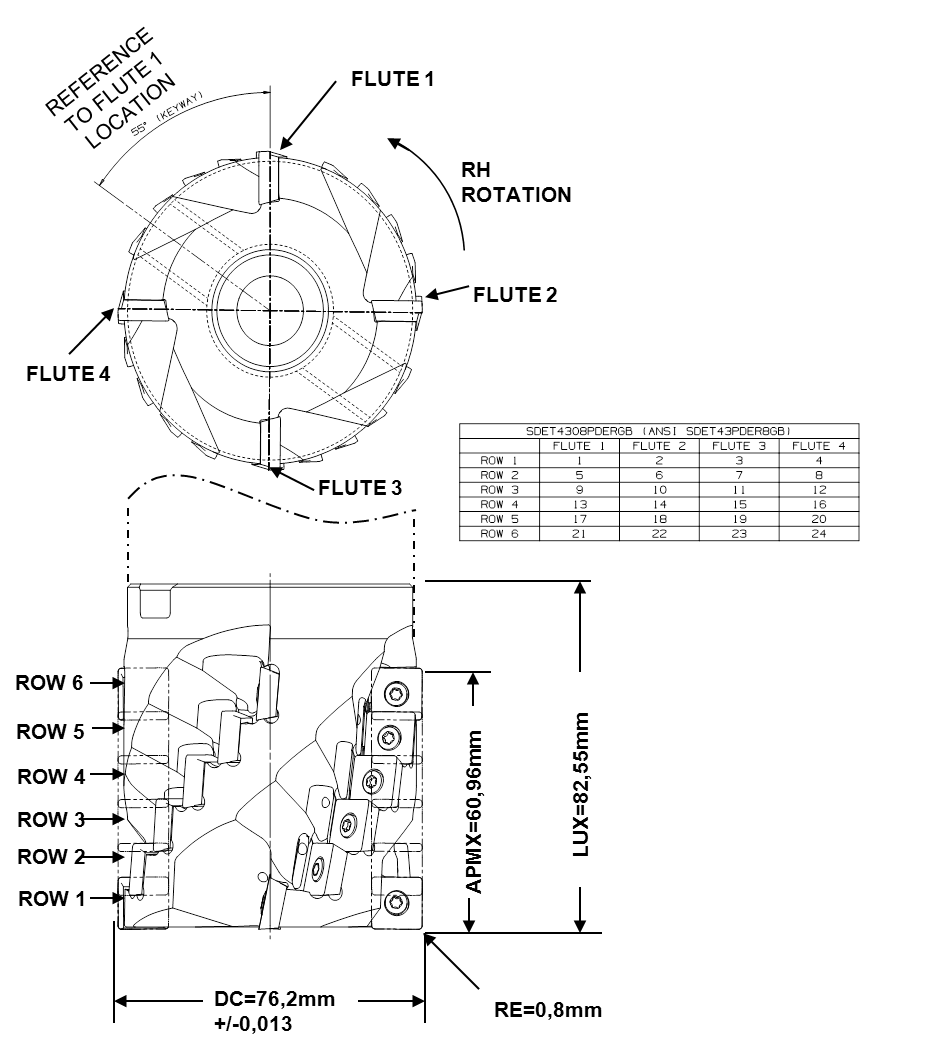
<?xml version="1.0" encoding="UTF-8"?>
<MTConnectAssets xmlns:m="urn:mtconnect.org:MTConnectAssets:1.2"
xmlns="urn:mtconnect.org:MTConnectAssets:1.2"
xmlns:xsi="http://www.w3.org/2001/XMLSchema-instance"
xsi:schemaLocation="urn:mtconnect.org:MTConnectAssets:1.2
http://mtconnect.org/schemas/MTConnectAssets\\_1.2.xsd">
  <Header creationTime="2011-05-11T13:55:22" assetBufferSize="1024"
  sender="localhost" assetCount="2" version="1.2" instanceId="1234"/>
  <Assets>
    <CuttingTool serialNumber="1" toolId="KSSP300R4SD43L240"
    timestamp="2011-05-11T13:55:22" assetId="KSSP300R4SD43L240.1"
    manufacturers="KMT,Parlec">
      <Description>Keyway: 55 degrees</Description>
      <CuttingToolLifeCycle>
        <CutterStatus><Status>NEW</Status></CutterStatus>
        <Measurements>
          <UsableLengthMax code="LUX"
          nominal="82.55">82.55</UsableLengthMax>
          <CuttingDiameterMax code="DC" nominal="76.2" maximum="76.213"
          minimum="76.187">76.2</CuttingDiameterMax>
          <DepthOfCutMax code="APMX" nominal="60.96">60.95</DepthOfCutMax>
        </Measurements>
        <CuttingItems count="24">
          <CuttingItem indices="1" itemId="SDET43PDER8GB"
          manufacturers="KMT">
            <Locus>FLUTE: 1, ROW: 1</Locus>
            <Measurements>
             <DriveAngle code="DRVA" nominal="55">55</DriveAngle>
           </Measurements>
          </CuttingItem>
          <CuttingItem indices="2-24" itemId="SDET43PDER8GB"
          manufacturers="KMT">
            <Locus>FLUTE: 2-4, ROW: 1; FLUTE: 1-4, ROW 2-6</Locus>
          </CuttingItem>
        </CuttingItems>
      </CuttingToolLifeCycle>
    </CuttingTool>
  </Assets>
</MTConnectAssets>
Example for Shell Mill with Explicate Loci
Drill with Individual Loci
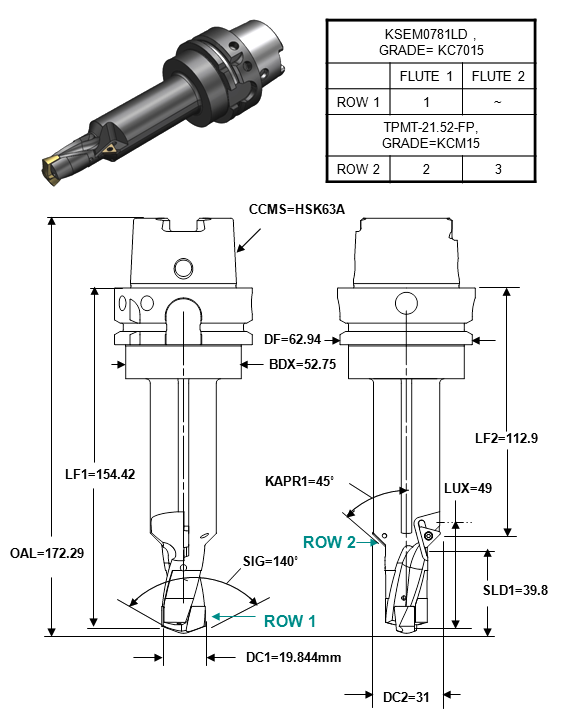
<?xml version="1.0" encoding="UTF-8"?>
<MTConnectAssets xmlns:m="urn:mtconnect.org:MTConnectAssets:1.2"
xmlns="urn:mtconnect.org:MTConnectAssets:1.2"
xmlns:xsi="http://www.w3.org/2001/XMLSchema-instance"
xsi:schemaLocation="urn:mtconnect.org:MTConnectAssets:1.2
http://mtconnect.org/schemas/MTConnectAssets\\_1.2.xsd">
  <Header creationTime="2011-05-11T13:55:22" assetBufferSize="1024"
  sender="localhost" assetCount="2" version="1.2" instanceId="1234"/>
  <Assets>
    <CuttingTool serialNumber="1" toolId="KSEM0781LD"
    timestamp="2011-05-11T13:55:22" assetId="KSEM0781LD.1" manufacturers="KMT">
      <CuttingToolLifeCycle>
        <CutterStatus><Status>NEW</Status></CutterStatus>
        <ConnectionCodeMachineSide>HSK63A</ConnectionCodeMachineSide>
        <Measurements>
          <BodyDiameterMax code="BDX">52.75</BodyDiameterMax>
          <OverallToolLength nominal="172.29"
          code="OAL">172.29</OverallToolLength>
          <UsableLengthMax code="LUX" nominal="49">49</UsableLengthMax>
          <FlangeDiameterMax code="DF"
          nominal="62.94">62.94</FlangeDiameterMax>
        </Measurements>
        <CuttingItems count="3">
          <CuttingItem indices="1" itemId="KSEM0781LD" manufacturers="KMT"
          grade="KC7015">
            <Locus>FLUTE: 1, ROW: 1</Locus>
            <Measurements>
         <FunctionalLength code="LF1" nominal="154.42">154.42</FunctionalLength>
         <CuttingDiameter code="DC1" nominal="19.844">19.844</CuttingDiameter>
         <PointAngle code="SIG" nominal="140">140</PointAngle>
         <ToolCuttingEdgeAngle code="KAPR1" nominal="45">45</ToolCuttingEdgeAngle>
         <StepDiameterLength code="SLD1" nominal="39.8">39.8</StepDiameterLength>
            </Measurements>
          </CuttingItem>
          <CuttingItem indices="2-3" itemId="TPMT-21.52-FP"
          manufacturers="KMT" grade="KCM15">
            <Locus>FLUTE: 1-2, ROW: 2</Locus>
            <Measurements>
         <FunctionalLength code="LF2" nominal="112.9">119.2</FunctionalLength>
         <CuttingDiameter code="DC2" nominal="31">31</CuttingDiameter>
            </Measurements>
          </CuttingItem>
        </CuttingItems>
      </CuttingToolLifeCycle>
    </CuttingTool>
  </Assets>
</MTConnectAssets>
Example for Step Drill with Explicate Loci
Shell Mill with Different Inserts on First Row
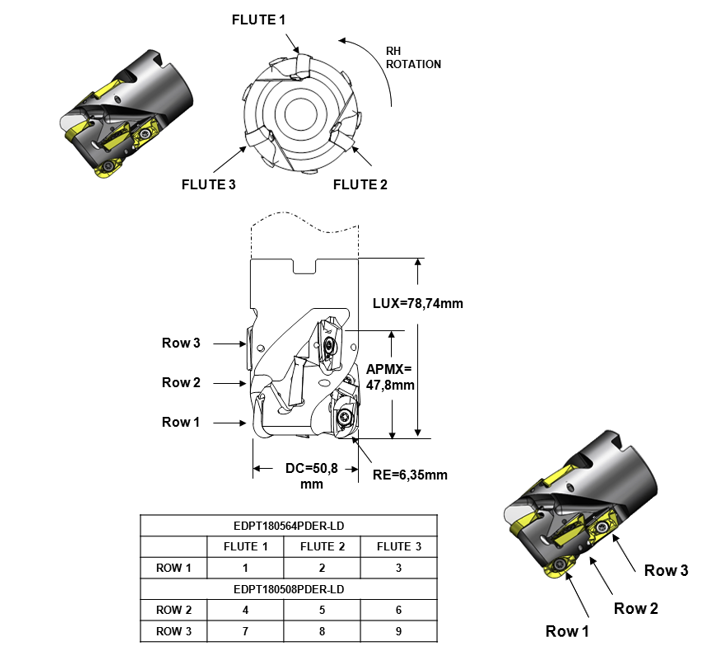
<?xml version="1.0" encoding="UTF-8"?>
<MTConnectAssets xmlns:m="urn:mtconnect.org:MTConnectAssets:1.2"
xmlns="urn:mtconnect.org:MTConnectAssets:1.2"
xmlns:xsi="http://www.w3.org/2001/XMLSchema-instance"
xsi:schemaLocation="urn:mtconnect.org:MTConnectAssets:1.2
http://mtconnect.org/schemas/MTConnectAssets\\_1.2.xsd">
  <Header creationTime="2011-05-11T13:55:22" assetBufferSize="1024"
  sender="localhost" assetCount="2" version="1.2" instanceId="1234"/>
  <Assets>
    <CuttingTool serialNumber="1" toolId="XXX" timestamp="2011-05-11T13:55:22"
    assetId="XXX.1" manufacturers="KMT">
      <CuttingToolLifeCycle>
        <CutterStatus><Status>NEW</Status></CutterStatus>
        <Measurements>
          <DepthOfCutMax code="APMX" nominal="47.8">47.8</DepthOfCutMax>
          <CuttingDiameterMax code="DC"
          nominal="50.8">50.8</CuttingDiameterMax>
          <UsableLengthMax code="LUX"
          nominal="78.74">78.74</UsableLengthMax>
        </Measurements>
        <CuttingItems count="9">
          <CuttingItem indices="1-3" itemId="EDPT180564PDER-LD"
          manufacturers="KMT">
            <Locus>FLUTE: 1-3, ROW: 1</Locus>
            <Measurements>
              <CornerRadius code="RE" nominal="6.25">6.35</CornerRadius>
            </Measurements>
          </CuttingItem>
          <CuttingItem indices="4-9" itemId="EDPT180508PDER-LD"
          manufacturers="KMT">
            <Locus>FLANGE: 1-4, ROW: 2-3</Locus>
          </CuttingItem>
        </CuttingItems>
      </CuttingToolLifeCycle>
    </CuttingTool>
  </Assets>
</MTConnectAssets>
Example for Shell Mill with Different Inserts on First Row
File Schema Diagrams
See
Fileelement inMTConnectAssetsschema.RawMaterial Schema Diagrams
See
RawMaterialelement inMTConnectAssetsschema.QIFDocumentWrapper Schema Diagrams
See
QIFDocumentWrapperelement inMTConnectAssetsschema.- Asset Information Model (class)
Glossary / Information Model Terms
information model that provides semantic models for Assets.
- asset request (class)
Glossary / Protocol Terms
HTTP Request to the agent regarding Assets.
- AssetAdded (class)
Observation Information Model / Observation Types / Event Types
ASSET_ADDED
- AssetChanged (class)
Observation Information Model / Observation Types / Event Types
ASSET_CHANGED
- AssetCommand (class)
Reference Agent Architecture / Pipelines
Review the MTConnect definition and model details for AssetCommand, an MTConnect class.
- AssetCount (class)
Fundamentals / MTConnect Protocol / MTConnectDevices Response Document
count of each asset type currently in the agent.
- AssetCount (class)
Observation Information Model / Observation Types / Event Types
ASSET_COUNT
- AssetNotFound (class)
Fundamentals / MTConnect Protocol / MTConnectErrors Response Document / Error Types
request for information specifies an
Assetthat is not recognized by the agent.- AssetRelationship (class)
Device Information Model / Configurations / Relationships
ConfigurationRelationship that describes the association between a
Componentor anAssetand anotherAsset.- AssetRemoved (class)
Observation Information Model / Observation Types / Event Types
ASSET_REMOVED
- AssetStroage (class)
Reference Agent Architecture
Review the MTConnect definition and model details for AssetStroage, an MTConnect class.
- AssetTypeEnum (enumeration)
DataTypes
Review the MTConnect definition and model details for AssetTypeEnum, an MTConnect enumeration.
- AssetUpdateRate (class)
Observation Information Model / Observation Types / Sample Types
ASSET_UPDATE_RATE
- AssociatedAssetId (class)
Observation Information Model / Observation Types / Event Types
ASSOCIATED_ASSET_ID
If defined as a DataSet or Table:
keyMUST be anAssettype. Examples: CuttingTool, Fixture, File.valueMUST be the correspondingassetId.
- attachment (class)
Glossary
connection by which one thing is associated with another.
- attribute (class)
Glossary / XML Terms
additional information or property for an element.
- AutomaticToolChanger (class)
Device Information Model / Components / Component Types
ToolingDelivery composed of a tool delivery mechanism that moves tools between a ToolMagazine and a spindle a Turret.
Description
AutomaticToolChanger may also transfer tools between a location outside of a piece of equipment and a ToolMagazine or Turret.
- Auxiliaries (class)
Device Information Model / Components / Component Types / Component Organizer Types
- Auxiliary (class)
Device Information Model / Components / Component Types
abstract
Componentcomposed of removable part(s) of a piece of equipment that provides supplementary or extended functionality.- Availability (class)
Observation Information Model / Observation Types / Event Types
AVAILABILITY
- AvailabilityEnum (enumeration)
DataTypes
Review the MTConnect definition and model details for AvailabilityEnum, an MTConnect enumeration.
- Axes (class)
Device Information Model / Components / Component Types / Component Organizer Types
Componentthat organizesAxistypes.- Axis (class)
Device Information Model / Components / Component Types
abstract
Componentcomposed of a motion system that provides linear or rotational motion for a piece of equipment.Description
In robotics, the term Axis is synonymous with Joint. A Joint is the connection between two parts of the structure that move in relation to each other.
Linear and Rotary components MUST have
namethat MUST follow the conventions described below. Use thenativeNamefor the manufacturer's name of the axis if it differs from the assignedname.MTConnect has two high-level classes for automation equipment as follows: (1) Equipment that controls cartesian coordinate axes and (2) Equipment that controls articulated axes. There are ambiguous cases where some machines exhibit both characteristics; when this occurs, the primary control system's configuration determines the classification.
Examples of cartesian coordinate equipment are CNC Machine Tools, Coordinate measurement machines, as specified in ISO 841, and 3D Printers. Examples of articulated automation equipment are Robotic systems as specified in ISO 8373.
The following sections define the designation of names for the axes and additional guidance when selecting the correct scheme to use for a given piece of equipment.
Cartesian Coordinate Naming Conventions
A Three-Dimensional Cartesian Coordinate control system organizes its axes orthogonally relative to a machine coordinate system where the manufacturer of the equipment specifies the origin.
Axes
nameSHOULD comply with ISO 841, if possible.Linear Motion
A piece of equipment MUST represent prismatic motion using a Linear axis and assign its
nameusing the designationsX,Y, andZ. A Linear axisnameMUST append a monotonically increasing suffix when there are more than one parallel axes; for example,X2,X3, andX4.Rotary Motion
MTConnect MUST assign the
nameto Rotary axes exhibiting rotary motion usingA,B, andC. A Rotary axisnameMUST append a monotonically increasing suffix when more than one Rotary axis rotates around the same Linear axis; for example,A2,A3, andA4.Articulated Machine Control Systems
An articulated control system's axes represent the connecting linkages between two adjacent rigid members of an assembly. The Linear axis represents prismatic motion, and the Rotary axis represents the rotational motion of the two related members. The control organizes the axes in a kinematic chain from the mounting surface (base) to the end-effector or tooling.
Articulated Machine Axis Names
The axes of articulated machines represent forward kinematic relationships between mechanical linkages. Each axis is a connection between linkages, also referred to as joints, and MUST be named using a
Jfollowed by a monotonically increasing number; for example,J1,J2,J3. The numbering starts at the base axis connected or closest to the mounting surface,J1, incrementing to the mechanical interface,Jn, wherenis the number of the last axis. The chain forms a parent-child relationship with the parent being the axis closest to the base.A machine having an axis with more than one child MUST number each branch using its numeric designation followed by a branch number and a monotonically increasing number. For example, if
J2has two children, the first child branch MUST be namedJ2.1.1and the second child branchJ2.2.1. A child of the first branch MUST be namedJ2.1.2, incrementing toJ2.1.n, whereJ2.1.nis the number of the last axis in that branch.- Axis (class)
Device Information Model / Configurations / Motion
axis along or around which the
Componentmoves relative to a coordinate system.- Axis (class)
WIP: Device Examples / Kinematics Simulation / XArm7Model
Review the MTConnect definition and model details for Axis, an MTConnect class.
- AxisCoupling (class)
Observation Information Model / Observation Types / Event Types
AXIS_COUPLING
- AxisCouplingEnum (enumeration)
DataTypes
Review the MTConnect definition and model details for AxisCouplingEnum, an MTConnect enumeration.
- AxisDataSet (class)
Device Information Model / Configurations / Motion
axis along or around which the
Componentmoves relative to a coordinate system represented as a dataset.- AxisFeedrate (class)
Observation Information Model / Observation Types / Sample Types
AXIS_FEEDRATE
- AxisFeedrate.Actual (class)
Observation Information Model / Observation Types / Sample Types
measured or reported value of an observation.
- AxisFeedrate.Commanded (class)
Observation Information Model / Observation Types / Sample Types
directive value including adjustments such as an offset or overrides.
- AxisFeedrate.Jog (class)
Observation Information Model / Observation Types / Sample Types
relating to momentary activation of a function or a movement.
DEPRECATION WARNING: May be deprecated in the future.
- AxisFeedrate.Override (class)
Observation Information Model / Observation Types / Sample Types
operator's overridden value.
- AxisFeedrate.Programmed (class)
Observation Information Model / Observation Types / Sample Types
directive value without offsets and adjustments.
- AxisFeedrate.Rapid (class)
Observation Information Model / Observation Types / Sample Types
performing an operation faster or in less time than nominal rate.
- AxisFeedrateOverride (class)
Observation Information Model / Observation Types / Event Types
AXIS_FEEDRATE_OVERRIDE
- AxisFeedrateOverride.Jog (class)
Observation Information Model / Observation Types / Event Types
relating to momentary activation of a function or a movement.
DEPRECATION WARNING: May be deprecated in the future.
Description
When the
JOGsubtype ofAxisFeedrateOverrideis applied, the resulting commanded feedrate for the axis is limited to the value of the originalJOGsubtype of theAxisFeedratemultiplied by the value of theJOGsubtype ofAxisFeedrateOverride.- AxisFeedrateOverride.Programmed (class)
Observation Information Model / Observation Types / Event Types
directive value without offsets and adjustments.
- AxisFeedrateOverride.Rapid (class)
Observation Information Model / Observation Types / Event Types
performing an operation faster or in less time than nominal rate.
- AxisInterlock (class)
Observation Information Model / Observation Types / Event Types
AXIS_INTERLOCK
- AxisInterlockEnum (enumeration)
DataTypes
Review the MTConnect definition and model details for AxisInterlockEnum, an MTConnect enumeration.
- AxisState (class)
Observation Information Model / Observation Types / Event Types
AXIS_STATE
- AxisStateEnum (enumeration)
DataTypes
Review the MTConnect definition and model details for AxisStateEnum, an MTConnect enumeration.
B
- Ballscrew (class)
Device Information Model / Components / Component Types
leaf
Componentcomposed of a mechanical structure that transforms rotary motion into linear motion.- BarFeeder (class)
Device Information Model / Components / Component Types
Loader that delivers bar stock to a piece of equipment.
- BarFeederInterface (class)
Interface Interaction Model / Interface Types
Interfacethat coordinates the operations between a bar feeder and another piece of equipment.Bar feeder is a piece of equipment that pushes bar stock (i.e., long pieces of material of various shapes) into an associated piece of equipment – most typically a lathe or turning center.
- Basic Acceleration (package)
Imports / Unit Imports / Basic Units
Review the MTConnect definition and model details for Basic Acceleration, an MTConnect package.
- Basic Amount of Substance (package)
Imports / Unit Imports / Basic Units
Review the MTConnect definition and model details for Basic Amount of Substance, an MTConnect package.
- Basic Amount of Substance Concentration (package)
Imports / Unit Imports / Basic Units
Review the MTConnect definition and model details for Basic Amount of Substance Concentration, an MTConnect package.
- Basic Area (package)
Imports / Unit Imports / Basic Units
Review the MTConnect definition and model details for Basic Area, an MTConnect package.
- Basic Electric Current (package)
Imports / Unit Imports / Basic Units
Review the MTConnect definition and model details for Basic Electric Current, an MTConnect package.
- Basic Electric Current Density (package)
Imports / Unit Imports / Basic Units
Review the MTConnect definition and model details for Basic Electric Current Density, an MTConnect package.
- Basic Length (package)
Imports / Unit Imports / Basic Units
Review the MTConnect definition and model details for Basic Length, an MTConnect package.
- Basic Luminance (package)
Imports / Unit Imports / Basic Units
Review the MTConnect definition and model details for Basic Luminance, an MTConnect package.
- Basic Luminous Intensity (package)
Imports / Unit Imports / Basic Units
Review the MTConnect definition and model details for Basic Luminous Intensity, an MTConnect package.
- Basic Magnetic Field Strength (package)
Imports / Unit Imports / Basic Units
Review the MTConnect definition and model details for Basic Magnetic Field Strength, an MTConnect package.
- Basic Mass (package)
Imports / Unit Imports / Basic Units
Review the MTConnect definition and model details for Basic Mass, an MTConnect package.
- Basic Mass Density (package)
Imports / Unit Imports / Basic Units
Review the MTConnect definition and model details for Basic Mass Density, an MTConnect package.
- Basic Speed and Velocity (package)
Imports / Unit Imports / Basic Units
Review the MTConnect definition and model details for Basic Speed and Velocity, an MTConnect package.
- Basic Thermodynamic Temperature (package)
Imports / Unit Imports / Basic Units
Review the MTConnect definition and model details for Basic Thermodynamic Temperature, an MTConnect package.
- Basic Time (package)
Imports / Unit Imports / Basic Units
Review the MTConnect definition and model details for Basic Time, an MTConnect package.
- Basic Units (package)
Imports / Unit Imports
Review the MTConnect definition and model details for Basic Units, an MTConnect package.
- Basic Volume (package)
Imports / Unit Imports / Basic Units
Review the MTConnect definition and model details for Basic Volume, an MTConnect package.
- BatteryCapacity (class)
Observation Information Model / Observation Types / Sample Types
BATTERY_CAPACITY
- BatteryCapacity.Actual (class)
Observation Information Model / Observation Types / Sample Types
measured or reported value of an observation.
- BatteryCapacity.Target (class)
Observation Information Model / Observation Types / Sample Types
goal of the operation or process.
- BatteryCharge (class)
Observation Information Model / Observation Types / Sample Types
BATTERY_CHARGE
- BatteryCharge.Actual (class)
Observation Information Model / Observation Types / Sample Types
measured or reported value of an observation.
- BatteryCharge.Target (class)
Observation Information Model / Observation Types / Sample Types
goal of the operation or process.
- BatteryState (class)
Observation Information Model / Observation Types / Event Types
BATTERY_STATE
- BatteryStateEnum (enumeration)
DataTypes
Review the MTConnect definition and model details for BatteryStateEnum, an MTConnect enumeration.
- Belt (class)
Device Information Model / Components / Component Types
leaf
Componentcomposed of an endless flexible band that transmits motion for a piece of equipment or conveys materials and objects.- BindingState (class)
Observation Information Model / Observation Types / Event Types
BINDING_STATE
- BindingStateEnum (enumeration)
DataTypes
Review the MTConnect definition and model details for BindingStateEnum, an MTConnect enumeration.
- Block (class)
Observation Information Model / Observation Types / Event Types
BLOCK
- BlockCount (class)
Observation Information Model / Observation Types / Event Types
BLOCK_COUNT
- BodyDiameterMax (class)
Asset Information Model / Cutting Tool / Cutting Tool Measurement Subtypes
largest diameter of the body of a tool item.
- BodyLengthMax (class)
Asset Information Model / Cutting Tool / Cutting Tool Measurement Subtypes
distance measured along the X axis from that point of the item closest to the workpiece, including the cutting item for a tool item but excluding a protruding locking mechanism for an adaptive item, to either the front of the flange on a flanged body or the beginning of the connection interface feature on the machine side for cylindrical or prismatic shanks.
- Brake (class)
Device Information Model / Components / Component Types
leaf
Componentthat slows or stops a moving object by the absorption or transfer of the energy of momentum, usually by means of friction, electrical force, or magnetic force.- buffer (class)
Glossary
section of an agent that provides storage for information published from pieces of equipment.
C
- CapacityFluid (class)
Observation Information Model / Observation Types / Sample Types
CAPACITY_FLUID
- CapacitySpatial (class)
Observation Information Model / Observation Types / Sample Types
CAPACITY_SPATIAL
- cartesian coordinate system (class)
Glossary
3D orthogonal coordinate system ISO/IEC 19794-5:2011(en).
- CategoryEnum (enumeration)
DataTypes
Review the MTConnect definition and model details for CategoryEnum, an MTConnect enumeration.
- Cell (class)
Observation Information Model / Representations / Table
key-value pair published as part of a
TableEntry.Constraints for Cell Values
Constraints for Cell Values
The value of each Cell MUST have the same restrictions as the value of an observation with
representationasVALUE.An Cell MAY be further constrained by the
DataItemdefinition (see Device Information Model), for example aVariableDataSethaving a string value MAY have a floating-pointTemperaturevalue. A restriction MUST NOT be broadened or removed, for example, the valueREADYMUST NOT occur with aTemperatureDataSetconstrained limited to floating-point numbers.CellDefinition MAY provide type and units of a key.
- CellDefinition (class)
Device Information Model / DataItems / Properties of DataItem / Properties of Definition
semantic definition of a Cell.
- Chain (class)
Device Information Model / Components / Component Types
leaf
Componentcomposed of interconnected series of objects that band together and are used to transmit motion for a piece of equipment or to convey materials and objects.- ChamferFlatLength (class)
Asset Information Model / Cutting Tool / Cutting Item / Cutting Item Measurement Subtypes
flat length of a chamfer.
- ChamferWidth (class)
Asset Information Model / Cutting Tool / Cutting Item / Cutting Item Measurement Subtypes
width of the chamfer.
- Channel (class)
Device Information Model / Configurations / Sensor
sensing element of a
Sensor.Description
When
Sensorhas multiple sensing elements, each sensing element is modeled as a Channel for theSensor.- characteristic (class)
Glossary
control placed on an element of a feature such as its size, location, or form, which may be a specification limit, a nominal with tolerance, or some other numerical or non-numerical control. QIF 3.0 3.4.29. AS9102-B.
- CharacteristicPersistentId (class)
Observation Information Model / Observation Types / Event Types
CHARACTERISTIC_PERSISTENT_ID
- CharacteristicStatus (class)
Observation Information Model / Observation Types / Event Types
CHARACTERISTIC_STATUS
- CharacteristicStatusEnum (enumeration)
DataTypes
Review the MTConnect definition and model details for CharacteristicStatusEnum, an MTConnect enumeration.
- ChargeRate (class)
Observation Information Model / Observation Types / Sample Types
CHARGE_RATE
- ChargeRate.Actual (class)
Observation Information Model / Observation Types / Sample Types
measured or reported value of an observation.
- ChargeRate.Target (class)
Observation Information Model / Observation Types / Sample Types
goal of the operation or process.
- child element (class)
Glossary / XML Terms
element of a data modeling structure that illustrates the relationship between itself and the higher-level parent element within which it is contained.
- Chopper (class)
Device Information Model / Components / Component Types
leaf
Componentthat breaks material into smaller pieces.- Chuck (class)
Device Information Model / Components / Component Types
leaf
Componentcomposed of a mechanism that holds a part or stock material in place.- ChuckInterface (class)
Interface Interaction Model / Interface Types
Interfacethat coordinates the operations between two pieces of equipment, one of which controls the operation of a chuck.The piece of equipment that is controlling the chuck MUST provide the data item ChuckState as part of the set of information provided.
- ChuckInterlock (class)
Observation Information Model / Observation Types / Event Types
CHUCK_INTERLOCK
- ChuckInterlock.ManualUnclamp (class)
Observation Information Model / Observation Types / Event Types
indication of the state of an operator controlled interlock that can inhibit the ability to initiate an unclamp action of an electronically controlled chuck.
When
ChuckInterlockManualUnclampisACTIVE, it is expected that a chuck cannot be unclamped untilChuckInterlockManualUnclampis set toINACTIVE.- ChuckInterlockEnum (enumeration)
DataTypes
Review the MTConnect definition and model details for ChuckInterlockEnum, an MTConnect enumeration.
- ChuckState (class)
Observation Information Model / Observation Types / Event Types
CHUCK_STATE
- ChuckStateEnum (enumeration)
DataTypes
Review the MTConnect definition and model details for ChuckStateEnum, an MTConnect enumeration.
- Chute (class)
Device Information Model / Components / Component Types
leaf
Componentcomposed of an inclined channel that conveys material.- CircuitBreaker (class)
Device Information Model / Components / Component Types
leaf
Componentthat interrupts an electric circuit.- CircularBufffer (class)
Reference Agent Architecture / Rest / Storage
Review the MTConnect definition and model details for CircularBufffer, an MTConnect class.
- Clamp (class)
Device Information Model / Components / Component Types
leaf
Componentthat strengthens, support, or fastens objects in place.- client (class)
Glossary
application that sends request for information to an agent.
Note: Examples include software applications or a function that implements the request portion of an interface interaction model.
- ClockTime (class)
Observation Information Model / Observation Types / Event Types
CLOCK_TIME
- CloseChuck (class)
Interface Interaction Model / DataItem Types for Interface
CLOSE_CHUCK
- CloseChuck.Request (class)
Interface Interaction Model / DataItem Types for Interface
operating state of the request to close a chuck.
- CloseChuck.Response (class)
Interface Interaction Model / DataItem Types for Interface
operating state of the response to a request to close a chuck.
- CloseDoor (class)
Interface Interaction Model / DataItem Types for Interface
CLOSE_DOOR
- CloseDoor.Request (class)
Interface Interaction Model / DataItem Types for Interface
operating state of the request to close a door.
- CloseDoor.Response (class)
Interface Interaction Model / DataItem Types for Interface
operating state of the response to a request to close a door.
- Code (class)
Observation Information Model / Observation Types / Event Types
CODE
- CodeEnum (enumeration)
DataTypes
Review the MTConnect definition and model details for CodeEnum, an MTConnect enumeration.
- Collaborator (class)
Asset Information Model / Task
DeviceorComponentthat is required to implement a Task- Collaborator (class)
Asset Information Model / Task / Task Archetype
DeviceorComponentthat is required to implement a Task- combined standard uncertainty (class)
Glossary
standard uncertainty of the result of a measurement when that result is obtained from the values of a number of other quantities, equal to the positive square root of a sum of terms, the terms being the variances or covariances of these other quantities weighted according to how the measurement result varies with changes in these quantities. JCGM 100:2008 2.3.4
- Common Documents (package)
Supporting Documents
Acronyms
application programming interface bill of materials designated-engineering representative digital manufacturing certificate small-to-medium enterprise Uniform Resource Identifier Uniform Resource Locator Uniform Resource Name Coordinated Universal Time
two-dimensional three-dimensional artificial intelligence application lifecycle management The Association for Manufacturing Technology American National Standards Institute Application Protocol American Society of Mechanical Engineers American Society for Testing and Materials American Welding Society block definition diagram Board on Standardization and Testing certificate authority computer-aided design computer-aided engineering computer-aided inspection computer-aided manufacturing computer-aided technologies computational fluid dynamics configuration management coordinate-measurement system Corporation for National Research Initiatives Core Product Model Revised Core Product Model Consumer Product Safety Commission cause and remedy configurable unmanned aerial vehicle Defense Advanced Research Projects Agency design for manufacturing Defense Logistics Agency Dimensional Metrology Standards Consortium Domain Name System U.S. Department of Defense Distributed Object Identifier digital rights management engineering change request enterprise resource planning Federal Aviation Administration first article inspection reporting Food and Drug Administration finite-element analysis geometric dimensions and tolerances global identifier Hypertext Markup Language Hypertext Transfer Protocol Hypertext Transfer Protocol over Secure Sockets Layer identifier Institute of Electrical and Electronics Engineers industrial internet of things International Council on Systems Engineering in-out intellectual property International Standards Organization International Space Station information technology Telecommunication Standardization Sector of the International Telecommunication Union JavaScript Object Notation Jupiter Tesselation Lifecycle Handler System Lifecycle Information Framework and Technology Lifecycle Object Identifier media access control Manufacturing Automation and Design Engineering model-based definition Model-Based Enterprise model-based inspection model-based manufacturing model-based standards development model-based systems engineering Military Engineering Data Asset Locator System manufacturing execution system manufacturing object identifier Manufacturing Technology Centre National Aeronautics and Space Administration numerical control National Institute of Standards and Technology National Network of Manufacturing Innovation National Science Foundation National Transportation Safety Board Organization for the Advancement of Structured Information Standards Open Data Institute original equipment manufacturer Ocean Observatories Initiative Open Services for Lifecycle Collaboration Office of Science and Technology Policy operational technology Ontology Web Language Portable Document Format product-data management product-data quality prognosis and health monitoring principal investigator Product Life Cycle Support product lifecycle management product lifecycle of trust product and manufacturing information Product Representation Compact Physical Science Informatics Primary Trustworthy Digital Repository Authorization Body Ltd. Quality Information Framework quality management system Resource Description Framework Representational State Transfer receiving and incoming inspection software-as-a-service Security Assertion Markup Language Standards Committee Standards Development Organization Secure File Transfer Protocol Simple Knowledge Organization System system lifecycle handler systematic literature review Secure/Multipurpose Internet Mail Extensions Smart Manufacturing Operations Planning and Control Smart Manufacturing Systems Test Bed service-oriented architecture semantic-based product metamodel Secure Sockets Layer Standard for the Exchange of Product Model Data Standard for the Exchange of Product Model Data Application Protocol 242 Stereolithography Systems Modeling Language technical data package Transport Layer Security Total System Model Unified Modeling Language Universally Unique Identifier verification and validation World Wide Web Consortium Wirth Syntax Notation World Wide Web Extensible Markup Language Public Key Infrastructure Privilege Management Infrastructure XML Schema Definitions
OLE for Process Control Unified Architecture Unified Architecture Language Human Machine Interface Programmable Logic Controller Supervisory Control And Data Acquisition Transmission Control Protocol/Internet Protocol Computer Numerical Controller
Message Orienged Middleware Production Management System Independent Software Vendor Message Queuing Telemetry Transport Character Data Name Token Qualified Name XML Path Language
MTConnect Class
% MTConnect Document Class %
\NeedsTeXFormat{LaTeX2e} \ProvidesClass{mtconnect}[2018/02/13 LaTeX document class for MTConnect]
% Preliminary Declarations %
\LoadClass[12pt,letterpaper,twoside]{article} \usepackage[utf8]{inputenc} \usepackage[letterpaper,top=1.25in,% bottom=1.25in,footskip=0.5in]{geometry}
\usepackage[citations,hybrid,smartEllipses,hashEnumerators,html,% pipeTables,tableCaptions,fencedCode,codeSpans,tightLists=false,% cacheDir=markdowncache]{markdown}% \usepackage[absolute]{textpos} \RequirePackage[htt]{hyphenat} % Allow hyphenation of fixed space fonts \RequirePackage{fancyvrb} \RequirePackage{placeins} \RequirePackage{booktabs} \usepackage{morewrites} \RequirePackage{times} % Loads Adobe Times Roman Font (clone of Times New Roman) \RequirePackage{mathptmx} % Loads Adobe Times Roman Math Font \RequirePackage{ifpdf} % Enables switch between latex and pdflatex \RequirePackage{stringstrings} % Loads stringstrings to create Camel and Pascal case fonts \RequirePackage{ifthen} % Loads ifthen package for conditional statements \RequirePackage[T1]{fontenc} % Loads fontenc package for controlled vocabulary formatting \let\BreakableUnderscore\undefined \RequirePackage{graphicx} % Loads graphicx package to include figures and images \RequirePackage{fancyhdr} % Loads fancyhdr package to modify headers and footers %\RequirePackage[hyphens]{url} % Loads url package to typeset URLs \RequirePackage{lineno} % Loads lineno package to apply line numbers to document \RequirePackage{etoolbox} % Loads etoolbox package to patch lineno package and suppress line numbers in section headings \RequirePackage{sectsty} % Loads sectsty package to modify font of section headings \RequirePackage{xcolor} % Loads xcolor package to define color for fonts and tables \RequirePackage{colortbl} % Loads colortbl package to provide colors for table shading \RequirePackage{caption} % Loads caption package to adjust caption font \usepackage{listings} % Loads listings package to typeset code samples \lstset{ %default basicstyle=\footnotesize\fontfamily{pcr}\selectfont, numbers=left, stepnumber=1, xleftmargin=0.25in, breaklines=true } \renewcommand\lstlistingname{Example} \RequirePackage{hyperref} % Loads hyperref package to link TOC/LOF/LOT \RequirePackage{tocloft} % Loads tocloft package to format TOC/LOF/LOT \RequirePackage[ampersand]{easylist} % Loads easylist package to simplify lists using & \RequirePackage[english]{babel} \RequirePackage{csquotes} \RequirePackage{xstring} \RequirePackage{siunitx} \RequirePackage{upgreek} \RequirePackage{longtable} \RequirePackage{enumitem} \usepackage{tabularray} \usepackage{amsmath} \usepackage{amssymb} \usepackage[normalem]{ulem} %For deprecated items \RequirePackage[acronym,toc,numberedsection,% abbreviations,automake,nonumberlist,% section=subsection]{glossaries-extra} \usepackage{mdframed} \usepackage{nameref} \usepackage[titletoc,title]{appendix} \usepackage{hanging} \usepackage{titlesec} \usepackage{xargs} \newcommand{\sectionbreak}{\clearpage}
\usepackage[backend=biber,style=alphabetic,]{biblatex} \defbibheading{bibliography}[\bibname]{% \subsection{#1}}
\usepackage{titlesec}
% Watermark %
%\usepackage{background} %\backgroundsetup{contents=DRAFT, opacity=0.3, color=cyan, scale=9}
% Formatting for MTConnect with registration mark, which is required in title and footer. \newcommand{\mtconnectregistered}{MTConnect\textsuperscript{\textregistered} } % Formatting for MTConnect without registration mark, which can be used everywhere except title page(s) and footer. %\newcommand{\mtconnect}{MTConnect } %Use MTConnect
\newcommand{\storedstringPCR}[1]{{\fontfamily{pcr}\selectfont #1}}
% Page Layout %
\setlength\paperheight{11in} \setlength\paperwidth{8.5in} \setlength\oddsidemargin{0.25in} \setlength\evensidemargin{0.25in}
\setlength\parindent{0pt} \setlength\parskip{1em}
% Title Page %
\newcommand\@docnum{} \newcommand\@doctitle{} \newcommand\@versionnum{} \newcommand\@preparedfor{} \newcommand\@preparedby{} \newcommand\@preparedon{} \newcommand\@preparedfrom{} \newcommand{\docnum}[1]{\gdef\@docnum{#1}} \newcommand{\doctitle}[1]{\gdef\@doctitle{#1}} \newcommand{\versionnum}[1]{\gdef\@versionnum{#1}} \newcommand{\preparedfor}[1]{\gdef\@preparedfor{#1}} \newcommand{\preparedby}[1]{\gdef\@preparedby{#1}} \newcommand{\preparedon}[1]{\gdef\@preparedon{#1}} \newcommand{\preparedfrom}[1]{\gdef\@preparedfrom{#1}}
\renewcommand{\maketitle}{% \begin{titlepage}% \begin{flushleft}% \includegraphics[width=0.5\linewidth]{mtconnect.png} \\% \end{flushleft}% \vfill% \begin{center}% \Huge{\textbf{\mtconnectregistered Standard}} \\% \huge{\@docnum\ -- \@doctitle} \\% \LARGE{Version \@versionnum} \\% \end{center}% \vfill% \hspace*{\fill}% \begin{tabular}[t]{l@{}}% Prepared for: \@preparedfor \\% Prepared from: \@preparedfrom \\% Prepared on: \@preparedon \\% \end{tabular}% \vfill% \noindent \footnotesize{\mtconnectregistered is a registered trademark of AMT - The Association for Manufacturing Technology. Use of MTConnect is limited to use as specified on \url{http://www.mtconnect.org/}.}% \end{titlepage}% \setcounter{page}{1}% }
% Table of Contents/Figures/Tables %
\addto\captionsenglish{% \renewcommand\contentsname{\color{mtc1} Table of Contents}} \addto\captionsenglish{% \renewcommand\listfigurename{\color{mtc1} Table of Figures}} \addto\captionsenglish{% \renewcommand\listtablename{\color{mtc1} List of Tables}}
\renewcommand{\cftfigfont}{\normalsize\bfseries} \renewcommand{\cftfigindent}{0pt} \renewcommand{\cftfignumwidth}{4.25em} \renewcommand{\cftfigpresnum}{Figure } \renewcommand{\cftfigaftersnum}{:}
\renewcommand{\cfttabfont}{\normalsize\bfseries} \renewcommand{\cfttabindent}{0pt} \renewcommand{\cfttabnumwidth}{4em} \renewcommand{\cfttabpresnum}{Table } \renewcommand{\cfttabaftersnum}{:}
\renewcommand{\newline}{\vskip 0.1in}
% Header and Footer Definitions %
\newcommand\@doctitleshort{} \newcommand{\doctitleshort}[1]{\gdef\@doctitleshort{#1}}
\pagestyle{fancy} \fancyhf{} \rhead{\@preparedon} \lfoot{MTConnect \@docnum : \@doctitle { -} Version \@versionnum} \rfoot{\thepage} \renewcommand{\headrulewidth}{0pt}
% Sections and Enumerate %
\setcounter{secnumdepth}{5} \setcounter{tocdepth}{3}
\makeatletter \renewcommand\subparagraph{% \@startsection {subparagraph}{5}{\z@ }{3.25ex \@plus 1ex \@minus .2ex}{-1em}{\normalfont \normalsize \bfseries }}% \makeatother
\usepackage{float}
\restylefloat{figure} \restylefloat{table}
\newif\iffigures \newif\iftables
\makeatletter \AtEndDocument {% \if@filesw \ifnum\value{figure}=\z@ % no figures \immediate\write\@mainaux {\global\string\figuresfalse}% \else \immediate\write\@mainaux {\global\string\figurestrue}% \fi \ifnum\value{table}=\z@ % no tables \immediate\write\@mainaux {\global\string\tablesfalse}% \else \immediate\write\@mainaux {\global\string\tablestrue}% \fi \fi } \makeatother
\definecolor{mtc1}{RGB}{43,105,145} \sectionfont{\bfseries\color{mtc1}\Large} \subsectionfont{\bfseries\color{mtc1}\large} \subsubsectionfont{\bfseries\color{black}\large} \paragraphfont{\bfseries\color{black}\normalsize} \subparagraphfont{\bfseries\color{black}\normalsize}
% Tables and Figures %
\definecolor{mtc2}{RGB}{0,128,128} \newcommand{\tblh}[1]{\normalsize\textbf{\textcolor{white}{#1}}}
\graphicspath{ {./figures/} }
\newcommand{\figcap}[1]{\caption{\textbf{#1}}} \captionsetup{labelfont=bf}
\newcommand{\tabuheader}{\rowcolor{mtc2}\rowfont[c]{\fontsize{10pt}{12pt}\selectfont\bfseries\color{white}}}
% Line Numbers %
\renewcommand\linenumberfont{\footnotesize\fontfamily{pcr}\selectfont} \makeatletter \patchcmd{\@startsection}{\@ifstar}{\nolinenumbers\@ifstar}{}{} \patchcmd{\@xsect}{\ignorespaces}{\linenumbers\ignorespaces}{}{} \makeatother \linenumbers
% Other Commands %
% Courier font selection: \newcommand{\cfont}[1]{{\fontfamily{pcr}\selectfont #1}} \newcommand{\literal}[1]{{\fontfamily{pcr}\selectfont #1}} \newcommand{\xml}[1]{{\fontfamily{pcr}\selectfont #1}} \newcommand{\deprecated}[1]{\sout{#1}} \newcommand{\DEPRECATED}{\textbf{DEPRECATED }} \newcommand{\DEPRECATIONWARNING}{\textbf{DEPRECATION WARNING }} \newcommand{\WARNING}{\textbf{WARNING }}
\newcommand{\notesign}{\textsuperscript{\textdagger}} %create a loop if more are required
% Requirement levels: \newcommand{\must}{\textbf{MUST }} \newcommand{\mustnot}{\textbf{MUST NOT }} \newcommand{\should}{\textbf{SHOULD }} \newcommand{\shouldnot}{\textbf{SHOULD NOT }} \newcommand{\may}{\textbf{MAY }} \newcommand{\maynot}{\textbf{MAY NOT }} \newcommand{\shall}{\textbf{SHALL }} \newcommand{\shallnot}{\textbf{SHALL NOT }}
\newcommand{\NOT}{\textbf{NOT }} % Mapping must, MUST, shall, SHALL to SHALL \newcommand{\MUST}{\must} \newcommand{\MUSTNOT}{\mustnot}
\newcommand{\SHOULD}{\should} \newcommand{\SHOULDNOT}{\shouldnot} \newcommand{\MAY}{\may} \newcommand{\MAYNOT}{\maynot} \newcommand{\SHALL}{\shall} \newcommand{\SHALLNOT}{\shallnot}
% Formatting for cross-references: \newcommand{\fig}[1]{\textit{Figure~\ref{fig:#1} }} \newcommand{\sect}[1]{\textit{Section~\ref{sec:\detokenize{#1}} - \nameref{\detokenize{sec:#1}}}} \newcommand{\tbl}[1]{\textit{Table~\ref{table:#1}}} \newcommand{\apx}[1]{\textit{Appendix~\ref{appendix:#1}}} \newcommand{\lst}[1]{\textit{Example~\ref{lst:#1}}} \newcommand{\ver}[1]{\textit{MTConnect Version #1 }}
% Format for terms \newcommand{\term}[1]{\textit{#1}}
% Formatting for code samples: \newcommand{\code}{% \lstset{basicstyle=\footnotesize\fontfamily{pcr}\selectfont,numbers=left,stepnumber=1,xleftmargin=0.25in,breaklines=true}}
\definecolor{maroon}{rgb}{0.5,0,0} \definecolor{darkgreen}{rgb}{0,0.5,0}
% Glossaries
\newglossary*{mtc}{MTConnect Terms} \newglossary*{general}{General Terms} \newglossary*{informationmodel}{Information Model Terms} \newglossary*{protocol}{Protocol Terms} \newglossary*{xml}{XML Terms} \newglossary*{http}{HTTP Terms} \newglossary*{conceptmodel}{Concept Model Terms} \newglossary*{industrial}{Industrial Terms}
\makeglossaries
%Underlined headings (Example: scenarios in Part5) \newcommand{\ulheading}[1]{\tab \uline{#1}}
%indent/tab in tables \newcommand{\tab}{\hspace{0.5cm}}
% For acronyms, puts the long description first and then the acronym second. \setabbreviationstyle[acronym]{long-short}
\defglsentryfmt[general]{\term{\glsgenentryfmt}} \defglsentryfmt[informationmodel]{\term{\glsgenentryfmt}} \defglsentryfmt[protocol]{\term{\glsgenentryfmt}} \defglsentryfmt[http]{\term{\glsgenentryfmt}} \defglsentryfmt[xml]{\term{\glsgenentryfmt}} \defglsentryfmt[conceptmodel]{\term{\glsgenentryfmt}}
\renewcommand{\glsnamefont}[1]{% \glsifcategory{\glscurrententrylabel}{model}% {\cfont{#1}}% {\term{#1}}% }
\setglossarystyle{altlist} \makeglossaries
% Styles for OPC, UML, SysML
\usepackage{sty/tikz-uml} \usetikzlibrary{positioning} \usetikzlibrary{arrows,calc,decorations.markings,math,arrows.meta}
\tikzumlset{fill class=white, fill template=white}
\tikzstyle{tikzuml unidirectional association style}=% [color=\tikzumlDefaultDrawColor, {-{Stealth[inset=3pt,scale=2.5,angle'=45]}},% rounded corners]
\tikzstyle{tikzuml inherit style}=% [color=\tikzumlDefaultDrawColor, {-{Stealth[inset=0pt,scale=2.5,fill=white,angle'=45]}},% rounded corners]
\lstdefinelanguage{XML} { basicstyle=\ttfamily\footnotesize, morestring=[b]", moredelim=[s][\bfseries\color{maroon}]{<}{\ }, moredelim=[s][\bfseries\color{maroon}]{</}{>}, moredelim=[l][\bfseries\color{maroon}]{/>}, moredelim=[l][\bfseries\color{maroon}]{>}, morecomment=[s]{<?}{?>}, morecomment=[s]{<!--}{-->}, commentstyle=\color{darkgreen}, stringstyle=\color{blue}, identifierstyle=\color{red} }
\newcommand{\block}[1]{\cfont{#1}} \newcommand{\property}[1]{\cfont{#1}} \newcommand{\operation}[1]{\cfont{#1}}
\newenvironment{note}{}{}
MTConnect Specification and Materials
AMT owns the copyright in this MTConnect Specification or Material. AMT grants to you a non-exclusive, non-transferable, revocable, non-sublicensable, fully-paid-up copyright license to reproduce, copy and redistribute this MTConnect Specification or Material, provided that you may only copy or redistribute the MTConnect Specification or Material in the form in which you received it, without modifications, and with all copyright notices and other notices and disclaimers contained in the MTConnect Specification or Material.
If you intend to adopt or implement an MTConnect Specification or Material in a product, whether hardware, software or firmware, which complies with an MTConnect Specification, you shall agree to the MTConnect Specification Implementer License Agreement ("Implementer License") or to the MTConnect Intellectual Property Policy and Agreement ("IP Policy"'). The Implementer License and IP Policy each sets forth the license terms and other terms of use for MTConnect Implementers to adopt or implement the MTConnect Specifications, including certain license rights covering necessary patent claims for that purpose. These materials can be found at www.MTConnect.org, or or by contacting mailto:info@MTConnect.org.
MTConnect Institute and AMT have no responsibility to identify patents, patent claims or patent applications which may relate to or be required to implement a Specification, or to determine the legal validity or scope of any such patent claims brought to their attention. Each MTConnect Implementer is responsible for securing its own licenses or rights to any patent or other intellectual property rights that may be necessary for such use, and neither AMT nor MTConnect Institute have any obligation to secure any such rights.
This Material and all MTConnect Specifications and Materials are provided "as is" and MTConnect Institute and AMT, and each of their respective members, officers, affiliates, sponsors and agents, make no representation or warranty of any kind relating to these materials or to any implementation of the MTConnect Specifications or Materials in any product, including, without limitation, any expressed or implied warranty of noninfringement, merchantability, or fitness for particular purpose, or of the accuracy, reliability, or completeness of information contained herein. In no event shall MTConnect Institute or AMT be liable to any user or implementer of MTConnect Specifications or Materials for the cost of procuring substitute goods or services, lost profits, loss of use, loss of data or any incidental, consequential, indirect, special or punitive damages or other direct damages, whether under contract, tort, warranty or otherwise, arising in any way out of access, use or inability to use the MTConnect Specification or other MTConnect Materials, whether or not they had advance notice of the possibility of such damage.
The normative XMI is located at the following URL:
MTConnectSysMLModel.xmlMTConnect References
@manual{MTCPart1, title = {{MTConnect Standard Part 1.0 - Fundamentals}}, %url = {http://bit.ly/2CaOlt1}, label = {MTConnect Part 1.0}, volume = {Part 1.0}, version = {2.0}, keywords = {MTC} }
@manual{MTCPart2, title = {{MTConnect Standard: Part 2.0 - Device Information Model}}, %url = {http://bit.ly/2OVfEy6}, label = {MTConnect Part 2.0}, volume = {Part 2.0}, version = {2.0}, keywords = {MTC} }
@manual{MTCPart3, title = {{MTConnect Standard: Part 3.0 - Observation Information Model}}, %url = {http://bit.ly/2pMob8q}, label = {MTConnect Part 3.0}, volume = {Part 3.0}, version = {2.0}, keywords = {MTC} }
@manual{MTCPart4, title = {{MTConnect Standard: Part 4.0 - Asset Information Model}}, %url = {http://bit.ly/2yyLc2D}, label = {MTConnect Part 4.0}, volume = {Part 4.0}, version = {2.0}, keywords = {MTC} }
@manual{MTCPart5, title = {{MTConnect Standard: Part 5.0 - Interface Interaction Model}}, %url = {http://bit.ly/2pPNGFY}, label = {MTConnect Part 5.0}, volume = {Part 5.0}, version = {2.0}, keywords = {MTC} }
External References
@article{Gerkey2004, title = {{A formal analysis and taxonomy of task allocation in multi-robot systems}}, year = {2004}, journal = {International Journal of Robotics Research}, author = {Gerkey, Brian P. and Matari{\'{c}}, Maja J.}, isbn = {0278-3649}, doi = {10.1177/0278364904045564}, issn = {02783649}, pmid = {13688984}, keywords = {Coordination, Multi-robot systems, Task allocation, Utility} }
@book{Gamma1994, title = {{Design Patterns: Elements of Reusable Object-Oriented Software}}, year = {1994}, author = {Gamma, Erich and Heml, Richard and Johnson, Ralph and Vlissides, John}, pages = {107}, publisher = {Addison Wesley}, isbn = {ISBN 0-201-63361-2} }
@article{Birman1987, title = {{Exploiting virtual synchrony in distributed systems}}, year = {1987}, journal = {ACM SIGOPS Operating Systems Review}, author = {Birman, K. and Joseph, T.}, isbn = {089791242X}, doi = {10.1145/37499.37515}, issn = {01635980}, pmid = {21463384} }
@misc{ISO2011, title = {{ISO/IEC 42010:2011}}, year = {2011}, booktitle = {Systems and software engineering - Architecture description}, author = {{ISO}}, number = {March}, pages = {1--46}, volume = {2011}, url = {http://ieeexplore.ieee.org/xpl/articleDetails.jsp?tp=&arnumber=6129467&contentType=Standards&sortType=asc_p_Sequence&filter=AND(p_Publication_Number:6129465)}, isbn = {978-0-7456-5060-9}, doi = {10.1081/E-ELIS3-120044716}, issn = {10655077}, pmid = {15814772} }
@article{ISOInternationalOrganizationforStandardization2011, title = {{ISO/IEC/IEEE 42010:2011 - Systems and software engineering -- Architecture description}}, year = {2011}, journal = {ISOIECIEEE 420102011E Revision of ISOIEC 420102007 and IEEE Std 14712000}, author = {{ISO (International Organization for Standardization)}}, number = {March}, pages = {1--46}, volume = {2011}, isbn = {VO -}, doi = {10.1109/IEEESTD.2011.6129467}, issn = {0028-0836} }
@phdthesis{Fielding2000ArchitecturalArchitectures, title = {{Architectural Styles and the Design of Network-based Software Architectures}}, year = {2000}, booktitle = {Doctoral thesis}, author = {Fielding, Roy Thomas}, isbn = {0599871180}, doi = {10.1.1.91.2433}, issn = {1098-6596}, pmid = {25246403}, arxivId = {arXiv:1011.1669v3} }
Main Template TEX
% MTCONNECT DOCUMENT TEMPLATE % % FILENAME: mtconnect.tex % % VERSION: 0.1 % % DATE: 02/13/2018 % % PORTED BY: Moneer Helu % % ADDRESS: Engineering Laboratory % % National Institute of Standards and Technology (NIST) % % 100 Bureau Drive % % Mailstop 8260 % % Gaithersburg, MD 20899 % % United States of America % % EMAIL: moneer.helu@nist.gov % % DESCRIPTION: Template for MTConnect documentation; % % Initial attempt for testing and discussion % % USAGE: \documentclass[options]{mtconnect} %
\documentclass{mtconnect} % Load mtconnect document class
\input{acronyms.tex} \input{glossary.tex} %\addbibresource{references.bib} \addbibresource{mtc.bib}
%\hypersetup{draft} %to test without hyperlinks \hyperref \begin{document} % Begin document here
% REQUIRED INITIAL INPUTS %
\docnum{} % Document "number" \doctitle{} % Full document title \doctitleshort{} % Shortened document title \versionnum{} % MTConnect version \preparedfor{MTConnect Institute} % Should not change!!! \preparedfrom{\href{https://model.mtconnect.org/MTConnectSysMLModel.xml}{\texttt{MTConnectSysMLModel.xml}}} % Model link \preparedon{\today} % Date prepared
% FRONT MATTER (DO NOT CHANGE!!!) %
\begin{nolinenumbers} \maketitle % Title page
\pagenumbering{roman}
% MTConnect Specification and Material Statement: \textbf{\color{mtc1}\Large MTConnect Specification and Materials} \\
\input{legal.tex}
\clearpage \tableofcontents \thispagestyle{fancy} \clearpage \iffigures \listoffigures \fi \thispagestyle{fancy} \clearpage \iftables \listoftables \fi \end{nolinenumbers}
\pagenumbering{arabic}
% ENTER DOCUMENT CONTENT BELOW %
\input{introduction.tex}
\input{%MAIN%}
\input{profile.tex}
\input{appendix.tex}
\end{document}
Appendix
{{section*{Appendices}()}} {{addcontentsline{toc}{section}{Appendices}()}} {{renewcommand{\thesubsection}{\Alph{subsection}}()}}
Bibliography
Engineering Industries Association. EIA Standard - EIA-274-D, Interchangeable Variable, Block Data Format for Positioning, Contouring, and Contouring/Positioning Numerically Controlled Machines. Washington, D.C. 1979.
ISO TC 184/SC4/WG3 N1089. ISO/DIS 10303-238: Industrial automation systems and integration Product data representation and exchange Part 238: Application Protocols: Application interpreted model for computerized numerical controllers. Geneva, Switzerland, 2004.
International Organization for Standardization. ISO 14649: Industrial automation systems and integration – Physical device control – Data model for computerized numerical controllers – Part 10: General process data. Geneva, Switzerland, 2004.
International Organization for Standardization. ISO 14649: Industrial automation systems and integration – Physical device control – Data model for computerized numerical controllers – Part 11: Process data for milling. Geneva, Switzerland, 2000.
International Organization for Standardization. ISO 6983/1 – Numerical Control of machines – Program format and definition of address words – Part 1: Data format for positioning, line and contouring control systems. Geneva, Switzerland, 1982.
Electronic Industries Association. ANSI/EIA-494-B-1992, 32 Bit Binary CL (BCL) and 7 Bit ASCII CL (ACL) Exchange Input Format for Numerically Controlled Machines. Washington, D.C. 1992.
National Aerospace Standard. Uniform Cutting Tests - NAS Series: Metal Cutting Equipment Specifications. Washington, D.C. 1969.
International Organization for Standardization. ISO 10303-11: 1994, Industrial automation systems and integration Product data representation and exchange Part 11: Description methods: The EXPRESS language reference manual. Geneva, Switzerland, 1994.
International Organization for Standardization. ISO 10303-21: 1996, Industrial automation systems and integration -- Product data representation and exchange -- Part 21: Implementation methods: Clear text encoding of the exchange structure. Geneva, Switzerland, 1996.
H.L. Horton, F.D. Jones, and E. Oberg. Machinery's Handbook. Industrial Press, Inc. New York, 1984.
International Organization for Standardization. ISO 841-2001: Industrial automation systems and integration - Numerical control of machines - Coordinate systems and motion nomenclature. Geneva, Switzerland, 2001.
ASME B5.57: Methods for Performance Evaluation of Computer Numerically Controlled Lathes and Turning Centers, 1998.
ASME/ANSI B5.54: Methods for Performance Evaluation of Computer Numerically Controlled Machining Centers. 2005.
OPC Foundation. OPC Unified Architecture Specification, Part 1: Concepts Version 1.00. July 28, 2006.
IEEE STD 1451.0-2007, Standard for a Smart Transducer Interface for Sensors and Actuators – Common Functions, Communication Protocols, and Transducer Electronic Data Sheet (TEDS) Formats, IEEE Instrumentation and Measurement Society, TC-9, The Institute of Electrical and Electronics Engineers, Inc., New York, N.Y. 10016, SH99684, October 5, 2007.
IEEE STD 1451.4-1994, Standard for a Smart Transducer Interface for Sensors and Actuators – Mixed-Mode Communication Protocols and Transducer Electronic Data Sheet (TEDS) Formats, IEEE Instrumentation and Measurement Society, TC-9, The Institute of Electrical and Electronics Engineers, Inc., New York, N.Y. 10016, SH95225, December 15, 2004.
Main Template MD
MTConnect Specification and Material Statement
legal.md
introduction.md
%MAIN%
profile.md
appendix.md
- Communications (class)
Observation Information Model / Observation Types / Condition Types
COMMUNICATIONS
- Component (class)
Device Information Model / Components
logical or physical entity that provides a capability.
Description
Componentis an abstract entity and will be realized by specificComponenttypes for an MTConnectDevices entity. See Component Types for more details on theComponenttypes.Componentalso provides structure for describing the lower level entities associated with it.At least one of
Component,DataItem, orReferenceentities MUST be provided for aComponent.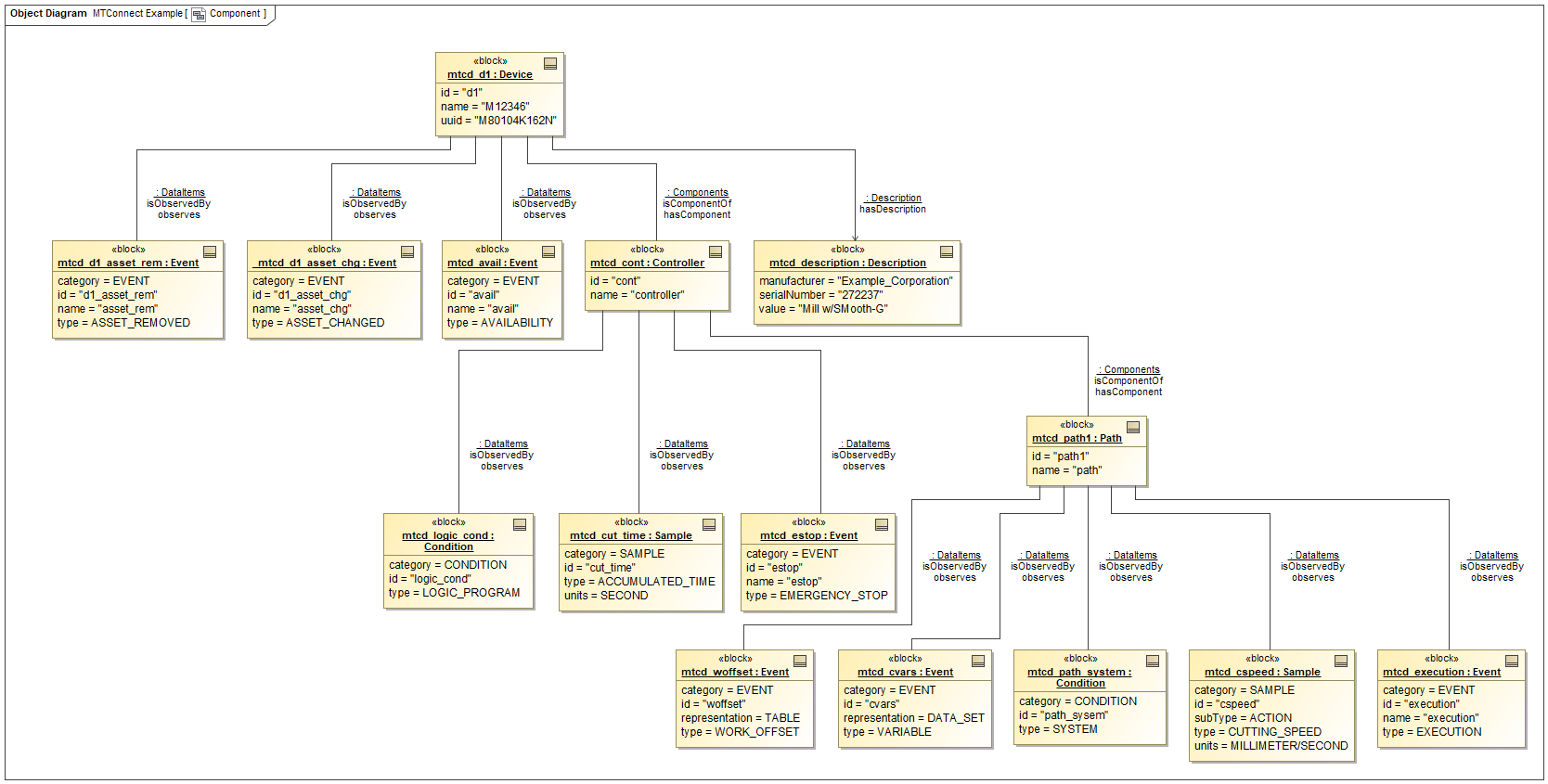
Note: See component-example for the XML representation of the same example.
- Component (class)
Glossary / MTConnect Terms
engineered system part of a Device composed of zero or more Components
- Component (class)
Reference Agent Architecture / InformationModel
Review the MTConnect definition and model details for Component, an MTConnect class.
- Component Configuration Parameters (package)
Asset Information Model
This section provides semantic information for the ComponentConfigurationParameters model.
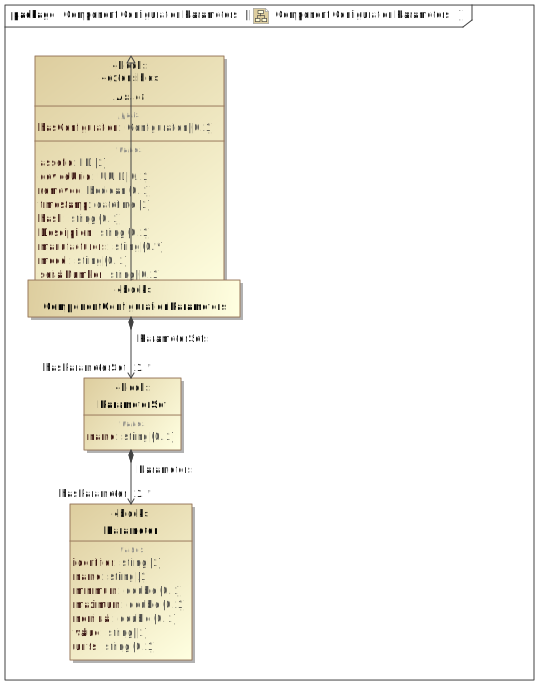
- Component Organizer Types (package)
Device Information Model / Components / Component Types
This section provides semantic information for the types of
Componentthat are used to organize otherComponenttypes.- Component Types (package)
Device Information Model / Components
This section provides semantic information for the types of
Component.Note: In the XML representation,
Componententities are defined into two major categories:- top level
Componententities that organizes the most significant physical or logical functions of a piece of equipment (see Part Properties of Device). They MAY also be used as lower levelComponententities; as required. See Component Organizer Types.
- lower level
Componententities composed of the sub-parts of the parentComponentto provide more clarity and granularity to the physical or logical structure of the top levelComponententities.
This section provides guidance for the most common relationships between
Componenttypes. However, allComponenttypes MAY be used in any configuration, as required, to fully describe a piece of equipment.As described in Components,
Componentis an abstract entity and will be always realized by a specificComponenttype.- top level
- ComponentConfigurationParameters (class)
Asset Information Model / Component Configuration Parameters
set of ParameterSets that govern the functionality of the related
Component.- ComponentData (class)
Observation Information Model / Observation Types / Event Types
tabular COMPONENT_DATA
If the
Componentmultiplicity can be determined, the device model MUST use a fixed set ofComponents.ComponentData MUST provide a
DataItemDefinition.- ComponentRef (class)
Device Information Model / References
Referencethat is a pointer to all of the information associated with another entity defined for a piece of equipment.Description
ComponentRef allows all of the information of (lower level
Componententities that is associated with the other entity to be directly associated with this entity.- ComponentRelationship (class)
Device Information Model / Configurations / Relationships
ConfigurationRelationship that describes the association between a
Componentor anAssetand anotherComponent.- Components (package)
Device Information Model
This section provides semantic information for the
Componententity. Components shows theComponentmodel.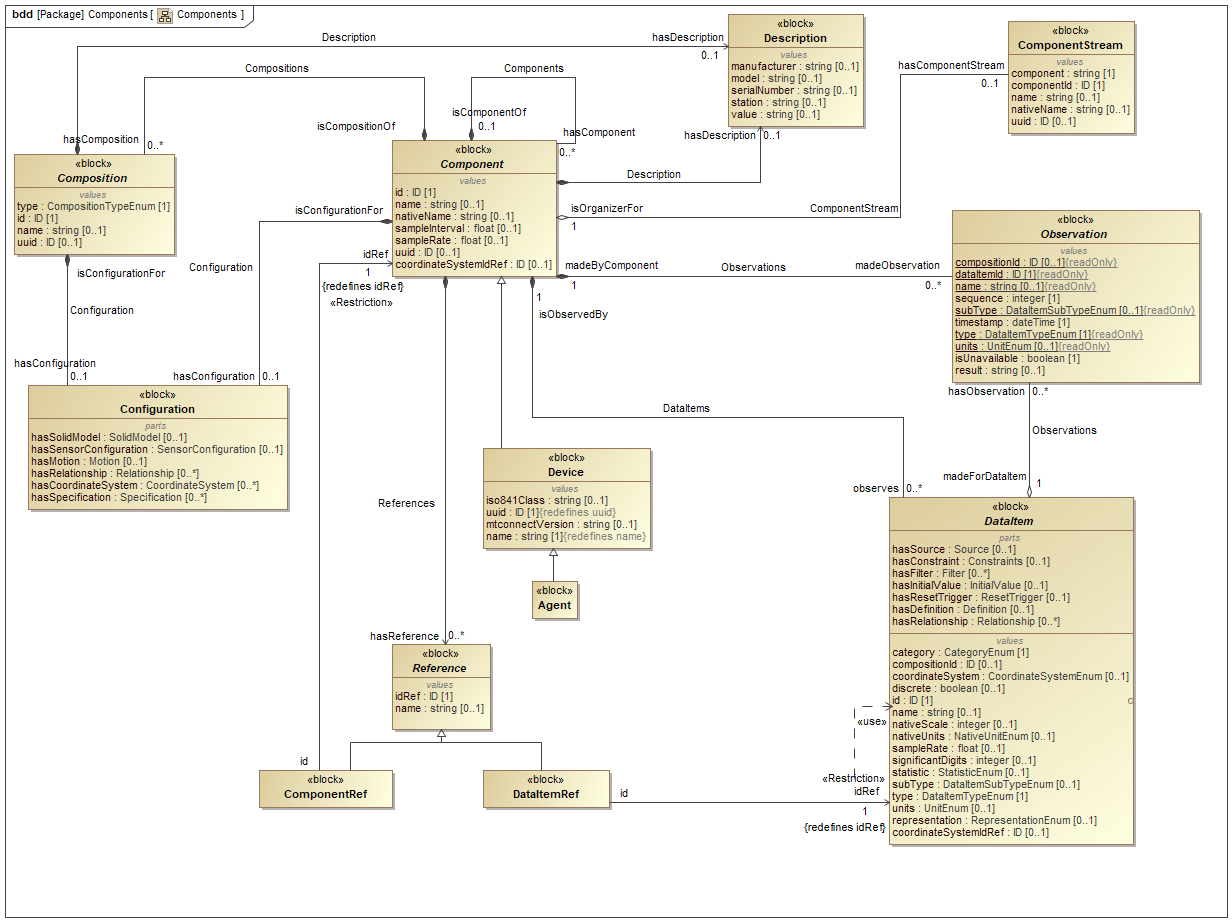
Note: See Components Schema Diagrams for XML schema.
Components Model
MTConnectDevices provides the physical and logical architecture of a piece of equipment. Device Entity Hierarchy Example provides an overview of the entities used in an example of an MTConnectDevices entity.
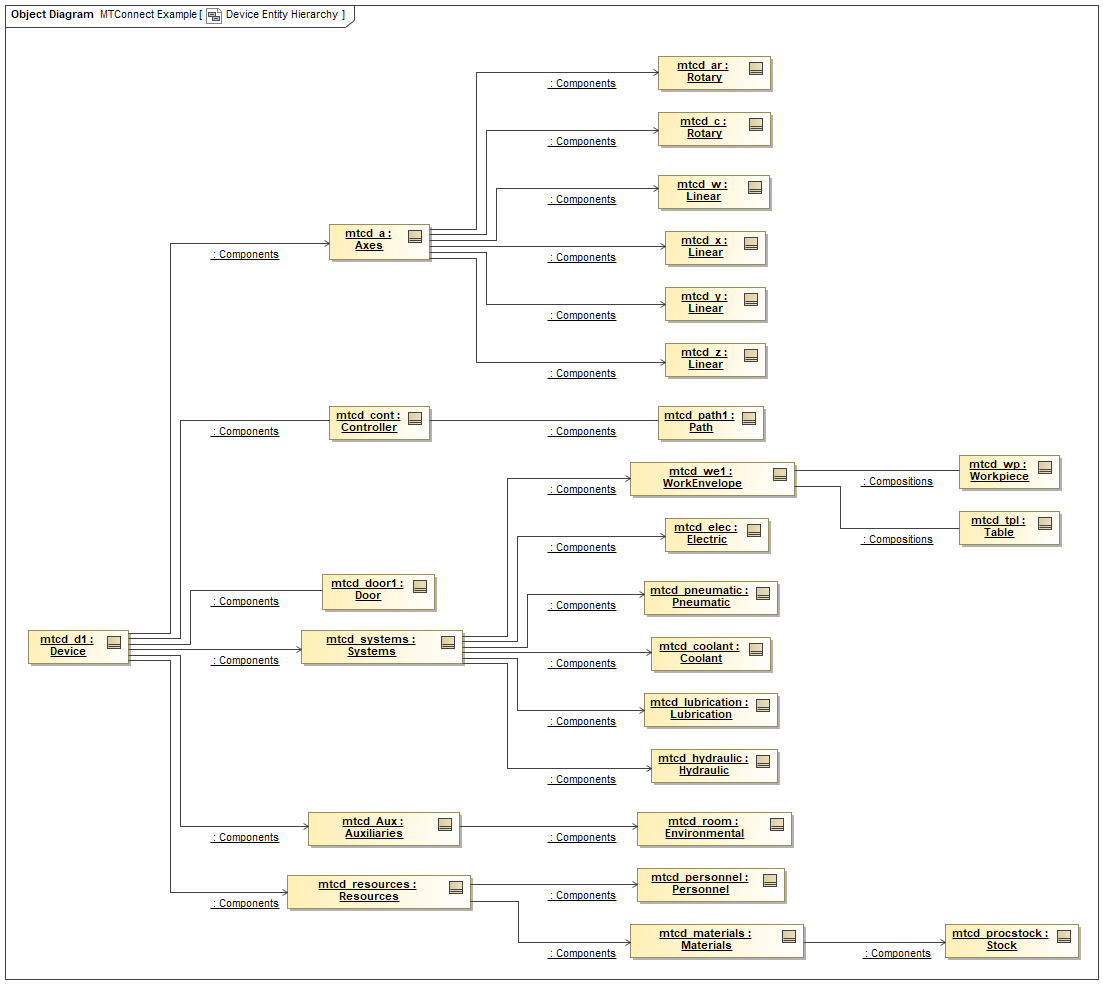
Note 1 to entry: See device-entity-hierarchy-example for the XML representation of the same example.
Note 2 to entry: Example above only shows the
ComponentandCompositionlevel hierarchy. For a complete semantics on each kind see Components and Compositions.A variety of entities are defined to describe a piece of equipment. Some of these entities MUST always be defined for an MTConnectDevices entity, while others are optional and MAY be used, as required, to provide additional structure.
The first, or highest level, entity defined for an MTConnectDevices entity is
Devices.Devicesis used to group one or more pieces of equipment into a single document.DevicesMUST always be defined for an MTConnectDevices entity.Deviceis the next entity defined for the MTConnectDevices entity. A separateDeviceentity is used to identify each piece of equipment for an MTConnectDevices entity. EachDeviceprovides information on the physical and logical structure of the piece of equipment and the data associated with that equipment.Devicecan also represent any logical grouping of pieces of equipment that function as a unit or any other data source that provides data through an agent.One or more
Deviceentities MUST always be defined for an MTConnectDevices entity.Componentsis the next entity defined for the MTConnectDevices entity.Componentsis used to group information describing lower level physical parts or logical functions of a piece of equipment.Componentis the next level of entity defined for the MTConnectDevices entity.Componentis both an abstract type entity and an organizer type entity.As an abstract entity,
Componentwill always be realized by a specificComponenttype defined in Component Types. EachComponentcan also be used to organize information describing lower level entities or DataItems associated with theComponent.If lower level entities are described, these entities are by definition child
Componententities of a parentComponent. At this next level, the lower level childComponententities are grouped byComponents.A
ComponentMAY be further decomposed intoCompositionentities that are grouped byCompositions. These describe the lowest level basic structural or functional building blocks contained within aComponent. Data provided for aComponentprovides more specific meaning when it is associated with one of theCompositionentities of theComponent. The differentCompositiontypes that MAY be defined for the MTConnectDevices entity are defined in Compositions.This parent-child relationship can continue to any depth required to fully define a piece of equipment.
Note: See Device Entity Hierarchy Example for an example.
- ComponentStream (class)
Observation Information Model
organizes the data associated with each
Componententity defined for aDevicein the associated MTConnectDevices Response Document.Description
At least one of
Sample,Event, orConditionMUST be organized by a ComponentStream entity.- Composition (class)
Device Information Model / Compositions
functional part of a piece of equipment contained within a
Component.Description
CompositionMUST NOT have childComponent,Composition, orDataItemselements.- Composition (class)
Glossary / MTConnect Terms
Component belonging to a Component and not composed of any Components.
- Compositions (package)
Device Information Model
This section provides semantic information for the
Compositionentity.See Components for the
Compositionmodel diagram.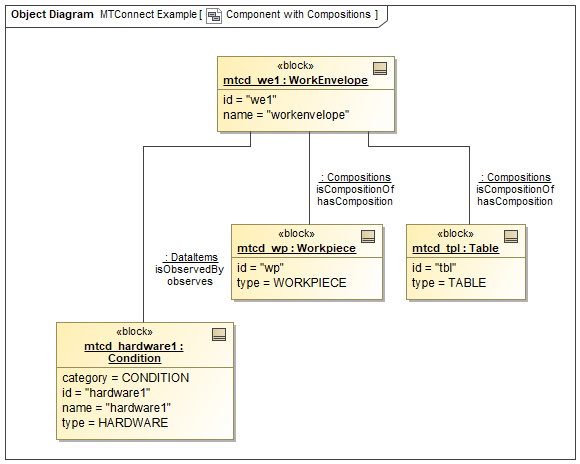
Note: See component-with-compositions-example for the XML representation of the same example.
Compositions Model
Compositionentities are used to describe the lowest level physical building blocks of a piece of equipment contained within aComponent. By referencing a specificCompositionentity, further clarification and meaning to data associated with a specificComponentcan be achieved.Both
ComponentandCompositionentities are lower level entities representing the sub-parts of the parentComponent. However, there are distinct differences betweenComponentandCompositiontype entities.Componententities may be further defined with lower levelComponententities and may have associated DataItems.Compositionentities represent the lowest level physical part of a piece of equipment. They MUST NOT be further defined with lower levelComponententities and they MUST NOT have DataItems directly associated with them. They do provide additional information that can be used to enhance the specificity of DataItems associated with the parentComponent.- CompositionState (class)
Observation Information Model / Observation Types / Event Types
COMPOSITION_STATE
- CompositionState.Action (class)
Observation Information Model / Observation Types / Event Types
indication of the operating state of a mechanism.
- CompositionState.Lateral (class)
Observation Information Model / Observation Types / Event Types
indication of the position of a mechanism that may move in a lateral direction.
- CompositionState.Motion (class)
Observation Information Model / Observation Types / Event Types
indication of the open or closed state of a mechanism.
- CompositionState.Switched (class)
Observation Information Model / Observation Types / Event Types
indication of the activation state of a mechanism.
- CompositionState.Vertical (class)
Observation Information Model / Observation Types / Event Types
indication of the position of a mechanism that may move in a vertical direction.
- CompositionStateActionEnum (enumeration)
DataTypes
Review the MTConnect definition and model details for CompositionStateActionEnum, an MTConnect enumeration.
- CompositionStateLateralEnum (enumeration)
DataTypes
Review the MTConnect definition and model details for CompositionStateLateralEnum, an MTConnect enumeration.
- CompositionStateMotionEnum (enumeration)
DataTypes
Review the MTConnect definition and model details for CompositionStateMotionEnum, an MTConnect enumeration.
- CompositionStateSwitchedEnum (enumeration)
DataTypes
Review the MTConnect definition and model details for CompositionStateSwitchedEnum, an MTConnect enumeration.
- CompositionStateVerticalEnum (enumeration)
DataTypes
Review the MTConnect definition and model details for CompositionStateVerticalEnum, an MTConnect enumeration.
- CompositionTypeEnum (enumeration)
DataTypes
Review the MTConnect definition and model details for CompositionTypeEnum, an MTConnect enumeration.
- Compressor (class)
Device Information Model / Components / Component Types
leaf
Componentcomposed of a pump or other mechanism that reduces volume and increases pressure of gases in order to condense the gases to drive pneumatically powered pieces of equipment.- Concentration (class)
Observation Information Model / Observation Types / Sample Types
CONCENTRATION
- Condition (class)
Device Information Model / DataItems / DataItem Types
abstract
DataItemthat is about an entity's status regarding its ability to operate or it provides an indication whether the data reported for the entity is within an expected range.Description
Conditionis reported differently thanSampleorEvent.ConditionMUST be reported asNormal,Warning, orFault.All
Samples MAY have associatedConditionstates.Conditionstates indicate whether the value for the data is within an expected range and MUST be reported asNormal, or the value is unexpected or out of tolerance for the data and aWarningorFaultMUST be provided.- condition (class)
Glossary / Industrial Terms
ability of a piece of equipment or Component to function to specification.
- Condition (class)
Glossary / MTConnect Terms / Additional Observation Terms
An indicator of the ability of a piece of equipment or Component to function to specification.
- Condition (class)
Observation Information Model
Observationthat provides the condition of a piece of equipment or a Component.Description
It provides the information and data reported from a piece of equipment with
categoryasCONDITIONin the MTConnectDevices Response Document.Condition Example shows
Conditiontype examples for variousstate:Normal(dataItemId=path_system) andWarning(dataItemId=logic_cond). It also shows an example for when thestateis not available (dataItemId=cont_system).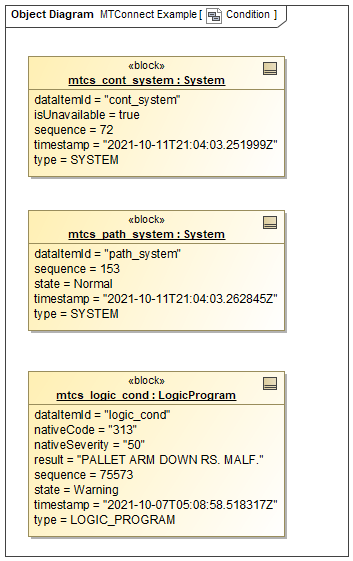
Note: See condition-example for the XML representation of the same example.
The following Value Properties of Condition lists the additional and/or updated attributes for
Condition.- condition activation (class)
Glossary
state transition from
Normalto eitherWarningorFault.- condition state (class)
Glossary / Industrial Terms
indicator of the condition.
- Condition Types (package)
Observation Information Model / Observation Types
This section provides semantic information for
Conditiontypes.Conditiontypes are reported differently from otherObservationtypes. They are reported based on the condition state for eachCondition.The
typeandsubType(where applicable) for aConditionMAY be any of thetypeandsubTypedefined forDataItems withcategoryasSAMPLEorcategoryasEVENTlisted in the Device Information Model.This section lists additional
Conditiontypes that have been defined to represent the health and fault status of Components.- ConditionEnum (enumeration)
DataTypes
Review the MTConnect definition and model details for ConditionEnum, an MTConnect enumeration.
- ConditionStateEnum (enumeration)
DataTypes
Review the MTConnect definition and model details for ConditionStateEnum, an MTConnect enumeration.
- ConditionValue (class)
Reference Agent Architecture / InformationModel
Review the MTConnect definition and model details for ConditionValue, an MTConnect class.
- Conductivity (class)
Observation Information Model / Observation Types / Sample Types
CONDUCTIVITY
- Configuration (class)
Device Information Model / Configurations
technical information about an entity describing its physical layout, functional characteristics, and relationships with other entities.
- configuration (class)
Glossary / Industrial Terms
information about an engineered system describing its physical layout, functional characteristics, and relationships with other engineered systems
- Configuration (class)
Glossary / MTConnect Terms
configuration for a Component
- Configuration (class)
Reference Agent Architecture / InformationModel
Review the MTConnect definition and model details for Configuration, an MTConnect class.
- ConfigurationRelationship (class)
Device Information Model / Configurations / Relationships
association between two pieces of equipment or assets that may function independently but together perform a manufacturing operation.
Description
ConfigurationRelationship is an abstract entity and hence will be realized by specific ConfigurationRelationship types in an MTConnectDevices entity. See ComponentRelationship and DeviceRelationship.
- Configurations (package)
Device Information Model
Configuration shows the abstract
Configurationand its types.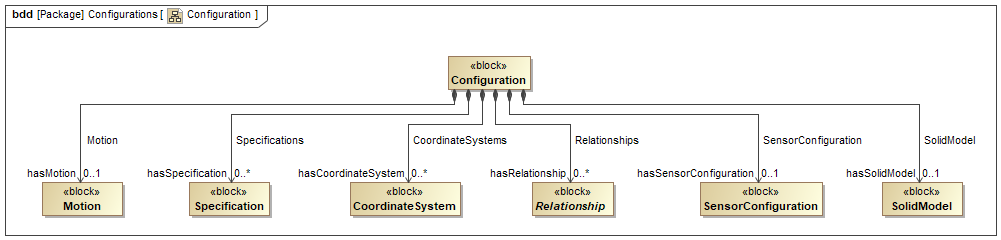
Note: See Configuration Schema Diagrams for XML schema.
Configurations Model
This section provides semantic information for the
Configurationentity that is used to model technical information about aComponent.- ConnectionStatus (class)
Observation Information Model / Observation Types / Event Types
CONNECTION_STATUS
- ConnectionStatusEnum (enumeration)
DataTypes
Review the MTConnect definition and model details for ConnectionStatusEnum, an MTConnect enumeration.
- Constraints (class)
Device Information Model / DataItems / Properties of DataItem
organizes a set of expected values that can be reported for a
DataItem.- Contition (class)
Reference Agent Architecture / InformationModel
Review the MTConnect definition and model details for Contition, an MTConnect class.
- control limit (class)
Glossary / Industrial Terms
limit used to indicate whether a process variable is stable and in control.
- controlled vocabulary (class)
Glossary
restricted set of values for a given property.
- ControlledVocabularyValue (class)
Reference Agent Architecture / InformationModel
Review the MTConnect definition and model details for ControlledVocabularyValue, an MTConnect class.
- Controller (class)
Device Information Model / Components / Component Types
Systemthat provides regulation or management of a system or component. ISO 16484-5:2017Description
Typical types of controllers for a piece of equipment include CNC (Computer Numerical Control), PAC (Programmable Automation Control), IPC (Industrialized Computer), or IC (Imbedded Computer).
Note: In XML representation, Controller is a top level element.
- ControllerMode (class)
Observation Information Model / Observation Types / Event Types
CONTROLLER_MODE
- ControllerModeEnum (enumeration)
DataTypes
Review the MTConnect definition and model details for ControllerModeEnum, an MTConnect enumeration.
- ControllerModeOverride (class)
Observation Information Model / Observation Types / Event Types
CONTROLLER_MODE_OVERRIDE
- ControllerModeOverride.DryRun (class)
Observation Information Model / Observation Types / Event Types
setting or operator selection used to execute a test mode to confirm the execution of machine functions.
When
DRY_RUNisON, the equipment performs all of its normal functions, except no part or product is produced. If the equipment has a spindle, spindle operation is suspended.- ControllerModeOverride.MachineAxisLock (class)
Observation Information Model / Observation Types / Event Types
setting or operator selection that changes the behavior of the controller on a piece of equipment.
When
MACHINE_AXIS_LOCKisON, program execution continues normally, but no equipment motion occurs.- ControllerModeOverride.OptionalStop (class)
Observation Information Model / Observation Types / Event Types
setting or operator selection that changes the behavior of the controller on a piece of equipment.
The program execution is stopped after a specific program block is executed when
OPTIONAL_STOPisON.In the case of a G-Code program, a program block containing a M01 code designates the command for an
OPTIONAL_STOP.Execution MUST change to
OPTIONAL_STOPafter a program block specifying an optional stop is executed and the ControllerModeOverrideOPTIONAL_STOPselection isON.- ControllerModeOverride.SingleBlock (class)
Observation Information Model / Observation Types / Event Types
setting or operator selection that changes the behavior of the controller on a piece of equipment.
Program execution is paused after each block of code is executed when
SINGLE_BLOCKisON.When
SINGLE_BLOCKisON, Execution MUST change toINTERRUPTEDafter completion of each block of code.- ControllerModeOverride.ToolChangeStop (class)
Observation Information Model / Observation Types / Event Types
setting or operator selection that changes the behavior of the controller on a piece of equipment.
Program execution is paused when a command is executed requesting a cutting tool to be changed.
Execution MUST change to
INTERRUPTEDafter completion of the command requesting a cutting tool to be changed andTOOL_CHANGE_STOPisON.- ControllerModeOverrideEnum (enumeration)
DataTypes
Review the MTConnect definition and model details for ControllerModeOverrideEnum, an MTConnect enumeration.
- Controllers (class)
Device Information Model / Components / Component Types / Component Organizer Types
Componentthat organizes Controller entities.- ControlLimit (class)
Observation Information Model / Observation Types / Event Types
CONTROL_LIMIT
- ControlLimitResult (class)
DataTypes
Review the MTConnect definition and model details for ControlLimitResult, an MTConnect class.
- ControlLimits (class)
Device Information Model / Configurations / Specifications
set of limits that is used to indicate whether a process variable is stable and in control.
- ControlLimits (class)
Observation Information Model / Observation Types / Event Types
CONTROL_LIMITS
- ConvertSample (class)
Reference Agent Architecture / Pipelines
Review the MTConnect definition and model details for ConvertSample, an MTConnect class.
- Coolant (class)
Device Information Model / Components / Component Types
Systemthat provides distribution and management of fluids that remove heat from a piece of equipment.- Cooling (class)
Device Information Model / Components / Component Types
Systemthat extracts controlled amounts of heat to achieve a target temperature at a specified cooling rate.Description
Note: As an example, Energy Extraction Method can be via cooling water pipes running through the chamber.
- CoolingTower (class)
Device Information Model / Components / Component Types
leaf
Componentcomposed of a heat exchange system that uses a fluid to transfer heat to the atmosphere.- CoordinateSystem (class)
Device Information Model / Configurations / CoordinateSystems
reference system that associates a unique set of n parameters with each point in an n-dimensional space. ISO 10303-218:2004
Description
At most only one of Origin or
TransformationMUST be defined for a CoordinateSystem.- CoordinateSystemEnum (enumeration)
DataTypes
Review the MTConnect definition and model details for CoordinateSystemEnum, an MTConnect enumeration.
- CoordinateSystems (package)
Device Information Model / Configurations
This section provides semantic information for the CoordinateSystem entity.
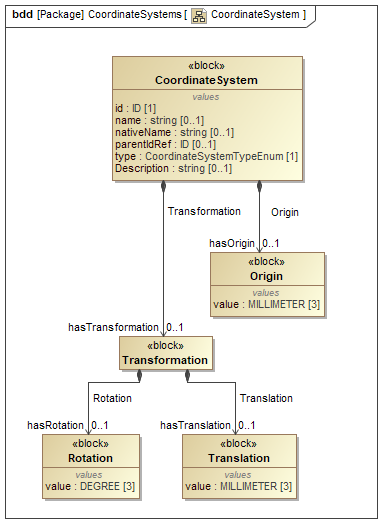
Note: See Configuration Schema Diagrams for XML schema.
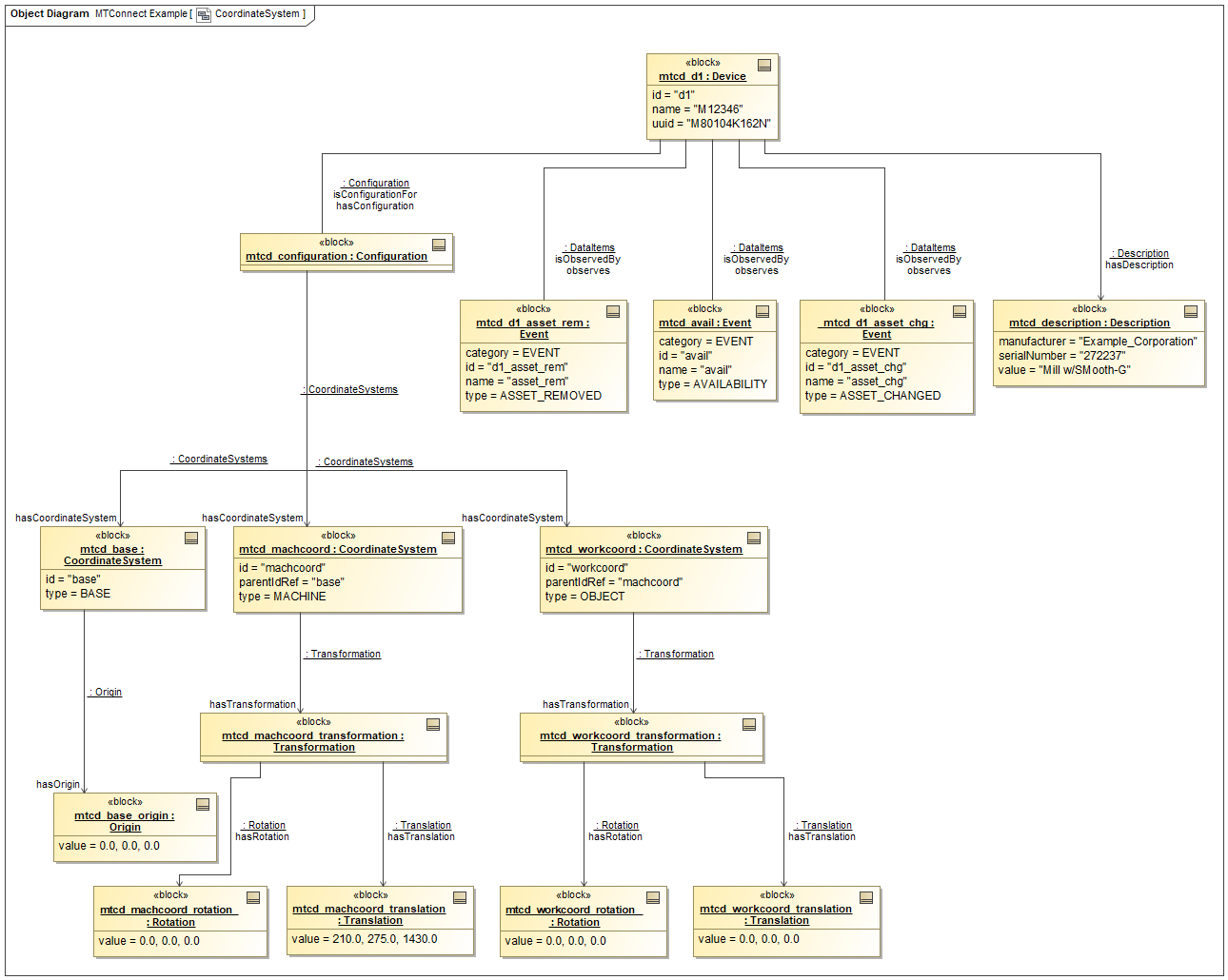
Note: See coordinatesystem-example for the XML representation of the same example.
- CoordinateSystemTypeEnum (enumeration)
DataTypes
Review the MTConnect definition and model details for CoordinateSystemTypeEnum, an MTConnect enumeration.
- CornerRadius (class)
Asset Information Model / Cutting Tool / Cutting Item / Cutting Item Measurement Subtypes
nominal radius of a rounded corner measured in the X Y-plane.
- CountDirectionTypeEnum (enumeration)
DataTypes
Review the MTConnect definition and model details for CountDirectionTypeEnum, an MTConnect enumeration.
- CoupledAxes (class)
Observation Information Model / Observation Types / Event Types
COUPLED_AXES
- CriticalityTypeEnum (enumeration)
DataTypes
Review the MTConnect definition and model details for CriticalityTypeEnum, an MTConnect enumeration.
- CSV Imports (package)
Imports
Review the MTConnect definition and model details for CSV Imports, an MTConnect package.
- current request (class)
Glossary / Protocol Terms
request to an agent to produce an MTConnectStreams Response Document containing the Observation Information Model for a snapshot of the latest observations at the moment of the request or at a given sequence number.
- Customer (class)
Asset Information Model / Part
customer for this part
- CutterStatusTypeEnum (enumeration)
DataTypes
Review the MTConnect definition and model details for CutterStatusTypeEnum, an MTConnect enumeration.
- Cutting Item (package)
Asset Information Model / Cutting Tool
A CuttingItem is the portion of the tool that physically removes the material from the workpiece by shear deformation. The cutting item can be either a single piece of material attached to the CuttingTool or it can be one or more separate pieces of material attached to the CuttingTool using a permanent or removable attachment. A CuttingItem can be comprised of one or more cutting edges. Cutting items include: replaceable inserts, brazed tips and the cutting portions of solid
CuttingTools.MTConnect Standard considers CuttingItems as part of the CuttingTool. A CuttingItems MUST NOT exist in MTConnect unless it is attached to a CuttingTool. Some of the measurements, such as
FunctionalLength, MUST be made with reference to the entire CuttingTool to be meaningful.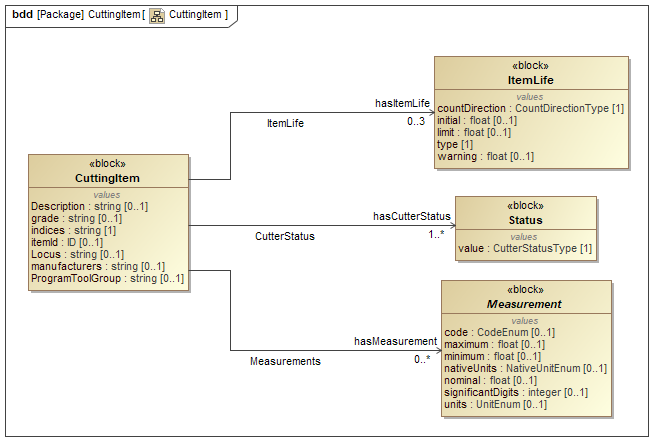
Note: See CuttingItem Schema Diagrams for XML schema.
- Cutting Item Measurement Subtypes (package)
Asset Information Model / Cutting Tool / Cutting Item
This section lists the Measurement subtypes for CuttingItem.
These Measurement subtypes for CuttingItem are specific to an individual CuttingItem and MUST NOT be used for the Measurement pertaining to an assembly. Figures below will be used to for reference for the CuttingItem specific Measurement types.
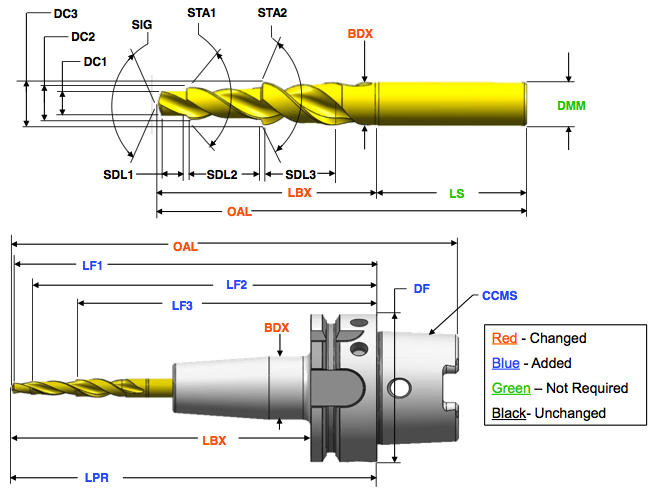
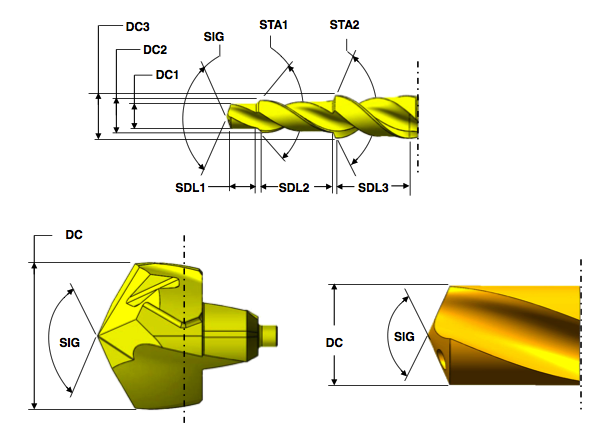
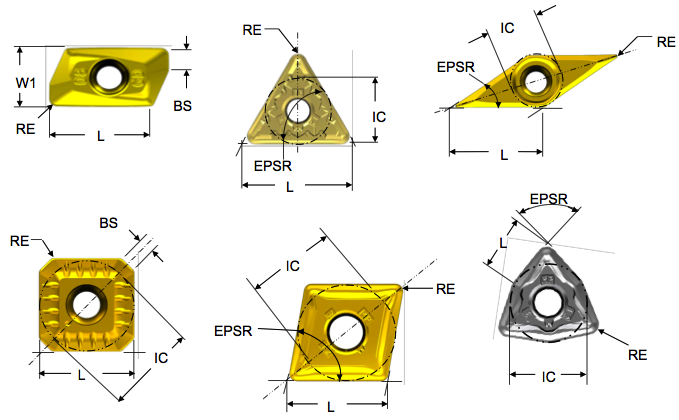
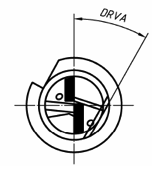
- Cutting Tool (package)
Asset Information Model
This section provides semantic information for the CuttingTool and CuttingToolArchetype models.
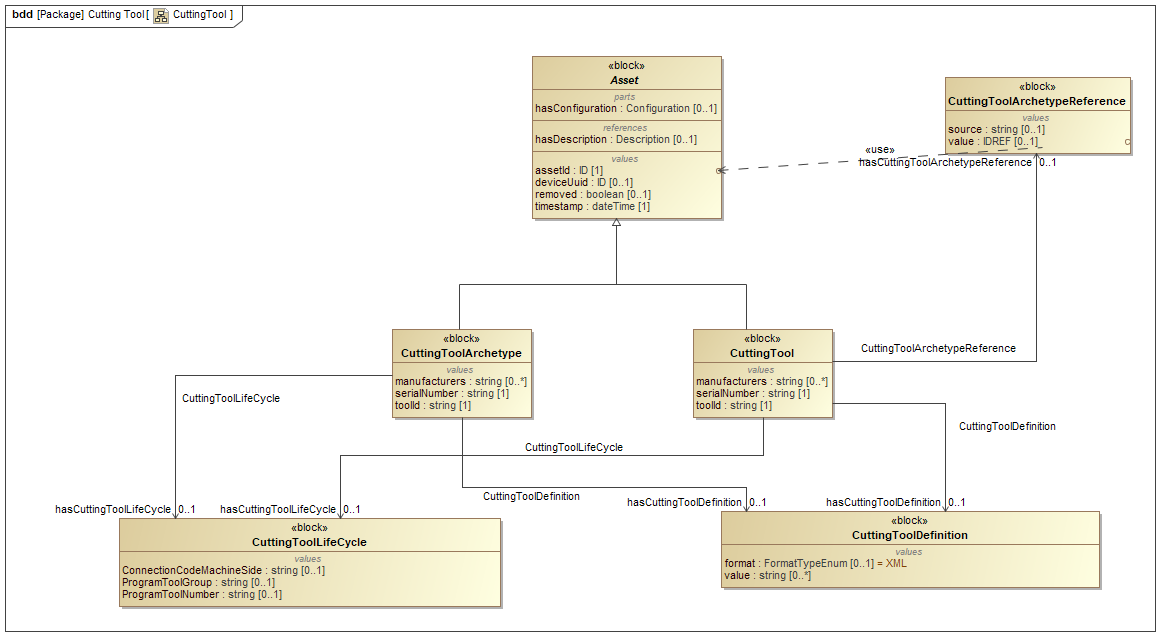
Note: See CuttingTool Schema Diagrams for XML schema.
Cutting Tool Asset Information Model
There are two information models used to represent a cutting tool, CuttingToolArchetype and CuttingTool. The CuttingToolArchetype represents the static cutting tool geometries and nominal values as one would expect from a tool catalog and the CuttingTool represents the use or application of the tool on the shop floor with actual measured values and process data. In Version 1.3.0 of the MTConnect Standard it was decided to separate out these two concerns since not all pieces of equipment will have access to both sets of information. In this way, a generic definition of the cutting tool can coexist with a specific assembly information model with minimal redundancy of data.
MTConnect Standard will adopt the ISO 13399 structure when formulating the vocabulary for Cutting Tool geometries and structure to be represented in the CuttingToolArchetype. The nominal values provided in the CuttingToolLifeCycle section are only concerned with two aspects of the Cutting Tool; the Cutting Tool and the cutting item. The tool item, Adaptive Item, and Assembly Item will only be covered in the CuttingToolDefinition section of this document since this section contains the full ISO 13399 information about a Cutting Tool.
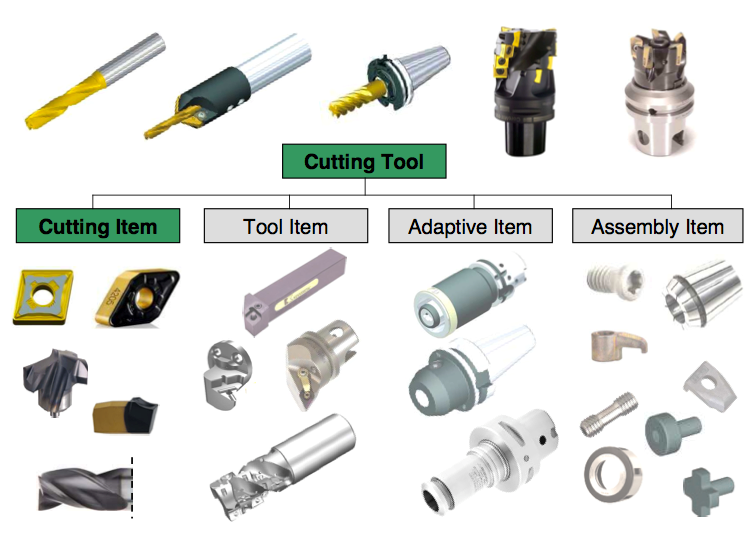
The Cutting Tool Parts illustrates the parts of a Cutting Tool. The Cutting Tool is the aggregate of all the components and the cutting item is the part of the tool that removes the material from the workpiece. These are the primary focus of the MTConnect Standard.
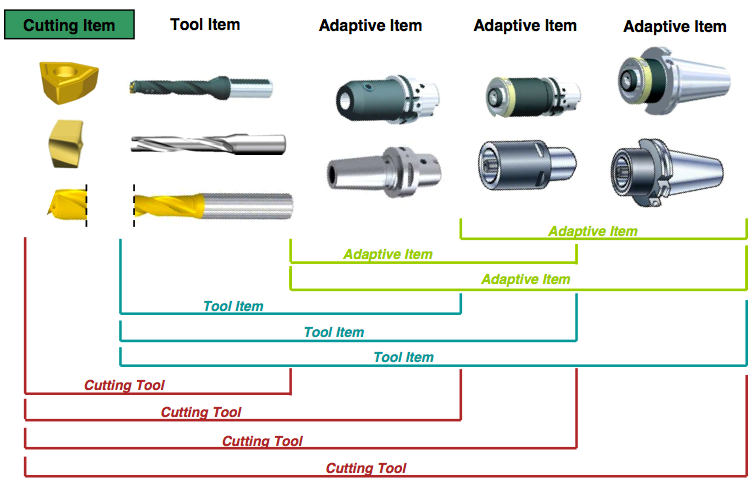
Cutting Tool Composition provides another view of the composition of a Cutting Tool. The Adaptive Items and tool items will be used for measurements, but will not be modeled as separate entities. When we are referencing the Cutting Tool we are referring to the entirety of the assembly and when we provide data regarding the cutting item we are referencing each individual item as illustrated on the left of the previous diagram.
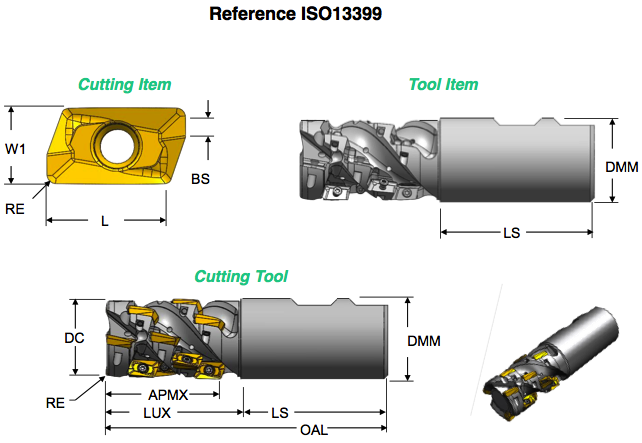
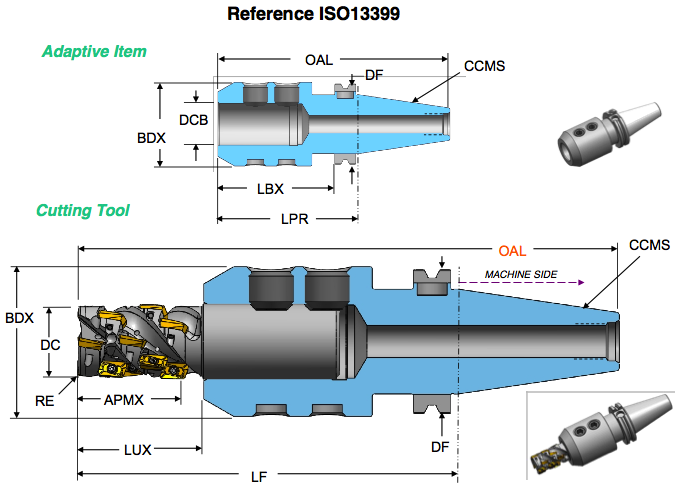
Cutting Tool, Tool Item, and Cutting Item and Cutting Tool, Tool Item, and Cutting Item 2 further illustrates the components of the Cutting Tool. As we compose the tool item, cutting item, Adaptive Item, we get a Cutting Tool. The tool item, Adaptive Item, and Assembly Item will only be in the CuttingToolDefinition section that will contain the full ISO 13399 information. These figures also use the ISO 13399 codes for each of the measurements. These codes will be translated into the MTConnect Standard vocabulary as illustrated below. The measurements will have a maximum, minimum, and nominal value representing the tolerance of allowable values for this dimension.
The MTConnect Standard will not define the entire geometry of the Cutting Tool, but will provide the information necessary to use the tool in the manufacturing process. Additional information can be added to the definition of the Cutting Tool by means of schema extensions.
Additional diagrams will reference these dimensions by their codes that will be defined in the measurement tables. The codes are consistent with the codes used in ISO 13399 and have been standardized. MTConnect Standard will use the full text name for clarity in the response documents.
- Cutting Tool Life Cycle (package)
Asset Information Model / Cutting Tool
This section provides semantic information for the CuttingToolLifeCycle model.
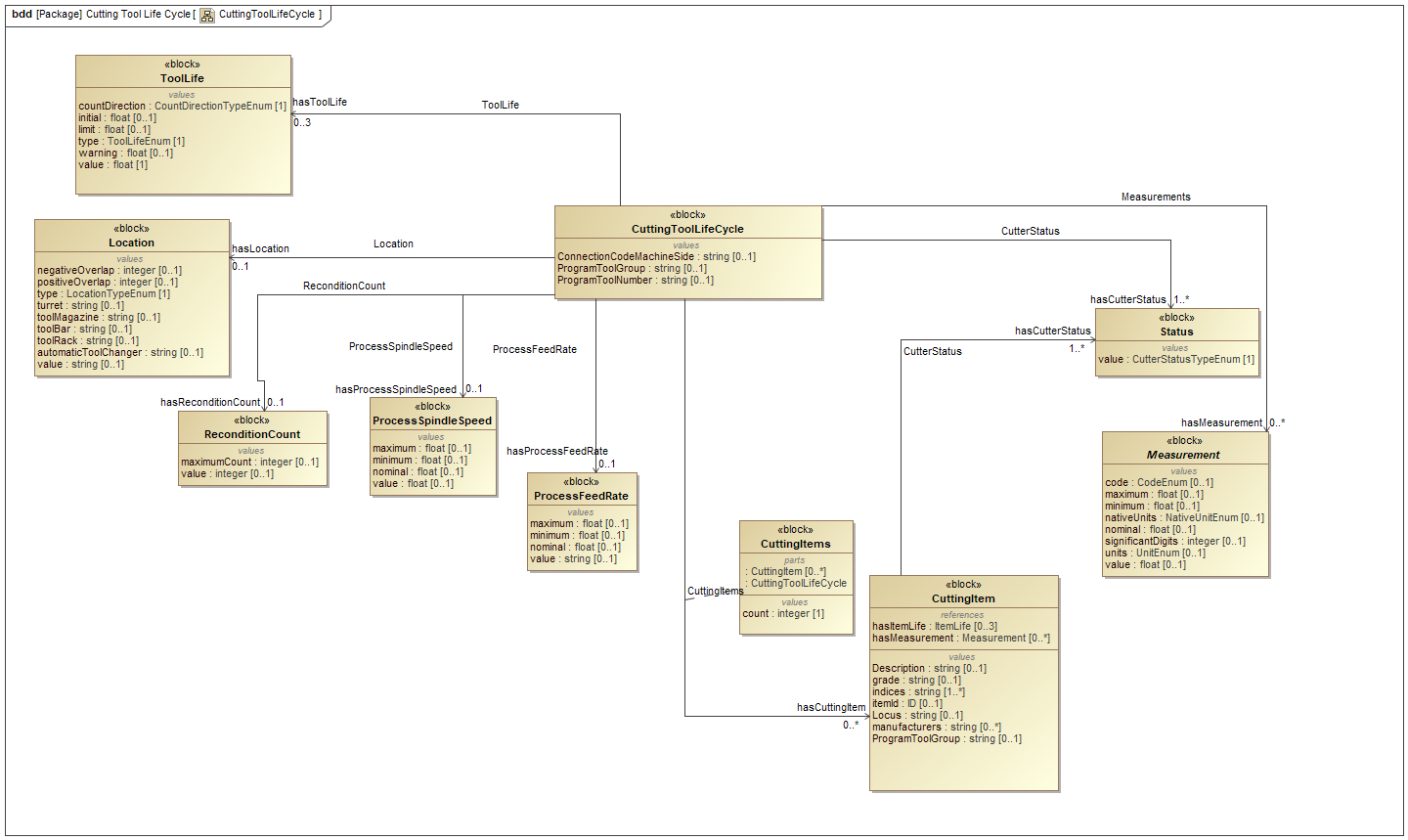
Note: See CuttingToolLifeCycle Schema Diagrams for XML schema.
- Cutting Tool Measurement Subtypes (package)
Asset Information Model / Cutting Tool
This section lists the Measurement subtypes for CuttingTool.
These Measurement subtypes for CuttingTool are specific to the entire assembly and MUST NOT be used for the Measurement pertaining to a CuttingItem. Cutting Tool Measurement 1 and Cutting Tool Measurement 2 will be used to reference the assembly specific Measurement subtypes.
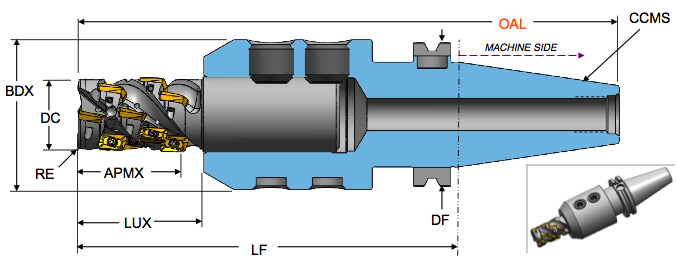
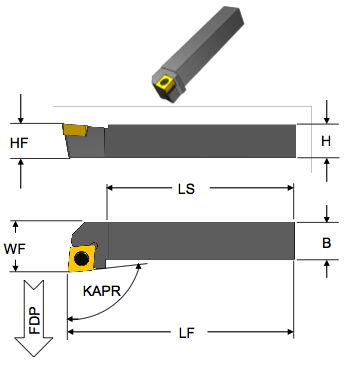
- CuttingDiameter (class)
Asset Information Model / Cutting Tool / Cutting Item / Cutting Item Measurement Subtypes
diameter of a circle on which the defined point Pk located on this cutting tool.
The normal of the machined peripheral surface points towards the axis of the cutting tool.
- CuttingDiameterMax (class)
Asset Information Model / Cutting Tool / Cutting Tool Measurement Subtypes
maximum diameter of a circle on which the defined point Pk of each of the master inserts is located on a tool item.
The normal of the machined peripheral surface points towards the axis of the cutting tool.
- CuttingEdgeLength (class)
Asset Information Model / Cutting Tool / Cutting Item / Cutting Item Measurement Subtypes
theoretical length of the cutting edge of a cutting item over sharp corners.
- CuttingHeight (class)
Asset Information Model / Cutting Tool / Cutting Item / Cutting Item Measurement Subtypes
distance from the basal plane of the tool item to the cutting point.
- CuttingItem (class)
Asset Information Model / Cutting Tool / Cutting Item
part of of the tool that physically removes the material from the workpiece by shear deformation.
- CuttingItems (class)
Asset Information Model / Cutting Tool / Cutting Item
CuttingItems groups one or more CuttingItem entities. See CuttingItem and Cutting Item for more detail.
- CuttingReferencePoint (class)
Asset Information Model / Cutting Tool / Cutting Item / Cutting Item Measurement Subtypes
theoretical sharp point of the cutting tool from which the major functional dimensions are taken.
- CuttingSpeed (class)
Observation Information Model / Observation Types / Sample Types
CUTTING_SPEED
- CuttingSpeed.Actual (class)
Observation Information Model / Observation Types / Sample Types
measured or reported value of an observation.
- CuttingSpeed.Commanded (class)
Observation Information Model / Observation Types / Sample Types
directive value including adjustments such as an offset or overrides.
- CuttingSpeed.Programmed (class)
Observation Information Model / Observation Types / Sample Types
directive value without offsets and adjustments.
- CuttingTool (class)
Asset Information Model / Cutting Tool
Assetthat physically removes the material from the workpiece by shear deformation.- CuttingToolArchetype (class)
Asset Information Model / Cutting Tool
Assetthat describes the static cutting tool geometries and nominal values as one would expect from a tool catalog.- CuttingToolArchetypeReference (class)
Asset Information Model / Cutting Tool
reference information about the
assetIdand/or the URL of the data source of CuttingToolArchetype.- CuttingToolDefinition (class)
Asset Information Model / Cutting Tool
detailed structure of the cutting tool which is static during its lifecycle. ISO 13399.
- CuttingToolLifeCycle (class)
Asset Information Model / Cutting Tool / Cutting Tool Life Cycle
data regarding the application or use of the tool.
This data is provided by various pieces of equipment (i.e. machine tool, presetter) and statistical process control applications. Life cycle data will not remain static, but will change periodically when a tool is used or measured.
- CuttingTorch (class)
Device Information Model / Components / Component Types
Auxiliary that employs a concentrated flame to both sever materials through cutting and fuse them together in joining processes.
- CycleCount (class)
Observation Information Model / Observation Types / Event Types
CYCLE_COUNT
- CycleCount.Aborted (class)
Observation Information Model / Observation Types / Event Types
accumulation of actions or activities that were attempted, but terminated before they could be completed.
- CycleCount.All (class)
Observation Information Model / Observation Types / Event Types
accumulation of all actions, items, or activities being counted independent of the outcome.
- CycleCount.Bad (class)
Observation Information Model / Observation Types / Event Types
accumulation of actions, items, or activities being counted that do not conform to specification or expectation.
- CycleCount.Complete (class)
Observation Information Model / Observation Types / Event Types
accumulation of actions, items, or activities that have been completed, independent of the outcome.
- CycleCount.Failed (class)
Observation Information Model / Observation Types / Event Types
accumulation of actions or activities that were attempted, but failed to complete or resulted in an unexpected or unacceptable outcome.
- CycleCount.Good (class)
Observation Information Model / Observation Types / Event Types
accumulation of actions, items, or activities being counted that conform to specification or expectation.
- CycleCount.Remaining (class)
Observation Information Model / Observation Types / Event Types
accumulation of actions, items, or activities yet to be counted.
- CycleCount.Target (class)
Observation Information Model / Observation Types / Event Types
goal of the operation or process.
D
- data dictionary (class)
Glossary
listing of standardized terms and definitions used in MTConnect Information Model.
- Data for Interface (package)
Interface Interaction Model
Each interface MUST provide the data associated with the specific interface to implement the interaction model and any additional data that may be needed by another piece of equipment to understand the operating states and conditions of the first piece of equipment as it applies to the interface.
Details on data items specific to the interaction model for each type of interface are provided in DataItem Types for Interface.
An implementer may choose any other data available from a piece of equipment to describe the operating states and other information needed to support an interface.
References for Interface
Some of the data items needed to support a specific interface may already be defined elsewhere in the MTConnectDevices Response Document for a piece of equipment. However, the implementer may not be able to directly associate this data with the interface since the MTConnect Standard does not permit multiple occurrences of a piece of data to be configured in an MTConnectDevices Response Document.
Referencesprovides a mechanism for associating information defined elsewhere in the information model for a piece of equipment with a specific interface.ReferencesorganizesReferenceelements.Referenceis a pointer to information that is associated with another entity defined elsewhere for a piece of equipment.Referencesis an economical syntax for providing interface specific information without directly duplicating the occurrence of the data. It provides a mechanism to include all necessary information required for interaction and deterministic information flow between pieces of equipment.For more information on the
Referencesmodel, see Device Information Model.- data model (class)
Glossary
organizes elements of data and standardizes how they relate to one another and to the properties of real-world entities.
- data set (class)
Glossary
key-value pairs where each entry is uniquely identified by the key.
- data source (class)
Glossary
piece of equipment that can produce data that is published to an agent.
- data streaming (class)
Glossary / Protocol Terms
method for an agent to provide a continuous stream of information in response to a single request from a client.
- DataItem (class)
Device Information Model / DataItems
information reported about a piece of equipment.
- DataItem (class)
Glossary / MTConnect Terms
observable observed by a Component that may make Observations
- DataItem (class)
Reference Agent Architecture / InformationModel
Review the MTConnect definition and model details for DataItem, an MTConnect class.
- DataItem Types (package)
Device Information Model / DataItems
This section provides semantic information for the types of a
DataItem.In the MTConnect Standard,
DataItemare defined and organized based upon thecategoryandtype. Thecategoryprovides a high level grouping forDataItems based on the kind of information that is reported by the data item.These categories are:
SAMPLE: ASAMPLEreports a continuously variable or analog data value.EVENT: AnEVENTreports information representing a functional state, with two or more discrete values, associated with a component or it contains a message. The data provided may be a numeric value or text.CONDITION: ACONDITIONreports information about the health of a piece of equipment and its ability to function.
The
typespecifies the specific kind of data that is reported. For some types of data items, asubTypemay also be used to differentiate between multiple data items of the sametypewhere the information reported by the data item has a different, but related, meaning.Many types of data items provide two forms of data: a value (reported as either a
SAMPLEorEVENT) and a health status (reported as aCONDITION). TheseDataItemtypes MAY be defined in more than onecategorybased on the data that they report.- DataItem Types for Interface (package)
Interface Interaction Model
Each
Interfacecontains data items which are used to communicate information required to execute the interface. When these data items are read by another piece of equipment, that piece of equipment can then determine the actions that it may take based upon that data.InterfaceState is a data item specifically defined for interfaces. It defines the operational state of the interface. This is an indicator identifying whether the interface is functioning or not. See InterfaceState for complete semantic details.
Some data items MAY be directly associated with the
Interfaceelement and others will be organized by aReferenceselement. It is up to an implementer to determine which additional data items are required for a particular interface.Specific Data Items for the Interaction Model for Interface
A special set of data items have been defined to be used in conjunction with
Interface. They provide information from a piece of equipment to request a service to be performed by another associated piece of equipment; and for the associated piece of equipment to indicate its progress in performing its response to the request for service. .Many of the data items describing the services associated with an interface are paired to describe two distinct actions – one to request an action to be performed and a second to reverse the action or to return to an original state. For example, a DoorInterface will have two actions OpenDoor and CloseDoor. An example of an implementation of this would be a robot that indicates to a machine that it would like to have a door opened so that the robot could extract a part from the machine and then asks the machine to close that door once the part has been removed.
When these data items are used to describe a service associated with an interface, they MUST have one of the following two
subTypeelements:REQUESTorRESPONSE. These MUST be specified to define whether the piece of equipment is functioning as the requester or responder for the service to be performed. The requester MUST specify theREQUESTsubTypefor the data item and the responder MUST specify a correspondingRESPONSEsubTypefor the data item to enable the coordination between the two pieces of equipment.These data items and their associated
subTypeprovide the basic structure for implementing the interaction model for an interface and are defined in the following sections.Request State Machine and Response State Machine show possible state transitions for a request and response respectively. The state machine diagrams provide the permissible values of the observations for the
DataItemtypes listed in this section.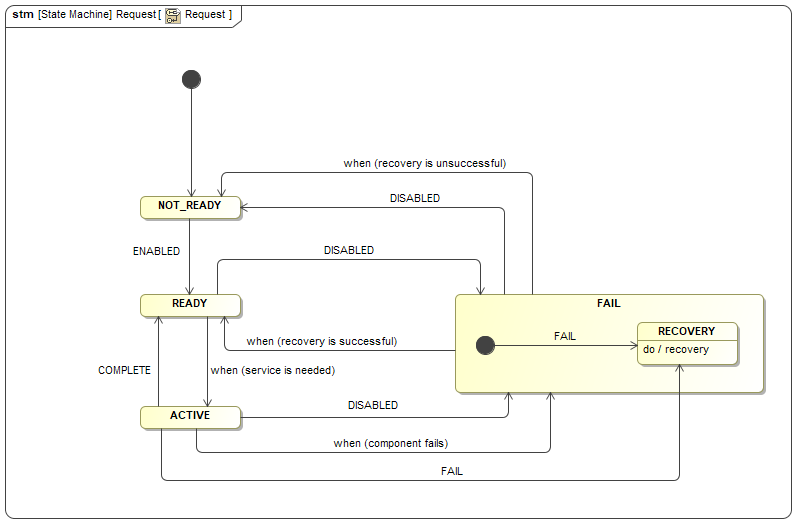
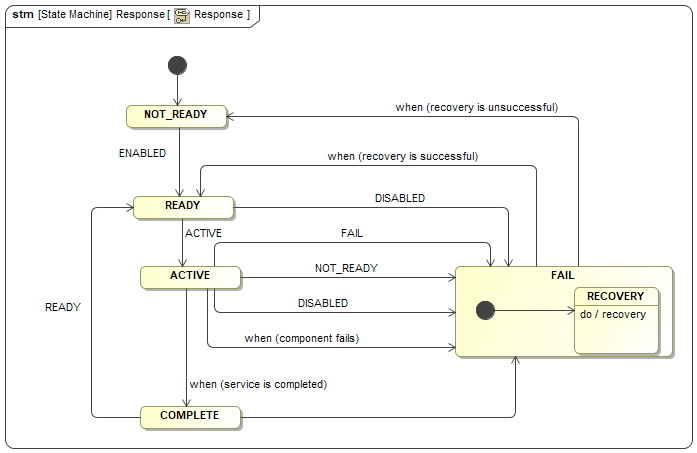
- DataItemRef (class)
Device Information Model / References
Referencethat is a pointer to aDataItemassociated with another entity defined for a piece of equipment.Description
DataItemRef allows the data associated with a
DataItemdefined in another entity to be directly associated with this entity.- DataItemRelationship (class)
Device Information Model / DataItems / Properties of DataItem / Relationship Types for DataItem
AbstractDataItemRelationship that provides a semantic reference to another
DataItemdescribed by type.- DataItemRelationshipTypeEnum (enumeration)
DataTypes
Review the MTConnect definition and model details for DataItemRelationshipTypeEnum, an MTConnect enumeration.
- DataItems (package)
Device Information Model
This section provides semantic information for the
DataItementity. DataItems shows theDataItemmodel.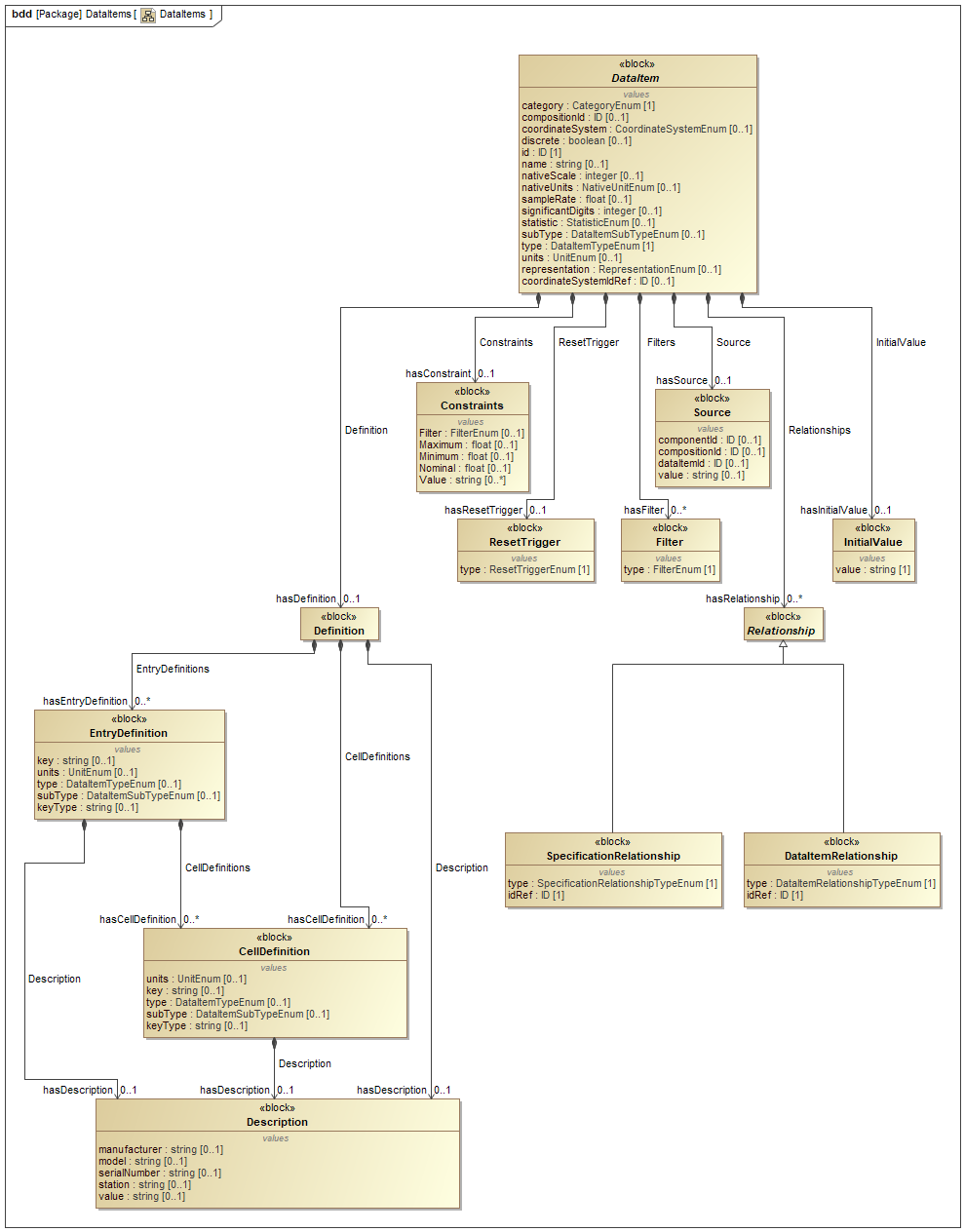
Note: See DataItems Schema Diagrams for XML schema.
DataItems Model
For an MTConnectDevices entity, DataItems describe data that can be reported by a piece of equipment and are associated with
DeviceandComponententities. While the DataItems describe the data that can be reported by a piece of equipment as an MTConnectDevices entity, the actual data values are provided by the MTConnectStreams entity in the MTConnectStreams Response Document. See Observation Information Model for detail on the reported values.Each DataItem SHOULD be modeled for the MTConnectDevices entity such that it is associated with the entity that the reported data directly applies.
DataItemdescribes specific types of DataItems that represent a numeric value, a functioning state, or a health status reported by a piece of equipment.DataItemprovides a detailed description for each DataItem that is reported; it defines the type of data being reported and an array of optional attributes that further describe that data. The different types ofDataItemelements are defined in DataItem Types.- DataItemSubTypeEnum (enumeration)
DataTypes
Review the MTConnect definition and model details for DataItemSubTypeEnum, an MTConnect enumeration.
- DataItemTypeEnum (enumeration)
DataTypes
Review the MTConnect definition and model details for DataItemTypeEnum, an MTConnect enumeration.
- DataMessage (class)
Reference Agent Architecture / Pipelines
Review the MTConnect definition and model details for DataMessage, an MTConnect class.
- DataRange (class)
Observation Information Model / Observation Types / Condition Types
DATA_RANGE
- DataSet (class)
Observation Information Model / Representations
Representation for an
Observationcomposed of value(s) represented as a set of key-value pairs.Description
DataSetfor anObservationis defined by the associatedrepresentationasDATA_SET.representationasDATA_SETMUST havecategoryasSAMPLEorEVENT.VariableDataSet shows the model for
Variable(Eventtype) with a Representation type ofDataSet.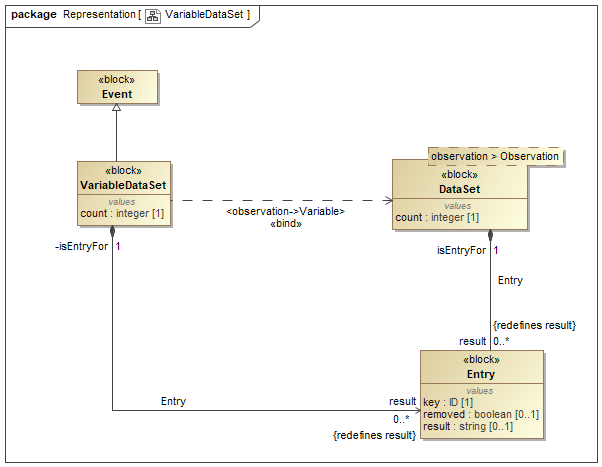
Note: See DataSet Schema for XML schema.
DataSetreports multiple values as a set of key-value pair where each key MUST be unique. The representation of the key-value pair is anEntry. The value of eachEntryMUST have the same constraints and format as theObservationdefined forrepresentationasVALUEfor theDataItemtype. (See Value).The meaning of each
EntryMAY be provided as theDataItemEntryDefinition.DataSet Example shows
EventObservationtypeVariablewith a Representation type ofDataSet.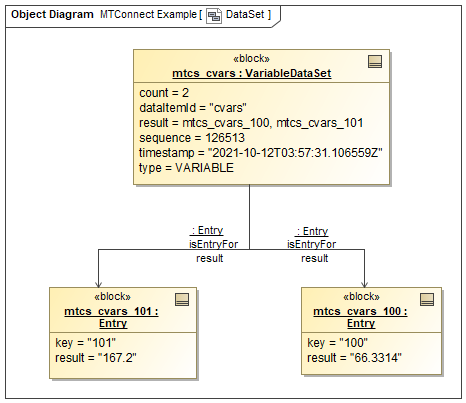
Note: See dataset-example for the XML representation of the same example.
Management of Data Set Observations
An agent MUST maintain the current state of the
DataSetas described in Fundamentals.One or more key-value pairs MAY be added, removed, or changed in an
Observation. An agent MUST publish the changes to one or more key-value pairs as a singleObservation. An agent MUST indicate the removal of a key-value pair from aDataSetusing theremovedastrue.When the
discreteisfalseor is not present, an agent in response to a sample request MUST only publish the changed key-value pair since the previous state of theDataSet.When the
discreteattribute istrue, an agent, in response to a sample request, MUST report all key-value pairs ignoring the state of theDataSet.When an agent responds to a current request, the response document MUST include the full set of key-value pairs. If the current request includes an
atquery parameter, the agent MUST provide the set of key-value pairs at the sequence number.When an
Observationreset occurs, theDataSetMUST remove all key-value pairs making the set empty. TheObservationMAY simultaneously populate theDataSetwith new key-value pairs. The previous entries MUST NOT be included and MUST NOT haveremovedastrue.When the
ObservationisUNAVAILABLEtheDataSetMUST remove all key-value pairs making the set empty.- DataSet (class)
Reference Agent Architecture / InformationModel
Review the MTConnect definition and model details for DataSet, an MTConnect class.
- DataSinkService (class)
Reference Agent Architecture
Review the MTConnect definition and model details for DataSinkService, an MTConnect class.
- DataSourceService (class)
Reference Agent Architecture
Review the MTConnect definition and model details for DataSourceService, an MTConnect class.
- DataTypes (package)
- DateCode (class)
Observation Information Model / Observation Types / Event Types
DATE_CODE
- DateCode.Expiration (class)
Observation Information Model / Observation Types / Event Types
time and date code relating to the expiration or end of useful life for a material or other physical item.
- DateCode.FirstUse (class)
Observation Information Model / Observation Types / Event Types
time and date code relating the first use of a material or other physical item.
- DateCode.Manufacture (class)
Observation Information Model / Observation Types / Event Types
time and date code relating to the production of a material or other physical item.
- DeactivationCount (class)
Observation Information Model / Observation Types / Event Types
DEACTIVATION_COUNT
- DeactivationCount.Aborted (class)
Observation Information Model / Observation Types / Event Types
accumulation of actions or activities that were attempted, but terminated before they could be completed.
- DeactivationCount.All (class)
Observation Information Model / Observation Types / Event Types
accumulation of all actions, items, or activities being counted independent of the outcome.
- DeactivationCount.Bad (class)
Observation Information Model / Observation Types / Event Types
accumulation of actions, items, or activities being counted that do not conform to specification or expectation.
- DeactivationCount.Complete (class)
Observation Information Model / Observation Types / Event Types
accumulation of actions, items, or activities that have been completed, independent of the outcome.
- DeactivationCount.Failed (class)
Observation Information Model / Observation Types / Event Types
accumulation of actions or activities that were attempted, but failed to complete or resulted in an unexpected or unacceptable outcome.
- DeactivationCount.Good (class)
Observation Information Model / Observation Types / Event Types
accumulation of actions, items, or activities being counted that conform to specification or expectation.
- DeactivationCount.Remaining (class)
Observation Information Model / Observation Types / Event Types
accumulation of actions, items, or activities yet to be counted.
- DeactivationCount.Target (class)
Observation Information Model / Observation Types / Event Types
goal of the operation or process.
- Deceleration (class)
Observation Information Model / Observation Types / Sample Types
DECELERATION
- Deceleration.Actual (class)
Observation Information Model / Observation Types / Sample Types
measured or reported value of an observation.
- Deceleration.Commanded (class)
Observation Information Model / Observation Types / Sample Types
directive value including adjustments such as an offset or overrides.
- Deceleration.Programmed (class)
Observation Information Model / Observation Types / Sample Types
directive value without offsets and adjustments.
- Definition (class)
Device Information Model / DataItems / Properties of DataItem
defines the meaning of
Entryand Cell entities when the associatedrepresentationis eitherDATA_SETorTABLE.- Density (class)
Observation Information Model / Observation Types / Sample Types
DENSITY
- Deposition (class)
Device Information Model / Components / Component Types
Auxiliary that manages the addition of material or state change of material being performed in an additive manufacturing process.
Description
For example, this could describe the portion of a piece of equipment that manages a material extrusion process or a vat polymerization process.
- DepositionAccelerationVolumetric (class)
Observation Information Model / Observation Types / Sample Types
DEPOSITION_ACCELERATION_VOLUMETRIC
- DepositionAccelerationVolumetric.Actual (class)
Observation Information Model / Observation Types / Sample Types
measured or reported value of an observation.
- DepositionAccelerationVolumetric.Commanded (class)
Observation Information Model / Observation Types / Sample Types
directive value including adjustments such as an offset or overrides.
- DepositionDensity (class)
Observation Information Model / Observation Types / Sample Types
DEPOSITION_DENSITY
- DepositionDensity.Actual (class)
Observation Information Model / Observation Types / Sample Types
measured or reported value of an observation.
- DepositionDensity.Commanded (class)
Observation Information Model / Observation Types / Sample Types
directive value including adjustments such as an offset or overrides.
- DepositionMass (class)
Observation Information Model / Observation Types / Sample Types
DEPOSITION_MASS
- DepositionMass.Actual (class)
Observation Information Model / Observation Types / Sample Types
measured or reported value of an observation.
- DepositionMass.Commanded (class)
Observation Information Model / Observation Types / Sample Types
directive value including adjustments such as an offset or overrides.
- DepositionRateVolumetric (class)
Observation Information Model / Observation Types / Sample Types
DEPOSITION_RATE_VOLUMETRIC
- DepositionRateVolumetric.Actual (class)
Observation Information Model / Observation Types / Sample Types
measured or reported value of an observation.
- DepositionRateVolumetric.Commanded (class)
Observation Information Model / Observation Types / Sample Types
directive value including adjustments such as an offset or overrides.
- DepositionVolume (class)
Observation Information Model / Observation Types / Sample Types
DEPOSITION_VOLUME
- DepositionVolume.Actual (class)
Observation Information Model / Observation Types / Sample Types
measured or reported value of an observation.
- DepositionVolume.Commanded (class)
Observation Information Model / Observation Types / Sample Types
directive value including adjustments such as an offset or overrides.
- deprecated (class)
Glossary
indication that specific content in an MTConnect Document is currently usable but is regarded as being obsolete or superseded.
- deprecation warning (class)
Glossary
indication that specific content in an MTConnect Document may be changed to deprecated in a future release of the standard.
- Depth (class)
Observation Information Model / Observation Types / Event Types
DEPTH
- Depth.Cut (class)
Observation Information Model / Observation Types / Event Types
DEPTH when the action is to CUT
- Depth.Layer (class)
Observation Information Model / Observation Types / Event Types
DEPTH for a LAYER
- Depth.Peck (class)
Observation Information Model / Observation Types / Event Types
DEPTH when the action is to PECK
- Depth.Plunge (class)
Observation Information Model / Observation Types / Event Types
DEPTH when the action is to PLUNGE
- DepthOfCutMax (class)
Asset Information Model / Cutting Tool / Cutting Tool Measurement Subtypes
maximum engagement of the cutting edge or edges with the workpiece measured perpendicular to the feed motion.
- Description (class)
Device Information Model / Components
descriptive content.
Description
Note 1 to entry: See Component Example for an example.
Note 2 to entry: See component-example for the XML representation of the same example.
- Destination (class)
Asset Information Model / Files
reference to the target
Devicefor this File.- Development Process (package)
Review the MTConnect definition and model details for Development Process, an MTConnect package.
- Device (class)
Device Information Model
Componentcomposed of a piece of equipment that produces observations about itself.Description
A
Deviceorganizes its parts asComponententities.A
DeviceMUST have anameanduuidto identify itself.A
DeviceMUST have the followingDataItems: Availability, AssetChanged, and AssetRemoved.See Components for more details on the properties of
Device.See Part Properties of Device for a list of top level
Componenttypes for aDevice.- Device (class)
Glossary / MTConnect Terms
Component not belonging to any Component that may have assets
- Device (class)
Reference Agent Architecture / InformationModel
Review the MTConnect definition and model details for Device, an MTConnect class.
- Device Information Model (package)
The Device Information Model provides a representation of the physical and logical configuration for a piece of equipment used for a manufacturing process or for any other purpose. It also provides the definition of data that may be reported by that equipment.
Using information defined in the Device Information Model, a software application can determine the configuration and reporting capabilities of a piece of equipment. To do this, the software application issues a probe request (defined in Fundamentals) to an agent associated with a piece of equipment. An agent responds to the probe request with an MTConnectDevices Response Document that contains information describing both the physical and logical structure of the piece of equipment and a detailed description of each Observation that can be reported by the agent associated with the piece of equipment. This information allows the client software application to interpret the document and to extract the data with the same meaning, value, and context that it had at its original source.
The MTConnectDevices Response Document is comprised of two sections:
HeaderandDevices.The
Headersection contains protocol related information as defined in Fundamentals.The
Devicessection of the MTConnectDevices Response Document contains aDeviceentity for each piece of equipment described in the document. EachDeviceis comprised of two primary types of entities - Components and DataItems.Components organize information that represents the physical and logical parts and sub-parts of a piece of equipment (See Components for more details).
DataItems describe data that can be reported by a piece of equipment. In the Device Information Model, DataItems are defined as
DataItementities (See DataItem Types).The Components and DataItems in the MTConnectDevices Response Document provide information representing the physical and logical structure for a piece of equipment and the types of data that the piece of equipment can report relative to that structure. The MTConnectDevices Response Document does not contain values for the data types reported by the piece of equipment. The MTConnectStreams Response Document defined in Observation Information Model provides the data values that are reported by the piece of equipment.
Note: The MTConnect Standard also defines the information model for assets. An asset is something that is used in the manufacturing process, but is not permanently associated with a single piece of equipment, can be removed from the piece of equipment without compromising its function, and can be associated with other pieces of equipment during its lifecycle. See Asset Information Model for more details on assets.
Devices Appendix
XML Schema Diagrams
See XML schemas for the MTConnect standard here: https://schemas.mtconnect.org/.
Components Schema Diagrams
See
Componentselement inMTConnectDevicesschema.See
Descriptionelement inMTConnectDevicesschema.DataItems Schema Diagrams
See
DataItemselement inMTConnectDevicesschema.See
Sourceelement inMTConnectDevicesschema.See
Constraintselement inMTConnectDevicesschema.See
Filterelement inMTConnectDevicesschema.See
Definitionelement inMTConnectDevicesschema.References Schema Diagrams
See
Referenceselement inMTConnectDevicesschema.See
ComponentRefelement inMTConnectDevicesschema.See
DataItemRefelement inMTConnectDevicesschema.Configuration Schema Diagrams
See
Configurationelement inMTConnectDevicesschema.See
CoordinateSystemelement inMTConnectDevicesschema.See
Motionelement inMTConnectDevicesschema.See
Relationshipselement inMTConnectDevicesschema.See
ComponentRelationshipelement inMTConnectDevicesschema.See
DeviceRelationshipelement inMTConnectDevicesschema.See
SensorConfigurationelement inMTConnectDevicesschema.See
SolidModelelement inMTConnectDevicesschema.See
Specificationselement inMTConnectDevicesschema.See
ProcessSpecificationelement inMTConnectDevicesschema.XML Examples
Device Entity Hierarchy Example
<Devices>
  <Device id="d1" name="M12346" uuid="M80104K162N">
    <Components>
    <Axes id="a" name="base">
    <Components>
      <Linear id="x" name="X"/>
      <Linear id="y" name="Y"/>
      <Linear id="z" name="Z"/>
      <Rotary id="ar" name="B"/>
      <Linear id="w" name="Z3" nativeName="W"/>
      <Rotary id="c" name="C"/>
    </Components>
    </Axes>
    <Controller id="cont" name="controller">
    <Components>
      <Path id="path1" name="path"/>
    </Components>
    </Controller>
    <Door id="door1" name="door"/>
    <Systems id="systems" name="systems">
    <Components>
      <WorkEnvelope id="we1" name="workenv">
      <Compositions>
        <Composition type="WORKPIECE" id="wp"/>
        <Composition type="TABLE" id="tbl"/>
      </Compositions>
      </WorkEnvelope>
      <Electric id="elec" name="electric"/>
      <Hydraulic id="hydraulic" name="hydraulic"/>
      <Coolant id="coolant" name="coolant"/>
      <Pneumatic id="pneumatic" name="pneumatic"/>
      <Lubrication id="lubrication" name="lubrication"/>
    </Components>
    </Systems>
    <Auxiliaries id="Aux" name="auxiliaries">
    <Components>
      <Environmental id="room" name="environmental"/>
    </Components>
    </Auxiliaries>
    <Resources id="resources" name="resources">
    <Components>
      <Personnel id="personnel" name="personnel"/>
      <Materials id="materials" name="materials">
      <Components>
        <Stock id="procstock" name="stock"/>
      </Components>
      <Materials/>
    </Components>
    </Resources>
    </Components>
  </Device>
</Devices>
Device Entity Hierarchy Example
Component Example
<Devices>
  <Device id="d1" name="M12346" uuid="M80104K162N">
    <Description manufacturer="Example_Corporation"
      serialNumber="272237"> Mill w/SMooth-G
    </Description>
  <DataItems>
    <DataItem category="EVENT" id="avail" name="avail" type="AVAILABILITY"/>
    <DataItem category="EVENT" id="d1_asset_chg" name="asset_chg" type="ASSET_CHANGED"/>
    <DataItem category="EVENT" id="d1_asset_rem" name="asset_rem" type="ASSET_REMOVED"/>
  </DataItems>
    <Components>
    <Controller id="cont" name="controller">
      <DataItems>
      <DataItem category="EVENT" id="estop" name="estop" type="EMERGENCY_STOP"/>
      <DataItem category="CONDITION" id="logic_cond" type="LOGIC_PROGRAM"/>
      <DataItem category="CONDITION" id="cont_system" type="SYSTEM"/>
      <DataItem category="SAMPLE" id="cut_time" type="ACCUMULATED_TIME" units="SECOND"/>
    </DataItems>
    <Components>
      <Path id="path1" name="path">
        <DataItems>
        <DataItem category="EVENT" id="execution" name="execution" type="EXECUTION"/>
        <DataItem category="SAMPLE" id="cspeed" subType="ACTUAL" type="CUTTING_SPEED" units="MILLIMETER/SECOND"/>
        <DataItem category="CONDITION" id="path_system" type="SYSTEM"/>
        <DataItem category="EVENT" id="cvars" representation="DATA_SET" type="VARIABLE"/>
        <DataItem category="EVENT" id="woffset" representation="TABLE" type="WORK_OFFSET"/>
      </DataItems>
      </Path>
    </Components>
    </Controller>
  </Components>
  </Device>
</Devices>
Component Example
Component with Compositions Example
In XML,
Compositiontypes are represented differently thanComponenttypes. ForComponenttypes, the element name is Pascal Case of theComponenttype name. Whereas, the element name for allCompositiontypes isCompositionand the type is defined by thetypeattribute of the element (see example below).<WorkEnvelope id="we1" name="workenv"> <DataItems> <DataItem category="CONDITION" id="hardware1" name="hardware1" type="HARDWARE"/> </DataItems> <Compositions> <Composition type="WORKPIECE" id="wp"/> <Composition type="TABLE" id="tbl"/> </Compositions> </WorkEnvelope>Component with Compositions Example
CoordinateSystem Example
<Devices>
  <Device id="d1" name="M12346" uuid="M80104K162N">
    <Description manufacturer="Example_Corporation"
      serialNumber="272237"> Mill w/SMooth-G
    </Description>
    <DataItems>
      <DataItem id="avail" type="AVAILABILITY" category="EVENT"/>
      <DataItem category="EVENT" id="d1_asset_chg" name="asset_chg" type="ASSET_CHANGED"/>
      <DataItem category="EVENT" id="d1_asset_rem" name="asset_rem" type="ASSET_REMOVED"/>
    </DataItems>
    <Configuration>
      <CoordinateSystems>
        <CoordinateSystem id="base" type="BASE">
          <Origin>0 0 0</Origin>
        </CoordinateSystem>
        <CoordinateSystem id="machcoord" type="MACHINE" parentIdRef="base">
          <Transformation>
            <Translation>210 275 1430</Translation>
            <Rotation>0 0 0</Rotation>
          </Transformation>
        </CoordinateSystem>
        <CoordinateSystem id="workcoord" type="OBJECT" parentIdRef="machcoord">
          <Transformation>
            <Translation>0 0 0</Translation>
            <Rotation>0 0 0</Rotation>
          </Transformation>
        </CoordinateSystem>
      </CoordinateSystems>
    </Configuration>
  </Device>
</Devices>
CoordinateSystem Example
Motion Example
<Devices>
  <Device id="d1" name="M12346" uuid="M80104K162N">
    <Description manufacturer="Example_Corporation"
      serialNumber="272237"> Mill w/SMooth-G
    </Description>
    <DataItems>
      <DataItem id="avail" type="AVAILABILITY" category="EVENT"/>
      <DataItem category="EVENT" id="d1_asset_chg" name="asset_chg" type="ASSET_CHANGED"/>
      <DataItem category="EVENT" id="d1_asset_rem" name="asset_rem" type="ASSET_REMOVED"/>
    </DataItems>
    <Configuration>
      <CoordinateSystems>
        <CoordinateSystem id="base" type="BASE">
          <Origin>0 0 0</Origin>
        </CoordinateSystem>
        <CoordinateSystem id="machcoord" type="MACHINE" parentIdRef="base">
          <Transformation>
            <Translation>210 275 1430</Translation>
            <Rotation>0 0 0</Rotation>
          </Transformation>
        </CoordinateSystem>
        <CoordinateSystem id="workcoord" type="OBJECT" parentIdRef="machcoord">
          <Transformation>
            <Translation>0 0 0</Translation>
            <Rotation>0 0 0</Rotation>
          </Transformation>
        </CoordinateSystem>
      </CoordinateSystems>
    </Configuration>
    <Components>
      <Axes id="a" name="base">
        <Components>
          <Linear id="x" name="X">
            <Configuration>
              <Motion id="xmotion" coordinateSystemIdRef="machcoord" type="PRISMATIC" actuation="DIRECT">
                <Transformation>
                  <Translaton>300 915 590</Translaton>
                  <Rotation>0 0 0</Rotation>
                </Transformation>
                <Axis>1.0 0 0</Axis>
              </Motion>
            </Configuration>
          </Linear>
          <DataItems>
            <DataItem id="xtravel" type="SYSTEM" category="CONDITION">
          </DataItems>
        </Components>
      </Axes>
    </Components>
  </Device>
</Devices>
Motion Example
Relationship Example
<Components>
  <Axes id="a" name="base">
    <Components>
      <Linear id="x" name="X">
        <Configuration>
          <Relationships>
            <ComponentRelationship id="xpar" type="PARENT" idRef="we1"/>
          </Relationships>
        </Configuration>
      </Linear>
      <DataItems>
        <DataItem id="xtravel" type="SYSTEM" category="CONDITION">
      </DataItems>
    </Components>
  </Axes>
  <Systems id="systems" name="systems">
    <Components>
      <WorkEnvelope id="we1" name="workenv">
        <Compositions>
          <Composition type="WORKPIECE" id="wp"/>
          <Composition type="TABLE" id="tbl"/>
        </Compositions>
        <DataItems>
          <DataItem id="we1cond" type="SYSTEM" category="CONDITION">
        </DataItems>
      </WorkEnvelope>
    </Components>
  </Systems>
</Components>
Relationship Example
SolidModel Example
<Devices>
  <Device id="d1" name="M12346" uuid="M80104K162N">
    <Description manufacturer="Example_Corporation"
      serialNumber="272237"> Mill w/SMooth-G
    </Description>
    <DataItems>
      <DataItem id="avail" type="AVAILABILITY" category="EVENT"/>
      <DataItem category="EVENT" id="d1_asset_chg" name="asset_chg" type="ASSET_CHANGED"/>
      <DataItem category="EVENT" id="d1_asset_rem" name="asset_rem" type="ASSET_REMOVED"/>
    </DataItems>
    <Configuration>
      <CoordinateSystems>
        <CoordinateSystem id="base" type="BASE">
          <Origin>0 0 0</Origin>
        </CoordinateSystem>
        <CoordinateSystem id="machcoord" type="MACHINE" parentIdRef="base">
          <Transformation>
            <Translation>210 275 1430</Translation>
            <Rotation>0 0 0</Rotation>
          </Transformation>
        </CoordinateSystem>
        <CoordinateSystem id="workcoord" type="OBJECT" parentIdRef="machcoord">
          <Transformation>
            <Translation>0 0 0</Translation>
            <Rotation>0 0 0</Rotation>
          </Transformation>
        </CoordinateSystem>
      </CoordinateSystems>
    </Configuration>
    <Components>
      <Structures id="struct">
        <Configuration>
          <SolidModel id="model" mediaType="OBJ" href="/objs/mazak.obj" coordinateSystemIdRef="base">
            <Transformation>
              <Translation>0 860 0</Translation>
              <Rotation>-90 0 0</Rotation>
            </Transformation>
            <Scale>0.001 0.001 0.001</Scale>
          </SolidModel>
        </Configuration>
        <Components>
          <Structure id="xaxis" name="X_AXIS">
            <Configuration>
              <SolidModel id="x_model" mediaType="OBJ" itemRef="xaxis" solidModelIdRef="model" coordinateSystemIdRef="base"/>
            </Configuration>
            <DataItems>
              <DataItem type="SYSTEM" category="CONDITION" id="struct_cond"/>
            </DataItems>
          </Structure>
        </Components>
      </Structures>
    </Components>
  </Device>
</Devices>
SolidModel Example
Specification Example
<Components>
  <Axes id="a" name="base">
    <Components>
      <Linear id="x" name="X">
        <Configuration>
          <Specifications>
            <Specification id="spec001" type="LENGTH" units="MILLIMETER">
              <Nominal>650</Nominal>
            </Specification>
            <Specification id="spec002" type="LINEAR_FORCE" units="NEWTON">
              <Maximum>5200</Maximum>
              <Minimum>0</Minimum>
            </Specification>
          </Specifications>
        </Configuration>
        <DataItems>
          <DataItem id="xtravel" type="SYSTEM" category="CONDITION">
        </DataItems>
      </Linear>
    </Components>
  </Axes>
</Components>
Specification Example
Example of sensing element provided as data item associated with a Component
<Components>
  <Axes id="a" name="base"
    <Components>
      <Rotary id="c" name="C">
        <DataItems>
          <DataItem type="TEMPERATURE" id="servotemp4"
            category="SAMPLE" nativeUnits="CELSIUS"
            compositionId="Bmotor" units="CELSIUS"/>
          </DataItems>
      </Rotary>
    </Components>
  </Axes>
</Components>
Example of sensing element provided as data item associated with a Component
Example of Sensor for rotary axis
<Components>
  <Axes id="a" name="base"
    <Components>
      <Rotary id="ar" name="B">
        <Components>
          <Sensor id="spdlm" name="Spindlemonitor">
            <DataItems>
              <DataItem type="DISPLACEMENT" id="cvib"
                category="SAMPLE" name="Svib"
                units="MILLIMETER"/>
            </DataItems>
          </Sensor >
        <Components>
      </Rotary>
    </Components>
  </Axes>
</Components>
Example of Sensor for rotary axis
Example of sensor unit with sensing element
<Axes id="a" name="base"
  <Components>
  <Sensor id="sens1" name="Sensorunit">
    <DataItems>
    <DataItem type="TEMPERATURE" id="sentemp"
      category="SAMPLE" name="Sensortemp"
      units="CELSIUS"/>
    </DataItems>
  </Sensor >
  <Linear id="x" name="X">
    <DataItems>
    <DataItem type="DISPLACEMENT" id="xvib"
      category="SAMPLE" name="xvib"
      units="MILLIMETER">
      <Source componentId="sens1"/>
    </DataItem>
    </DataItems>
  </Rotary>
  <Linear id="y" name="Y">
    <DataItems>
    <DataItem type="DISPLACEMENT" id="yvib"
      category="SAMPLE" name="yvib"
      units="MILLIMETER">
      <Source componentId="sens1"/>
    </DataItem>
    </DataItems>
  </Linear>
  <Components>
</Axes>
Example of sensor unit with sensing element
Example of configuration data for Sensor
<Sensor id="sensor" name="sensor">
  <Configuration>
    <SensorConfiguration>
      <FirmwareVersion>2.02</FirmwareVersion>
      <CalibrationDate>2010-05-16</CalibrationDate>
      <NextCalibrationDate>2010-05-16</NextCalibrationDate>
      <CalibrationInitials>WS</CalibrationInitials>
      <Channels>
        <Channel number="1" name="A/D:1">
          <Description>A/D With Thermister</Description>
        </Channel>
      </Channels>
    </SensorConfiguration>
  </Configuration>
  <DataItems>
    <DataItem category="CONDITION" id="sensorc"
      name="sensorc" type="SYSTEM" />
    <DataItem category="SAMPLE" id="senv" name="sensorc"
      type="VOLTAGE_DC" units="VOLT" subType="ACTUAL" />
  </DataItems>
</Sensor>
Example of configuration data for Sensor
- Device Information Model (class)
Glossary / Information Model Terms
information model that describes the physical and logical configuration for a piece of equipment and the data that may be reported by that equipment.
- DeviceAdded (class)
Observation Information Model / Observation Types / Event Types
DEVICE_ADDED
- DeviceChanged (class)
Observation Information Model / Observation Types / Event Types
DEVICE_CHANGED
- DeviceRelationship (class)
Device Information Model / Configurations / Relationships
ConfigurationRelationship that describes the association between a
Componentor anAssetand aDevice.- DeviceRemoved (class)
Observation Information Model / Observation Types / Event Types
DEVICE_REMOVED
- Devices (package)
Device Information Model / Components
This section provides semantic information for the
Devicetypes.- DeviceStream (class)
Observation Information Model
organizes data reported from a
Device.Description
DeviceStream MUST be provided for each
Devicereporting data in an MTConnectStreams Response Document.If the response to the request for data from an agent does not contain any data for a specific
Device, an empty DeviceStream entity MAY be created to indicate that theDeviceexists, but there was no data available.- DeviceUuid (class)
Observation Information Model / Observation Types / Event Types
DEVICE_UUID
- DewPoint (class)
Observation Information Model / Observation Types / Sample Types
DEW_POINT
- Diameter (class)
Observation Information Model / Observation Types / Sample Types
DIAMETER
- Dielectric (class)
Device Information Model / Components / Component Types
Systemthat manages a chemical mixture used in a manufacturing process being performed at that piece of equipment.Description
For example, this could describe the dielectric system for an EDM process or the chemical bath used in a plating process.
- Direction (class)
Observation Information Model / Observation Types / Event Types
DIRECTION
- Direction.Linear (class)
Observation Information Model / Observation Types / Event Types
direction of motion of a linear motion.
- Direction.Rotary (class)
Observation Information Model / Observation Types / Event Types
rotational direction of a rotary motion using the right hand rule convention.
- DirectionEnum (enumeration)
DataTypes
Review the MTConnect definition and model details for DirectionEnum, an MTConnect enumeration.
- DirectionLinearEnum (enumeration)
DataTypes
Review the MTConnect definition and model details for DirectionLinearEnum, an MTConnect enumeration.
- DirectionRotaryEnum (enumeration)
DataTypes
Review the MTConnect definition and model details for DirectionRotaryEnum, an MTConnect enumeration.
- DischargeRate (class)
Observation Information Model / Observation Types / Sample Types
DISCHARGE_RATE
- DischargeRate.Actual (class)
Observation Information Model / Observation Types / Sample Types
measured or reported value of an observation.
- DischargeRate.Target (class)
Observation Information Model / Observation Types / Sample Types
goal of the operation or process.
- Discrete (class)
Observation Information Model / Representations
DEPRECATED Representation for an
Observationwhere each discrete occurrence of the data may have the same value as the previous occurrence of the data.Description
Discrete for an
Observationis defined by the associatedrepresentationasDISCRETE.representationasDISCRETEMUST havecategoryasEVENT.MTConnect Version 1.5 replaced
representationasDISCRETEwithdiscrete.Each occurrence of the
ObservationMAY have the same value as the previous occurrence, and MUST NOT suppress duplicates.Examples of Discrete: A
PartCountreporting the completion of each part using a 1 to indicate completion of a single part, aMessagethat occurs each time a door opens.- Displacement (class)
Observation Information Model / Observation Types / Sample Types
DISPLACEMENT
- DisplacementAngular (class)
Observation Information Model / Observation Types / Sample Types
DISPLACEMENT_ANGULAR
Note: The displacement vector MAY be defined by the motion of the owning
Component.- DisplacementLinear (class)
Observation Information Model / Observation Types / Sample Types
DISPLACEMENT_LINEAR
Note: The displacement vector MAY be defined by the motion of the owning
Component.- document (class)
Glossary
piece of written, printed, or electronic matter that provides information or evidence that serves as an official record.
- document body (class)
Glossary / XML Terms
portion of the content of an MTConnect Response Document that is defined by the relative MTConnect Information Model. The document body contains the structural elements and Observations or DataItems reported in a response document.
- document header (class)
Glossary / XML Terms
portion of the content of an MTConnect Response Document that provides information from an agent defining version information, storage capacity, protocol, and other information associated with the management of the data stored in or retrieved from the agent.
- Door (class)
Device Information Model / Components / Component Types
Componentcomposed of a mechanical mechanism or closure that can cover a physical access portal into a piece of equipment allowing or restricting access to other parts of the equipment.Description
The closure can be opened or closed to allow or restrict access to other parts of the equipment.
Door MUST have DoorState data item to indicate if the door is
OPEN,CLOSED, orUNLATCHED. AComponentMAY contain multiple Door entities.- DoorInterface (class)
Interface Interaction Model / Interface Types
Interfacethat coordinates the operations between two pieces of equipment, one of which controls the operation of a door.The piece of equipment that is controlling the door MUST provide data item DoorState as part of the set of information provided.
- DoorState (class)
Observation Information Model / Observation Types / Event Types
DOOR_STATE
- DoorStateEnum (enumeration)
DataTypes
Review the MTConnect definition and model details for DoorStateEnum, an MTConnect enumeration.
- Drain (class)
Device Information Model / Components / Component Types
leaf
Componentthat allows material to flow for the purpose of drainage from, for example, a vessel or tank.- DriveAngle (class)
Asset Information Model / Cutting Tool / Cutting Item / Cutting Item Measurement Subtypes
angle between the driving mechanism locator on a tool item and the main cutting edge.
E
- Electric (class)
Device Information Model / Components / Component Types
Systemcomposed of the main power supply for the piece of equipment that provides distribution of that power throughout the equipment.Description
The electric system will provide all the data with regard to electric current, voltage, frequency, etc. that applies to the piece of equipment as a functional unit. Data regarding electric power that is specific to a
Componentwill be reported for that specificComponent.- electric current (class)
Glossary
rate of flow of electric charge.
- ElectricalEnergy (class)
Observation Information Model / Observation Types / Sample Types
ELECTRICAL_ENERGY
- Electrode (class)
Device Information Model / Components / Component Types
Auxiliary that is used for many electrical discharge manufacturing processes like welding.
- element (class)
Glossary
constituent part or a basic unit of identifiable and definable data.
- element name (class)
Glossary / XML Terms
descriptive identifier contained in both the
start-tagandend-tagof an XML element that provides the name of the element.- Elevation (class)
Observation Information Model / Observation Types / Sample Types
ELEVATION
- Elevation.GroundLevel (class)
Observation Information Model / Observation Types / Sample Types
ELEVATION where the fixed reference point is GROUND_LEVEL
- Elevation.MeanSeaLevel (class)
Observation Information Model / Observation Types / Sample Types
ELEVATION where the fixed reference point is MEAN_SEA_LEVEL
- EmergencyStop (class)
Observation Information Model / Observation Types / Event Types
EMERGENCY_STOP
- EmergencyStopEnum (enumeration)
DataTypes
Review the MTConnect definition and model details for EmergencyStopEnum, an MTConnect enumeration.
- Enclosure (class)
Device Information Model / Components / Component Types
Systemcomposed of a structure that is used to contain or isolate a piece of equipment or area.Description
Enclosure may provide information regarding access to the internal components of a piece of equipment or the conditions within the enclosure. For example, Door may be defined as a lower level
ComponentorCompositionentity of the Enclosure.- Encoder (class)
Device Information Model / Components / Component Types
leaf
Componentthat measures position.- EndEffector (class)
Device Information Model / Components / Component Types
Systemcomposed of functions that form the last link segment of a piece of equipment.Description
It is the part of a piece of equipment that interacts with the manufacturing process.
- EndOfBar (class)
Observation Information Model / Observation Types / Event Types
END_OF_BAR
- EndOfBar.Auxiliary (class)
Observation Information Model / Observation Types / Event Types
when multiple locations on a piece of bar stock are referenced as the indication for the EndOfBar, the additional location(s) MUST be designated as
AUXILIARYindication(s) for the EndOfBar.- EndOfBar.Primary (class)
Observation Information Model / Observation Types / Event Types
specific applications MAY reference one or more locations on a piece of bar stock as the indication for the EndOfBar.
The main or most important location MUST be designated as the
PRIMARYindication for the EndOfBar.If no subType is specified,
PRIMARYMUST be the default EndOfBar indication.- EndOfBarEnum (enumeration)
DataTypes
Review the MTConnect definition and model details for EndOfBarEnum, an MTConnect enumeration.
- engineered system (class)
Glossary / Industrial Terms
logical or physical entity that may produce observations about itself.
- engineering units (class)
Glossary / Industrial Terms
quantity, dimension, or magnitude used in engineering adopted as a standard in terms of which the magnitude of other quantities of the same kind can be expressed or calculated.
- Entity (class)
Reference Agent Architecture / Pipelines
Review the MTConnect definition and model details for Entity, an MTConnect class.
- EntityNameGuard (class)
Reference Agent Architecture / Pipelines
Review the MTConnect definition and model details for EntityNameGuard, an MTConnect class.
- Entity{Command} (class)
Reference Agent Architecture / Pipelines
Review the MTConnect definition and model details for Entity{Command}, an MTConnect class.
- Entity{ConnectionStatus} (class)
Reference Agent Architecture / Pipelines
Review the MTConnect definition and model details for Entity{ConnectionStatus}, an MTConnect class.
- Entity{Data} (class)
Reference Agent Architecture / Pipelines
Review the MTConnect definition and model details for Entity{Data}, an MTConnect class.
- Entity{M (class)
Reference Agent Architecture / Pipelines
Review the MTConnect definition and model details for Entity{M, an MTConnect class.
- Entity{Message} (class)
Reference Agent Architecture / Pipelines
Review the MTConnect definition and model details for Entity{Message}, an MTConnect class.
- Entry (class)
Observation Information Model / Representations
key-value pair published as part of a
DataSet.Constraints for Entry Values
The value of each
EntryMUST have the same restrictions as the value of an observation withrepresentationasVALUE.An
EntryMAY be further constrained by theDataItemdefinition (see Device Information Model), for example aVariableDataSethaving a string value MAY have a floating-pointTemperaturevalue. A restriction MUST NOT be broadened or removed, for example, the value "READY" MUST NOT occur with aTemperatureDataSetconstrained to floating-point numbers.EntryDefinition MAY provide the type and units of an
key.- Entry (class)
Observation Information Model / Representations / Table
key-value pair published as part of a
Table.- EntryDefinition (class)
Device Information Model / DataItems / Properties of DataItem / Properties of Definition
semantic definition of an
Entry.- Environmental (class)
Device Information Model / Components / Component Types
Componentthat observes the surroundings of anotherComponent.Note: Environmental SHOULD be organized by
Auxillaries, Systems or Parts depending on the relationship to theComponent.- equipment (class)
Glossary / Industrial Terms
represents anything that can publish information and is used in the operations of a manufacturing facility shop floor.
Note: Examples include machine tools, ovens, sensor units, workstations, software applications, and bar feeders.
- equipment metadata (class)
Glossary / Industrial Terms
metadata that defines both the entities that represent the physical and logical parts and sub-parts of each piece of equipment, the relationships between those parts and sub-parts, and the definitions of the DataItems associated with that piece of equipment.
- EquipmentMode (class)
Observation Information Model / Observation Types / Event Types
EQUIPMENT_MODE
- EquipmentMode.Delay (class)
Observation Information Model / Observation Types / Event Types
elapsed time of a temporary halt of action.
- EquipmentMode.Loaded (class)
Observation Information Model / Observation Types / Event Types
indication that the sub-parts of a piece of equipment are under load.
Example: For traditional machine tools, this is an indication that the cutting tool is assumed to be engaged with the part.
- EquipmentMode.Operating (class)
Observation Information Model / Observation Types / Event Types
indication that the major sub-parts of a piece of equipment are powered or performing any activity whether producing a part or product or not.
Example: For traditional machine tools, this includes when the piece of equipment is
WORKINGor it is idle.- EquipmentMode.Powered (class)
Observation Information Model / Observation Types / Event Types
indication that primary power is applied to the piece of equipment and, as a minimum, the controller or logic portion of the piece of equipment is powered and functioning or components that are required to remain on are powered.
Example: Heaters for an extrusion machine that required to be powered even when the equipment is turned off.
- EquipmentMode.Working (class)
Observation Information Model / Observation Types / Event Types
indication that a piece of equipment is performing any activity, the equipment is active and performing a function under load or not.
Example: For traditional machine tools, this includes when the piece of equipment is
LOADED, making rapid moves, executing a tool change, etc.- EquipmentModeEnum (enumeration)
DataTypes
Review the MTConnect definition and model details for EquipmentModeEnum, an MTConnect enumeration.
- EquipmentTimer (class)
Observation Information Model / Observation Types / Sample Types
EQUIPMENT_TIMER
- EquipmentTimer.Delay (class)
Observation Information Model / Observation Types / Sample Types
elapsed time of a temporary halt of action.
- EquipmentTimer.Loaded (class)
Observation Information Model / Observation Types / Sample Types
time that the sub-parts of a piece of equipment are under load.
Example: For traditional machine tools, this is a measurement of the time that the cutting tool is assumed to be engaged with the part.
- EquipmentTimer.Operating (class)
Observation Information Model / Observation Types / Sample Types
time that the major sub-parts of a piece of equipment are powered or performing any activity whether producing a part or product or not.
Example: For traditional machine tools, this includes
WORKING, plus idle time.- EquipmentTimer.Powered (class)
Observation Information Model / Observation Types / Sample Types
time that primary power is applied to the piece of equipment and, as a minimum, the controller or logic portion of the piece of equipment is powered and functioning or components that are required to remain on are powered.
Example: Heaters for an extrusion machine that are required to be powered even when the equipment is turned off.
- EquipmentTimer.Working (class)
Observation Information Model / Observation Types / Sample Types
time that a piece of equipment is performing any activity the equipment is active and performing a function under load or not.
Example: For traditional machine tools, this includes
LOADED, plus rapid moves, tool changes, etc.- Error (class)
Fundamentals / MTConnect Protocol / MTConnectErrors Response Document
abstract error encountered by an agent when responding to a request.
- Error Information Model (class)
Glossary / Information Model Terms
information model that describes the response document returned by an agent when it encounters an error while interpreting a request for information from a client or when an agent experiences an error while publishing the response to a request for information.
- Error Types (package)
Fundamentals / MTConnect Protocol / MTConnectErrors Response Document
This section provides semantic information for the types of {block(Error)}}.
- ErrorCodeEnum (enumeration)
DataTypes
Review the MTConnect definition and model details for ErrorCodeEnum, an MTConnect enumeration.
- Event (class)
Device Information Model / DataItems / DataItem Types
abstract
DataItemthat is a discrete piece of information from a piece of equipment. It does not have intermediate values that vary over time.Description
An
Eventis information that, when provided at any specific point in time, represents the current state of the piece of equipment.- Event (class)
Glossary / MTConnect Terms / Additional Observation Terms
Something that happens or takes place.
- Event (class)
Observation Information Model
Observationthat is a discrete piece of information from a piece of equipment.Description
It provides the information and data reported from a piece of equipment for those
DataItementities defined withcategoryasEVENTin the MTConnectDevices Response Document.Event Example shows
Eventtype examples. It also shows an example for when theresultis not available (dataItemId=d1_asset_rem).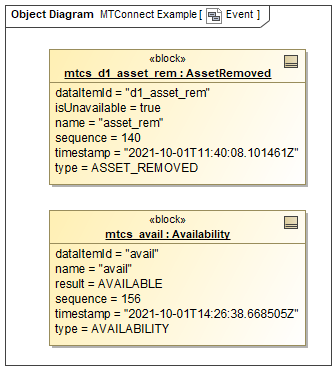
Note: See event-example for the XML representation of the same example.
The following Value Properties of Event lists the additional and/or updated attributes for
Event.- Event (class)
Reference Agent Architecture / InformationModel
Review the MTConnect definition and model details for Event, an MTConnect class.
- Event Types (package)
Observation Information Model / Observation Types
This section provides semantic information for
Eventtypes.- EventEnum (enumeration)
DataTypes
Review the MTConnect definition and model details for EventEnum, an MTConnect enumeration.
- ExactTypeGuard (class)
Reference Agent Architecture / Pipelines
Review the MTConnect definition and model details for ExactTypeGuard, an MTConnect class.
- Exception (class)
Fundamentals / MTConnect Protocol / MTConnectExceptionsReport Response Document
irregularity encountered by an agent in a response document that may or may not conform to the MTConnect Standard.
- ExceptionCodeEnum (enumeration)
DataTypes
Review the MTConnect definition and model details for ExceptionCodeEnum, an MTConnect enumeration.
- ExceptionReport Information Model (class)
Glossary / Information Model Terms
information model that describes the response document returned by an agent when it encounters an exception in the MTConnectAssets Response Document, MTConnectDevices Response Document or MTConnectStreams Response Document.
- Execution (class)
Observation Information Model / Observation Types / Event Types
EXECUTION
- ExecutionEnum (enumeration)
DataTypes
Review the MTConnect definition and model details for ExecutionEnum, an MTConnect enumeration.
- ExpiredPot (class)
Device Information Model / Components / Component Types
leaf
Componentthat is a Pot for a tool that is no longer usable for removal from a ToolMagazine or Turret.- ExposureUnit (class)
Device Information Model / Components / Component Types
leaf
Componentthat emits a type of radiation.- extensible (class)
Glossary
ability for an implementer to extend MTConnect Information Model by adding content not currently addressed in the MTConnect Standard.
- ExtrusionUnit (class)
Device Information Model / Components / Component Types
leaf
Componentthat dispenses liquid or powered materials.
F
- Fan (class)
Device Information Model / Components / Component Types
leaf
Componentthat produces a current of air.- feature (class)
Glossary
topological entity(ies) or design requirements related to a geometric model. QIF 3.0-3.4.59
- FeatureMeasurement (class)
Observation Information Model / Observation Types / Event Types
tabular representation of FEATURE_MEASUREMENT
FeatureMeasurement MAY include a characteristic in which case it MAY include a
CHARACTERISTIC_STATUS.- FeatureMeasurementResult (class)
DataTypes
Review the MTConnect definition and model details for FeatureMeasurementResult, an MTConnect class.
- FeatureOccurrence (class)
Device Information Model / Components / Component Types
Componentthat provides information related to an individual feature.- FeaturePersisitentId (class)
Observation Information Model / Observation Types / Event Types
FEATURE_PERSISTENT_ID
- Feeder (class)
Device Information Model / Components / Component Types
Systemthat manages the delivery of materials within a piece of equipment.Description
For example, this could describe the wire delivery system for an EDM or welding process; conveying system or pump and valve system distributing material to a blending station; or a fuel delivery system feeding a furnace.
- File (class)
Asset Information Model / Files
AbstractFile type that provides information about the File instance and its URL.
- FileArchetype (class)
Asset Information Model / Files
AbstractFile type that provides information common to all versions of a file.
- FileComment (class)
Asset Information Model / Files
remark or interpretation for human interpretation associated with a File or FileArchetype.
- FileLocation (class)
Asset Information Model / Files
URL reference to the file location.
- FileProperty (class)
Asset Information Model / Files
key-value pair providing additional metadata about a File.
- Files (package)
Asset Information Model
This section provides semantic information for the File model.
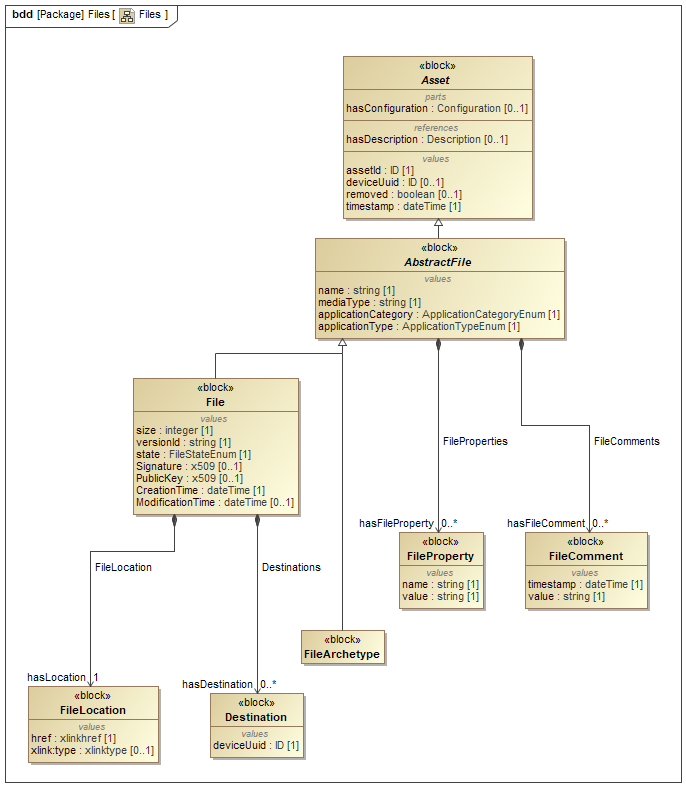
Note: See File Schema Diagrams for XML schema.
Files Asset Information Model
Manufacturing processes require various documents, programs, setup sheets, and digital media available at the device for a given process. The File and FileArchetype
Assets provide a mechanism to communicate specific "Files" that are relevant to a process where the media is located on a server and represented by a Universal Resource Locator (URL).The FileArchetype contains metadata common to all File
Assets for a certain purpose. The FileAssetreferences the file specific to a given device or set of devices. The FileAssetdoes not hold the contents of the file, it contains a reference to the location (URL) used to access the information. The metadata associated with the File provides semantic information about the representation (mime-type) and the application associated with the File. The application of the file is an extensible controlled vocabulary with common manufacturing uses provided.- FileStateEnum (enumeration)
DataTypes
Review the MTConnect definition and model details for FileStateEnum, an MTConnect enumeration.
- FillHeight (class)
Observation Information Model / Observation Types / Sample Types
FILL_HEIGHT
- FillHeight.Actual (class)
Observation Information Model / Observation Types / Sample Types
FILL_HEIGHT that is ACTUAL
- FillHeight.Target (class)
Observation Information Model / Observation Types / Sample Types
FILL_HEIGHT that is TARGET
- FillLevel (class)
Observation Information Model / Observation Types / Sample Types
FILL_LEVEL
- Filter (class)
Device Information Model / Components / Component Types
leaf
Componentthrough which liquids or gases are passed to remove suspended impurities or to recover solids.- Filter (class)
Device Information Model / DataItems / Properties of DataItem
provides a means to control when an agent records updated information for a
DataItem.- FilterEnum (enumeration)
DataTypes
Review the MTConnect definition and model details for FilterEnum, an MTConnect enumeration.
- Firmware (class)
Observation Information Model / Observation Types / Event Types
FIRMWARE
- Firmware.InstallDate (class)
Observation Information Model / Observation Types / Event Types
date the hardware or software was installed.
- Firmware.License (class)
Observation Information Model / Observation Types / Event Types
license code to validate or activate the hardware or software.
- Firmware.Manufacturer (class)
Observation Information Model / Observation Types / Event Types
corporate identity for the maker of the hardware or software.
- Firmware.ReleaseDate (class)
Observation Information Model / Observation Types / Event Types
date the hardware or software was released for general use.
- Firmware.Version (class)
Observation Information Model / Observation Types / Event Types
version of the hardware or software.
- Fixture (package)
Asset Information Model
This section provides semantic information for the Fixture model.
- Fixture (class)
Asset Information Model / Fixture
Review the MTConnect definition and model details for Fixture, an MTConnect class.
- FixtureAssetId (class)
Observation Information Model / Observation Types / Event Types
FIXTURE_ASSET_ID
- FixtureId (class)
Observation Information Model / Observation Types / Event Types
FIXTURE_ID
- FlangeDiameter (class)
Asset Information Model / Cutting Tool / Cutting Item / Cutting Item Measurement Subtypes
dimension between two parallel tangents on the outside edge of a flange.
- FlangeDiameterMax (class)
Asset Information Model / Cutting Tool / Cutting Tool Measurement Subtypes
dimension between two parallel tangents on the outside edge of a flange.
- Flow (class)
Observation Information Model / Observation Types / Sample Types
FLOW
- FollowingError (class)
Observation Information Model / Observation Types / Sample Types
FOLLOWING_ERROR
- FollowingError.Actual (class)
Observation Information Model / Observation Types / Sample Types
measured or reported value of an observation.
- FollowingErrorAngular (class)
Observation Information Model / Observation Types / Sample Types
FOLLOWING_ERROR_ANGULAR
- FollowingErrorAngular.Actual (class)
Observation Information Model / Observation Types / Sample Types
measured or reported value of an observation.
- FollowingErrorLinear (class)
Observation Information Model / Observation Types / Sample Types
FOLLOWING_ERROR_LINEAR
- FollowingErrorLinear.Actual (class)
Observation Information Model / Observation Types / Sample Types
measured or reported value of an observation.
- force (class)
Glossary
push or pull on a mass which results in an acceleration.
- FormatTypeEnum (enumeration)
DataTypes
Review the MTConnect definition and model details for FormatTypeEnum, an MTConnect enumeration.
- FormEnum (enumeration)
DataTypes
Review the MTConnect definition and model details for FormEnum, an MTConnect enumeration.
- Frequency (class)
Observation Information Model / Observation Types / Sample Types
FREQUENCY
- FunctionalLength (class)
Asset Information Model / Cutting Tool / Cutting Item / Cutting Item Measurement Subtypes
distance from the gauge plane or from the end of the shank of the cutting tool, if a gauge plane does not exist, to the cutting reference point determined by the main function of the tool.
This measurement will be with reference to the cutting tool and MUST NOT exist without a cutting tool.
- FunctionalLength (class)
Asset Information Model / Cutting Tool / Cutting Tool Measurement Subtypes
distance from the gauge plane or from the end of the shank to the furthest point on the tool, if a gauge plane does not exist, to the cutting reference point determined by the main function of the tool.
The CuttingTool functional length will be the length of the entire tool, not a single cutting item. Each CuttingItem can have an independent
FunctionalLengthrepresented in its measurements.- FunctionalMode (class)
Observation Information Model / Observation Types / Event Types
FUNCTIONAL_MODE
- FunctionalModeEnum (enumeration)
DataTypes
Review the MTConnect definition and model details for FunctionalModeEnum, an MTConnect enumeration.
- FunctionalWidth (class)
Asset Information Model / Cutting Tool / Cutting Item / Cutting Item Measurement Subtypes
distance between the cutting reference point and the rear backing surface of a turning tool or the axis of a boring bar.
- Fundamentals (package)
The MTConnect Standard defines the normative information model and protocol for retrieving information from manufacturing equipment. This document specifies the agent behavior and protocol.
Agent
The MTConnect Standard specifies the minimum functionality of the agent. The functionality is as follows:
- Provides store and forward messaging middleware service.
- Provides key-value information storage and asset retrieval service.
- Implements the REST API for the MTConnect Standard (See REST Protocol).
- Device metadata.
- observations collected by the agent.
- assets collected by the agent.
There are three types of information stored by an agent that MAY be published in a response document. These are as follows:
- equipment metadata specified in Device Information Model.
- streaming data provides the observations specified in Observation Information Model.
- Assets specified in Asset Information Model.
Agent Instance ID
The agent MUST set the
instanceIdto a unique value whenever the sequence number in the agent is initialized to1. (see Sequence Numbers and Persistence and Recovery below).Storage of Equipment Metadata
An agent MUST be capable of publishing equipment metadata for the agent as specified in Device Information Model.
Storage of Streaming Data
The agent MAY implement a buffer with a fixed number of observations. If the
bufferSizeis fixed, the agent MUST store observations using a first-in-first-out pattern. The agent will remove the oldest observation when the buffer is full and a new observation arrives.
In first-in-first-out-buffer-management, the maximum number of observations that can be stored in the buffer of the agent is 8. The
bufferSizein the header reports the maximum number of observations. This example illustrates that when the buffer fills up, the oldest piece of data falls out the other end.
Note: As an implementation suggestion, the buffer should be sized large enough to provide a continuous stream of observations. The implementer should also consider the impact of a temporary loss of communications when determining the size for the buffer. A larger buffer will allow more time to reconnect to an agent without losing data.
Sequence Numbers
In an agent, each occurrence of an observation in the buffer will be assigned a monotonically increasing unsigned 64-bit integer (sequence number) when it arrives. The first sequence number MUST be
1.The sequence number for each observation MUST be unique for an instance of an agent identified by an
instanceId.instanceid-and-sequence illustrates the changing of the
instanceIdwhen an agent resets the sequence number to1.instanceIdsequence5 234556 234 235 236 237 238 2 Agent Stops and Restarts 5 234557 1 2 3 4 5 identifying-the-range-of-data-with-firstsequence-and-lastsequence shows two additional pieces of information defined for an agent:
firstSequence-- the oldest observation in the buffer. The agent removes this observation when it receives the next observationlastSequence-- the newest observation in the buffer
firstSequenceandlastSequenceprovide the range of values for the REST API requests.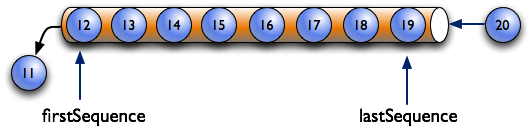
The agent MUST begin evaluating observations with sample request's
fromparameter. Also, the agent MUST include a maximum number of observations given by thecountparameter in the response document.In identifying-the-range-of-data-with-from-and-count, the request specifies the observations start at sequence number
15(from) and includes a total of three items (count).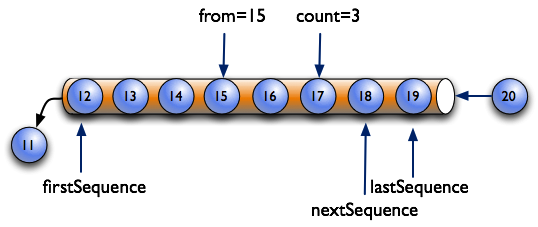
nextSequenceheader property has the sequence number of the next observation in the buffer for subsequent sample requests providing a contiguous set of observations. In the example in identifying-the-range-of-data-with-from-and-count, the next sequence number (nextSequence) will be 18.As shown in identifying-the-range-of-data-with-nextsequence-and-lastsequence, the combination of
fromandcountdefined by the request indicates a sequence number for data that is beyond that which is currently in the buffer. In this case,nextSequenceis set to a value of $$ lastSequence + 1 $$.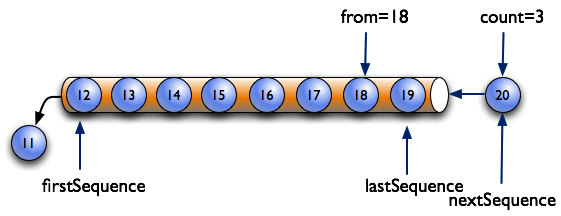
Observation Buffer
An observation has four pieces of information as follows:
- sequence number associated with each observation -
sequence. - The
timestampthe observation was made. . - A reference to the
dataitemidfrom the Device Information Model. - The value of the observation.
data-storage-concept is an example demonstrating the concept of how data may be stored in an agent:
sequencetimestampdataItemIdresult1012016-12-13T09:44:00.2221ZAVAIL-28277UNAVAILABLE1022016-12-13T09:54:00.3839ZAVAIL-28277AVAILABLE1032016-12-13T10:00:00.0594ZPOS-Y-2827725.3481042016-12-13T10:00:00.0594ZPOS-Z-2827713.231052016-12-13T10:00:03.2839ZSS-2827701062016-12-13T10:00:03.2839ZPOS-X-2827711.1951072016-12-13T10:00:03.2839ZPOS-Y-2827724.9381082016-12-13T10:01:37.8594ZPOS-Z-282771.1431092016-12-13T10:02:03.2617ZSS-282771002Timestamp
observations MUST have a
timestampgiving the most accurate time that the observation occurred.The timezone of the
timestampMUST be UTC (Coordinated Universal Time) and represented using ISO 8601 format: e.g., "2010-04-01T21:22:43Z".Applications SHOULD use the observation's
timestampfor ordering as opposed to sequence number.All observations occurring at the same time MUST have the same
timestamp.Recording Occurrences of Streaming Data
The agent MUST only place observations in the buffer if the data has changed from the previous observation for the same
DataItem.The agent MUST place every observation in the buffer, without checking for changes, in the following cases:
- The
discreteistrue. - The
representationisDISCRETE. - The
representationisTIME_SERIES.
Maintaining Last Value for Data Entities
An agent MUST retain the most recent observation associated with each
DataItem, even if the observation is no longer in the buffer. This function supports the current request functionality.Unavailability of Data
An observation with the value of
UNAVAILABLEindicates the value is indeterminate.The agent MUST initialize every
DataItem, unless it has a constant value (see below), with an observation with the value ofUNAVAILABLE. Aditionally, whenever the data source is unreachable, everyDataItemassociated with the data source must have an observation with the value ofUNAVAILABLEandtimestampwhen the connection was lost.An
DataItemthat is constrained to a constant value, as defined in Device Information Model, MUST only have an observation with the constant value and MUST NOT be set toUNAVAILABLE.Persistence and Recovery
The agent MAY have a fixed size buffer and the buffer MAY be ephemeral.
If the buffer is recoverable, the agent MUST NOT change the
instanceIdand MUST NOT set the sequence number to1. The sequence number MUST be one greater than the maximum value of the recovered observations. $$ max(sequence) + 1 $$Storage of MTConnect Assets
An agent MAY only retain a limited number of
Assets in the asset buffer. TheAssets are stored in first-in-first-out method where the oldestAssetis removed when the asset buffer is full and a newAssetarrives.first-in-first-out-asset-buffer-management illustrates the oldest
Assetbeing removed from the asset buffer when a newAssetis added and the asset buffer is full:
Assets are indexed byassetId. In the case ofAssets, relationship-between-assetid-and-stored-asset-documents demonstrates the relationship between the key (assetId) and the storedAsset: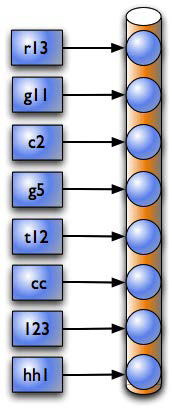
Note: The key (
assetId) is independent of the order of theAssetstored in the asset buffer.When the agent receives a new
Asset, one of the following rules MUST apply:If the
Assetis not in the asset buffer, the agent MUST add the newAssetto the front of the asset buffer. If the asset buffer is full, the oldestAssetwill be removed from the asset buffer.If the
Assetis already in the asset buffer, the agent MUST replace the existingAssetand move theAssetto the front of the asset buffer.
The number of
Assetthat may be stored in an agent is defined by the value forassetBufferSize. AnassetBufferSizeof 4,294,967,296 or $$ 2^{32 } $$ MUST indicate unlimited storage.The asset buffer MAY be ephemeral and the
Assetentities will be lost if the agent clears the asset buffer. They must be recovered from the data source.Asset Information Model provides additional information on asset management.
Response Documents
response documents are electronic documents generated by an agent in response to a request for data.
The response documents defined in the MTConnect Standard are:
MTConnectDevices Response Document: Describes the composition and configuration of the Device and the data that can be observed. See MTConnectDevices Response Document and Device Information Model for details on this information model.
MTConnectStreams Response Document: Observations made at a point in time about related DataItems. See MTConnectStreams Response Document and Observation Information Model for details on this information model.
MTConnectAssets Response Document: Assets related to Devices. See MTConnectAssets Response Document and Asset Information Model for details on this information model.
MTConnectErrors Response Document: Information in response to a failed request. See MTConnectErrors Response Document for details on this information model.
Request/Response Information Exchange
The transfer of information between an agent and a client software application is based on a request and response REST protocol. A client application requests specific information from an agent and an agent responds with a response document.
There are four types of MTConnect Requests. These requests are as follows:
probe request: Requests information about one more more Devices as an MTConnectDevices block.
current request: Requests the most recent, or snapshot at a sequence number, observations as an MTConnectStreams block.
sample request: Requests a series of observations as an MTConnectStreams block.
asset request: Requests a set of assets as an MTConnectAssets block.
If an agent is unable to respond to the request for information or the request includes invalid information, the agent will publish an MTConnectErrors Response Document. See
MTConnectErrors.See REST Protocol for the details on the normative requirements of the agent.
Fundamentals Appendix
Fundamentals of Using XML to Encode Response Documents
The MTConnect Standard specifies the structures and constructs that are used to encode response documents. When these response documents are encoded using XML, there are additional rules defined by the XML standard that apply for creating an XML compliant document. An implementer should refer to the W3C website for additional information on XML documentation and implementation details - http://www.w3.org/XML.
The following provides specific terms and guidelines referenced in the MTConnect Standard for forming response documents with XML:
tag: Atagis an XML construct that forms the foundation for an XML expression. It defines the scope (beginning and end) of an XML expression. The main types of tags are:start-tag: Designates the beginning on an XML element; e.g., <element name>end-tag: Designates the end on an XML element; e.g., </element name>.
Note: If an element has no child elements or CDATA, the
end-tagmay be shortened to />.Element: An element is an XML statement that is the primary building block for a document encoded using XML. An element begins with astart-tagand ends with a matchingend-tag. The characters between thestart-tagand theend-tagare the element's content. The content may contain attributes, CDATA, and/or other elements. If the content contains additional elements, these elements are called child elements.
An example would be: <element name>Content of the Element</element name>.
child element: An XML element that is contained within a higher-level parent element. A child element is also known as a sub-element. XML allows an unlimited hierarchy of parent element-child element relationships that establishes the structure that defines how the various pieces of information in the document relate to each other. A parent element may have multiple associated child elements.
element name: A descriptive identifier contained in both the
start-tagandend-tagthat provides the name of an XML element.Attribute: A construct consisting of a name–value pair that provides additional information about that XML element. The format for an attribute is `name="value"; where the value for the attribute is enclosed in a set of quotation (“) marks. An XML attribute MUST only have a single value and each attribute can appear at most once in each element. Also, each attribute MUST be defined in a schema to either be required or optional.An example of attributes for an XML element is example-of-attributes-for-an-element:
<DataItem category="SAMPLE" id="S1load"
  nativeUnits="PERCENT"  type="LOAD"
  units="PERCENT"/>
Example of attributes for an element
In this example,
DataItemis the element name.category,id,nativeUnits,type, andunitsare the names of the attributes. “SAMPLE", “S1load", “PERCENT", “LOAD", and “PERCENT" are the values for each of the respective attributes.- CDATA: CDATA is an XML term representing Character Data. Character Data contains a value(s) or text that is associated with an XML element. CDATA can be restricted to certain formats, patterns, or words.
An example of CDATA associated with an XML element would be example-of-cdata-associated-with-element:
<Message id="M1">This is some text</Message>Example of cdata associated with element
In this example,
Messageis the element name andThis is some textis the CDATA.- namespace: An XML namespace defines a unique vocabulary for named elements and attributes in an XML document. An XML document may contain content that is associated with multiple namespaces. Each namespace has its own unique identifier.
Elements and attributes are associated with a specific namespace by placing a prefix on the name of the element or attribute that associates that name to a specific namespace; e.g.,
x:MyTargetassociates the element nameMyTargetwith the namespace designated byx:(the prefix).namespaces are used to avoid naming conflicts within an XML document. The naming convention used for elements and attributes may be associated with either the default namespace specified in the header of an XML document or they may be associated with one or more alternate namespaces. All elements or attributes associated with a namespace that is not the default namespace, must include a prefix (e.g., x:) as part of the name of the element or attribute to associate it with the proper namespace. See Schema and Namespace Declaration Information for details on the structure for XML headers.
The names of the elements and attributes declared in a namespace may be identified with a different prefix than the prefix that signifies that specific namespace. These prefixes are called namespace aliases. As an example, MTConnect Standard specific namespaces are designated as
m:and the names of the elements and attributes defined in that namespace have an alias prefix ofmt:which designates these names as MTConnect Standard specific vocabulary; e.g.,mt:MTConnectDevices.XML documents are encoded with a hierarchy of elements. In general, XML elements may contain child elements, CDATA, or both. However, in the MTConnect Standard, an element MUST NOT contain mixed content; meaning it cannot contain both child elements and CDATA.
The semantic data model defined for each response document specifies the elements and child elements that may appear in a document. The semantic data model also defines the number of times each element and child element may appear in the document.
example-of-hierarchy-of-xml-elements demonstrates the hierarchy of XML elements and child elements used to form an XML document:
<Root Level>    (Parent Element)
  <First Level>  (Child Element to Root Level and
  Parent Element to Second Level)
    <Second Level>  (Child Element to First Level
    and Parent Element to Third Level)
      <Third Level name="N1"></Third Level>
      (Child Element to Second Level)
      <Third Level name="N2"></Third Level>
      (Child Element to Second Level)
      <Third Level name="N3"></Third Level>
      (Child Element to Second Level)
    </Second Level>   (end-tag for Second Level)
  </First Level>   (end-tag for First Level)
</Root Level>   (end-tag for Root Level)
Example of hierarchy of XML elements
In the example-of-hierarchy-of-xml-elements, Root Level and First Level have one child element (sub-elements) each and Second Level has three child elements; each called Third Level. Each Third Level element has a different name attribute. Each level in the structure is an element and each lower level element is a child element.
Schema and Namespace Declaration Information
There are four pseudo-attributes typically included in the header of a response document that declare the schema and namespace for the document. Each of these pseudo-attributes provides specific information for a client software application to properly interpret the content of the response document.
The pseudo-attributes include:
xmlns:xsi– Thexsiportion of this attribute name stands for XML Schema instance. An XML Schema instance provides information that may be used by a software application to interpret XML specific information within a document. See the W3C website for more details onxmlns:xsi.xmlns– Declares the default namespace associated with the content of the response document. The default namespace is considered to apply to all elements and attributes whenever the name of the element or attribute does not contain a prefix identifying an alternate namespace.
The value of this attribute is an URN identifying the name of the file that defines the details of the namespace content. This URN provides a unique identify for the namespace.
xmlns:m– Declares the MTConnect specific namespace associated with the content of the response document. There may be multiple namespaces declared for an XML document. Each may be associated to the default namespace or it may be totally independent. The:mdesignates that this is a specific MTConnect namespace which is directly associated with the default namespace.
Note: See Extensibility for details regarding extended namespaces.
The value associated with this attribute is an URN identifying the name of the file that defines the details of the namespace content.
xsi:schemaLocation- Declares the name for the schema associated with the response document and the location of the file that contains the details of the schema for that document.
The value associated with this attribute has two parts:
A URN identifying the name of the specific XML Schema instance associated with the response document.
The path to the location where the file describing the specific XML Schema instance is located. If the file is located in the same root directory where the agent is installed, then the local path MAY be declared. Otherwise, a fully qualified URL must be declared to identify the location of the file.
Note: In the format of the value associated with
xsi:schemaLocation, the URN and the path to the schema file MUST be separated by a “space”.In example-of-schema-and-namespace-declaration, the first line is the XML declaration. The second line is a root element called
MTConnectDevices. The remaining four lines are the pseudo-attributes ofMTCconnectDevicesthat declare the XML schema and namespace associated with an MTConnectDevices Response Document.<?xml version="1.0" encoding="UTF-8"?> <MTConnectDevices xmlns:xsi=http://www.w3.org/2001/XMLSchema-instance xmlns="urn:mtconnect.org:MTConnectDevices:1.3" xmlns:m="urn:mtconnect.org:MTConnectDevices:1.3" xsi:schemaLocation="urn:mtconnect.org: MTConnectDevices:1.3 /schemas/MTConnectDevices\\_1.3.xsd">Example of schema and namespace declaration
The format for the values provided for each of the pseudo-attributes MUST reference the semantic data model (e.g.,
MTConnectDevices,MTConnectStreams,MTConnectAssets, orMTConnectError) and the version (i.e.;1.1,1.2,1.3, etc.) of the MTConnect Standard that depict the schema and namespace(s) associated with a specific response document.When an implementer chooses to extend an MTConnect data model by adding custom data types or additional structural elements, the schema and namespace for that data model should be updated to reflect the additional content. When this is done, the namespace and schema information in the header should be updated to reflect the URI for the extended namespace and schema.
Extensibility
MTConnect is an extensible standard, which means that implementers MAY extend the data models defined in the various sections of the MTConnect Standard to include information required for a specific implementation. When these data models are encoded using XML, the methods for extending these data models are defined by the rules established for extending any XML schema (see the W3C website for more details on extending XML data models).
The following are typical extensions that MAY be considered in the MTConnect data models:
Additional
typeandsubtypevalues for DataItems.Additional structural elements as containers.
Additional
Compositionelements.New
Assettypes that are sub-typed from the abstractAssettype.child elements that may be added to specific XML elements contained within the MTConnect Information Models. These extended elements MUST be identified in a separate namespace.
When extending an MTConnect data model, there are some basic rules restricting changes to the MTConnect data models.
When extending an MTConnect data model, an implementer:
MUST NOT add new value for category for DataItems,
MUST NOT add new root elements,
SHOULD NOT add new top level Components, and
MUST NOT add any new attributes or include any sub-elements to
Composition.
Note: Throughout the documents additional information is provided where extensibility may be acceptable or unacceptable to maintain compliance with the MTConnect Standard.
When a schema representing a data model is extended, the schema and namespace declaration at the beginning of the corresponding response document MUST be updated to reflect the new schema and namespace so that a client software application can properly validate the response document.
An XML example of a schema and namespace declaration, including an extended schema and namespace, is shown in example-of-extended-schema-and-namespace-in-declaration:
<?xml version="1.0" encoding="UTF-8"?>
  <MTConnectDevices
   xmlns:xsi=http://www.w3.org/2001/XMLSchema-instance
   xmlns="urn:mtconnect.org:MTConnectDevices:1.3"
   xmlns:m="urn:mtconnect.org:MTConnectDevices:1.3"
   xmlns:x="urn:MyLocation:MyFile:MyVersion"
   xsi:schemaLocation="urn:MyLocation:MyFile:MyVersion
     /schemas/MyFileName.xsd" />
Example of extended schema and namespace in declaration
In this example:
xmlns:xis added in Line 6 to identify the XML Schema instance for the extended schema. element names identified with an "x" prefix are associated with this specific XML Schema instance.
Note: The "
x" prefix MAY be replaced with any prefix that the implementer chooses for identifying the extended schema and namespace.xsi:schemaLocationis modified in Line 7 to associate the namespace URN with the URL specifying the location of schema file.MyLocation,MyFile,MyVersion, andMyFileNamein Lines 6 and 7 MUST be replaced by the actual name, version, and location of the extended schema.
When an extended schema is implemented, each structural element, DataItem, and asset defined in the extended schema MUST be identified in each respective response document by adding a prefix to the XML element name associated with that structural element, DataItem, or asset. The prefix identifies the schema and namespace where that XML Element is defined.
G
- Galvanomotor (class)
Device Information Model / Components / Component Types
leaf
Componentcomposed of an electromechanical actuator that produces deflection of a beam of light or energy in response to electric current through its coil in a magnetic field.- GangToolBar (class)
Device Information Model / Components / Component Types
ToolingDelivery composed of a tool mounting mechanism that holds any number of tools.
Description
Tools are located in Station entities. Tools are positioned for use in the manufacturing process by linearly positioning the GangToolBar.
- GlobalPosition (class)
Observation Information Model / Observation Types / Sample Types
GLOBAL_POSITION
- GlobalPosition.Actual (class)
Observation Information Model / Observation Types / Sample Types
measured or reported value of an observation.
- GlobalPosition.Commanded (class)
Observation Information Model / Observation Types / Sample Types
directive value including adjustments such as an offset or overrides.
- Glossary (package)
Review the MTConnect definition and model details for Glossary, an MTConnect package.
- GravitationalAcceleration (class)
Observation Information Model / Observation Types / Sample Types
GRAVITATIONAL_ACCELERATION
- GravitationalForce (class)
Observation Information Model / Observation Types / Sample Types
GRAVITATIONAL_FORCE
Note: $$Mass\times GravitationalAcceleration$$
- Gripper (class)
Device Information Model / Components / Component Types
leaf
Componentthat holds a part, stock material, or any other item in place.- GroupIdentifier (class)
Asset Information Model / Part
identifier for a group of parts or a piece of raw material that will be transformed into multiple parts
- Guard (class)
Reference Agent Architecture / Pipelines
Review the MTConnect definition and model details for Guard, an MTConnect class.
- GuardResult (enumeration)
Reference Agent Architecture / Pipelines
Review the MTConnect definition and model details for GuardResult, an MTConnect enumeration.
H
- Hardness (class)
Observation Information Model / Observation Types / Event Types
HARDNESS
- Hardness.Brinell (class)
Observation Information Model / Observation Types / Event Types
scale to measure the resistance to deformation of a surface.
- Hardness.Leeb (class)
Observation Information Model / Observation Types / Event Types
scale to measure the elasticity of a surface.
- Hardness.Mohs (class)
Observation Information Model / Observation Types / Event Types
scale to measure the resistance to scratching of a surface.
- Hardness.Rockwell (class)
Observation Information Model / Observation Types / Event Types
scale to measure the resistance to deformation of a surface.
- Hardness.Shore (class)
Observation Information Model / Observation Types / Event Types
scale to measure the resistance to deformation of a surface.
- Hardness.Vickers (class)
Observation Information Model / Observation Types / Event Types
scale to measure the resistance to deformation of a surface.
- Hardware (class)
Observation Information Model / Observation Types / Event Types
HARDWARE
- Hardware.InstallDate (class)
Observation Information Model / Observation Types / Event Types
date the hardware or software was installed.
- Hardware.License (class)
Observation Information Model / Observation Types / Event Types
license code to validate or activate the hardware or software.
- Hardware.Manufacturer (class)
Observation Information Model / Observation Types / Event Types
corporate identity for the maker of the hardware or software.
- Hardware.Model (class)
Observation Information Model / Observation Types / Event Types
model info of the hardware or software.
- Hardware.ReleaseDate (class)
Observation Information Model / Observation Types / Event Types
date the hardware or software was released for general use.
- Hardware.Version (class)
Observation Information Model / Observation Types / Event Types
version of the hardware or software.
- Header (class)
Fundamentals / MTConnect Protocol / MTConnectAssets Response Document
provides information from an agent defining version information, storage capacity, and parameters associated with the data management within the agent.
- Header (class)
Fundamentals / MTConnect Protocol / MTConnectDevices Response Document
provides information from an agent defining version information, storage capacity, and parameters associated with the data management within the agent.
- Header (class)
Fundamentals / MTConnect Protocol / MTConnectErrors Response Document
provides information from an agent defining version information, storage capacity, and parameters associated with the data management within the agent.
- Header (class)
Fundamentals / MTConnect Protocol / MTConnectStreams Response Document
provides information from an agent defining version information, storage capacity, and parameters associated with the data management within the agent.
- heartbeat (class)
Glossary
function that indicates to a client that the communications connection to an agent is still viable during times when there is no new data available to report often referred to as a "keep alive" message.
- Heating (class)
Device Information Model / Components / Component Types
Systemthat delivers controlled amounts of heat to achieve a target temperature at a specified heating rate.Description
Note: As an example, Energy Delivery Method can be either through Electric heaters or Gas burners.
- Height (class)
Asset Information Model / Pallet / Measurements
height of the PhysicalAsset
- higher level (class)
Glossary
nested element that is above a lower level element.
- Hopper (class)
Device Information Model / Components / Component Types
leaf
Componentcomposed of a chamber or bin in which materials are stored temporarily, typically being filled through the top and dispensed through the bottom.- HostName (class)
Observation Information Model / Observation Types / Event Types
HOST_NAME
- HTTP Body (class)
Glossary / HTTP Terms
data bytes transmitted in an HTTP transaction message immediately following the headers. IETF:RFC-2616
- HTTP Error Message (class)
Glossary / HTTP Terms
response provided by an agent indicating that an HTTP Request is incorrectly formatted or identifies that the requested data is not available from the agent. IETF:RFC-2616
- HTTP Header (class)
Glossary / HTTP Terms
header of either an HTTP Request from a client or an HTTP Response from an agent. IETF:RFC-2616
- HTTP Header Field (class)
Glossary / HTTP Terms
components of the header section of request and response messages in an HTTP transaction. IETF:RFC-2616
- HTTP Message (class)
Glossary / HTTP Terms
consist of requests from client to server and responses from server to client. IETF:RFC-2616
Note: In MTConnect Standard, it describes the information that is exchanged between an agent and a client.
- HTTP Messaging (class)
Glossary / HTTP Terms
interface for information exchange functionality. IETF:RFC-2616
- HTTP Method (class)
Glossary / HTTP Terms
portion of a command in an HTTP Request that indicates the desired action to be performed on the identified resource; often referred to as verbs. IETF:RFC-2616
- HTTP Query (class)
Glossary / HTTP Terms
portion of a request for information that more precisely defines the specific information to be published in response to the request. IETF:RFC-2616
- HTTP Request (class)
Glossary / HTTP Terms
request message from a client to a server includes, within the first line of that message, the method to be applied to the resource, the identifier of the resource, and the protocol version in use. IETF:RFC-2616
Note: In MTConnect Standard, a request issued by a client to an agent requesting information defined in the HTTP Request Line.
- HTTP Request Line (class)
Glossary / HTTP Terms
begins with a method token, followed by the Request-URI and the protocol version, and ending with CRLF. A CRLF is allowed in the definition of TEXT only as part of a header field continuation. IETF:RFC-2616
Note: the first line of an HTTP Request describing a specific response document to be published by an agent.
- HTTP Request Method (class)
Glossary / HTTP Terms
indicates the method to be performed on the resource identified by the Request-URI. IETF:RFC-2616
- HTTP Request URI (class)
Glossary / HTTP Terms
Uniform Resource Identifier that identifies the resource upon which to apply the request. IETF:RFC-2616
- HTTP Response (class)
Glossary / HTTP Terms
after receiving and interpreting a request message, a server responds with an HTTP response message. IETF:RFC-2616
Note: In MTConnect Standard, the information published from an agent in reply to an HTTP Request.
- HTTP Server (class)
Glossary / HTTP Terms
server that accepts HTTP Request from client and publishes HTTP Response as a reply to those HTTP Request. IETF:RFC-2616
- HTTP Status Code (class)
Glossary / HTTP Terms
3-digit integer result code of the attempt to understand and satisfy the request. IETF:RFC-2616
- HTTP Terms (package)
Glossary
Review the MTConnect definition and model details for HTTP Terms, an MTConnect package.
- HTTP Version (class)
Glossary / HTTP Terms
version of the HTTP protocol. IETF:RFC-2616
- HumidityAbsolute (class)
Observation Information Model / Observation Types / Sample Types
HUMIDITY_ABSOLUTE
- HumidityAbsolute.Actual (class)
Observation Information Model / Observation Types / Sample Types
measured or reported value of an observation.
- HumidityAbsolute.Commanded (class)
Observation Information Model / Observation Types / Sample Types
directive value including adjustments such as an offset or overrides.
- HumidityRelative (class)
Observation Information Model / Observation Types / Sample Types
HUMIDITY_RELATIVE
- HumidityRelative.Actual (class)
Observation Information Model / Observation Types / Sample Types
measured or reported value of an observation.
- HumidityRelative.Commanded (class)
Observation Information Model / Observation Types / Sample Types
directive value including adjustments such as an offset or overrides.
- HumiditySpecific (class)
Observation Information Model / Observation Types / Sample Types
HUMIDITY_SPECIFIC
- HumiditySpecific.Actual (class)
Observation Information Model / Observation Types / Sample Types
measured or reported value of an observation.
- HumiditySpecific.Commanded (class)
Observation Information Model / Observation Types / Sample Types
directive value including adjustments such as an offset or overrides.
- Hydraulic (class)
Device Information Model / Components / Component Types
Systemthat provides movement and distribution of pressurized liquid throughout the piece of equipment.
I
- Identifier (class)
Asset Information Model / Part
unique name or label for a part.
- ImageFile (class)
Device Information Model / Configurations / ImageFiles
reference to a file containing an image of the
Component.- ImageFiles (package)
Device Information Model / Configurations
This section provides semantic information for the ImageFile entity.
- implementation (class)
Glossary
specific instantiation of the MTConnect Standard.
- ImportDescriptor (class)
Imports / CSV Imports
Review the MTConnect definition and model details for ImportDescriptor, an MTConnect class.
- Imports (package)
Review the MTConnect definition and model details for Imports, an MTConnect package.
- IncribedCircleDiameter (class)
Asset Information Model / Cutting Tool / Cutting Item / Cutting Item Measurement Subtypes
diameter of a circle to which all edges of a equilateral and round regular insert are tangential.
- Industrial Terms (package)
Glossary
Review the MTConnect definition and model details for Industrial Terms, an MTConnect package.
- information model (class)
Glossary
rules, relationships, and terminology that are used to define how information is structured.
- Information Model Terms (package)
Glossary
Review the MTConnect definition and model details for Information Model Terms, an MTConnect package.
- InformationModel (package)
Reference Agent Architecture
Review the MTConnect definition and model details for InformationModel, an MTConnect package.
- InitialValue (class)
Device Information Model / DataItems / Properties of DataItem
starting value for a
DataItemas well as the value to be set for theDataItemafter a reset event.- InsertWidth (class)
Asset Information Model / Cutting Tool / Cutting Item / Cutting Item Measurement Subtypes
W1 is used for the insert width when an inscribed circle diameter is not practical.
- instance (class)
Glossary
describes a set of streaming data in an agent. Each time an agent is restarted with an empty buffer, data placed in the buffer represents a new instance of the agent.
- interaction model (class)
Glossary
model that defines how information is exchanged across an interface to enable interactions between independent systems.
- interface (class)
Glossary
means by which communication is achieved between independent systems.
- Interface (class)
Interface Interaction Model
abstract
Componentthat coordinates actions and activities between pieces of equipment.- Interface Interaction Model (package)
In many manufacturing processes, multiple pieces of equipment must work together to perform a task. The traditional method for coordinating the activities between individual pieces of equipment is to connect them using a series of wires to communicate equipment states and demands for action. These interactions use simple binary ON/OFF signals to accomplished their intention.
In the MTConnect Standard, interfaces provides a means to replace this traditional method for interconnecting pieces of equipment with a structured interaction model that provides a rich set of information used to coordinate the actions between pieces of equipment. Implementers may utilize the information provided by this data model to (1) realize the interaction between pieces of equipment and (2) to extend the functionality of the equipment to improve the overall performance of the manufacturing process.
The interaction model used to implement interfaces provides a lightweight and efficient protocol, simplifies failure recovery scenarios, and defines a structure for implementing a Plug-And-Play relationship between pieces of equipment. By standardizing the information exchange using this higher-level semantic information model, an implementer may more readily replace a piece of equipment in a manufacturing system with any other piece of equipment capable of providing similar interaction model functions.
Two primary functions are required to implement the interaction model for an interfaces and manage the flow of information between pieces of equipment. Each piece of equipment needs to have the following:
- An agent which provides:
The data required to implement the interaction model.
Any other data from a piece of equipment needed to implement the interface – operating states of the equipment, position information, execution modes, process information, etc.
- A client software application that enables the piece of equipment to acquire and interpret information from another piece of equipment.
Interfaces Architecture
MTConnect Standard is based on a communications method that provides no direct way for one piece of equipment to change the state of or cause an action to occur in another piece of equipment. The interaction model used to implement interfaces is based on a publish and subscribe type of communications as described in Fundamentals and utilizes a request and response information exchange mechanism. For interfaces, pieces of equipment must perform both the publish (agent) and subscribe (client) functions.
Note: The current definition of interfaces addresses the interaction between two pieces of equipment. Future releases of the MTConnect Standard may address the interaction between multiple (more than two) pieces of equipment.
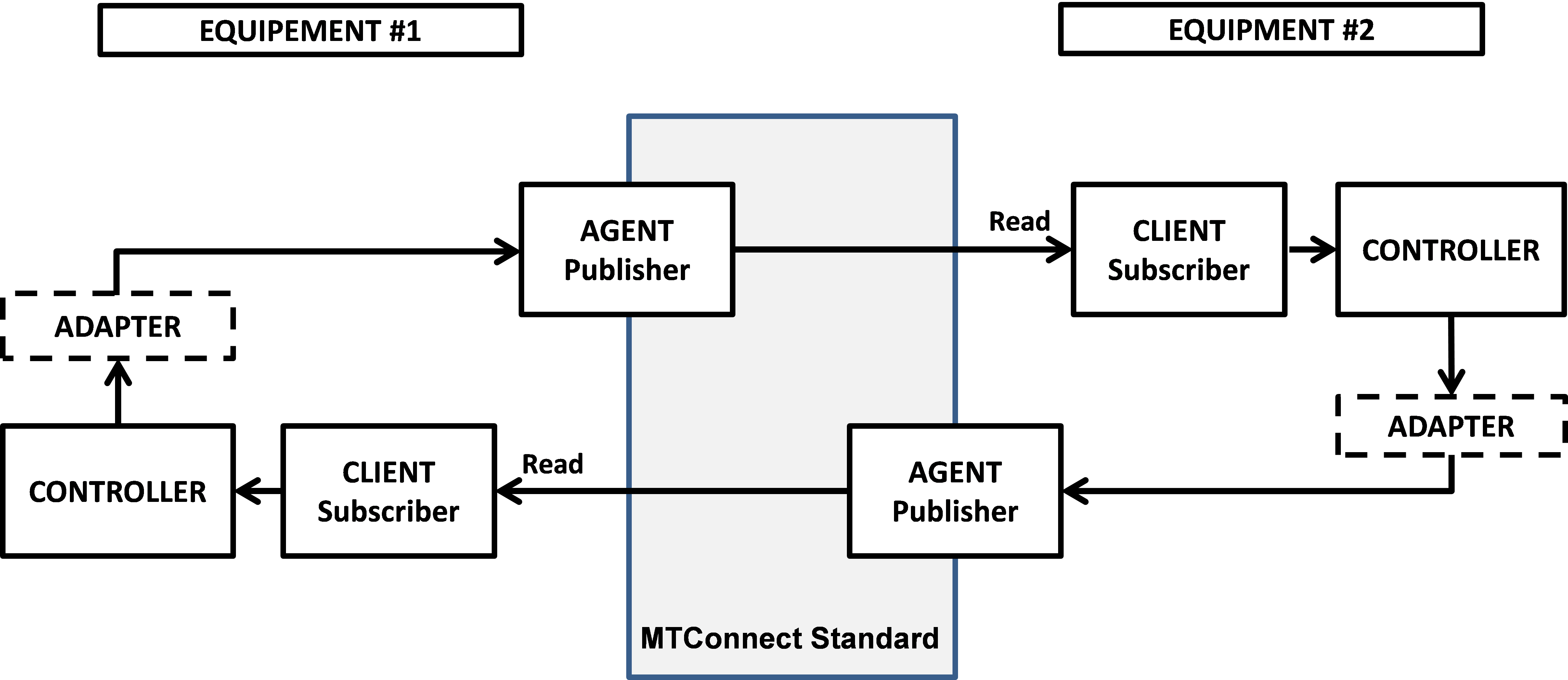
Note: The data flow architecture illustrated in Data Flow Architecture for Interfaces was historically referred to in the MTConnect Standard as a read-read concept.
In the implementation of the interaction model for interfaces, two pieces of equipment can exchange information in the following manner. One piece of equipment indicates a request for service by publishing a type of request using a data item provided through an agent as defined in DataItem Types for Interface. The client associated with the second piece of equipment, which is subscribing to data from the first machine, detects and interprets that request. If the second machine chooses to take any action to fulfill this request, it can indicate its acceptance by publishing a response using a data item provided through its agent. The client on the first piece of equipment continues to monitor information from the second piece of equipment until it detects an indication that the response to the request has been completed or has failed.
An example of this type of interaction between pieces of equipment can be represented by a machine tool that wants the material to be loaded by a robot. In this example, the machine tool is the requester, and the robot is the responder. On the other hand, if the robot wants the machine tool to open a door, the robot becomes the requester and the machine tool the responder.
Request and Response Information Exchange
The
DataItemelements defined by the interaction model each have aREQUESTandRESPONSEsubtype. These subtypes identify if the data item represents a request or a response. Using these data items, a piece of equipment changes the state of its request or response to indicate information that can be read by the other piece of equipment. To aid in understanding how the interaction model functions, one can view this interaction model as a simple state machine.The interaction between two pieces of equipment can be described as follows. When the requester wants an activity to be performed, it transitions its request state from a
READYstate to anACTIVEstate. In turn, when the client on the responder reads this information and interprets the request, the responder announces that it is performing the requested task by changing its response state toACTIVE. When the action is finished, the responder changes its response state toCOMPLETE. This pattern of request and response provides the basis for the coordination of actions between pieces of equipment. These actions are implemented usingEVENTcategory data items. (See DataItem Types for Interface for details on theEventtype data items defined for interfaces.)Note: The implementation details of how the responder piece of equipment reacts to the request and then completes the requested task are up to the implementer.
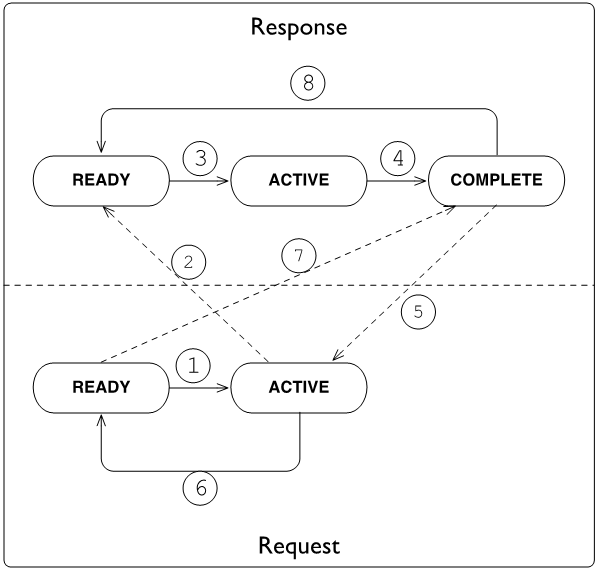
The initial condition of both the request and response states on both pieces of equipment is
READY. The dotted lines indicate the on-going communications that occur to monitor the progress of the interactions between the pieces of equipment.The interaction between the pieces of equipment as illustrated in Request and Response Overview progresses through the sequence listed below.
The request transitions from
READYtoACTIVEsignaling that a service is needed.The response transitions from
READYtoACTIVEindicating that it is performing the action.Once the action has been performed, the response transitions to
COMPLETE.The request detects the action is
COMPLETE.The request transitions back to
READYacknowledging that the service has been performed.In recognition of this acknowledgement, the response transitions back to
READY.
After the final action has been completed, both pieces of equipment are back in the
READYstate indicating that they are able to perform another action.- Interface Types (package)
Interface Interaction Model
The abstract
Interfaceis realized by the following types listed in this section.In order to implement the interaction model for interfaces, each piece of equipment associated with an interface MUST provide the corresponding
Interfacetype. A piece of equipment MAY support any number of unique interfaces.Interfaces for Device and Observation Information Models
The interaction model for implementing interfaces is defined in the MTConnect Standard as an extension to the Device Information Model and Observation Information Model.
A piece of equipment MAY support multiple different interfaces. Each piece of equipment supporting interfaces MUST model the information associated with each interface as an
Interfacecomponent.Interfaceis an abstractComponentand is realized byInterfacecomponent types.The Interfaces in Entity Hierarchy illustrates where an
Interfaceis modeled in the Device Information Model for a piece of equipment.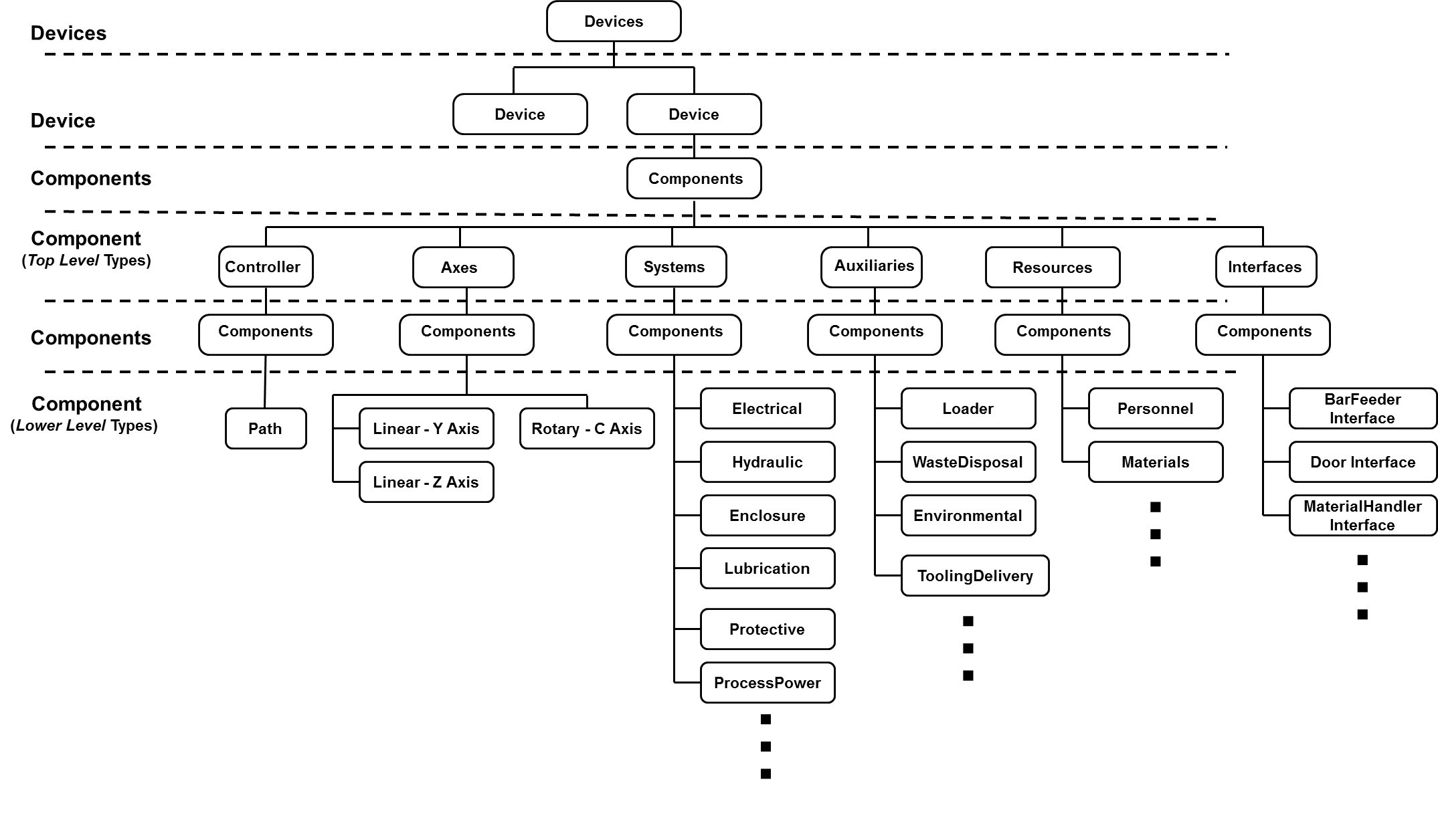
- InterfaceEventEnum (enumeration)
DataTypes
Review the MTConnect definition and model details for InterfaceEventEnum, an MTConnect enumeration.
- Interfaces (class)
Device Information Model / Components / Component Types / Component Organizer Types
Componentthat organizesInterfacetypes.- InterfaceState (class)
Interface Interaction Model / DataItem Types for Interface
INTERFACE_STATE
When the InterfaceState is
DISABLED, the state of all data items that are specific for the interaction model associated with thatInterfaceMUST be set toNOT_READY.- InterfaceStateEnum (enumeration)
DataTypes
Review the MTConnect definition and model details for InterfaceStateEnum, an MTConnect enumeration.
- InternalError (class)
Fundamentals / MTConnect Protocol / MTConnectErrors Response Document / Error Types
agent experienced an error while attempting to publish the requested information.
- InvalidParameterValue (class)
Fundamentals / MTConnect Protocol / MTConnectErrors Response Document / Error Types
supplied value does not match the required type.
- InvalidQueryParameter (class)
Fundamentals / MTConnect Protocol / MTConnectErrors Response Document / Error Types
agent does not recognize the parameter.
- InvalidRequest (class)
Fundamentals / MTConnect Protocol / MTConnectErrors Response Document / Error Types
request contains information that was not recognized by the agent.
- InvalidURI (class)
Fundamentals / MTConnect Protocol / MTConnectErrors Response Document / Error Types
URI provided was incorrect.
- InvalidXPath (class)
Fundamentals / MTConnect Protocol / MTConnectErrors Response Document / Error Types
XPath is either structurally malformed or the XPath does not exist.
- ItemLife (class)
Asset Information Model / Cutting Tool / Cutting Item
life of a CuttingItem.
J
- JsonMessage (class)
Reference Agent Architecture / Pipelines
Review the MTConnect definition and model details for JsonMessage, an MTConnect class.
- JsonParser (class)
Reference Agent Architecture / Parser
Review the MTConnect definition and model details for JsonParser, an MTConnect class.
- JsonPrinter (class)
Reference Agent Architecture / Printer
Review the MTConnect definition and model details for JsonPrinter, an MTConnect class.
K
- key (class)
Glossary
unique identifier in a key-value pair association.
- key-value pair (class)
Glossary
association between an identifier referred to as the key and a value which taken together create a key-value pair.
- Kinematics (class)
WIP: Device Examples / Kinematics Simulation / Simulation
Review the MTConnect definition and model details for Kinematics, an MTConnect class.
- Kinematics Simulation (package)
WIP: Device Examples
Review the MTConnect definition and model details for Kinematics Simulation, an MTConnect package.
L
- LambdaGuard (class)
Reference Agent Architecture / Pipelines
Review the MTConnect definition and model details for LambdaGuard, an MTConnect class.
- LeakDetect (class)
Observation Information Model / Observation Types / Event Types
LEAK_DETECT
- LeakDetectEnum (enumeration)
DataTypes
Review the MTConnect definition and model details for LeakDetectEnum, an MTConnect enumeration.
- Length (class)
Asset Information Model / Pallet / Measurements
length of the PhysicalAsset
- Length (class)
Observation Information Model / Observation Types / Sample Types
LENGTH
- Length.Remaining (class)
Observation Information Model / Observation Types / Sample Types
remaining total length of an object.
- Length.Standard (class)
Observation Information Model / Observation Types / Sample Types
standard or original length of an object.
- Length.Useable (class)
Observation Information Model / Observation Types / Sample Types
remaining usable length of an object.
- Level (class)
Observation Information Model / Observation Types / Sample Types
LEVEL
- Library (class)
Observation Information Model / Observation Types / Event Types
LIBRARY
- Library.InstallDate (class)
Observation Information Model / Observation Types / Event Types
date the hardware or software was installed.
- Library.License (class)
Observation Information Model / Observation Types / Event Types
license code to validate or activate the hardware or software.
- Library.Manufacturer (class)
Observation Information Model / Observation Types / Event Types
corporate identity for the maker of the hardware or software.
- Library.ReleaseDate (class)
Observation Information Model / Observation Types / Event Types
date the hardware or software was released for general use.
- Library.Version (class)
Observation Information Model / Observation Types / Event Types
version of the hardware or software.
- Line (class)
Observation Information Model / Observation Types / Event Types
LINE
- Line.Maximum (class)
Observation Information Model / Observation Types / Event Types
maximum line number of the code being executed.
- Line.Minimum (class)
Observation Information Model / Observation Types / Event Types
minimum line number of the code being executed.
- Linear (class)
Device Information Model / Components / Component Types
Axisthat provides prismatic motion along a fixed axis.- LinearForce (class)
Observation Information Model / Observation Types / Sample Types
LINEAR_FORCE
- LinearPositionFeedback (class)
Device Information Model / Components / Component Types
leaf
Componentthat measures linear motion or position.DEPRECATION WARNING : May be deprecated in the future. Recommend using Encoder.
- LineLabel (class)
Observation Information Model / Observation Types / Event Types
LINE_LABEL
- LineNumber (class)
Observation Information Model / Observation Types / Event Types
LINE_NUMBER
- LineNumber.Absolute (class)
Observation Information Model / Observation Types / Event Types
position of a block of program code relative to the beginning of the control program.
- LineNumber.Incremental (class)
Observation Information Model / Observation Types / Event Types
position of a block of program code relative to the occurrence of the last LineLabel encountered in the control program.
- Link (class)
Device Information Model / Components / Component Types
Structure that provides a connection between
Componententities.- Load (class)
Observation Information Model / Observation Types / Sample Types
LOAD
- LoadCount (class)
Observation Information Model / Observation Types / Event Types
LOAD_COUNT
- LoadCount.Aborted (class)
Observation Information Model / Observation Types / Event Types
accumulation of actions or activities that were attempted, but terminated before they could be completed.
- LoadCount.All (class)
Observation Information Model / Observation Types / Event Types
accumulation of all actions, items, or activities being counted independent of the outcome.
- LoadCount.Bad (class)
Observation Information Model / Observation Types / Event Types
accumulation of actions, items, or activities being counted that do not conform to specification or expectation.
- LoadCount.Complete (class)
Observation Information Model / Observation Types / Event Types
accumulation of actions, items, or activities that have been completed, independent of the outcome.
- LoadCount.Failed (class)
Observation Information Model / Observation Types / Event Types
accumulation of actions or activities that were attempted, but failed to complete or resulted in an unexpected or unacceptable outcome.
- LoadCount.Good (class)
Observation Information Model / Observation Types / Event Types
accumulation of actions, items, or activities being counted that conform to specification or expectation.
- LoadCount.Remaining (class)
Observation Information Model / Observation Types / Event Types
accumulation of actions, items, or activities yet to be counted.
- LoadCount.Target (class)
Observation Information Model / Observation Types / Event Types
goal of the operation or process.
- LoadedHeight (class)
Asset Information Model / Pallet / Measurements
loaded height of the PhysicalAsset
- LoadedLength (class)
Asset Information Model / Pallet / Measurements
loaded length of the PhysicalAsset
- LoadedSwing (class)
Asset Information Model / Pallet / Measurements
loaded swing of the PhysicalAsset
- LoadedWeight (class)
Asset Information Model / Pallet / Measurements
loaded weight of the PhysicalAsset
- LoadedWidth (class)
Asset Information Model / Pallet / Measurements
loaded width of the PhysicalAsset
- Loader (class)
Device Information Model / Components / Component Types
Auxiliary that provides movement and distribution of materials, parts, tooling, and other items to or from a piece of equipment.
- Location (class)
Asset Information Model / Cutting Tool / Cutting Tool Life Cycle
location of the pot or spindle the cutting tool currently resides in.
If
negativeOverlaporpositiveOverlapis provided, the tool reserves additional locations on either side, otherwise if they are not given, no additional locations are required for this tool.If the pot occupies the first or last location, a rollover to the beginning or the end of the indexable values may occur. For example, if there are 64 pots and the tool is in pot 64 with a
positiveOverlapof 1, the first pot MAY be occupied as well.Description
LocationMUST be defined only for the CuttingToolLifeCycle of CuttingTool and MUST NOT be defined for the CuttingToolLifeCycle of CuttingToolArchetype.- location (class)
Glossary
place or named space associated with an object or that can be occupied by an object.
- LocationAddress (class)
Observation Information Model / Observation Types / Event Types
LOCATION_ADDRESS
- LocationAddressResult (class)
DataTypes
Review the MTConnect definition and model details for LocationAddressResult, an MTConnect class.
- LocationNarrative (class)
Observation Information Model / Observation Types / Event Types
LOCATION_NARRATIVE
- LocationSpatialGeographic (class)
Observation Information Model / Observation Types / Event Types
LOCATION_SPATIAL_GEOGRAPHIC
- LocationSpatialGeographicResult (class)
DataTypes
Review the MTConnect definition and model details for LocationSpatialGeographicResult, an MTConnect class.
- LocationTypeEnum (enumeration)
DataTypes
Review the MTConnect definition and model details for LocationTypeEnum, an MTConnect enumeration.
- Lock (class)
Device Information Model / Components / Component Types
Componentthat physically prohibits aDeviceorComponentfrom opening or operating.- LockState (class)
Observation Information Model / Observation Types / Event Types
LOCK_STATE
- LockStateEnum (enumeration)
DataTypes
Review the MTConnect definition and model details for LockStateEnum, an MTConnect enumeration.
- LogicProgram (class)
Observation Information Model / Observation Types / Condition Types
LOGIC_PROGRAM
- lower camel case (class)
Glossary
first word is lowercase and the remaining words are capitalized and all spaces between words are removed.
- lower level (class)
Glossary
nested element that is below a higher level element.
- lower limit (class)
Glossary
lower conformance boundary for a variable.
- lower warning (class)
Glossary
lower boundary indicating increased concern and supervision may be required.
- LowerLimit (class)
Device Information Model / Configurations / Specifications
lower conformance boundary for a variable.
Note: immediate concern or action may be required.
- LowerWarning (class)
Device Information Model / Configurations / Specifications
lower boundary indicating increased concern and supervision may be required.
- Lubrication (class)
Device Information Model / Components / Component Types
Systemthat provides distribution and management of fluids used to lubricate portions of the piece of equipment.
M
- Machine Monitoring (package)
WIP: Use Cases
Review the MTConnect definition and model details for Machine Monitoring, an MTConnect package.
- Machine Monitoring (class)
WIP: Use Cases / Machine Monitoring
Review the MTConnect definition and model details for Machine Monitoring, an MTConnect class.
- MaintenanceList (class)
Observation Information Model / Observation Types / Event Types
MAINTENANCE_LIST
If Interval
keyis not provided, it is assumedABSOLUTE.If Direction
keyis not provided, it is assumedUP.If Units
keyis not provided, it is assumed to beCOUNT.- MaintenanceListDirectionEnum (enumeration)
DataTypes
Review the MTConnect definition and model details for MaintenanceListDirectionEnum, an MTConnect enumeration.
- MaintenanceListIntervalEnum (enumeration)
DataTypes
Review the MTConnect definition and model details for MaintenanceListIntervalEnum, an MTConnect enumeration.
- MaintenanceListResult (class)
DataTypes
Review the MTConnect definition and model details for MaintenanceListResult, an MTConnect class.
- major (class)
Glossary
identifier representing a consistent set of functionalities defined by the MTConnect Standard.
- Manufacturing Equipment (class)
WIP: Use Cases / Machine Monitoring
Review the MTConnect definition and model details for Manufacturing Equipment, an MTConne See Manufacturing Equipment, an MTConnect class in Machine Monitoring.
- Manufacturing Equipment (class)
WIP: Use Cases / Power Source
Review the MTConnect definition and model details for Manufacturing Equipment, an MTConnect cla See Manufacturing Equipment, an MTConnect class in Power Source.
- Mass (class)
Observation Information Model / Observation Types / Sample Types
MASS
- Material (class)
Asset Information Model / Raw Material
material used as the RawMaterial.
- Material (class)
Device Information Model / Components / Component Types
Resourcecomposed of material that is consumed or used by the piece of equipment for production of parts, materials, or other types of goods.- Material (class)
Observation Information Model / Observation Types / Event Types
MATERIAL
- Material.Electrode (class)
Observation Information Model / Observation Types / Event Types
MATERIAL for an ELECTRODE
- Material.Filler (class)
Observation Information Model / Observation Types / Event Types
MATERIAL that is a FILLER
- Material.Gas (class)
Observation Information Model / Observation Types / Event Types
MATERIAL that is a GAS
- MaterialChange (class)
Interface Interaction Model / DataItem Types for Interface
MATERIAL_CHANGE
- MaterialChange.Request (class)
Interface Interaction Model / DataItem Types for Interface
operating state of the request to change the type of material or product being loaded or fed to a piece of equipment.
- MaterialChange.Response (class)
Interface Interaction Model / DataItem Types for Interface
operating state of the response to a request to change the type of material or product being loaded or fed to a piece of equipment.
- MaterialFeed (class)
Interface Interaction Model / DataItem Types for Interface
MATERIAL_FEED
- MaterialFeed.Request (class)
Interface Interaction Model / DataItem Types for Interface
operating state of the request to advance material or feed product to a piece of equipment from a continuous or bulk source.
- MaterialFeed.Response (class)
Interface Interaction Model / DataItem Types for Interface
operating state of the response to a request to advance material or feed product to a piece of equipment from a continuous or bulk source.
- MaterialHandlerInterface (class)
Interface Interaction Model / Interface Types
Interfacethat coordinates the operations between a piece of equipment and another associated piece of equipment used to automatically handle various types of materials or services associated with the original piece of equipment.A material handler is a piece of equipment capable of providing any one, or more, of a variety of support services for another piece of equipment or a process like:
- Loading/unloading material or tooling
- Part inspection
- Testing
- Cleaning
A robot is a common example of a material handler.
- MaterialLayer (class)
Observation Information Model / Observation Types / Event Types
MATERIAL_LAYER
- MaterialLayer.Actual (class)
Observation Information Model / Observation Types / Event Types
measured or reported value of an observation.
- MaterialLayer.Target (class)
Observation Information Model / Observation Types / Event Types
goal of the operation or process.
- MaterialLoad (class)
Interface Interaction Model / DataItem Types for Interface
MATERIAL_LOAD
- MaterialLoad.Request (class)
Interface Interaction Model / DataItem Types for Interface
operating state of the request to load a piece of material or product.
- MaterialLoad.Response (class)
Interface Interaction Model / DataItem Types for Interface
operating state of the response to a request to load a piece of material or product.
- MaterialRetract (class)
Interface Interaction Model / DataItem Types for Interface
MATERIAL_RETRACT
- MaterialRetract.Request (class)
Interface Interaction Model / DataItem Types for Interface
operating state of the request to remove or retract material or product.
- MaterialRetract.Response (class)
Interface Interaction Model / DataItem Types for Interface
operating state of the response to a request to remove or retract material or product.
- Materials (class)
Device Information Model / Components / Component Types / Component Organizer Types
- MaterialUnload (class)
Interface Interaction Model / DataItem Types for Interface
MATERIAL_UNLOAD
- MaterialUnload.Request (class)
Interface Interaction Model / DataItem Types for Interface
operating state of the request to unload a piece of material or product.
- MaterialUnload.Response (class)
Interface Interaction Model / DataItem Types for Interface
operating state of the response to a request to unload a piece of material or product.
- Maximum (class)
Device Information Model / Configurations / Specifications
numeric upper constraint.
- maximum (class)
Glossary
numeric upper constraint.
- Measurement (class)
Asset Information Model / Pallet / Measurements
constrained scalar value associated with an
Asset- Measurements (package)
Asset Information Model / Pallet
This section lists common Measurement types for a PhysicalAsset.
- MeasurementType (class)
Observation Information Model / Observation Types / Event Types
MEASUREMENT_TYPE
Examples:
POINT,RADIUS,ANGLE,LENGTH, etc.- MeasurementUnits (class)
Observation Information Model / Observation Types / Event Types
MEASUREMENT_UNITS
- MeasurementValue (class)
Observation Information Model / Observation Types / Event Types
MEASUREMENT_VALUE
- MediaTypeEnum (enumeration)
DataTypes
Review the MTConnect definition and model details for MediaTypeEnum, an MTConnect enumeration.
- message (class)
Glossary
communication in writing, in speech, or by signals.
- Message (class)
Observation Information Model / Observation Types / Event Types
MESSAGE
- metadata (class)
Glossary
data that provides information about other data.
- Mill w/SmoothG (package)
WIP: Device Examples
Review the MTConnect definition and model details for Mill w/SmoothG, an MTConnect package.
- Minimum (class)
Device Information Model / Configurations / Specifications
numeric lower constraint.
- minimum (class)
Glossary
numeric lower constraint.
- MinimumDeltaFilter (class)
Device Information Model / DataItems / Properties of DataItem
MINIMUM_DELTA
- minor (class)
Glossary
identifier representing a specific set of functionalities defined by the MTConnect Standard.
- Motion (package)
Device Information Model / Configurations
This section provides semantic information for the Motion entity.
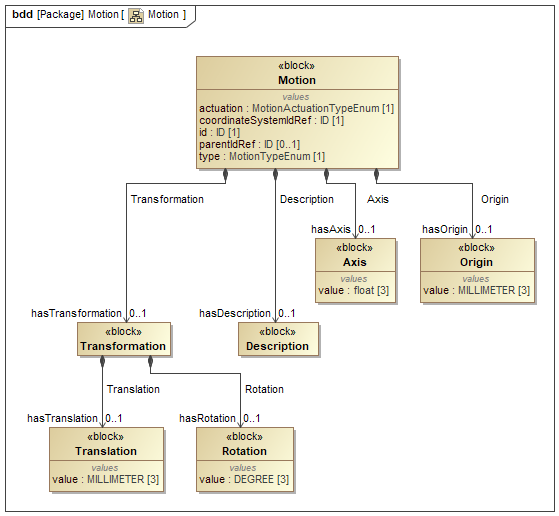
Note: See Configuration Schema Diagrams for XML schema.
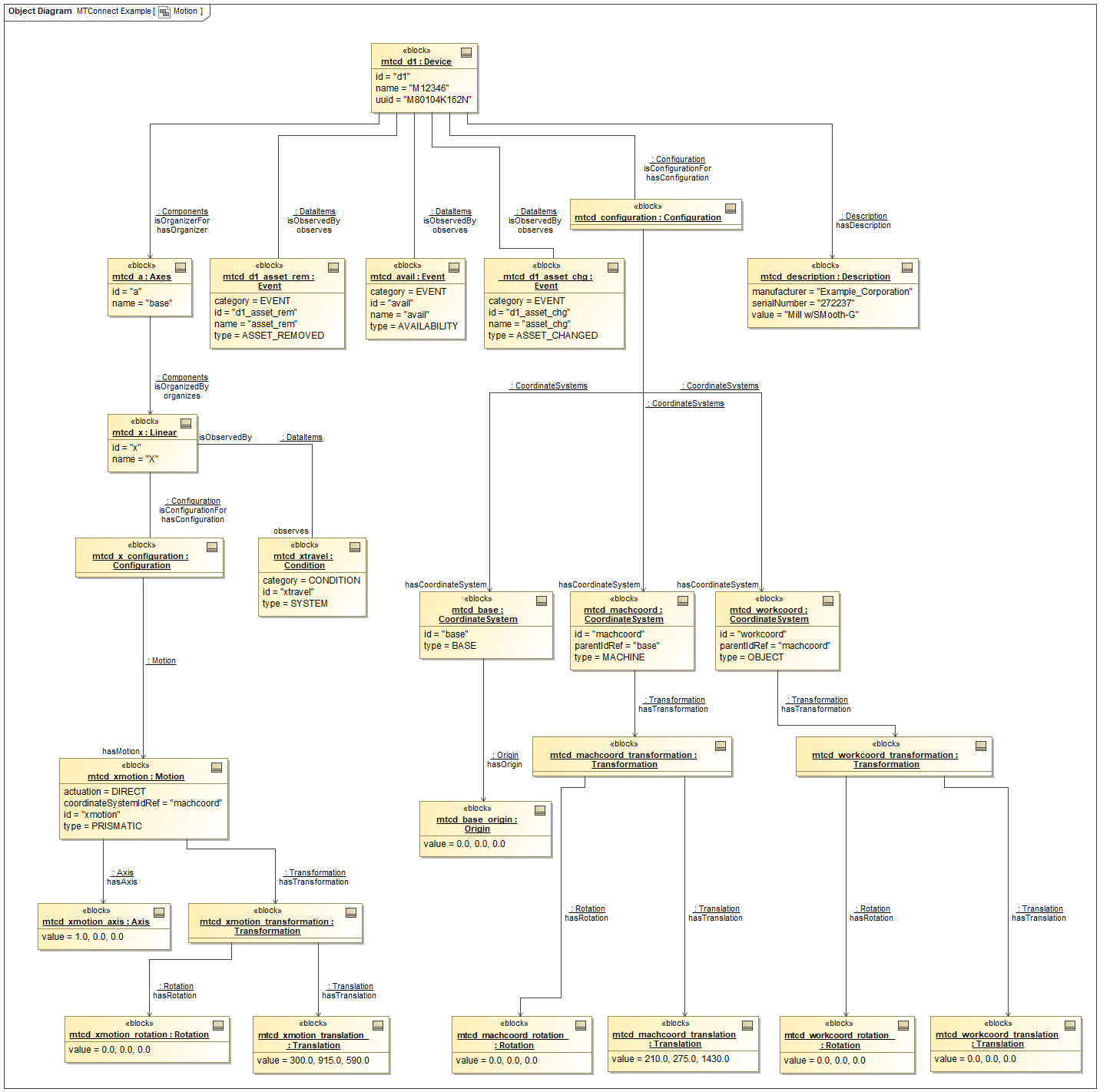
Note: See motion-example for the XML representation of the same example.
- Motion (class)
Device Information Model / Configurations / Motion
movement of the component relative to a coordinate system.
Description
Motion specifies the kinematic chain of the
componententities.At most only one of Origin or
TransformationMUST be defined for a Motion.- MotionActuationTypeEnum (enumeration)
DataTypes
Review the MTConnect definition and model details for MotionActuationTypeEnum, an MTConnect enumeration.
- MotionProgram (class)
Observation Information Model / Observation Types / Condition Types
MOTION_PROGRAM
- MotionTypeEnum (enumeration)
DataTypes
Review the MTConnect definition and model details for MotionTypeEnum, an MTConnect enumeration.
- Motor (class)
Device Information Model / Components / Component Types
leaf
Componentthat converts electrical, pneumatic, or hydraulic energy into mechanical energy.- MQTT Sink (class)
Reference Agent Architecture
Review the MTConnect definition and model details for MQTT Sink, an MTConnect class.
- MQTTDataSource (class)
Reference Agent Architecture / Source
Review the MTConnect definition and model details for MQTTDataSource, an MTConnect class.
- MQTTSink (class)
Reference Agent Architecture
Review the MTConnect definition and model details for MQTTSink, an MTConnect class.
- MQTTSource (class)
Reference Agent Architecture
Review the MTConnect definition and model details for MQTTSource, an MTConnect class.
- MTConnect Agent (class)
Glossary / MTConnect Terms
agent for the MTConnect Information Model.
- MTConnect Device Validation Suite (package)
Review the MTConnect definition and model details for MTConnect Device Validation Suite, an MTConnect package.
- MTConnect Document (class)
Glossary / MTConnect Terms
document that represents a Part(s) of the MTConnect Standard.
- MTConnect Event (class)
Glossary / MTConnect Terms
observation of either a state or discrete value of the Component.
- MTConnect Information Model (class)
Glossary / Information Model Terms
information model that defines the semantics of the MTConnect Standard.
- MTConnect Interface (class)
Glossary / MTConnect Terms
interaction model for interoperability between pieces of equipment.
- MTConnect Protocol (package)
Fundamentals
The agent MUST support the REST Protocol and produce XML representations of the information models.
All other protocols and representations are optional.
- MTConnect Request (class)
Glossary / Protocol Terms
request for information issued from a client to an MTConnect Agent.
- MTConnect Response Document (class)
Glossary / Protocol Terms
response document published by an MTConnect Agent.
- MTConnect Terms (package)
Glossary
Review the MTConnect definition and model details for MTConnect Terms, an MTConnect package.
- MTConnectAssets (class)
Fundamentals / MTConnect Protocol / MTConnectAssets Response Document
root entity of an MTConnectAssets Response Document that contains the Asset Information Model of
Assettypes.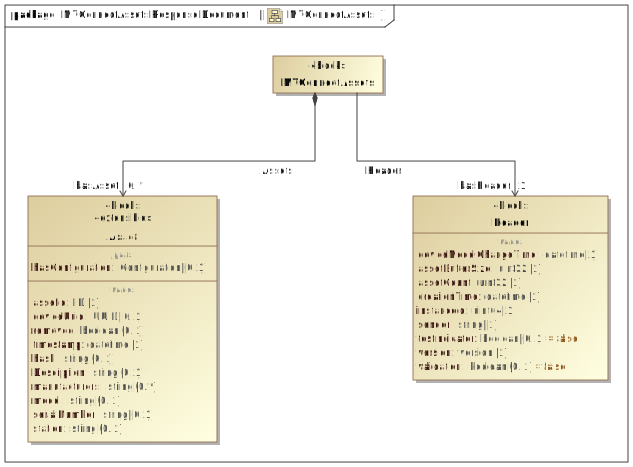
Note: Additional properties of MTConnectAssets MAY be defined for schema and namespace declaration. See Schema and Namespace Declaration Information for an XML example.
- MTConnectAssets Response Document (package)
Fundamentals / MTConnect Protocol
This section provides semantic information for the MTConnectAssets entity.
- MTConnectAssets Response Document (class)
Glossary / Protocol Terms
response document published by an MTConnect Agent in response to an asset request.
- MTConnectAssetsExceptionsReport (class)
Fundamentals / MTConnect Protocol / MTConnectExceptionsReport Response Document
MTConnectExceptionsReport where exception is encountered in the MTConnectAssets Response Document.
- MTConnectDevices (class)
Fundamentals / MTConnect Protocol / MTConnectDevices Response Document
root entity of an MTConnectDevices Response Document that contains the Device Information Model of one or more
Deviceentities.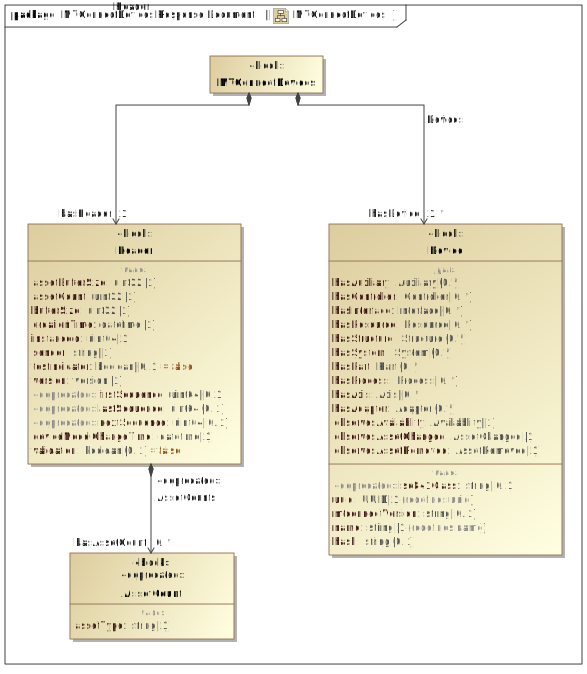
Note: Additional properties of MTConnectDevices MAY be defined for schema and namespace declaration. See Schema and Namespace Declaration Information for an XML example.
- MTConnectDevices Response Document (package)
Fundamentals / MTConnect Protocol
This section provides semantic information for the MTConnectDevices entity.
- MTConnectDevices Response Document (class)
Glossary / Protocol Terms
response document published by an MTConnect Agent in response to a probe request.
- MTConnectDevicesExceptionsReport (class)
Fundamentals / MTConnect Protocol / MTConnectExceptionsReport Response Document
MTConnectExceptionsReport where exception is encountered in the MTConnectDevices Response Document.
- MTConnectError (class)
Fundamentals / MTConnect Protocol / MTConnectErrors Response Document
root entity of an MTConnectErrors Response Document that contains the Error Information Model.
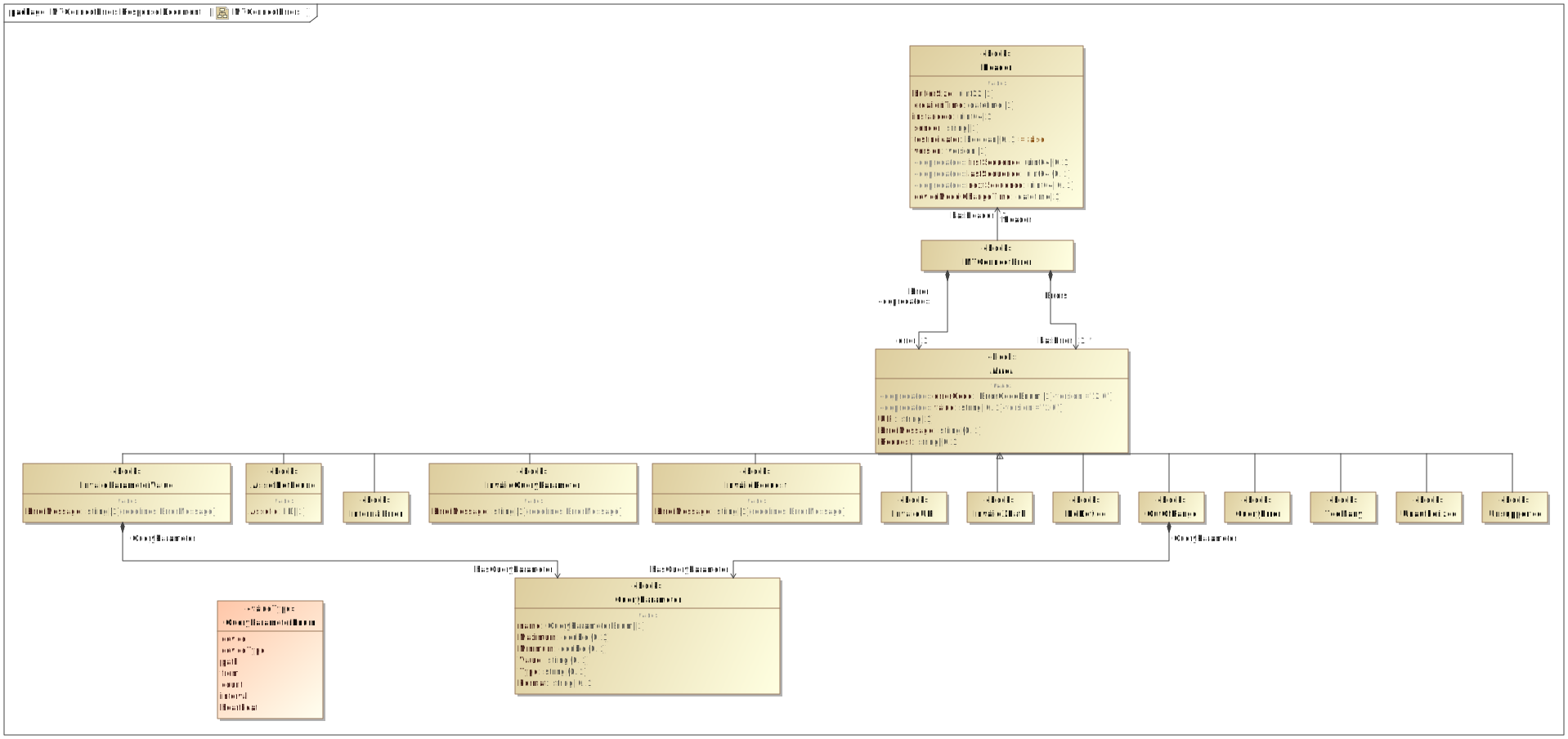
Note: Additional properties of MTConnectError MAY be defined for schema and namespace declaration. See Schema and Namespace Declaration Information for an XML example.
- MTConnectErrors Response Document (package)
Fundamentals / MTConnect Protocol
This section provides semantic information for the
MTConnectErrorsentity.Error Information Model
The Error Information Model establishes the rules and terminology that describes the response document returned by an agent when it encounters an error while interpreting a request for information from a client software application or when an agent experiences an error while publishing the response to a request for information.
An agent provides the information regarding errors encountered when processing a request for information by publishing an MTConnectErrors Response Document to the client software application that made the request for information.
- MTConnectErrors Response Document (class)
Glossary / Protocol Terms
response document published by an MTConnect Agent whenever it encounters an error while interpreting an MTConnect Request.
- MTConnectExceptionsReport (class)
Fundamentals / MTConnect Protocol / MTConnectExceptionsReport Response Document
root entity of an MTConnectExceptionsReport Response Document that contains the ExceptionReport Information Model.
- MTConnectExceptionsReport Response Document (package)
Fundamentals / MTConnect Protocol
This section provides semantic information for the MTConnectExceptionsReport entity.
- MTConnectExceptionsReport Response Document (class)
Glossary / Protocol Terms
response document returned by an agent when it encounters an exception in the MTConnectAssets Response Document, MTConnectDevices Response Document or MTConnectStreams Response Document.
- MTConnectStreams (class)
Fundamentals / MTConnect Protocol / MTConnectStreams Response Document
root entity of an MTConnectStreams Response Document that contains the Observation Information Model of one or more
Deviceentities.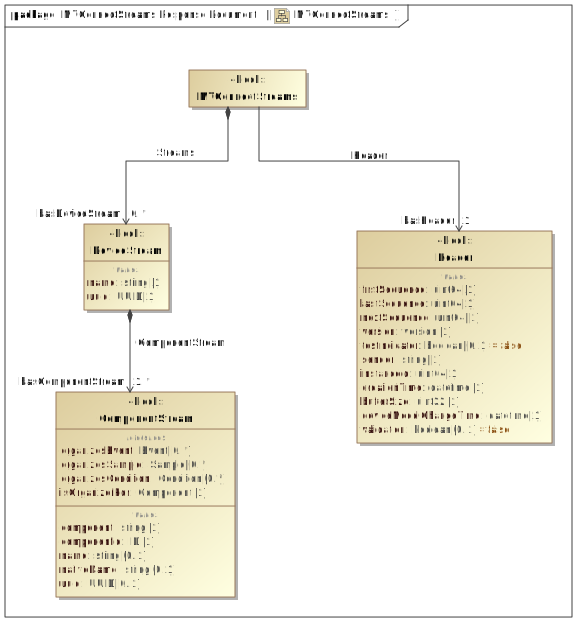
Note: Additional properties of MTConnectStreams MAY be defined for schema and namespace declaration. See Schema and Namespace Declaration Information for an XML example.
- MTConnectStreams Response Document (package)
Fundamentals / MTConnect Protocol
This section provides semantic information for the MTConnectStreams entity.
- MTConnectStreams Response Document (class)
Glossary / Protocol Terms
response document published by an MTConnect Agent in response to a current request or a sample request.
- MTConnectStreamsExceptionsReport (class)
Fundamentals / MTConnect Protocol / MTConnectExceptionsReport Response Document
MTConnectExceptionsReport where exception is encountered in the MTConnectStreams Response Document.
- MTConnectVersion (class)
Observation Information Model / Observation Types / Event Types
MTCONNECT_VERSION
N
- namespace (class)
Glossary / XML Terms
organizes information into logical groups.
- NativeUnitEnum (enumeration)
DataTypes
Review the MTConnect definition and model details for NativeUnitEnum, an MTConnect enumeration.
- NC Link (class)
Reference Agent Architecture
Review the MTConnect definition and model details for NC Link, an MTConnect class.
- Network (class)
Observation Information Model / Observation Types / Event Types
NETWORK
- Network.Gateway (class)
Observation Information Model / Observation Types / Event Types
Gateway for the component network.
- Network.IPv4Address (class)
Observation Information Model / Observation Types / Event Types
IPV4 network address of the component.
- Network.IPv6Address (class)
Observation Information Model / Observation Types / Event Types
IPV6 network address of the component.
- Network.MacAddress (class)
Observation Information Model / Observation Types / Event Types
Media Access Control Address.
The unique physical address of the network hardware.
- Network.SubnetMask (class)
Observation Information Model / Observation Types / Event Types
SubNet mask for the component network.
- Network.VLanId (class)
Observation Information Model / Observation Types / Event Types
layer2 Virtual Local Network (VLAN) ID for the component network.
- Network.Wireless (class)
Observation Information Model / Observation Types / Event Types
identifies whether the connection type is wireless.
- NetworkPort (class)
Observation Information Model / Observation Types / Event Types
NETWORK_PORT
- NetworkWirelessEnum (enumeration)
DataTypes
Review the MTConnect definition and model details for NetworkWirelessEnum, an MTConnect enumeration.
- NoDevice (class)
Fundamentals / MTConnect Protocol / MTConnectErrors Response Document / Error Types
identity of the
Devicespecified in the request for information is not associated with the agent.- Nominal (class)
Device Information Model / Configurations / Specifications
numeric target or expected value.
- nominal (class)
Glossary
ideal or desired value for a variable.
- NumericValue (class)
Reference Agent Architecture / InformationModel
Review the MTConnect definition and model details for NumericValue, an MTConnect class.
O
- observable (class)
Glossary / Industrial Terms
quality, property, or characteristic that can be observed.
- Observable Condition (class)
Glossary / MTConnect Terms / Additional Observation Terms
Review the MTConnect definition and model details for Observable Condition, an MTConnect class.
- Observable Event (class)
Glossary / MTConnect Terms / Additional Observation Terms
Review the MTConnect definition and model details for Observable Event, an MTConnect class.
- Observable Measurement (class)
Glossary / MTConnect Terms / Additional Observation Terms
Review the MTConnect definition and model details for Observable Measurement, an MTConnect class.
- Observable Sample (class)
Glossary / MTConnect Terms / Additional Observation Terms
Review the MTConnect definition and model details for Observable Sample, an MTConnect class.
- Observable State (class)
Glossary / MTConnect Terms / Additional Observation Terms
Review the MTConnect definition and model details for Observable State, an MTConnect class.
- observation (class)
Glossary / Industrial Terms
observed value of a property at a point in time.
- Observation (class)
Glossary / MTConnect Terms
observation that provides telemetry data for a DataItem.
- Observation (class)
Observation Information Model
abstract entity that provides telemetry data for a
DataItemat a point in time.Description
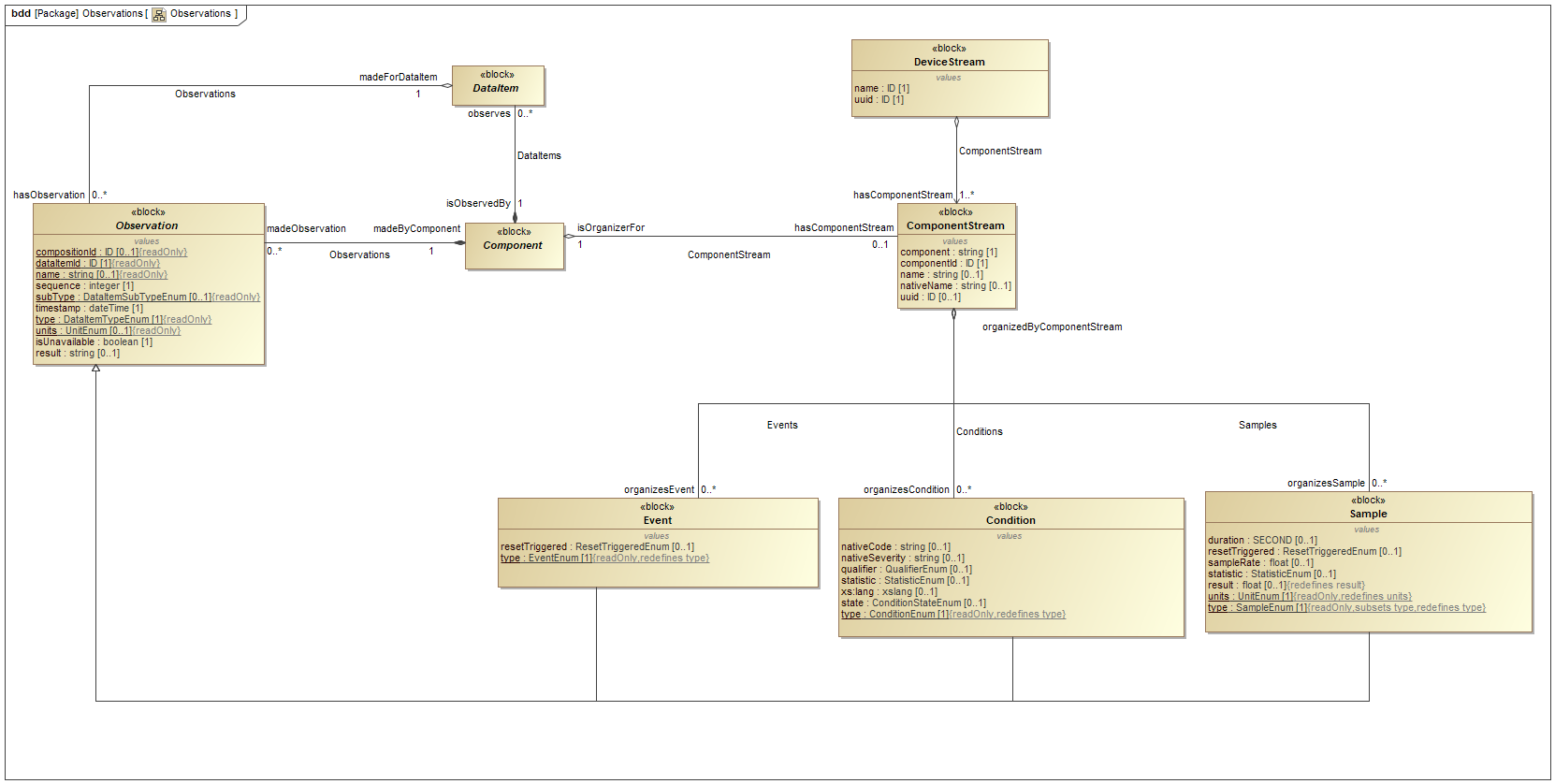
Note: See Observations Schema Diagrams for XML schema. The XML schema also shows differences in XML representation of certain MTConnect entities.
DeviceStream Example shows a complete example of DeviceStream for the
Deviceshown in Device Information Model.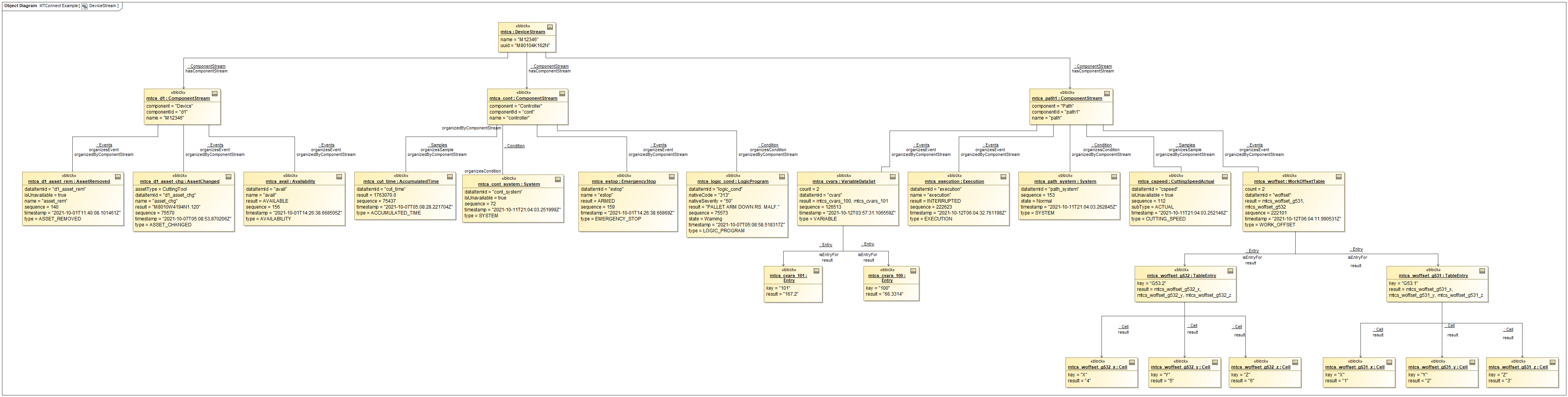
Note: See devicestream-example for the XML representation of the same example.
This section provides semantic information for the
Observationmodel.Note: See Observations Schema Diagrams for XML schema of
Observationtypes.Observations made for DataItem
ComponentobservesDataItementities and createsObservationentities for theDataItementities. See Observations.Observationentities made by aComponentare organized by a ComponentStream which is specifically created for thatComponent.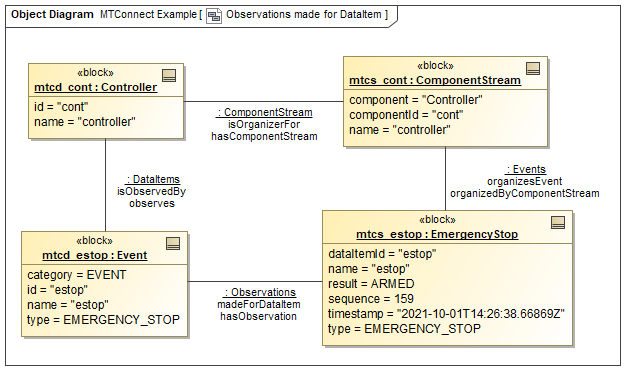
Note: See Observations made for DataItem Example for how XML representation of the same example is separated into MTConnectDevices Response Document and MTConnectStreams Response Document.
Observations made for DataItem Example is a subset of DeviceStream Example. It shows an example of the association between a
DataItemEventtype (EMERGENCY_STOP) and anObservationEventtype (EmergencyStop). See Naming Convention for Observation types.Observations made for DataItem Example also shows example of the association between a
Componenttype (Controller) and related ComponentStream.Naming Convention for Observation types
The name of an
Observationtype MUST derive from the associatedtypeconverted to Pascal-Case by removing underscores (_ ) and capitalizing each word. The conversion MUST NOT apply to the following abbreviated words:PH,AC,DCandURI.MTCONNECTMUST be converted toMTConnect. See Observations made for DataItem Example for an example.The name of an
Observationtype reported in the MTConnectStreams Response Document is extended when therepresentationis used to further describe thatDataItemin the MTConnectDevices Response Document. See Representations for more details.- Observation (class)
Reference Agent Architecture / InformationModel
Review the MTConnect definition and model details for Observation, an MTConnect class.
- Observation Information Model (class)
Glossary / Information Model Terms
information model that describes the streaming data reported by a piece of equipment.
- Observation Information Model (package)
The Observation Information Model provides a representation of the data reported by a piece of equipment used for a manufacturing process, or used for any other purpose. Additional descriptive information associated with the reported data is defined by the MTConnectDevices entity, which is described in Device Information Model.
Information defined in the Observation Information Model allows a software application to (1) determine the Observations for DataItems returned from a piece of equipment and (2) interpret the data associated with those Observations with the same meaning, value, and context that it had at its original source. To do this, the software application issues one of two HTTP requests to an agent associated with a piece of equipment. They are:
sample: Returns a designated number of time stamped Observations from an agent associated with a piece of equipment; subject to any HTTP filtering associated with the request. SeeAgentin Fundamentals for details on thesampleHTTP request.current: Returns a snapshot of either the most recent values or the values at a given sequence number for all Observations associated with a piece of equipment from an agent; subject to any HTTP filtering associated with the request. SeeAgentin Fundamentals for details on thecurrentHTTP request.
An agent responds to either the
sampleorcurrentHTTP request with an MTConnectStreams Response Document. This document contains information describing Observations reported by an agent associated with a piece of equipment. A client software application may correlate the information provided in the MTConnectStreams Response Document with the physical and logical structure for that piece of equipment defined in the MTConnectDevices entity to form a clear and unambiguous understanding of the information provided. (See details on the structure for a piece of equipment described in Device Information Model).Streamsfor an MTConnectStreams entity contains a DeviceStream entity for each piece of equipment represented in the document. Each DeviceStream is comprised of two primary types of entities – Components and Observations. The contents of the DeviceStream container are described in detail in this document, Observation Information Model of the MTConnect Standard.Components are defined for both the MTConnectDevices and the MTConnectStreams entities. These Components are used to provide a logical organization of the information provided in each entity.
For an MTConnectDevices entity: Components organize information that represents the physical and logical parts and sub-parts of a piece of equipment. (See
Componentin Device Information Model for more details on Components used in the MTConnectDevices entity).For an MTConnectStreams entity: Components provide the structure to organize the data returned from a piece of equipment and establishes the proper context for that data. The Components specifically defined for MTConnectStreams are DeviceStream (see DeviceStream) and ComponentStream (see ComponentStream).
DeviceStream and ComponentStream entities have a direct correlation to each of the Component defined in the MTConnectDevices entity.
Within each ComponentStream entity in the MTConnectStreams entity, Observations are modeled as
Observationentities. The three types ofObservationentity areSample,Event, andCondition. (See Observation Types for more information on these entities.)Observations Appendix
XML Schema Diagrams
Observations Schema Diagrams
See
Streamselement inMTConnectStreamsschema.See
DeviceStreamelement inMTConnectStreamsschema.See
ComponentStreamelement inMTConnectStreamsschema.See
Sampleelement inMTConnectStreamsschema.See
Eventelement inMTConnectStreamsschema.See
Conditionelement inMTConnectStreamsschema.Representation Schema Diagrams
See
AbsTimeSerieselement inMTConnectStreamsschema.See
PartCountDiscreteelement inMTConnectStreamsschema.See
VariableDataSetelement inMTConnectStreamsschema.See
Entryelement inMTConnectStreamsschema.See
WorkOffsetTableelement inMTConnectStreamsschema.XML Examples
DeviceStream Example
<Streams>
  <DeviceStream name="M12346" uuid="M8010W4194N">
    <ComponentStream component="Device" name="M12346" componentId="d1">
      <Events>
        <Availability dataItemId="avail" sequence="156" timestamp="2021-10-01T14:26:38.668505Z">AVAILABLE</Availability>
        <AssetChanged assetType="CuttingTool" dataItemId="d1_asset_chg" sequence="75570" timestamp="2021-10-07T05:08:53.870206Z">M8010W4194N1.120</AssetChanged>
        <AssetRemoved assetType="CuttingTool" dataItemId="d1_asset_rem" sequence="140" timestamp="2021-10-01T11:40:08.101461Z">UNAVAILABLE</AssetRemoved>
      </Events>
    </ComponentStream>
    <ComponentStream component="Controller" name="controller" componentId="cont">
      <Events>
        <EmergencyStop dataItemId="estop" sequence="159" timestamp="2021-10-01T14:26:38.66869Z">ARMED</EmergencyStop>
      </Events>
      <Samples>
        <AccumulatedTime dataItemId="cut_time" sequence="75437" timestamp="2021-10-07T05:08:28.221704Z">1763070.0</AccumulatedTime>
      </Samples>
      <Condition>
        <Unavailable dataItemId="cont_system" sequence="72" timestamp="2021-10-11T21:04:03.251999Z" type="SYSTEM"/>
        <Warning dataItemId="cont_system" nativecode="313" nativeSeverity="50" sequence="75573" timestamp="2021-10-07T05:08:58.518317Z" type="LOGIC_PROGRAM">PALLET ARM DOWN RS. MALF.</Warning>
      </Condition>
    </ComponentStream>
    <ComponentStream component="Path" name="path" componentId="path1">
      <Events>
        <Execution dataItemId="execution" name="execution" sequence="222623" timestamp="2021-10-12T06:04:32.761198Z">INTERRUPTED</Execution>
        <VariableDataSet count="2" dataItemId="cvars" sequence="126513" timestamp="2021-10-12T03:57:31.106559Z">
          <Entry key="100">66.3314</Entry>
          <Entry key="101">167.2</Entry>
        </VariableDataSet>
        <WorkOffsetTable count="2" dataItemId="woffset" sequence="222101" timestamp="2021-10-12T06:04:11.990531Z">
          <Entry key="G53.1">
            <Cell key="X">1</Cell>
            <Cell key="Y">2</Cell>
            <Cell key="Z">3</Cell>
          </Entry>
          <Entry key="G53.2">
            <Cell key="X">4</Cell>
            <Cell key="Y">5</Cell>
            <Cell key="Z">6</Cell>
          </Entry>
        </WorkOffsetTable>
      </Events>
      <Samples>
        <CuttingSpeed dataItemId="cspeed" sequence="112" timestamp="2021-10-07T05:08:28.221704Z" subType="ACTUAL">UNAVAILABLE</CuttingSpeed>
      </Samples>
      <Condition>
        <Normal dataItemId="path_system" sequence="153" timestamp="2021-10-11T21:04:03.262845Z" type="SYSTEM"/>
      </Condition>
    </ComponentStream>
  </DeviceStream>
</Streams>
DeviceStream Example
Observations made for DataItem Example
<Components>
  <Controller id="cont" name="controller">
      <DataItems>
      <DataItem category="EVENT" id="estop" name="estop" type="EMERGENCY_STOP"/>
    </DataItems>
  </Controller>
</Components>
MTConnectDevices Response Document
<ComponentStream component="Controller" name="controller" componentId="cont">
  <Events>
    <EmergencyStop dataItemId="estop" sequence="159" timestamp="2021-10-01T14:26:38.66869Z">ARMED</EmergencyStop>
  </Events>
</ComponentStream>
MTConnectStreams Response Document
Sample Example
<Samples>
  <AccumulatedTime dataItemId="cut_time" sequence="75437" timestamp="2021-10-07T05:08:28.221704Z">1763070.0</AccumulatedTime>
  <CuttingSpeed dataItemId="cspeed" sequence="112" timestamp="2021-10-07T05:08:28.221704Z" subType="ACTUAL">UNAVAILABLE</CuttingSpeed>
</Samples>
Sample Example
Event Example
<Events>
  <Availability dataItemId="avail" sequence="156" timestamp="2021-10-01T14:26:38.668505Z">AVAILABLE</Availability>
  <AssetRemoved assetType="CuttingTool" dataItemId="d1_asset_rem" sequence="140" timestamp="2021-10-01T11:40:08.101461Z">UNAVAILABLE</AssetRemoved>
</Events>
Event Example
Condition Example
Conditiontypes are represented differently in XML when compared toSampleandEventtypes. The element name is the condition state of theConditiontype in Pascal Case. The name of theConditiontype is represented by the attributetype.If the condition state is unavailable then the element name is represented by
Unavailable.<Condition> <Unavailable dataItemId="cont_system" sequence="72" timestamp="2021-10-11T21:04:03.251999Z" type="SYSTEM"/> <Normal dataItemId="path_system" sequence="153" timestamp="2021-10-11T21:04:03.262845Z" type="SYSTEM"/> <Warning dataItemId="cont_system" nativecode="313" nativeSeverity="50" sequence="75573" timestamp="2021-10-07T05:08:58.518317Z" type="LOGIC_PROGRAM">PALLET ARM DOWN RS. MALF.</Warning> </Condition>Condition Example
DataSet Example
<Events>
  <VariableDataSet count="2" dataItemId="cvars" sequence="126513" timestamp="2021-10-12T03:57:31.106559Z">
    <Entry key="100">66.3314</Entry>
    <Entry key="101">167.2</Entry>
  </VariableDataSet>
</Events>
DataSet Example
Table Example
<Events>
  <WorkOffsetTable count="2" dataItemId="woffset" sequence="222101" timestamp="2021-10-12T06:04:11.990531Z">
    <Entry key="G53.1">
      <Cell key="X">1</Cell>
      <Cell key="Y">2</Cell>
      <Cell key="Z">3</Cell>
    </Entry>
    <Entry key="G53.2">
      <Cell key="X">4</Cell>
      <Cell key="Y">5</Cell>
      <Cell key="Z">6</Cell>
    </Entry>
  </WorkOffsetTable>
</Events>
Table Example
- Observation Types (package)
Observation Information Model
This section provides semantic information for the
Observationtypes.Observationentities are instantiated asSample,EventorConditionentities based upon thecategoryandtypedefined for the correspondingDataItem.See DeviceStream Example for examples on how the
Observationtypes are organized within ComponentStream.- Observations (class)
Reference Agent Architecture / Pipelines
Review the MTConnect definition and model details for Observations, an MTConnect class.
- ObservationUpdateRate (class)
Observation Information Model / Observation Types / Sample Types
OBSERVATION_UPDATE_RATE
- ObservationValue (class)
Reference Agent Architecture / InformationModel
Review the MTConnect definition and model details for ObservationValue, an MTConnect class.
- observe (class)
Glossary / Industrial Terms
act of measuring or determining the value of a property at a point in time.
- Observed Condition (class)
Glossary / MTConnect Terms / Additional Observation Terms
Review the MTConnect definition and model details for Observed Condition, an MTConnect class.
- Observed Event (class)
Glossary / MTConnect Terms / Additional Observation Terms
Review the MTConnect definition and model details for Observed Event, an MTConnect class.
- Observed Fault (class)
Glossary / MTConnect Terms / Additional Observation Terms
Review the MTConnect definition and model details for Observed Fault, an MTConnect class.
- Observed Measurement (class)
Glossary / MTConnect Terms / Additional Observation Terms
Review the MTConnect definition and model details for Observed Measurement, an MTConnect class.
- Observed Normal (class)
Glossary / MTConnect Terms / Additional Observation Terms
Review the MTConnect definition and model details for Observed Normal, an MTConnect class.
- Observed State (class)
Glossary / MTConnect Terms / Additional Observation Terms
Review the MTConnect definition and model details for Observed State, an MTConnect class.
- Observed Warning (class)
Glossary / MTConnect Terms / Additional Observation Terms
Review the MTConnect definition and model details for Observed Warning, an MTConnect class.
- Oil (class)
Device Information Model / Components / Component Types
leaf
Componentcomposed of a viscous liquid.- OPC UA Sink (class)
Reference Agent Architecture
Review the MTConnect definition and model details for OPC UA Sink, an MTConnect class.
- OpenChuck (class)
Interface Interaction Model / DataItem Types for Interface
OPEN_CHUCK
- OpenChuck.Request (class)
Interface Interaction Model / DataItem Types for Interface
operating state of the request to open a chuck.
- OpenChuck.Response (class)
Interface Interaction Model / DataItem Types for Interface
operating state of the response to a request to open a chuck.
- OpenDoor (class)
Interface Interaction Model / DataItem Types for Interface
OPEN_DOOR
- OpenDoor.Request (class)
Interface Interaction Model / DataItem Types for Interface
operating state of the request to open a door.
- OpenDoor.Response (class)
Interface Interaction Model / DataItem Types for Interface
operating state of the response to a request to open a door.
- Openness (class)
Observation Information Model / Observation Types / Sample Types
OPENNESS
- OperatingMode (class)
Observation Information Model / Observation Types / Event Types
OPERATING_MODE
- OperatingModeEnum (enumeration)
DataTypes
Review the MTConnect definition and model details for OperatingModeEnum, an MTConnect enumeration.
- OperatingSystem (class)
Observation Information Model / Observation Types / Event Types
OPERATING_SYSTEM
- OperatingSystem.InstallDate (class)
Observation Information Model / Observation Types / Event Types
date the hardware or software was installed.
- OperatingSystem.License (class)
Observation Information Model / Observation Types / Event Types
license code to validate or activate the hardware or software.
- OperatingSystem.Manufacturer (class)
Observation Information Model / Observation Types / Event Types
corporate identity for the maker of the hardware or software.
- OperatingSystem.ReleaseDate (class)
Observation Information Model / Observation Types / Event Types
date the hardware or software was released for general use.
- OperatingSystem.Version (class)
Observation Information Model / Observation Types / Event Types
version of the hardware or software.
- Operation and Error Recovery (package)
Interface Interaction Model
The request and response state model implemented for interfaces may also be represented by a graphical model. The scenario in Success Scenario demonstrates the state transitions that occur during a successful request for service and the resulting response to fulfill that service request.
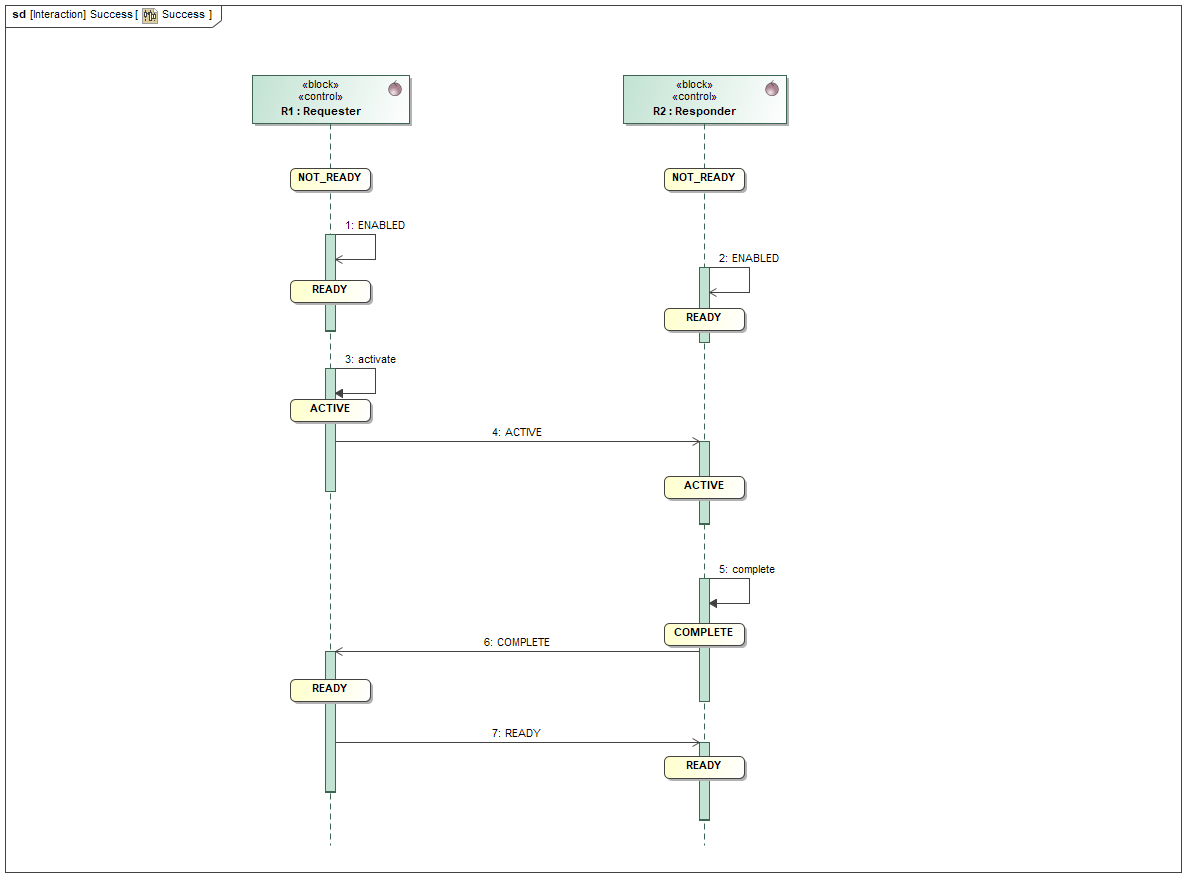
- OperatorId (class)
Observation Information Model / Observation Types / Event Types
OPERATOR_ID
- organize (class)
Glossary
act of containing and owning one or more elements.
- organizer (class)
Glossary
entity that organizes one or more elements.
- Orientation (class)
Observation Information Model / Observation Types / Sample Types
ORIENTATION
- Orientation.Actual (class)
Observation Information Model / Observation Types / Sample Types
measured or reported value of an observation.
- Orientation.Commanded (class)
Observation Information Model / Observation Types / Sample Types
directive value including adjustments such as an offset or overrides.
- Origin (class)
Device Information Model / Configurations / CoordinateSystems
coordinates of the origin position of a coordinate system.
- OriginatorEnum (enumeration)
DataTypes
Review the MTConnect definition and model details for OriginatorEnum, an MTConnect enumeration.
- OriginDataSet (class)
Device Information Model / Configurations / CoordinateSystems
coordinates of the origin position of a coordinate system represented as a dataset.
- OriginPosition (class)
WIP: Device Examples / Kinematics Simulation / XArm7Model
Review the MTConnect definition and model details for OriginPosition, an MTConnect class.
- OriginProperty (class)
WIP: Device Examples / Kinematics Simulation / XArm7Model
Review the MTConnect definition and model details for OriginProperty, an MTConnect class.
- OutOfRange (class)
Fundamentals / MTConnect Protocol / MTConnectErrors Response Document / Error Types
request for information specifies streaming data that includes sequence number(s) for pieces of data that are beyond the end of the buffer.
- OverallToolLength (class)
Asset Information Model / Cutting Tool / Cutting Tool Measurement Subtypes
largest length dimension of the cutting tool including the master insert where applicable.
P
- Pallet (package)
Asset Information Model
This section provides semantic information for the Pallet model.
- Pallet (class)
Asset Information Model / Pallet
PhysicalAsset that has a portable platform for handling, storing, or moving materials, parts, blanks etc.
- PalletId (class)
Observation Information Model / Observation Types / Event Types
PALLET_ID
- Parameter (class)
Asset Information Model / Component Configuration Parameters
property that determines the characteristic or behavior of an entity.
- parameter (class)
Glossary
variable that must be given a value during the execution of a program or a communications command.
- ParameterSet (class)
Asset Information Model / Component Configuration Parameters
set of
Parameters.- parent element (class)
Glossary / XML Terms
element of a data modeling structure that illustrates the relationship between itself and the lower-level child element.
- ParentCoordinates (class)
WIP: Device Examples / Kinematics Simulation / XArm7Model
Review the MTConnect definition and model details for ParentCoordinates, an MTConnect class.
- Parser (package)
Reference Agent Architecture
Review the MTConnect definition and model details for Parser, an MTConnect package.
- Part (package)
Asset Information Model
This section provides semantic information for the
Partmodel.- Part (class)
Asset Information Model / Part
Assetthat is a part.- Part (class)
Device Information Model / Components / Component Types
abstract
Componentcomposed of a part being processed by a piece of equipment.- part (class)
Glossary
discrete item that has both defined and measurable physical characteristics including mass, material, and features, and is created by applying one or more manufacturing process steps to material
- PartArchetype (class)
Asset Information Model / Part
Assetthat defines common data for all derivedParts.- PartChange (class)
Interface Interaction Model / DataItem Types for Interface
PART_CHANGE
- PartChange.Request (class)
Interface Interaction Model / DataItem Types for Interface
operating state of the request to change the part or product associated with a piece of equipment to a different part or product.
- PartChange.Response (class)
Interface Interaction Model / DataItem Types for Interface
operating state of the response to a request to change the part or product associated with a piece of equipment to a different part or product.
- PartCount (class)
Observation Information Model / Observation Types / Event Types
PART_COUNT
- PartCount.Aborted (class)
Observation Information Model / Observation Types / Event Types
accumulation of actions or activities that were attempted, but terminated before they could be completed.
- PartCount.All (class)
Observation Information Model / Observation Types / Event Types
accumulation of all actions, items, or activities being counted independent of the outcome.
- PartCount.Bad (class)
Observation Information Model / Observation Types / Event Types
accumulation of actions, items, or activities being counted that do not conform to specification or expectation.
- PartCount.Complete (class)
Observation Information Model / Observation Types / Event Types
accumulation of actions, items, or activities that have been completed, independent of the outcome.
- PartCount.Failed (class)
Observation Information Model / Observation Types / Event Types
accumulation of actions or activities that were attempted, but failed to complete or resulted in an unexpected or unacceptable outcome.
- PartCount.Good (class)
Observation Information Model / Observation Types / Event Types
accumulation of actions, items, or activities being counted that conform to specification or expectation.
- PartCount.Remaining (class)
Observation Information Model / Observation Types / Event Types
accumulation of actions, items, or activities yet to be counted.
- PartCount.Target (class)
Observation Information Model / Observation Types / Event Types
goal of the operation or process.
- PartCountType (class)
Observation Information Model / Observation Types / Event Types
PART_COUNT_TYPE
- PartCountTypeEnum (enumeration)
DataTypes
Review the MTConnect definition and model details for PartCountTypeEnum, an MTConnect enumeration.
- PartDetect (class)
Observation Information Model / Observation Types / Event Types
PART_DETECT
- PartDetectEnum (enumeration)
DataTypes
Review the MTConnect definition and model details for PartDetectEnum, an MTConnect enumeration.
- PartGroupId (class)
Observation Information Model / Observation Types / Event Types
PART_GROUP_ID
If no
subTypeis specified,UUIDis default.- PartGroupId.Batch (class)
Observation Information Model / Observation Types / Event Types
identifier that references a group of parts produced in a batch.
- PartGroupId.HeatTreat (class)
Observation Information Model / Observation Types / Event Types
identifier used to reference a material heat number.
- PartGroupId.Lot (class)
Observation Information Model / Observation Types / Event Types
identifier that references a group of parts tracked as a lot.
- PartGroupId.RawMaterial (class)
Observation Information Model / Observation Types / Event Types
material that is used to produce parts.
- PartGroupId.Uuid (class)
Observation Information Model / Observation Types / Event Types
universally unique identifier as specified in ISO 11578 or RFC 4122.
- ParticleCount (class)
Observation Information Model / Observation Types / Sample Types
PARTICLE_COUNT
- ParticleCount.Gas (class)
Observation Information Model / Observation Types / Sample Types
PARTICLE_COUNT for a GAS
- ParticleCount.Liquid (class)
Observation Information Model / Observation Types / Sample Types
PARTICLE_COUNT for a LIQUID
- ParticleCount.Solid (class)
Observation Information Model / Observation Types / Sample Types
PARTICLE_COUNT for a SOLID
- ParticleSize (class)
Observation Information Model / Observation Types / Sample Types
PARTICLE_SIZE
- PartId (class)
Observation Information Model / Observation Types / Event Types
PART_ID
- PartIdentifierEnum (enumeration)
DataTypes
Review the MTConnect definition and model details for PartIdentifierEnum, an MTConnect enumeration.
- PartIndex (class)
Observation Information Model / Observation Types / Event Types
PART_INDEX
- PartKindId (class)
Observation Information Model / Observation Types / Event Types
PART_KIND_ID
If no
subTypeis specified,UUIDis default.- PartKindId.PartFamily (class)
Observation Information Model / Observation Types / Event Types
identifier given to a group of parts having similarities in geometry, manufacturing process, and/or functions.
- PartKindId.PartName (class)
Observation Information Model / Observation Types / Event Types
word or set of words by which a part is known, addressed, or referred to.
- PartKindId.PartNumber (class)
Observation Information Model / Observation Types / Event Types
identifier of a particular part design or model.
- PartKindId.Uuid (class)
Observation Information Model / Observation Types / Event Types
universally unique identifier as specified in ISO 11578 or RFC 4122.
- PartNumber (class)
Observation Information Model / Observation Types / Event Types
PART_NUMBER
- PartOccurrence (class)
Device Information Model / Components / Component Types
Partthat exists at a specific place and time, such as a specific instance of a bracket at a specific timestamp.Description
PartId MUST be defined for PartOccurrence.
Example
<Parts id="partOccSet">
   <Components>
	   <PartOccurrence id="partOccur">
		 <DataItems>
		   <DataItem id="partSet" category="EVENT" representation="TABLE" type ="COMPONENT_DATA">
			  <Definition>
				 <EntryDefinitions>
					  <EntryDefinition keyType="PART_UNIQUE_ID"/>
				 </EntryDefinitions>
				 <CellDefinitions>
					<CellDefinition key="partNumber" type="PART_KIND_ID" subType="PART_NUMBER"/>
					<CellDefinition key="batchId" type="PART_GROUP_ID" subType="BATCH"/>
					<CellDefinition key="quantity" type="PART_COUNT" subType="TARGET"/>
					<CellDefinition key="actualCompleteTime" type="PROCESS_TIME" subType="COMPLETE"/>
					<CellDefinition key="partState" type="PROCESS_STATE"/>
				</CellDefinitions>
			  </Definition>
			</DataItem>
		 </DataItems>
	   </PartOccurrence>
	</Components>
</Parts>
XML Device Model Example for PartOccurrence and ComponentData
<?xml version="1.0" encoding="UTF-8"?>
<?xml-stylesheet type="text/xsl" href="/styles/Streams.xsl"?>
<MTConnectStreams>
  <Streams>
    <DeviceStream name="VMC-3Axis" uuid="test_27MAY">
      <ComponentStream component="PartOccurrence" name="partSet" componentId="partOccur">
        <Events>
          <ComponentDataTable dataItemId="partSet" timestamp="2020-10-28T19:45:43.070010Z" sequence="95" count="2">
            <Entry key="part1">
              <Cell key="actualStartTime">2009-06-15T00:00:00.000000</Cell>
              <Cell key="partId">part1</Cell>
              <Cell key="partName">SomeName</Cell>
              <Cell key="uniqueID">abc-123</Cell>
            </Entry>
            <Entry key="part2">
              <Cell key="actualStartTime">2009-06-15T00:00:00.007925</Cell>
              <Cell key="partId">part2</Cell>
              <Cell key="partName">AnotherName</Cell>
              <Cell key="uniqueID">def-123</Cell>
            </Entry>
          </ComponentDataTable>
        </Events>
      </ComponentStream>
    </DeviceStream>
  </Streams>
</MTConnectStreams>
XML Streams Response Example for PartOccurrence and ComponentData
- PartProcessingState (class)
Observation Information Model / Observation Types / Event Types
PART_PROCESSING_STATE
- PartProcessingStateEnum (enumeration)
DataTypes
Review the MTConnect definition and model details for PartProcessingStateEnum, an MTConnect enumeration.
- Parts (class)
Device Information Model / Components / Component Types / Component Organizer Types
Componentthat organizesParttypes.- PartStatus (class)
Observation Information Model / Observation Types / Event Types
PART_STATUS
If unique identifier is given, part status is for that individual. If group identifier is given without a unique identifier, then the status is assumed to be for the whole group.
- PartStatusEnum (enumeration)
DataTypes
Review the MTConnect definition and model details for PartStatusEnum, an MTConnect enumeration.
- PartUniqueId (class)
Observation Information Model / Observation Types / Event Types
PART_UNIQUE_ID
If no
subTypeis specified,UUIDis default.- PartUniqueId.RawMaterial (class)
Observation Information Model / Observation Types / Event Types
material that is used to produce parts.
- PartUniqueId.SerialNumber (class)
Observation Information Model / Observation Types / Event Types
serial number that uniquely identifies a specific part.
- PartUniqueId.Uuid (class)
Observation Information Model / Observation Types / Event Types
universally unique identifier as specified in ISO 11578 or RFC 4122.
- pascal case (class)
Glossary
first letter of each word is capitalized and the remaining letters are in lowercase. All space is removed between letters
- patch (class)
Glossary
supplemental identifier representing only organizational or editorial changes to a minor version document with no changes in the functionality described in that document.
- Path (class)
Device Information Model / Components / Component Types
Componentthat organizes an independent operation or function within a Controller.Description
For many types of equipment, Path organizes a set of Axes, one or more Program elements, and the data associated with the motion of a control point as it moves through space. However, it MAY also represent any independent function within a Controller that has unique data associated with that function.
Path SHOULD provide an Execution data item to define the operational state of the Controller of the piece of equipment.
If the Controller is capable of performing more than one independent operation or function simultaneously, a separate Path MUST be used to organize the data associated with each independent operation or function.
- PathFeedrate (class)
Observation Information Model / Observation Types / Sample Types
PATH_FEEDRATE
- PathFeedrate.Actual (class)
Observation Information Model / Observation Types / Sample Types
measured or reported value of an observation.
- PathFeedrate.Commanded (class)
Observation Information Model / Observation Types / Sample Types
directive value including adjustments such as an offset or overrides.
- PathFeedrate.Jog (class)
Observation Information Model / Observation Types / Sample Types
relating to momentary activation of a function or a movement.
DEPRECATION WARNING: May be deprecated in the future.
- PathFeedrate.Override (class)
Observation Information Model / Observation Types / Sample Types
operator's overridden value.
DEPRECATED in Version 1.3.
- PathFeedrate.Programmed (class)
Observation Information Model / Observation Types / Sample Types
directive value without offsets and adjustments.
- PathFeedrate.Rapid (class)
Observation Information Model / Observation Types / Sample Types
performing an operation faster or in less time than nominal rate.
- PathFeedrateOverride (class)
Observation Information Model / Observation Types / Event Types
PATH_FEEDRATE_OVERRIDE
- PathFeedrateOverride.Jog (class)
Observation Information Model / Observation Types / Event Types
relating to momentary activation of a function or a movement.
DEPRECATION WARNING: May be deprecated in the future.
- PathFeedrateOverride.Programmed (class)
Observation Information Model / Observation Types / Event Types
directive value without offsets and adjustments.
- PathFeedrateOverride.Rapid (class)
Observation Information Model / Observation Types / Event Types
performing an operation faster or in less time than nominal rate.
- PathFeedratePerRevolution (class)
Observation Information Model / Observation Types / Sample Types
PATH_FEEDRATE_PER_REVOLUTION
- PathFeedratePerRevolution.Actual (class)
Observation Information Model / Observation Types / Sample Types
measured or reported value of an observation.
- PathFeedratePerRevolution.Commanded (class)
Observation Information Model / Observation Types / Sample Types
directive value including adjustments such as an offset or overrides.
- PathFeedratePerRevolution.Programmed (class)
Observation Information Model / Observation Types / Sample Types
directive value without offsets and adjustments.
- PathMode (class)
Observation Information Model / Observation Types / Event Types
PATH_MODE
- PathModeEnum (enumeration)
DataTypes
Review the MTConnect definition and model details for PathModeEnum, an MTConnect enumeration.
- PathPosition (class)
Observation Information Model / Observation Types / Sample Types
PATH_POSITION
Example
<DataItem type='PATH_POSITION' id='pathposit1' units="MILLIMETER_3D"/>XML Device Model Example for `PathPosition` using `MILLIMETER_3D` unit
<PathPosition>10.0 0.0 20.0</PathPosition>XML Streams Response Example for `PathPosition` using `MILLIMETER_3D` unit
<DataItem type='PATH_POSITION' id='pathposit1' representation="DATA_SET">
  <Definition>
    <EntryDefinition key='X' units='MILLIMETER'>
    <EntryDefinition key='Y' units='MILLIMETER'>
    <EntryDefinition key='Z' units='MILLIMETER'>
  </Definition>
</DataItem>
XML Device Model Example for `PathPosition` to demonstrate multi-dimensional representation using `DataSet` representation
<PathPositionDataSet id='pathposit1'>
  <Entry key='X'>10.0</Entry>
  <Entry key='Z'>20.0</Entry>
</PathPositionDataSet>
XML Streams Response Example for `PathPosition` to demonstrate multi-dimensional representation using `DataSet` representation
- PathPosition.Actual (class)
Observation Information Model / Observation Types / Sample Types
measured or reported value of an observation.
- PathPosition.Commanded (class)
Observation Information Model / Observation Types / Sample Types
directive value including adjustments such as an offset or overrides.
- PathPosition.Probe (class)
Observation Information Model / Observation Types / Sample Types
position provided by a measurement probe.
DEPRECATION WARNING: May be deprecated in the future.
- PathPosition.Target (class)
Observation Information Model / Observation Types / Sample Types
goal of the operation or process.
- PeriodFilter (class)
Device Information Model / DataItems / Properties of DataItem
PERIOD
- persistence (class)
Glossary
method for retaining or restoring information.
- Personnel (class)
Device Information Model / Components / Component Types
Resourcecomposed of an individual or individuals who either control, support, or otherwise interface with a piece of equipment.- PH (class)
Observation Information Model / Observation Types / Sample Types
PH
- physical connection (class)
Glossary / Industrial Terms
network transmission technologies that physically interconnect an agent.
- PhysicalAsset (class)
Asset Information Model
abstract physical
Asset.- PinTool (class)
Device Information Model / Components / Component Types
Systemcomposed of a tool that performs the work for a Friction Stir Welding processDescription
It is the part of a piece of equipment that interacts with the manufacturing process.
- Pipeline (class)
Reference Agent Architecture
Review the MTConnect definition and model details for Pipeline, an MTConnect class.
- PipelineMessage (class)
Reference Agent Architecture / Pipelines
Review the MTConnect definition and model details for PipelineMessage, an MTConnect class.
- Pipelines (package)
Reference Agent Architecture
Review the MTConnect definition and model details for Pipelines, an MTConnect package.
- Pneumatic (class)
Device Information Model / Components / Component Types
Systemthat uses compressed gasses to actuate components or do work within the piece of equipment.Description
Note: Actuation is usually performed using a cylinder.
- PocketNC (package)
WIP: Device Examples
Review the MTConnect definition and model details for PocketNC, an MTConnect package.
- PointAngle (class)
Asset Information Model / Cutting Tool / Cutting Item / Cutting Item Measurement Subtypes
angle between the major cutting edge and the same cutting edge rotated by 180 degrees about the tool axis.
- position (class)
Glossary
location that is represented by a point in space relative to a reference.
- Position (class)
Observation Information Model / Observation Types / Sample Types
POSITION
- Position (class)
WIP: Device Examples / Kinematics Simulation / XArm7Model
Review the MTConnect definition and model details for Position, an MTConnect class.
- Position.Actual (class)
Observation Information Model / Observation Types / Sample Types
measured or reported value of an observation.
- Position.Commanded (class)
Observation Information Model / Observation Types / Sample Types
directive value including adjustments such as an offset or overrides.
- Position.Programmed (class)
Observation Information Model / Observation Types / Sample Types
directive value without offsets and adjustments.
- Position.Target (class)
Observation Information Model / Observation Types / Sample Types
goal of the operation or process.
- PositionCartesian (class)
Observation Information Model / Observation Types / Sample Types
POSITION_CARTESIAN
- Pot (class)
Device Information Model / Components / Component Types
leaf
Componentcomposed of a tool storage location associated with a ToolMagazine or AutomaticToolChanger.- Power (class)
Device Information Model / Components / Component Types
Power was DEPRECATED in MTConnect Version 1.1 and was replaced by Availability data item type.
- Power Configuration Lookup (class)
WIP: Use Cases / Power Source
Review the MTConnect definition and model details for Power Configuration Lookup, an MTConnect class.
- Power Source (package)
WIP: Use Cases
Review the MTConnect definition and model details for Power Source, an MTConnect package.
- PowerFactor (class)
Observation Information Model / Observation Types / Sample Types
POWER_FACTOR
- PowerSource (class)
Device Information Model / Configurations / PowerSources
potential energy sources for the
Component.- PowerSources (package)
Device Information Model / Configurations
This section provides semantic information for the PowerSource entity.
- PowerSourceTypeEnum (enumeration)
DataTypes
Review the MTConnect definition and model details for PowerSourceTypeEnum, an MTConnect enumeration.
- PowerState (class)
Observation Information Model / Observation Types / Event Types
POWER_STATE
- PowerState.Control (class)
Observation Information Model / Observation Types / Event Types
state of the enabling signal or control logic that enables or disables the function or operation of the entity.
- PowerState.Line (class)
Observation Information Model / Observation Types / Event Types
state of the power source for the entity.
- PowerStateEnum (enumeration)
DataTypes
Review the MTConnect definition and model details for PowerStateEnum, an MTConnect enumeration.
- PowerStatus (class)
Observation Information Model / Observation Types / Event Types
POWER_STATUS
- PowerStatusEnum (enumeration)
DataTypes
Review the MTConnect definition and model details for PowerStatusEnum, an MTConnect enumeration.
- PowerSupply (class)
Device Information Model / Components / Component Types
leaf
Componentthat provides power to electric mechanisms.- Pressure (class)
Device Information Model / Components / Component Types
Systemthat delivers compressed gas or fluid and controls the pressure and rate of pressure change to a desired target set-point.Description
Note: For example, Delivery Method can be a Compressed Air or N2 tank that is piped via an inlet valve to the chamber.
- Pressure (class)
Observation Information Model / Observation Types / Sample Types
PRESSURE
- PressureAbsolute (class)
Observation Information Model / Observation Types / Sample Types
The force per unit area measured relative to a vacuum.
- PressurizationRate (class)
Observation Information Model / Observation Types / Sample Types
PRESSURIZATION_RATE
- PressurizationRate.Actual (class)
Observation Information Model / Observation Types / Sample Types
measured or reported value of an observation.
- PressurizationRate.Commanded (class)
Observation Information Model / Observation Types / Sample Types
directive value including adjustments such as an offset or overrides.
- PressurizationRate.Programmed (class)
Observation Information Model / Observation Types / Sample Types
directive value without offsets and adjustments.
- Printer (package)
Reference Agent Architecture
Review the MTConnect definition and model details for Printer, an MTConnect package.
- probe (class)
Glossary
instrument commonly used for measuring the physical geometrical characteristics of an object.
- probe request (class)
Glossary / Protocol Terms
request to an agent to produce an MTConnectDevices Response Document containing the Device Information Model.
- Process (package)
Asset Information Model
This section provides semantic information for the
Processmodel.- Process (class)
Asset Information Model / Process
Assetthat is composed of a series of actions to achieve a specific outcome.- Process (class)
Device Information Model / Components / Component Types
abstract
Componentcomposed of a manufacturing process being executed on a piece of equipment.- ProcessAggregateId (class)
Observation Information Model / Observation Types / Event Types
PROCESS_AGGREGATE_ID
- ProcessAggregateId.OrderNumber (class)
Observation Information Model / Observation Types / Event Types
identifier of the authorization of the process occurrence. Synonyms include "job id", "work order".
- ProcessAggregateId.ProcessPlan (class)
Observation Information Model / Observation Types / Event Types
identifier of the process plan that this occurrence belongs to. Synonyms include "routing id", "job id".
- ProcessAggregateId.ProcessStep (class)
Observation Information Model / Observation Types / Event Types
identifier of the step in the process plan that this occurrence corresponds to. Synonyms include "operation id".
- ProcessArchetype (class)
Asset Information Model / Process
Assetthat defines common data for all derivedProcesses.- Processes (class)
Device Information Model / Components / Component Types / Component Organizer Types
Componentthat organizesProcesstypes.- ProcessFeedRate (class)
Asset Information Model / Cutting Tool / Cutting Tool Life Cycle
constrained process feed rate for the tool in mm/s.
The value MAY contain the nominal process target feed rate if available. If ProcessFeedRate is provided, at least one value of maximum, nominal, or minimum MUST be specified.
- ProcessKindId (class)
Observation Information Model / Observation Types / Event Types
PROCESS_KIND_ID
- ProcessKindId.ISOStepExecutable (class)
Observation Information Model / Observation Types / Event Types
reference to a ISO 10303 Executable.
- ProcessKindId.ProcessName (class)
Observation Information Model / Observation Types / Event Types
word or set of words by which a process being executed (process occurrence) by the device is known, addressed, or referred to.
- ProcessKindId.Uuid (class)
Observation Information Model / Observation Types / Event Types
universally unique identifier as specified in ISO 11578 or RFC 4122.
- ProcessOccurrence (class)
Device Information Model / Components / Component Types
Processthat takes place at a specific place and time, such as a specific instance of part-milling occurring at a specific timestamp.Description
ProcessOccurrenceId MUST be defined for ProcessOccurrence.
- ProcessOccurrenceId (class)
Observation Information Model / Observation Types / Event Types
PROCESS_OCCURRENCE_ID
- ProcessOccurrenceId.Activity (class)
Observation Information Model / Observation Types / Event Types
phase or segment of a recipe or program.
- ProcessOccurrenceId.Operation (class)
Observation Information Model / Observation Types / Event Types
step of a discrete manufacturing process.
- ProcessOccurrenceId.Recipe (class)
Observation Information Model / Observation Types / Event Types
process as part of product production; can be a subprocess of a larger process.
- ProcessOccurrenceId.Segment (class)
Observation Information Model / Observation Types / Event Types
phase of a recipe process.
- ProcessPower (class)
Device Information Model / Components / Component Types
Systemcomposed of a power source associated with a piece of equipment that supplies energy to the manufacturing process separate from the Electric system.Description
For example, this could be the power source for an EDM machining process, an electroplating line, or a welding system.
- ProcessSpecification (class)
Device Information Model / Configurations / Specifications
Specification that provides information used to assess the conformance of a variable to process requirements.
- ProcessSpindleSpeed (class)
Asset Information Model / Cutting Tool / Cutting Tool Life Cycle
constrained process spindle speed for the tool in revolutions/minute.
The value MAY contain the nominal process target spindle speed if available. If ProcessSpindleSpeed is provided, at least one value of maximum, nominal, or minimum MUST be specified.
- ProcessState (class)
Observation Information Model / Observation Types / Event Types
PROCESS_STATE
- ProcessStateEnum (enumeration)
DataTypes
Review the MTConnect definition and model details for ProcessStateEnum, an MTConnect enumeration.
- ProcessStep (class)
Asset Information Model / Process
step involving a flow and/or transformation of material, information, energy, control, or any other element in manufacturing
- ProcessTime (class)
Observation Information Model / Observation Types / Event Types
PROCESS_TIME
- ProcessTime.Complete (class)
Observation Information Model / Observation Types / Event Types
time and date associated with the completion of an activity or event.
- ProcessTime.Start (class)
Observation Information Model / Observation Types / Event Types
boundary when an activity or an event commences.
- ProcessTime.TargetCompletion (class)
Observation Information Model / Observation Types / Event Types
projected time and date associated with the end or completion of an activity or event.
- ProcessTimer (class)
Observation Information Model / Observation Types / Sample Types
PROCESS_TIMER
- ProcessTimer.Delay (class)
Observation Information Model / Observation Types / Sample Types
elapsed time of a temporary halt of action.
- ProcessTimer.Process (class)
Observation Information Model / Observation Types / Sample Types
time from the beginning of production of a part or product on a piece of equipment until the time that production is complete for that part or product on that piece of equipment.
This includes the time that the piece of equipment is running, producing parts or products, or in the process of producing parts.
- profile (class)
Glossary
extends a reference metamodel (such as UML) by allowing to adapt or customize the metamodel with constructs that are specific to a particular domain, platform, or a software development method.
- Program (class)
Observation Information Model / Observation Types / Event Types
PROGRAM
- Program.Active (class)
Observation Information Model / Observation Types / Event Types
identity of the logic or motion program currently executing.
- Program.Activity (class)
Observation Information Model / Observation Types / Event Types
phase or segment of a recipe or program.
- Program.Main (class)
Observation Information Model / Observation Types / Event Types
identity of the primary logic or motion program currently being executed.
It is the starting nest level in a call structure and may contain calls to sub programs.
- Program.Operation (class)
Observation Information Model / Observation Types / Event Types
step of a discrete manufacturing process.
- Program.Recipe (class)
Observation Information Model / Observation Types / Event Types
process as part of product production; can be a subprocess of a larger process.
- Program.Schedule (class)
Observation Information Model / Observation Types / Event Types
identity of a control program that is used to specify the order of execution of other programs.
- Program.Segment (class)
Observation Information Model / Observation Types / Event Types
phase of a recipe process.
- ProgramComment (class)
Observation Information Model / Observation Types / Event Types
PROGRAM_COMMENT
- ProgramComment.Active (class)
Observation Information Model / Observation Types / Event Types
identity of the logic or motion program currently executing.
- ProgramComment.Main (class)
Observation Information Model / Observation Types / Event Types
identity of the primary logic or motion program currently being executed.
It is the starting nest level in a call structure and may contain calls to sub programs.
- ProgramComment.Schedule (class)
Observation Information Model / Observation Types / Event Types
identity of a control program that is used to specify the order of execution of other programs.
- ProgramEdit (class)
Observation Information Model / Observation Types / Event Types
PROGRAM_EDIT
- ProgramEditEnum (enumeration)
DataTypes
Review the MTConnect definition and model details for ProgramEditEnum, an MTConnect enumeration.
- ProgramEditName (class)
Observation Information Model / Observation Types / Event Types
PROGRAM_EDIT_NAME
- ProgramHeader (class)
Observation Information Model / Observation Types / Event Types
PROGRAM_HEADER
- ProgramHeader.Active (class)
Observation Information Model / Observation Types / Event Types
identity of the logic or motion program currently executing.
- ProgramHeader.Main (class)
Observation Information Model / Observation Types / Event Types
identity of the primary logic or motion program currently being executed.
It is the starting nest level in a call structure and may contain calls to sub programs.
- ProgramHeader.Schedule (class)
Observation Information Model / Observation Types / Event Types
identity of a control program that is used to specify the order of execution of other programs.
- ProgramLocation (class)
Observation Information Model / Observation Types / Event Types
PROGRAM_LOCATION
- ProgramLocation.Active (class)
Observation Information Model / Observation Types / Event Types
identity of the logic or motion program currently executing.
- ProgramLocation.Main (class)
Observation Information Model / Observation Types / Event Types
identity of the primary logic or motion program currently being executed.
It is the starting nest level in a call structure and may contain calls to sub programs.
- ProgramLocation.Schedule (class)
Observation Information Model / Observation Types / Event Types
identity of a control program that is used to specify the order of execution of other programs.
- ProgramLocationType (class)
Observation Information Model / Observation Types / Event Types
PROGRAM_LOCATION_TYPE
- ProgramLocationType.Active (class)
Observation Information Model / Observation Types / Event Types
identity of the logic or motion program currently executing.
- ProgramLocationType.Main (class)
Observation Information Model / Observation Types / Event Types
identity of the primary logic or motion program currently being executed.
It is the starting nest level in a call structure and may contain calls to sub programs.
- ProgramLocationType.Schedule (class)
Observation Information Model / Observation Types / Event Types
identity of a control program that is used to specify the order of execution of other programs.
- ProgramLocationTypeEnum (enumeration)
DataTypes
Review the MTConnect definition and model details for ProgramLocationTypeEnum, an MTConnect enumeration.
- ProgramNestLevel (class)
Observation Information Model / Observation Types / Event Types
PROGRAM_NEST_LEVEL
If an initial value is not defined, the nesting level associated with the highest or initial nesting level of the program MUST default to zero (0).
- Properties of DataItem (package)
Device Information Model / DataItems
This section provides additional semantic information for the Part Properties of
DataItem.Note: See DataItems Schema Diagrams for XML schema of the elements for
DataItem.- Properties of Definition (package)
Device Information Model / DataItems / Properties of DataItem
This section provides semantic information for the elements of the Definition for a
DataItem.- PropertyMap (class)
Imports / CSV Imports
Review the MTConnect definition and model details for PropertyMap, an MTConnect class.
- Protective (class)
Device Information Model / Components / Component Types
Systemthat provides functions used to detect or prevent harm or damage to equipment or personnel.Description
Protective does not include the information relating to the Enclosure.
- protocol (class)
Glossary / Protocol Terms
set of rules that allow two or more entities to transmit information from one to the other.
- Protocol Terms (package)
Glossary
Review the MTConnect definition and model details for Protocol Terms, an MTConnect package.
- ProtrudingLength (class)
Asset Information Model / Cutting Tool / Cutting Tool Measurement Subtypes
dimension from the yz-plane to the furthest point of the tool item or adaptive item measured in the -X direction.
- publish (class)
Glossary / Protocol Terms
sending of messages in a publish and subscribe pattern.
- publish and subscribe (class)
Glossary / Protocol Terms
asynchronous communication method in which messages are exchanged between applications without knowing the identity of the sender or recipient.
Note: In the MTConnect Standard, a communications messaging pattern that may be used to publish streaming data from an agent.
- Pulley (class)
Device Information Model / Components / Component Types
leaf
Componentcomposed of a mechanism or wheel that turns in a frame or block and serves to change the direction of or to transmit force.- Pump (class)
Device Information Model / Components / Component Types
leaf
Componentthat raises, drives, exhausts, or compresses fluids or gases by means of a piston, plunger, or set of rotating vanes.
Q
- QIF (package)
Asset Information Model
This section provides semantic information for the QIFDocumentWrapper model.
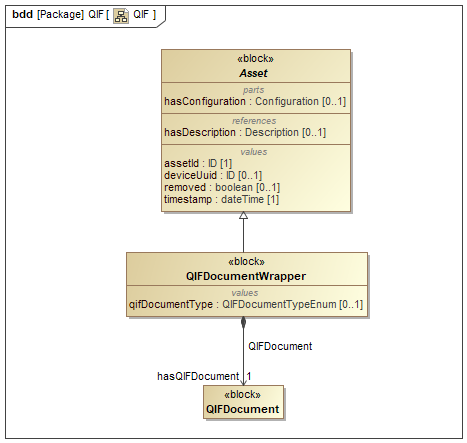
Note: See QIFDocumentWrapper Schema Diagrams for XML schema.
QIF Asset Information Model
The QIF is an American National Standards Institute (ANSI) accredited standard developed by the Digital Metrology Standards Consortium (DMSC) standards development organization. The DMSC is an A-liaison to the International Standards Organization (ISO) Technical Committee (TC) 184. QIF addresses the needs of the metrology community to have a semantic information model for the exchange of metrology data throughout the verification lifecycle from product design to execution, analysis, and reporting.
The MTConnect QIF Asset Information Model provides a wrapper around a QIF document (i.e., a dataset conforming to the QIF Information model) in its native XML representation. The MTConnect standard does not alter or extend the QIF standard and regards the QIF standard as a passthrough.
Information about the QIF standards is at the following location: https://qifstandards.org
- QIFDocument (class)
Asset Information Model / QIF
QIF Document as given by the QIF standard.
- QIFDocumentTypeEnum (enumeration)
DataTypes
Review the MTConnect definition and model details for QIFDocumentTypeEnum, an MTConnect enumeration.
- QIFDocumentWrapper (class)
Asset Information Model / QIF
Assetthat carries the QIF Document.- QualifierEnum (enumeration)
DataTypes
Review the MTConnect definition and model details for QualifierEnum, an MTConnect enumeration.
- QualityEnum (enumeration)
DataTypes
Review the MTConnect definition and model details for QualityEnum, an MTConnect enumeration.
- QueryError (class)
Fundamentals / MTConnect Protocol / MTConnectErrors Response Document / Error Types
agent was unable to interpret the query.
The query parameters do not contain valid values or include an invalid parameter.
- QueryParameter (class)
Fundamentals / MTConnect Protocol / MTConnectErrors Response Document / Error Types
property of the HTTP Request that modifies the information returned by the HTTP Request.
- QueryParameterEnum (enumeration)
DataTypes
Review the MTConnect definition and model details for QueryParameterEnum, an MTConnect enumeration.
R
- Raw Material (package)
Asset Information Model
This section provides semantic information for the RawMaterial model.
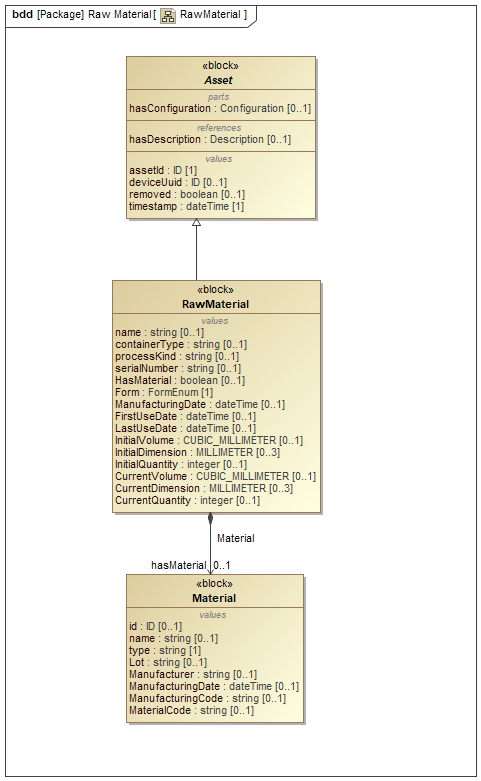
Note: See RawMaterial Schema Diagrams for XML schema.
Raw Material Asset Information Model
Raw material represents the source of material for immediate use and sources of material that may or may not be used during the manufacturing process.
The RawMaterial
Assetholds the references to the content stored in the actual RawMaterial container or derived about the RawMaterial by the system during operation.- raw material (class)
Glossary / Industrial Terms
crude or processed material that can be converted by manufacture, processing, or combination into a new and useful product.
- RawMaterial (class)
Asset Information Model / Raw Material
Assetthat represents raw material.- ReconditionCount (class)
Asset Information Model / Cutting Tool / Cutting Tool Life Cycle
number of times the cutter has been reconditioned.
- Reel (class)
Device Information Model / Components / Component Types
leaf
Componentcomposed of a rotary storage unit for material.- Reference (class)
Device Information Model / References
pointer to information that is associated with another entity defined elsewhere in the MTConnectDevices entity for a piece of equipment.
Description
Referenceis an abstract entity and will be realized by a specificReferencetype for an MTConnectDevices entity. See ComponentRef and DataItemRef.- Reference (class)
Reference Agent Architecture / InformationModel
Review the MTConnect definition and model details for Reference, an MTConnect class.
- Reference Agent Architecture (package)
Review the MTConnect definition and model details for Reference Agent Architecture, an MTConnect package.
- References (package)
Device Information Model
This section provides semantic information for the
Referenceentity. References shows theReferencemodel.Referencemay be modeled as part of aDevice,ComponentorInterfacetype.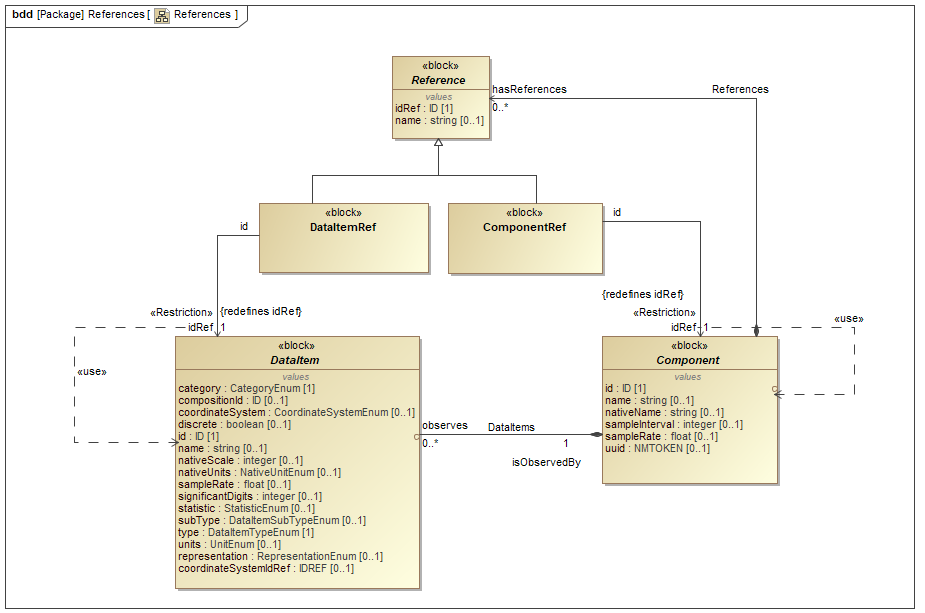
Note: See References Schema Diagrams for XML schema of
Referenceand its types.References Model
Referencesorganizes pointers to information defined elsewhere within the MTConnectDevices entity for a piece of equipment. It is an efficient method to associate information with an element without duplicating any of the data or structure.- Relationship Types for DataItem (package)
Device Information Model / DataItems / Properties of DataItem
This section provides semantic information for the types of AbstractDataItemRelationship that can be defined for a
DataItem.- Relationships (package)
Device Information Model / Configurations
This section provides semantic information for the ConfigurationRelationship entity.
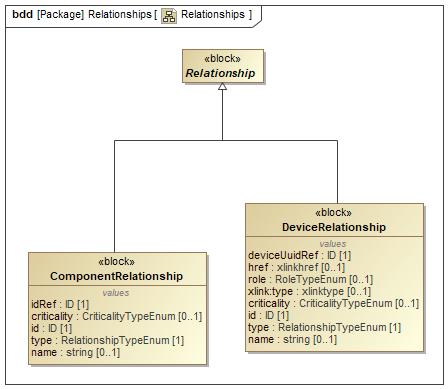
Note: See Configuration Schema Diagrams for XML schema.
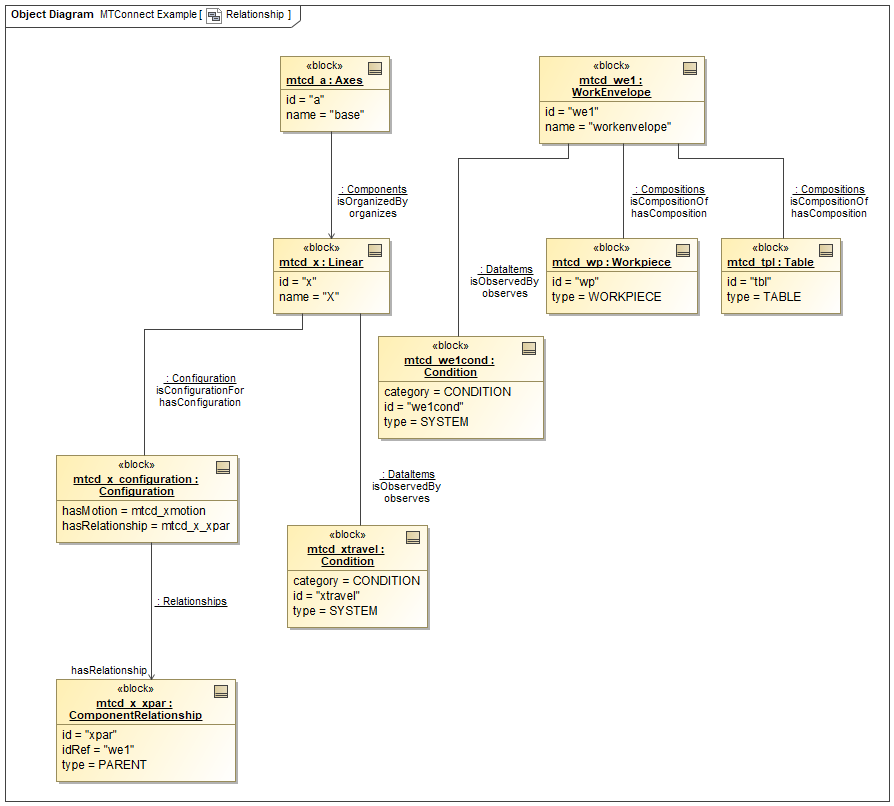
Note: See relationship-example for the XML representation of the same example.
- RelationshipTypeEnum (enumeration)
DataTypes
Review the MTConnect definition and model details for RelationshipTypeEnum, an MTConnect enumeration.
- RemovalPot (class)
Device Information Model / Components / Component Types
leaf
Componentthat is a Pot for a tool that has to be removed from a ToolMagazine or Turret to a location outside of the piece of equipment.- Representation (class)
Observation Information Model / Representations
specifies the format and structure of
result.Description
The Representation type for an
Observationis defined by the associatedrepresentationin the MTConnectDevices Response Document.Value is the default Representation type for all
Observationtypes.The name of the
Observationtype is modified for all Representation types other than Value by appending the pascal case of the Representation type.Example: The name for
SampleObservationtypeTemperaturewithRepresentationtype ofTimeSeriesbecomesTemperatureTimeSeries.- Representation (package)
WIP: Device Examples / Mill w/SmoothG
Review the MTConnect definition and model details for Representation, an MTConnect package.
- RepresentationEnum (enumeration)
DataTypes
Review the MTConnect definition and model details for RepresentationEnum, an MTConnect enumeration.
- Representations (package)
Observation Information Model
This section provides semantic information for the Representation model.
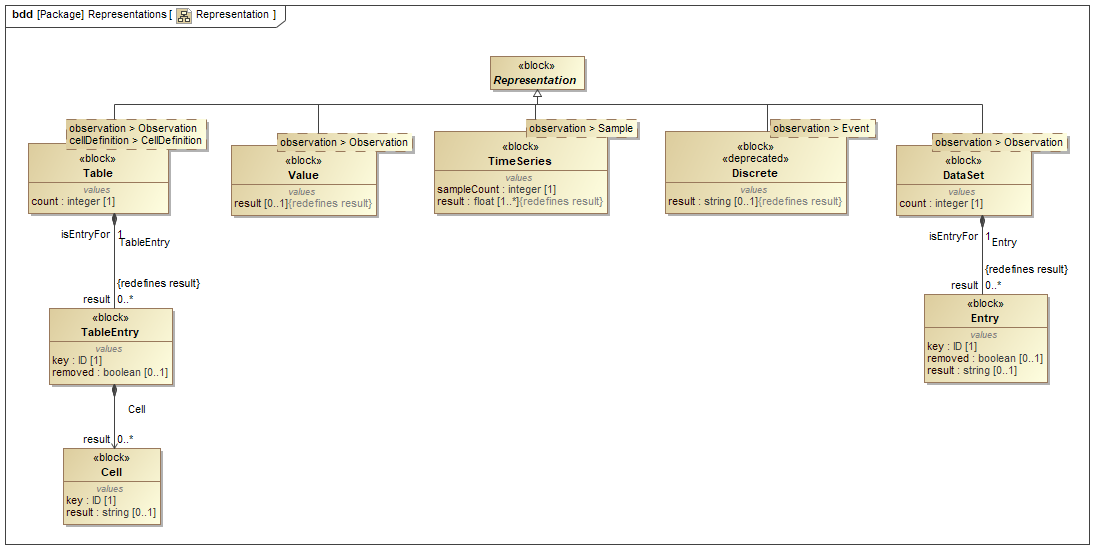
Note: See Representation Schema Diagrams for XML schema.
- request (class)
Glossary / Protocol Terms
communications method where a client transmits a message to an agent. That message instructs the agent to respond with specific information.
- request and response (class)
Glossary / Protocol Terms
communications pattern that supports the transfer of information between an agent and a client.
- Request and Response Failure Handling and Recovery (package)
Interface Interaction Model / Operation and Error Recovery
A significant feature of the request and response interaction model is the ability for either piece of equipment to detect a failure associated with either the request or response actions. When either a failure or unexpected action occurs, the request and the response portion of the interaction model can announce a
FAILstate upon detecting a problem. The following are graphical models describing multiple scenarios where either the requester or responder detects and reacts to a failure. In these examples, either the requester or responder announces the detection of a failure by setting either the request or the response state toFAIL.Once a failure is detected, the interaction model provides information from each piece of equipment as they attempt to recover from a failure, reset all of their functions associated with the interface to their original state, and return to normal operation.
The following sections are scenarios that describe how pieces of equipment may react to different types of failures and how they indicate when they are again ready to request a service or respond to a request for service after recovering from those failures:
Responder Fails Immediately
In this scenario, a failure is detected by the responder immediately after a request for service has been initiated by the requester.
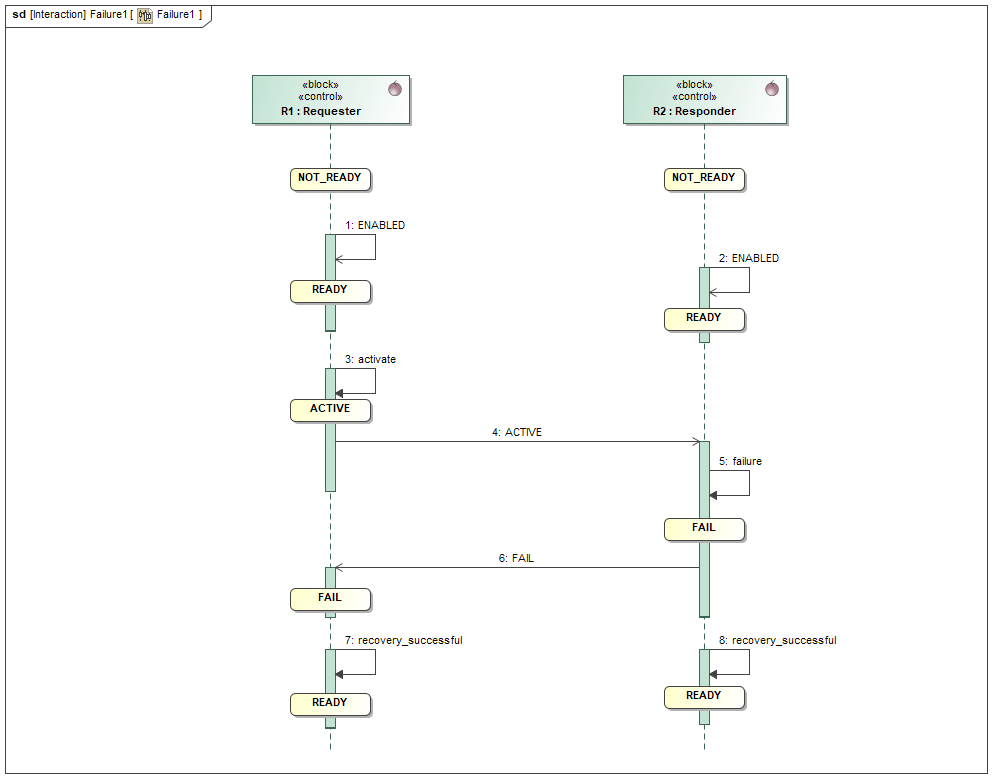
In this case, the request transitions to
ACTIVEand the responder immediately detects a failure before it can transition the response state toACTIVE. When this occurs, the responder transitions the response state toFAIL.After detecting that the responder has transitioned its state to
FAIL, the requester MUST change its state toFAIL.The requester, as part of clearing a failure, resets any partial actions that were initiated and attempts to return to a condition where it is again ready to request a service. If the recovery is successful, the requester changes its state from
FAILtoREADY. If for some reason the requester cannot return to a condition where it is again ready to request a service, it transitions its state fromFAILtoNOT_READY.The responder, as part of clearing a failure, resets any partial actions that were initiated and attempts to return to a condition where it is again ready to perform a service. If the recovery is successful, the responder changes its response state from
FAILtoREADY. If for some reason the responder is not again prepared to perform a service, it transitions its state fromFAILtoNOT_READY.Responder Fails While Providing a Service
This is the most common failure scenario. In this case, the responder will begin the actions required to provide a service. During these actions, the responder detects a failure and transitions its response state to
FAIL.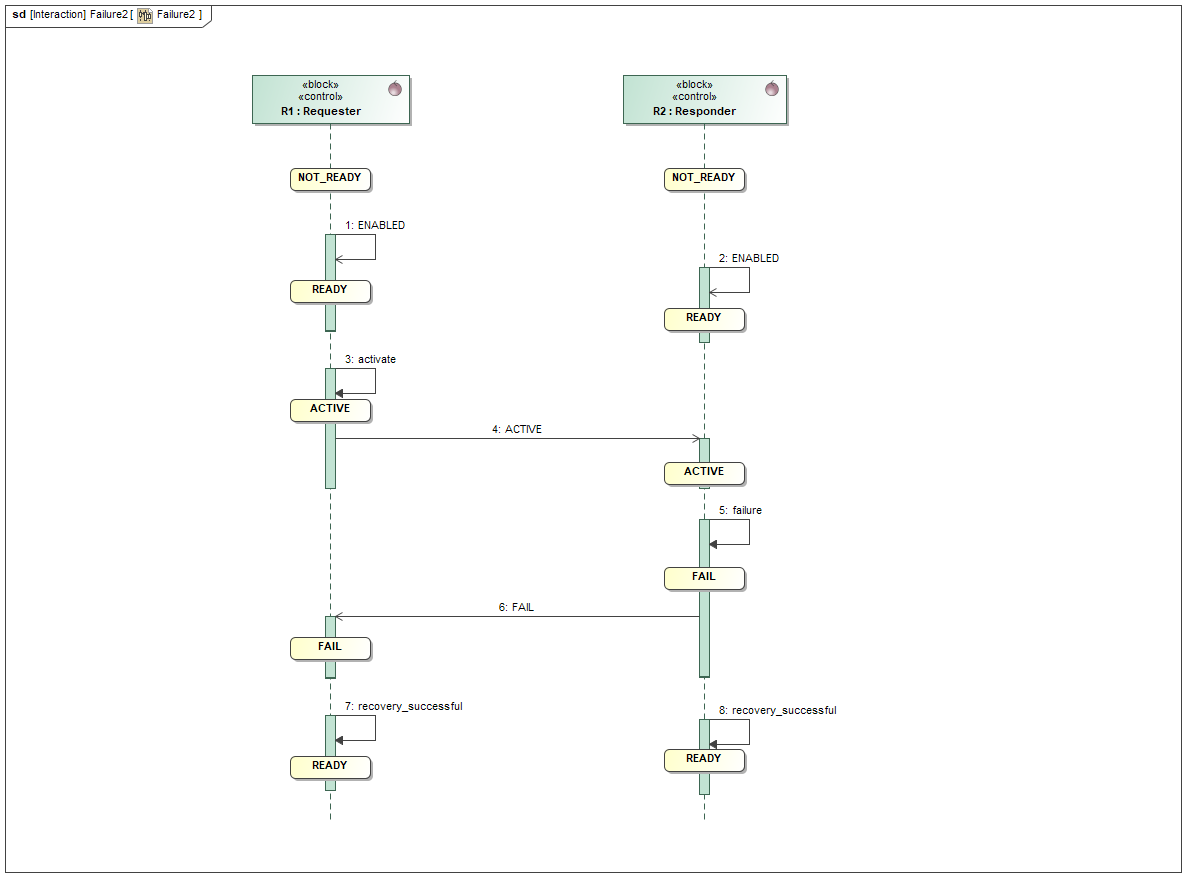
When a requester detects a failure of a responder, it transitions it state from
ACTIVEtoFAIL.The requester resets any partial actions that were initiated and attempts to return to a condition where it is again ready to request a service. If the recovery is successful, the requester changes its state from
FAILtoREADYif the failure has been cleared and it is again prepared to request another service. If for some reason the requester cannot return to a condition where it is again ready to request a service, it transitions its state fromFAILtoNOT_READY.The responder, as part of clearing a failure, resets any partial actions that were initiated and attempts to return to a condition where it is again ready to perform a service. If the recovery is successful, the responder changes its response state from
FAILtoREADYif it is again prepared to perform a service. If for some reason the responder is not again prepared to perform a service, it transitions its state fromFAILtoNOT_READY.Requester Failure During a Service Request
In this scenario, the responder will begin the actions required to provide a service. During these actions, the requester detects a failure and transitions its request state to
FAIL.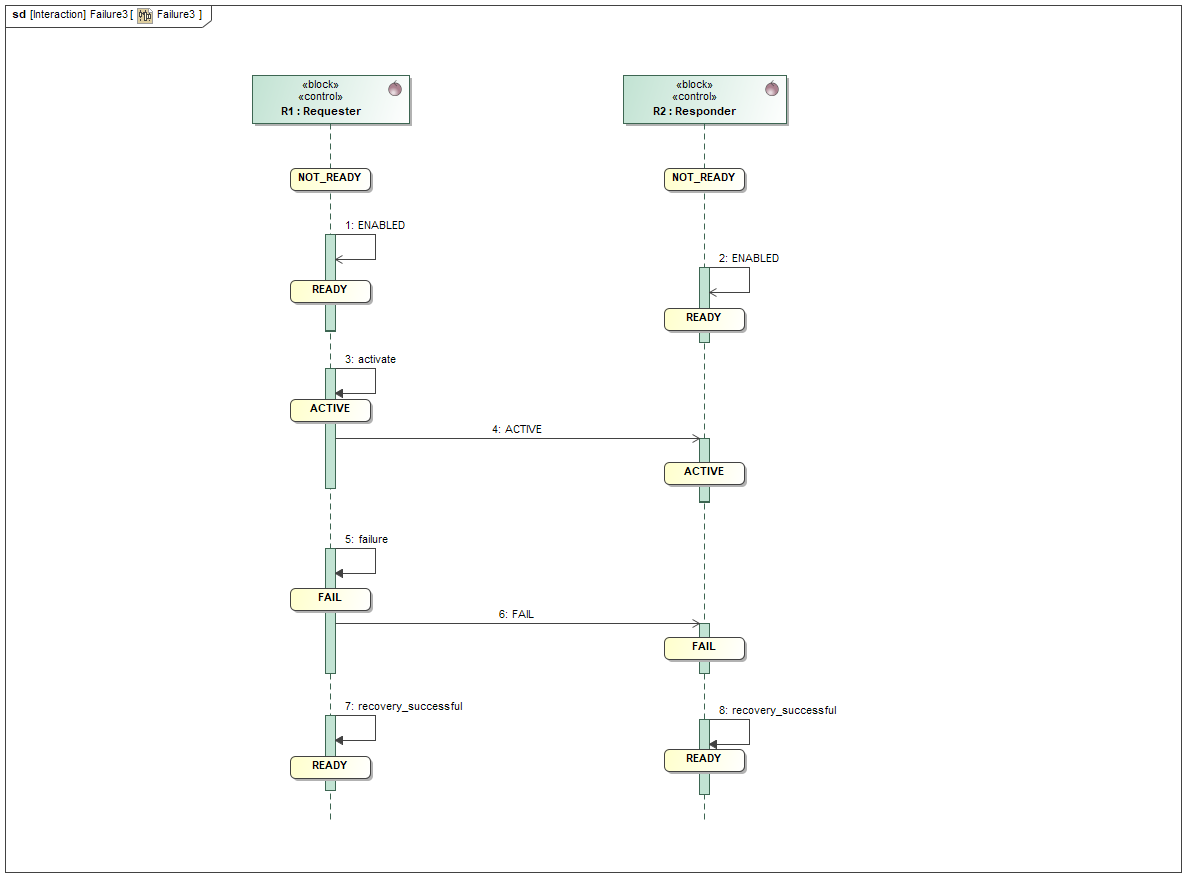
When the responder detects that the requester has transitioned its request state to
FAIL, the responder also transitions its response state toFAIL.The requester, as part of clearing a failure, resets any partial actions that were initiated and attempts to return to a condition where it is again ready to request a service. If the recovery is successful, the requester changes its state from
FAILtoREADY. If for some reason the requester cannot return to a condition where it is again ready to request a service, it transitions its state fromFAILtoNOT_READY.The responder, as part of clearing a failure, resets any partial actions that were initiated and attempts to return to a condition where it is again ready to perform a service. If the recovery is successful, the responder changes its response state from
FAILtoREADY. If for some reason the responder is not again prepared to perform a service, it transitions its state fromFAILtoNOT_READY.Requester Changes to an Unexpected State While Responder is Providing a Service
In some cases, a requester may transition to an unexpected state after it has initiated a request for service.
As demonstrated in Requester Makes Unexpected State Change, the requester has initiated a request for service and its request state has been changed to
ACTIVE. The responder begins the actions required to provide the service. During these actions, the requester transitions its request state back toREADYbefore the responder can complete its actions. This SHOULD be regarded as a failure of the requester.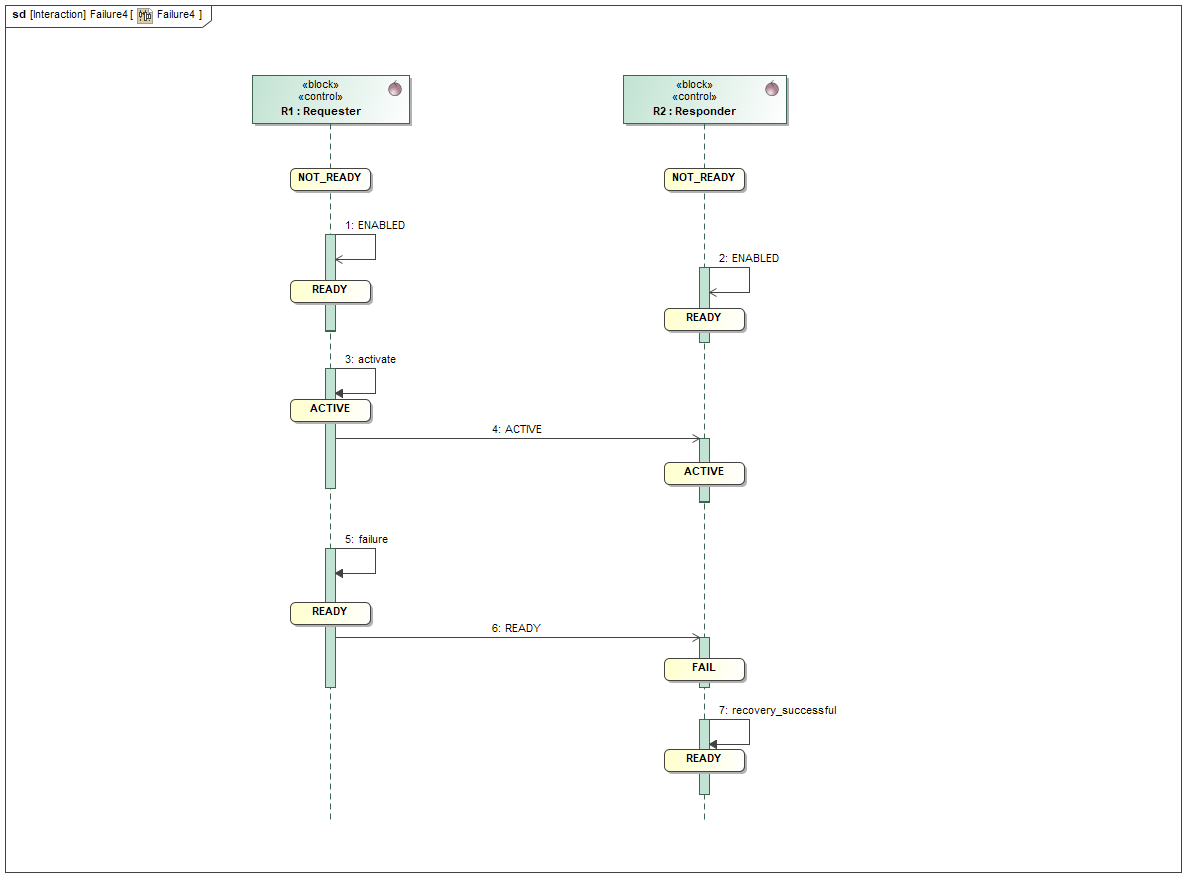
In this case, the responder reacts to this change of state of the requester in the same way as though the requester had transitioned its request state to
FAIL(i.e., the same as in Scenario 3 above).At this point, the responder then transitions its response state to
FAIL.The responder resets any partial actions that were initiated and attempts to return to its original condition where it is again ready to perform a service. If the recovery is successful, the responder changes its response state from
FAILtoREADY. If for some reason the responder is not again prepared to perform a service, it transitions its state fromFAILtoNOT_READY.Note: The same scenario exists if the requester transitions its request state to
NOT_READY. However, in this case, the requester then transitions its request state toREADYafter it resets all of its functions back to a condition where it is again prepared to make a request for service.Responder Changes to an Unexpected State While Providing a Service
Similar to Scenario 5, a responder may transition to an unexpected state while providing a service.
As demonstrated in Responder Makes Unexpected State Change, the responder is performing the actions to provide a service and the response state is
ACTIVE. During these actions, the responder transitions its state toNOT_READYbefore completing its actions. This should be regarded as a failure of the responder.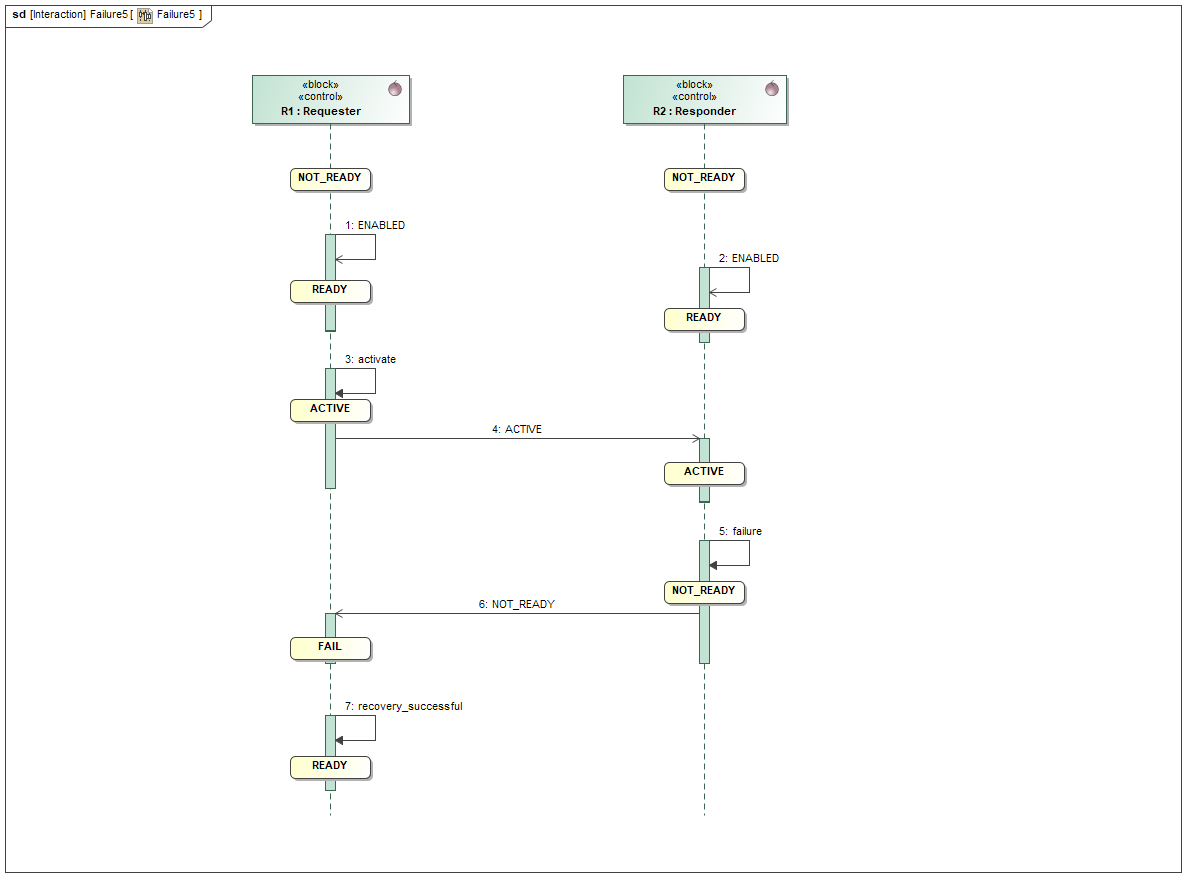
Upon detecting an unexpected state change of the responder, the requester transitions its state to
FAIL.The requester resets any partial actions that were initiated and attempts to return to a condition where it is again ready to request a service. If the recovery is successful, the requester changes its state from
FAILtoREADY. If for some reason the requester cannot return to a condition where it is again ready to request a service, it transitions its state fromFAILtoNOT_READY.Since the responder has failed to an invalid state, the condition of the responder is unknown. Where possible, the responder should try to reset to an initial state.
The responder, as part of clearing the cause for the change to the unexpected state, should attempt to reset any partial actions that were initiated and then return to a condition where it is again ready to perform a service. If the recovery is successful, the responder changes its response state from the unexpected state to
READY. If for some reason the responder is not again prepared to perform a service, it maintains its state asNOT_READY.Responder or Requester Become UNAVAILABLE or Experience a Loss of Communication
In this scenario, a failure occurs in the communications connection between the responder and requester. This failure may result from the InterfaceState from either piece of equipment returning a value of
UNAVAILABLEor one of the pieces of equipment does not provide a heartbeat within the desired amount of time (See Fundamentals for details on heartbeat).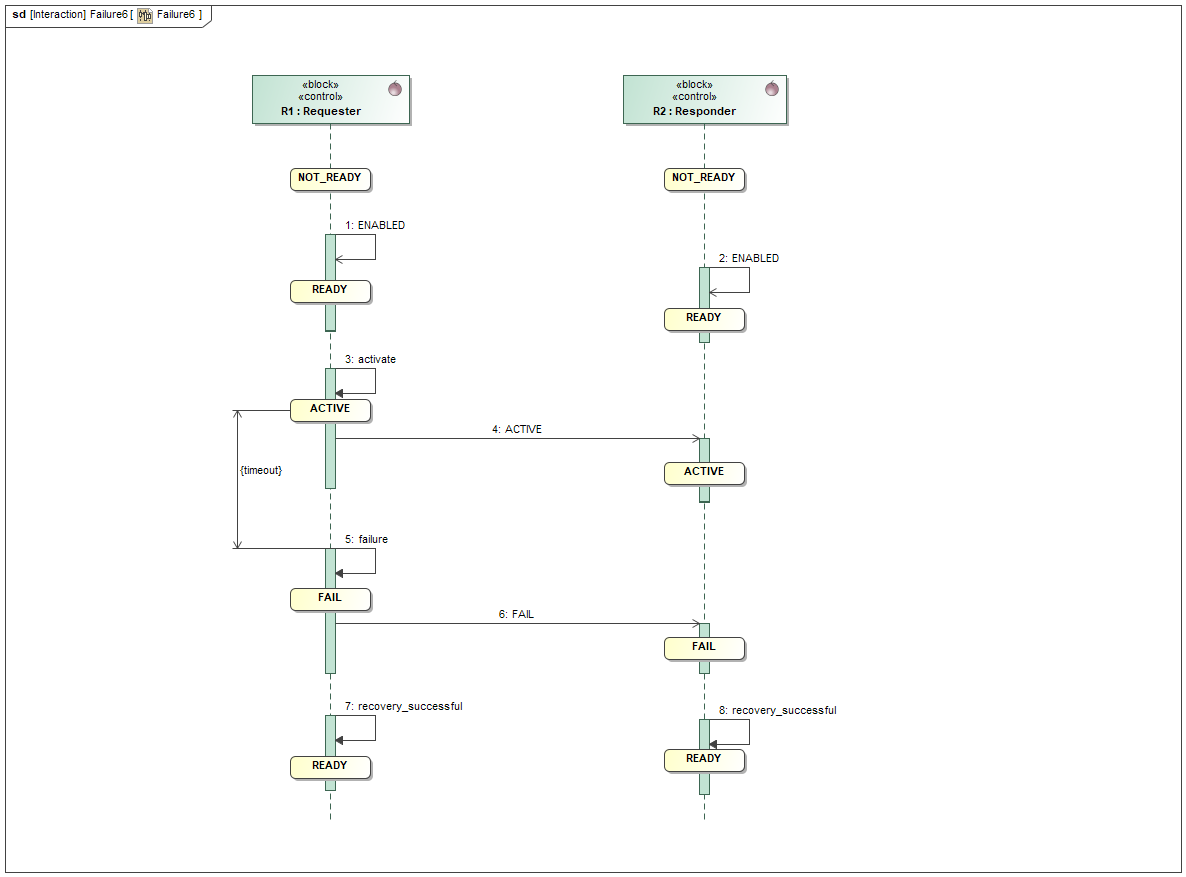
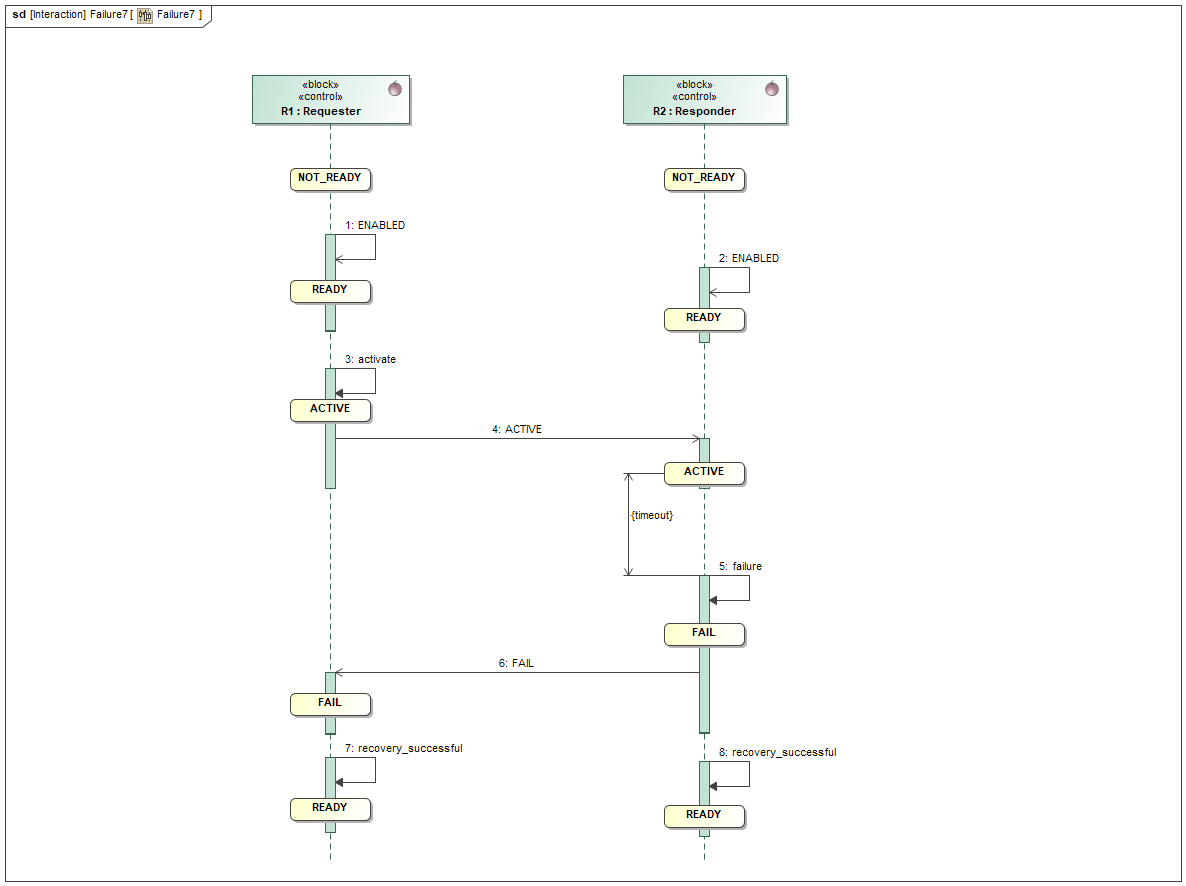
When one of these situations occurs, each piece of equipment assumes that there has been a failure of the other piece of equipment.
When normal communications are re-established, neither piece of equipment should assume that the request and response state of the other piece of equipment remains valid. Both pieces of equipment should set their state to
FAIL.The requester, as part of clearing its
FAILstate, resets any partial actions that were initiated and attempts to return to a condition where it is again ready to request a service. If the recovery is successful, the requester changes its state fromFAILtoREADY. If for some reason the requester cannot return to a condition where it is again ready to request a service, it transitions its state fromFAILtoNOT_READY.The responder, as part of clearing its
FAILstate, resets any partial actions that were initiated and attempts to return to a condition where it is again ready to perform a service. If the recovery is successful, the responder changes its response state fromFAILtoREADY. If for some reason the responder is not again prepared to perform a service, it transitions its state fromFAILtoNOT_READY.- requester (class)
Glossary
entity that initiates a request for information in a communications exchange.
- Requester (class)
Interface Interaction Model
Review the MTConnect definition and model details for Requester, an MTConnect class.
- RequestStateEnum (enumeration)
DataTypes
Review the MTConnect definition and model details for RequestStateEnum, an MTConnect enumeration.
- reset (class)
Glossary
act of reverting back the accumulated value or statistic to their initial value.
Note: An Observation with a data set representation removes all key-value pairs, setting the data set to an empty set.
- ResetTrigger (class)
Device Information Model / DataItems / Properties of DataItem
type of event that may cause a reset to occur.
- ResetTriggeredEnum (enumeration)
DataTypes
Review the MTConnect definition and model details for ResetTriggeredEnum, an MTConnect enumeration.
- ResetTriggerEnum (enumeration)
DataTypes
Review the MTConnect definition and model details for ResetTriggerEnum, an MTConnect enumeration.
- Resistance (class)
Observation Information Model / Observation Types / Sample Types
RESISTANCE
- Resistivity (class)
Observation Information Model / Observation Types / Sample Types
RESISTIVITY
- Resource (class)
Device Information Model / Components / Component Types
abstract
Componentcomposed of material or personnel involved in a manufacturing process.- resource (class)
Glossary / Industrial Terms
physical or logical entity used by an organization
- Resources (class)
Device Information Model / Components / Component Types / Component Organizer Types
Componentthat organizesResourcetypes.- responder (class)
Glossary
entity that responds to a request for information in a communications exchange.
- Responder (class)
Interface Interaction Model
Review the MTConnect definition and model details for Responder, an MTConnect class.
- response (class)
Glossary / Protocol Terms
response interface which responds to a request.
- response document (class)
Glossary
electronic document published by an MTConnect Agent in response to a probe request, current request, sample request or asset request.
- ResponseStateEnum (enumeration)
DataTypes
Review the MTConnect definition and model details for ResponseStateEnum, an MTConnect enumeration.
- Rest (package)
Reference Agent Architecture
Review the MTConnect definition and model details for Rest, an MTConnect package.
- REST Protocol (package)
Fundamentals / MTConnect Protocol
An agent MUST provide a REST API API supporting HTTP version 1.0 or greater. This interface MUST support HTTP (RFC7230) and use URIs (RFC3986) to identify specific information requested from an agent.
The REST API adheres to the architectural principles of a stateless service to retrieve information associated with pieces of equipment. Additionally, the API is read-only and does not produce any side effects on the agent or the equipment. In REST state management, the client is responsible for recovery in case of an error or loss of connection.
HTTP Request
An agent MUST support the
HTTPGETverb, all other verbs are optional. See IETF RFC 7230 for a complete description of the HTTP request structure.The HTTP uses Uniform Resource Identifiers (URI) as outlined in IETF RFC 3986 as the request-target. IETF RFC 7230 specifies the http URI scheme for the request-target as follows:
protocol: The protocol used for the request. Must behttporhttps.authority: The network domain or address of the agent with an optional port.path: A Hierarchical Identifier following a slash (/) and before the optional question-mark (?). Thepathseparates segments by a slash (/).query: The portion of the HTTP request following the question-mark (?). The query portion of the HTTP request is composed of key-value pairs,<key>=<value>separated by an ampersand (&).
pathPortion of an HTTP RequestThe
pathportion of the request-target has the following segments:device-nameoruuid: optionalnameoruuidof theDevicerequest: request, must be one of the following: (also see Operations for Agent)probecurrentsampleassetorassetsassetrequest has additional optional segment<asset ids>
If
nameoruuidsegement are not specified in the HTTP Request, an agent MUST return information for all pieces of equipment. The following sections willExamples:
http://localhost:5000/my_device/probeThe request only provides information about
my_device.http://localhost:5000/probeThe request provides information for all devices.
The following section specifies the details for each request.
MTConnect REST API
An agent MUST support probe requests, current requests, sample requests, and asset requests.
See the operations of the
Agentfor details regarding the requests.HTTP Errors
When an agent receives an HTTP Request that is incorrectly formatted or is not supported by the agent, the agent MUST publish an HTTP Error Message which includes a specific status code from the tables above indicating that the request could not be handled by the agent.
Also, if the agent experiences an internal error and is unable to provide the requested response document, it MUST publish an HTTP Error Message that includes a specific status code from the table above.
When an agent encounters an error in interpreting or responding to an HTTP Request, the agent MUST also publish an MTConnectErrors Response Document that provides additional details about the error. See Error Information Model for details on the MTConnectErrors Response Document.
Streaming Data
HTTP data streaming is a method for an agent to provide a continuous stream of observations in response to a single request using a publish and subscribe communication pattern.
When an HTTP Request includes an
intervalparameter, an agent MUST provide data with a minimum delay in milliseconds between the end of one data transmission and the beginning of the next. A value of zero (0) for theintervalparameter indicates that the agent should deliver data at the highest rate possible and is only relevant for sample requests .The format of the response MUST use an
x-multipart-replaceencoded message with each section separated by MIME boundaries. Each section MUST contain an entire MTConnectStreams Response Document.When streaming for a current request, the agent produces an MTConnectStreams Response Document with the most current observations every
intervalmilliseconds.When streaming for a sample request, if there are no available observations after the
intervaltime elapsed, the agent MUST wait for either theheartbeattime to elapse or an observation arrives. If theheartbeattime elapses and no observations arrive, then an empty MTConnectStreams Response Document MUST be sent.Note: For more information on MIME, see IETF RFC 1521 and RFC 822.
An example of the format for an HTTP Request that includes an
intervalparameter is:http://localhost:5000/sample?interval=1000HTTP Response Header:
HTTP/1.1 200 OK
Connection: close
Date: Sat, 13 Mar 2010 08:33:37 UTC
Status: 200 OK
Content-Disposition: inline
X-Runtime: 144ms
Content-Type: multipart/x-mixed-replace;boundary=
a8e12eced4fb871ac096a99bf9728425
Transfer-Encoding: chunked
Lines 1-9 in http-response-header represent a standard header for a MIME
multipart/x-mixed-replacemessage. The boundary is a separator for each section of the stream. Lines 7-8 indicate this is a multipart MIME message and the boundary between sections.With streaming protocols, the
Content-lengthMUST be omitted andTransfer-EncodingMUST be set tochunked(line 9). See IETF RFC 7230 for a full description of the HTTP protocol and chunked encoding.--a8e12eced4fb871ac096a99bf9728425 Content-type: text/xml Content-length: 887 <?xml version="1.0" ecoding="UTF-8"?> <MTConnectStreams ...>...Each section of the document begins with a boundary preceded by two hyphens (
--). TheContent-typeandContent-lengthheader fields MUST be provided for each section and MUST be followed by<CR><LF><CR><LF>(ASCII code for<CR>is 13 and<LF>10) before the XML document. The header and the<CR><LF><CR><LF>MUST NOT be included in the computation of the content length.An agent MUST continue to stream results until the client closes the connection. The agent MUST NOT stop streaming for any reason other than the following:
- agent process stops
- The client application stops receiving data
Heartbeat
When streaming data is requested from a sample request, an agent MUST support a heartbeat to indicate to a client application that the HTTP connection is still viable during times when there is no new data available to be published. The heartbeat is indicated by an agent by sending an MTConnect response document with an empty
Steamsentity (See Observation Information Model for more details onStreams) to the client software application.The heartbeat MUST occur on a periodic basis given by the optional
heartbeatquery parameter and MUST default to 10 seconds. An agent MUST maintain a separate heartbeat for each client application for which the agent is responding to a data streaming request.An agent MUST begin calculating the interval for the time-period of the heartbeat for each client application immediately after a response document is published to that specific client application.
The heartbeat remains in effect for each client software application until the data streaming request is terminated by either the agent or the client application.
References
A
ComponentMAY include a set ofReferenceentities of the following types that MAY alter the content of the MTConnectStreams Response Documents published in response to a current request or a sample request as specified:A Component reference (ComponentRef) modifies the set of Observations, limited by a path query parameter of a current request or sample request, to include the Observations associated with the entity whose value for its
idattribute matches the value provided for theidRefattribute of the ComponentRef element. Additionally, Observations defined for any lower level entity(s) associated with the identified entities MUST also be returned. The result is equivalent to appending//[@id=<"idRef">]to the path query parameters of the current request or sample request. See Agent for more details on path queries.A DataItem reference (DataItemRef) modifies the set of resulting Observations, limited by a path query parameter of a current request or sample request, to include the Observations whose value for its
idattribute matches the value provided for theidRefattribute of the DataItemRef element. The result is equivalent to appending//[@id=<"idRef">]to the path query parameters of the current request or sample request. See Agent for more details on path queries.
- RestService (class)
Reference Agent Architecture
Review the MTConnect definition and model details for RestService, an MTConnect class.
- RestSink (class)
Reference Agent Architecture
Review the MTConnect definition and model details for RestSink, an MTConnect class. See RestSink, an MTConnect class in Reference Agent Architecture.
- RestSink (class)
Reference Agent Architecture / Sink
Review the MTConnect definition and model details for RestSink, an MTConnect class. See RestSink, an MTConnect class in Sink.
- RestSource (class)
Reference Agent Architecture
Review the MTConnect definition and model details for RestSource, an MTConnect class.
- ReturnPot (class)
Device Information Model / Components / Component Types
leaf
Componentthat is a Pot for a tool that has been removed from spindle or Turret and awaiting for return to a ToolMagazine.- robot7axes (class)
WIP: Device Examples / Kinematics Simulation
Review the MTConnect definition and model details for robot7axes, an MTConnect class.
- RoleTypeEnum (enumeration)
DataTypes
Review the MTConnect definition and model details for RoleTypeEnum, an MTConnect enumeration.
- root element (class)
Glossary / XML Terms
first structural element provided in a response document encoded using XML.
- Rotary (class)
Device Information Model / Components / Component Types
Axisthat provides rotation about a fixed axis.- RotaryMode (class)
Observation Information Model / Observation Types / Event Types
ROTARY_MODE
- RotaryModeEnum (enumeration)
DataTypes
Review the MTConnect definition and model details for RotaryModeEnum, an MTConnect enumeration.
- RotaryVelocity (class)
Observation Information Model / Observation Types / Sample Types
ROTARY_VELOCITY
- RotaryVelocity.Actual (class)
Observation Information Model / Observation Types / Sample Types
measured or reported value of an observation.
- RotaryVelocity.Commanded (class)
Observation Information Model / Observation Types / Sample Types
directive value including adjustments such as an offset or overrides.
- RotaryVelocity.Override (class)
Observation Information Model / Observation Types / Sample Types
The operators overridden value.
- RotaryVelocity.Programmed (class)
Observation Information Model / Observation Types / Sample Types
directive value without offsets and adjustments.
- RotaryVelocityOverride (class)
Observation Information Model / Observation Types / Event Types
ROTARY_VELOCITY_OVERRIDE
This command represents a percentage change to the velocity calculated by a logic or motion program or set by a switch for a Rotary type axis.
- Rotation (class)
Device Information Model / Configurations / CoordinateSystems
rotations about X, Y, and Z axes are expressed in A, B, and C respectively within a 3-dimensional vector.
- Rotation (class)
Observation Information Model / Observation Types / Event Types
ROTATION
- RotationDataSet (class)
Device Information Model / Configurations / CoordinateSystems
rotations about X, Y, and Z axes are expressed in A, B, and C respectively within a 3-dimensional vector represented as a dataset.
- RotationVector (class)
WIP: Device Examples / Kinematics Simulation / XArm7Model
Review the MTConnect definition and model details for RotationVector, an MTConnect class.
- Routing (class)
Asset Information Model / Process
optimal sequence of process steps
S
- Sample (class)
Device Information Model / DataItems / DataItem Types
abstract
DataItemthat is continuously changing or analog data value.Description
This data can be measured at any point-in-time and will always produce a result.
- Sample (class)
Glossary / MTConnect Terms / Additional Observation Terms
The collection of one or more pieces of information.
- Sample (class)
Observation Information Model
Observationthat is continuously changing or analog data value.Description
It provides the information and data reported from a piece of equipment for those
DataItementities defined withcategoryasSAMPLEin the MTConnectDevices Response Document.SampleMUST always be reported infloat.Sample Example shows
Sampletype examples. It also shows an example for when theresultis not available (dataItemId=cspeed).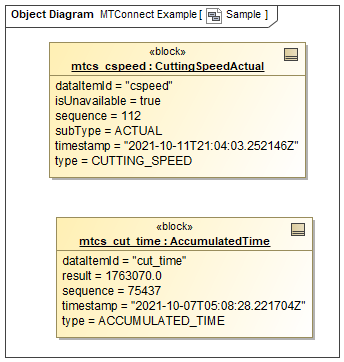
Note: See sample-example for the XML representation of the same example.
The following Value Properties of Sample lists the additional and/or updated attributes for
Sample.- Sample (class)
Reference Agent Architecture / InformationModel
Review the MTConnect definition and model details for Sample, an MTConnect class.
- sample request (class)
Glossary / Protocol Terms
request to an agent to produce an MTConnectStreams Response Document containing the Observation Information Model for a set of timestamped observations made by Components.
- Sample Types (package)
Observation Information Model / Observation Types
This section provides semantic information for
Sampletypes.- SampleEnum (enumeration)
DataTypes
Review the MTConnect definition and model details for SampleEnum, an MTConnect enumeration.
- Scale (class)
Device Information Model / Configurations / SolidModel
either a single multiplier applied to all three dimensions or a three space multiplier given in the X, Y, and Z dimensions in the coordinate system used for the SolidModel.
- ScaleDataSet (class)
Device Information Model / Configurations / SolidModel
either a single multiplier applied to all three dimensions or a three space multiplier given in the X, Y, and Z dimensions in the coordinate system used for the SolidModel represented as a dataset.
- schema (class)
Glossary
definition of the structure, rules, and vocabularies used to define the information published in an electronic document.
- ScopeTypeEnum (enumeration)
DataTypes
Review the MTConnect definition and model details for ScopeTypeEnum, an MTConnect enumeration.
- semantic data model (class)
Glossary
methodology for defining the structure and meaning for data in a specific logical way that can be interpreted by a software system.
- sensing element (class)
Glossary
mechanism that provides a signal or measured value.
- SensingElement (class)
Device Information Model / Components / Component Types
leaf
Componentthat provides a signal or measured value.- Sensor (class)
Device Information Model / Components / Component Types
Componentthat responds to a physical stimulus and transmits a resulting impulse or value from a sensing unit.Description
If modeling individual sensors, then sensor should be associated with the
Componentthat the measured value is most closely associated.When modeled as an Auxiliary, sensor SHOULD represent an integrated sensor unit system that provides signal processing, conversion, and communications. A sensor unit may have multiple sensing elements.
See SensorConfiguration for more details on the use and configuration of a
Sensor.- Sensor (package)
Device Information Model / Configurations
This section provides semantic information for the SensorConfiguration entity.
sensor is a unique type of a piece of equipment. A sensor is typically comprised of two major components: a sensor unit that provides signal processing, conversion, and communications and the sensing elements that provides a signal or measured value.
The sensor unit is modeled as a lower level
ComponentcalledSensor. The sensing element may be modeled as aCompositionelement of aSensorelement and the measured value would be modeled as aDataItem(See DataItems for more information onDataItemelements). Each sensor unit may have multiple sensing elements; each representing the data for a variety of measured values.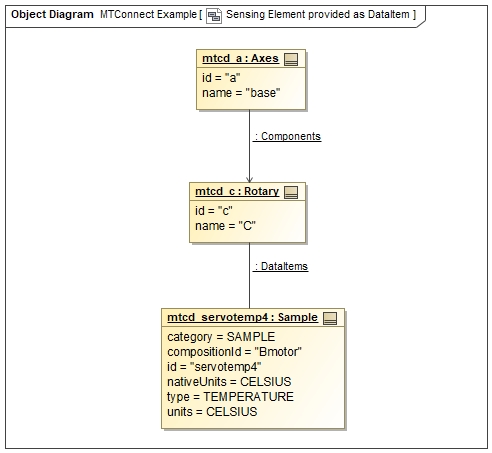
Note: See example-of-sensing-element-provided-as-data-item-associated-with-a-component for an XML example.
When a sensor unit is modeled as a
Componentor as a separate piece of equipment, it may provide additional configuration information for the sensor elements and the sensor unit itself.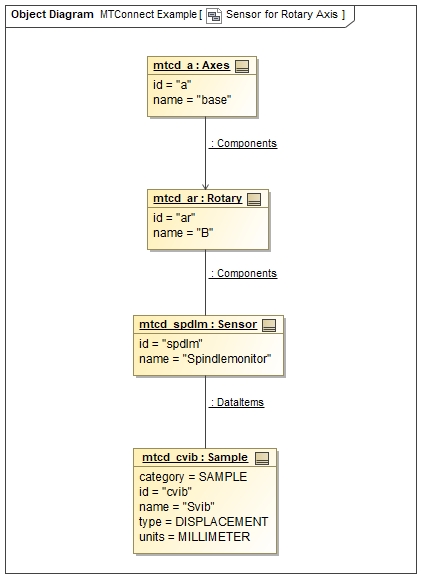
Note: If a
Sensorprovides vibration measurement data for the spindle on a piece of equipment, it could be modeled as aSensorfor rotary axis namedC. See example-of-sensor-for-rotary-axis for an XML example.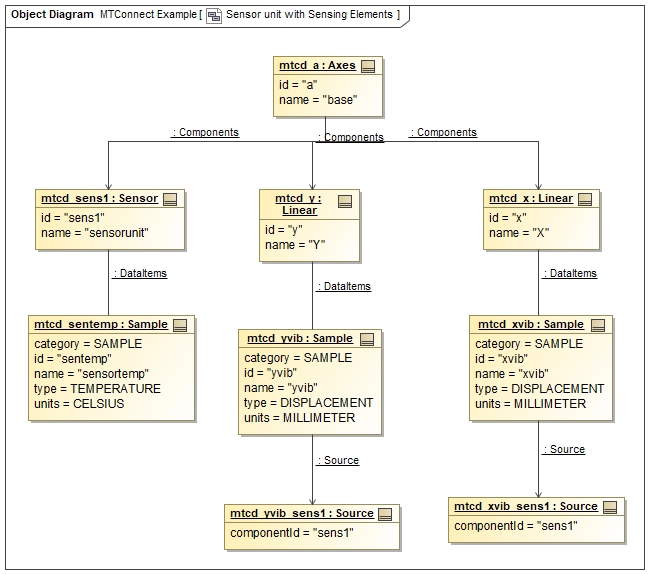
Note: If a
Sensorprovides measurement data for multipleComponentelements within a piece of equipment and is not associated with any particularComponent, it MAY be modeled as an independentComponentand the data associated with measurements are associated with their associatedComponententities. See example-of-sensor-unit-with-sensing-element for an XML example.Configurationdata provides information required for maintenance and support of the sensor.When
Sensorrepresents the sensor unit for multiple sensing element(s), each sensing element is represented by a Channel. The sensor unit itself and each Channel representing one sensing element MAY have its own configuration data.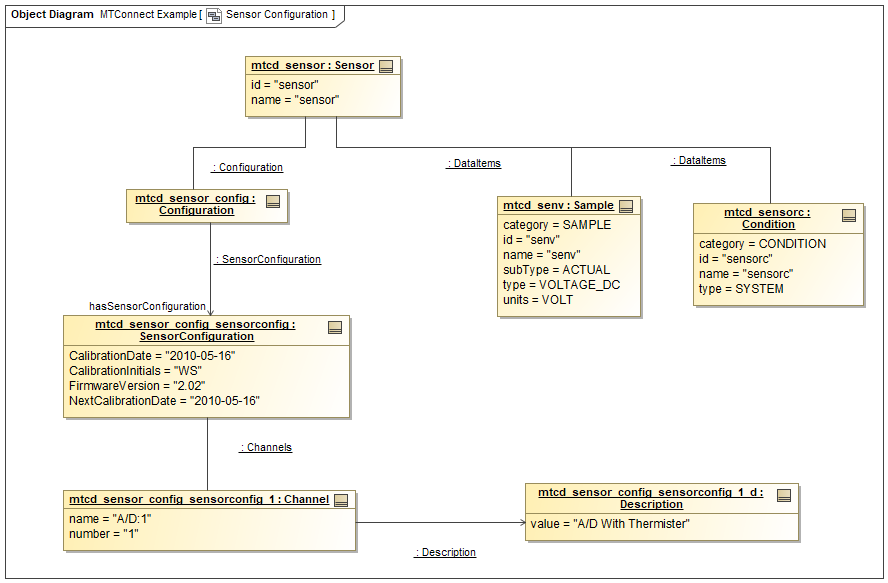
Note: See example-of-configuration-data-for-sensor for an XML example.
- sensor (class)
Glossary / Industrial Terms
sensing element that responds to a physical stimulus and transmits a resulting signal.
- sensor configuration (class)
Glossary / Industrial Terms
data in the MTConnectDevices Response Document that provides the information required for maintenance and support of the sensor unit.
- sensor data (class)
Glossary / Industrial Terms
value of a physical quantity reported by a measuring instrument or controller as an observation.
- sensor element (class)
Glossary / Industrial Terms
provides a signal or measured value.
- sensor unit (class)
Glossary / Industrial Terms
intelligent piece of equipment that manages the signals of one or more sensing elements and provides the measured values.
- SensorAttachment (class)
Observation Information Model / Observation Types / Event Types
SENSOR_ATTACHMENT
- SensorAttachmentResult (class)
DataTypes
- SensorConfiguration (class)
Device Information Model / Configurations / Sensor
configuration for a
Sensor.Description
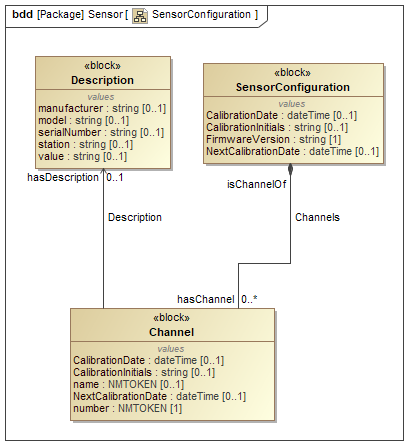
Note: See Configuration Schema Diagrams for XML schema.
- SensorState (class)
Observation Information Model / Observation Types / Event Types
SENSOR_STATE
- SensorState.Binary (class)
Observation Information Model / Observation Types / Event Types
SENSOR_STATE where the state is BINARY
- SensorState.Boolean (class)
Observation Information Model / Observation Types / Event Types
SENSOR_STATE where the state is BOOLEAN
- SensorState.Detect (class)
Observation Information Model / Observation Types / Event Types
SENSOR_STATE where the state is DETECT
- SensorState.Enumerated (class)
Observation Information Model / Observation Types / Event Types
SENSOR_STATE where the state is ENUMERATED
- SensorStateDetectEnum (enumeration)
DataTypes
Review the MTConnect definition and model details for SensorStateDetectEnum, an MTConnect enumeration.
- sequence number (class)
Glossary
primary key identifier used to manage and locate a specific piece of streaming data in an agent.
- SerialNumber (class)
Observation Information Model / Observation Types / Event Types
SERIAL_NUMBER
- Service (class)
Reference Agent Architecture
Review the MTConnect definition and model details for Service, an MTConnect class.
- SettlingError (class)
Observation Information Model / Observation Types / Sample Types
SETTLING_ERROR
- SettlingError.Actual (class)
Observation Information Model / Observation Types / Sample Types
measured or reported value of an observation.
- SettlingErrorAngular (class)
Observation Information Model / Observation Types / Sample Types
SETTLING_ERROR_ANGULAR
- SettlingErrorAngular.Actual (class)
Observation Information Model / Observation Types / Sample Types
measured or reported value of an observation.
- SettlingErrorLinear (class)
Observation Information Model / Observation Types / Sample Types
SETTLING_ERROR_LINEAR
- SettlingErrorLinear.Actual (class)
Observation Information Model / Observation Types / Sample Types
measured or reported value of an observation.
- SeverityEnum (enumeration)
DataTypes
Review the MTConnect definition and model details for SeverityEnum, an MTConnect enumeration.
- ShankDiameter (class)
Asset Information Model / Cutting Tool / Cutting Tool Measurement Subtypes
dimension of the diameter of a cylindrical portion of a tool item or an adaptive item that can participate in a connection.
- ShankHeight (class)
Asset Information Model / Cutting Tool / Cutting Tool Measurement Subtypes
dimension of the height of the shank.
- ShankLength (class)
Asset Information Model / Cutting Tool / Cutting Tool Measurement Subtypes
dimension of the length of the shank.
- Signals (package)
Interface Interaction Model
Review the MTConnect definition and model details for Signals, an MTConnect package.
- Simulation (package)
WIP: Device Examples / Kinematics Simulation
Review the MTConnect definition and model details for Simulation, an MTConnect package.
- Sink (class)
Reference Agent Architecture
Review the MTConnect definition and model details for Sink, an MTConnect class.
- Sink (package)
Reference Agent Architecture
Review the MTConnect definition and model details for Sink, an MTConnect package.
- SolidModel (package)
Device Information Model / Configurations
This section provides semantic information for the SolidModel entity.
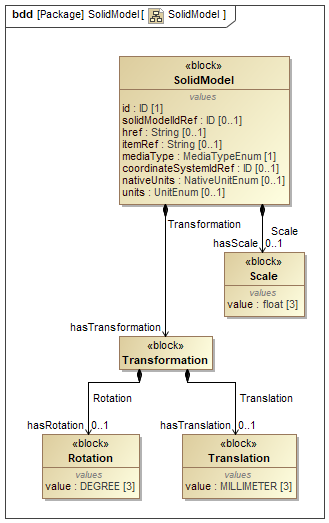
Note: See Configuration Schema Diagrams for XML schema.
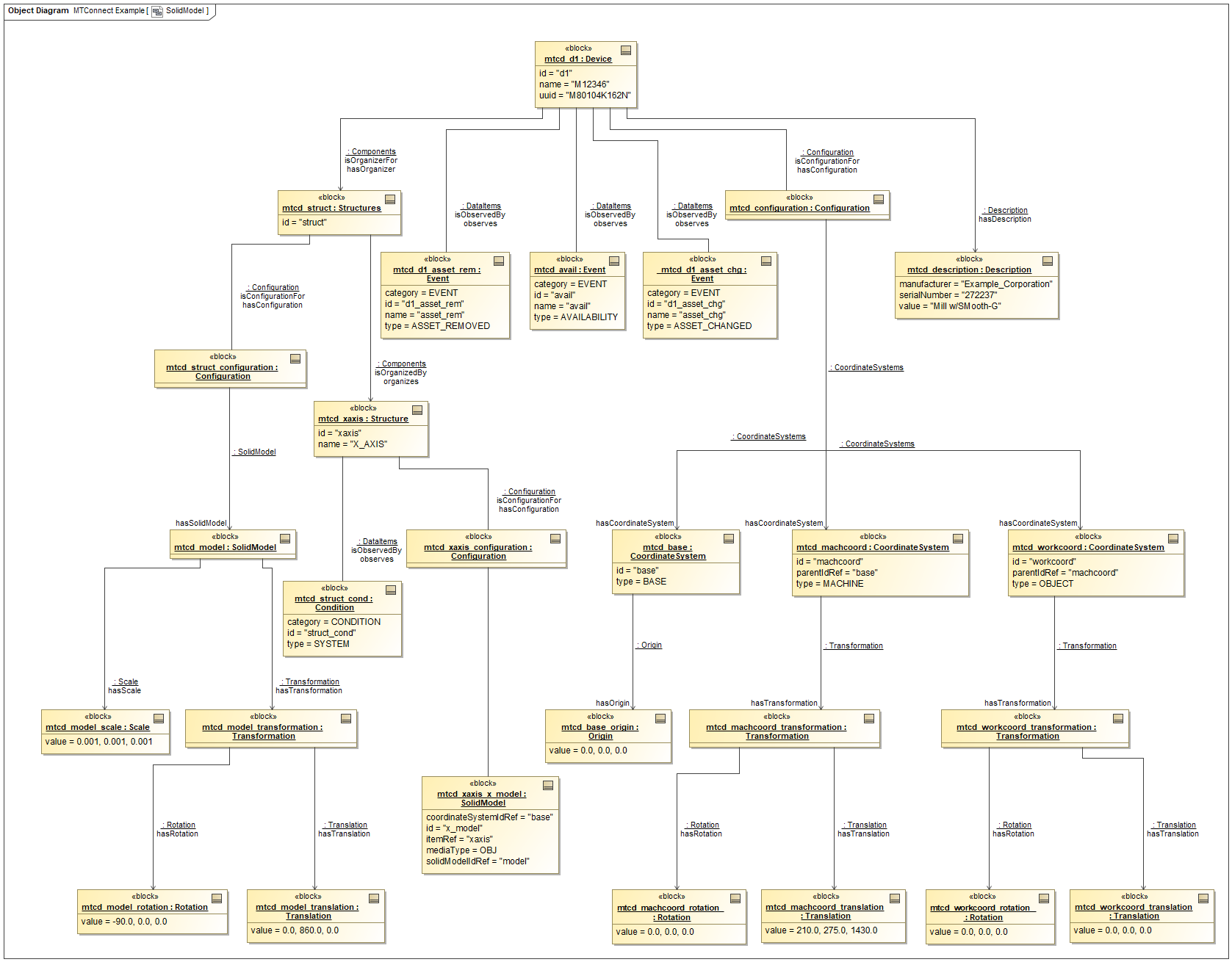
Note: See solidmodel-example for the XML representation of the same example.
- SolidModel (class)
Device Information Model / Configurations / SolidModel
references to a file with the three-dimensional geometry of the
ComponentorComposition.Description
The geometry MAY have a transformation and a scale to position the
Componentwith respect to the otherComponents. A geometry file can contain a set of assembled items, in this case, the SolidModel references the id of the assembly model file and the specific item within that file.The SolidModel MAY provide a translation, rotation, and scale to correctly place it relative to the other geometries in the machine. If the
Componentcan move and has a MotionConfiguration, the SolidModel will move when theComponentorCompositionmoves.Either an href or a modelIdRef and an itemRef MUST be specified.
- SoundLevel (class)
Observation Information Model / Observation Types / Sample Types
SOUND_LEVEL
- SoundLevel.AScale (class)
Observation Information Model / Observation Types / Sample Types
A Scale weighting factor. This is the default weighting factor if no factor is specified
- SoundLevel.BScale (class)
Observation Information Model / Observation Types / Sample Types
B Scale weighting factor
- SoundLevel.CScale (class)
Observation Information Model / Observation Types / Sample Types
C Scale weighting factor
- SoundLevel.DScale (class)
Observation Information Model / Observation Types / Sample Types
D Scale weighting factor
- SoundLevel.NoScale (class)
Observation Information Model / Observation Types / Sample Types
No weighting factor on the frequency scale
- Source (class)
Device Information Model / DataItems / Properties of DataItem
identifies the
Component,DataItem, orCompositionfrom which a measured value originates.- Source (package)
Reference Agent Architecture
Review the MTConnect definition and model details for Source, an MTConnect package.
- Source (class)
Reference Agent Architecture
Review the MTConnect definition and model details for Source, an MTConnect class.
- Specification (class)
Device Information Model / Configurations / Specifications
design characteristics for a piece of equipment.
- specification limit (class)
Glossary
limit defining a range of values designating acceptable performance for a variable.
- SpecificationLimit (class)
Observation Information Model / Observation Types / Event Types
SPECIFICATION_LIMIT
- SpecificationLimitResult (class)
DataTypes
Review the MTConnect definition and model details for SpecificationLimitResult, an MTConnect class.
- SpecificationLimits (class)
Device Information Model / Configurations / Specifications
set of limits that define a range of values designating acceptable performance for a variable.
- SpecificationLimits (class)
Observation Information Model / Observation Types / Event Types
SPECIFICATION_LIMITS
- SpecificationRelationship (class)
Device Information Model / DataItems / Properties of DataItem / Relationship Types for DataItem
AbstractDataItemRelationship that provides a semantic reference to another Specification described by type and idRef.
- SpecificationRelationshipTypeEnum (enumeration)
DataTypes
Review the MTConnect definition and model details for SpecificationRelationshipTypeEnum, an MTConnect enumeration.
- Specifications (package)
Device Information Model / Configurations
This section provides semantic information for the Specification entity.
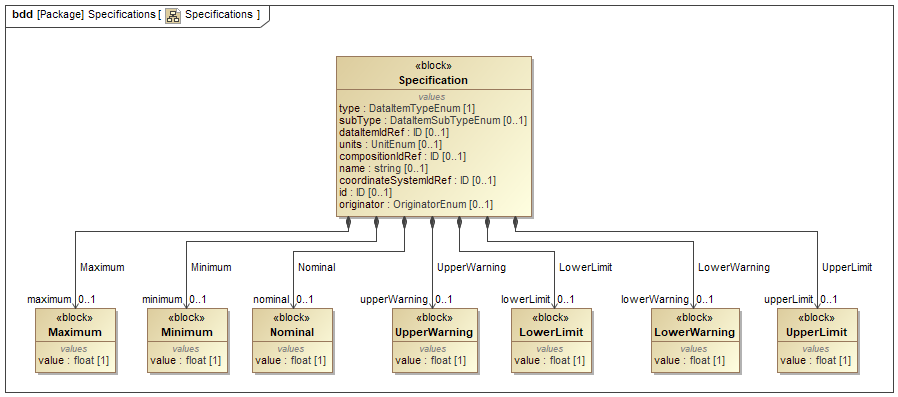
Note: See Configuration Schema Diagrams for XML schema.
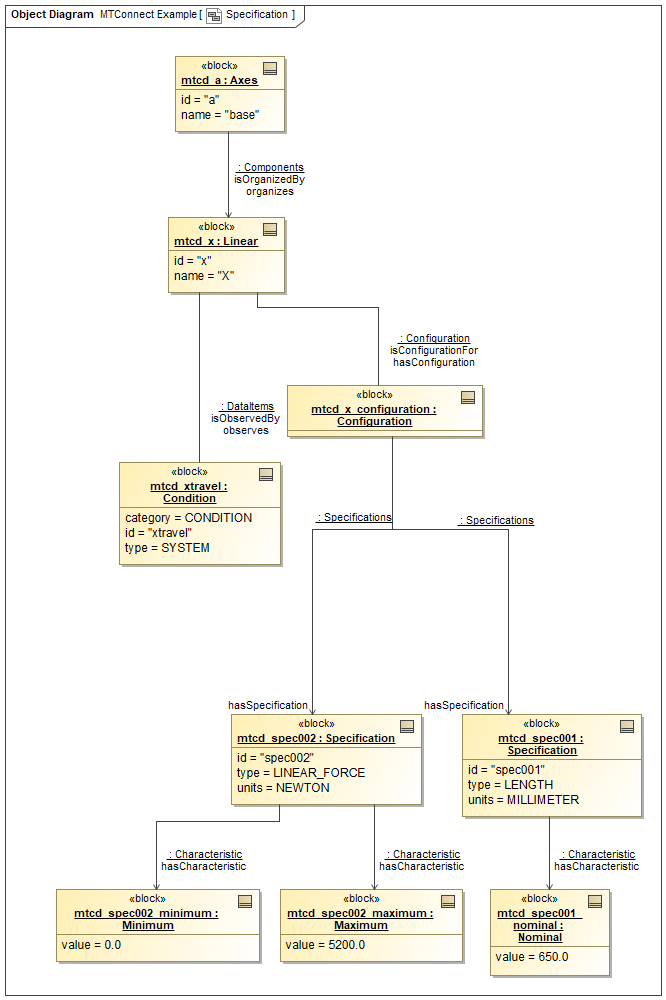
Note: See specification-example for the XML representation of the same example.
- Spindle (class)
Device Information Model / Components / Component Types
Componentthat provides an axis of rotation for the purpose of rapidly rotating a part or a tool to provide sufficient surface speed for cutting operations.Spindlewas DEPRECATED in MTConnect Version 1.1 and was replaced by RotaryMode.- spindle (class)
Glossary
mechanism that provides rotational capabilities to a piece of equipment.
Note: Typically used for either work holding, materials or cutting tools.
- SpindleInterlock (class)
Observation Information Model / Observation Types / Event Types
SPINDLE_INTERLOCK
- SpindleInterlockEnum (enumeration)
DataTypes
Review the MTConnect definition and model details for SpindleInterlockEnum, an MTConnect enumeration.
- SpindleSpeed (class)
Observation Information Model / Observation Types / Sample Types
SPINDLE_SPEED
- SpindleSpeed.Actual (class)
Observation Information Model / Observation Types / Sample Types
measured or reported value of an observation.
DEPRECATED in Version 1.3.
- SpindleSpeed.Commanded (class)
Observation Information Model / Observation Types / Sample Types
directive value including adjustments such as an offset or overrides.
DEPRECATED in Version 1.3.
- SpindleSpeed.Override (class)
Observation Information Model / Observation Types / Sample Types
operator's overridden value.
DEPRECATED in Version 1.3.
- Spreader (class)
Device Information Model / Components / Component Types
leaf
Componentthat flattens or spreading materials.- StagingPot (class)
Device Information Model / Components / Component Types
leaf
Componentthat is a Pot for a tool that is awaiting transfer to a ToolMagazine or Turret from outside of the piece of equipment.- standard (class)
Glossary
document established by consensus that provides rules, guidelines, or characteristics for activities or their results.. ISO/IEC Guide 2:2004
- standard uncertainty (class)
Glossary
uncertainty of the result of a measurement expressed as a standard deviation. JCGM 100:2008 2.3.1
- Station (class)
Device Information Model / Components / Component Types
leaf
Componentcomposed of a storage or mounting location for a tool associated with a Turret, GangToolBar, or ToolRack.- StatisticEnum (enumeration)
DataTypes
Review the MTConnect definition and model details for StatisticEnum, an MTConnect enumeration.
- Status (class)
Asset Information Model / Cutting Tool / Cutting Tool Life Cycle
status of the cutting tool.
- StepDiameterLength (class)
Asset Information Model / Cutting Tool / Cutting Item / Cutting Item Measurement Subtypes
length of a portion of a stepped tool that is related to a corresponding cutting diameter measured from the cutting reference point of that cutting diameter to the point on the next cutting edge at which the diameter starts to change.
- StepIncludedAngle (class)
Asset Information Model / Cutting Tool / Cutting Item / Cutting Item Measurement Subtypes
angle between a major edge on a step of a stepped tool and the same cutting edge rotated 180 degrees about its tool axis.
- stereotype (class)
Glossary
defines how an existing UML metaclass may be extended as part of a profile.
- Stereotypes (package)
Review the MTConnect definition and model details for Stereotypes, an MTConnect package.
- Stock (class)
Device Information Model / Components / Component Types
Materialthat is used in a manufacturing process and to which work is applied in a machine or piece of equipment to produce parts.Description
Stock may be either a continuous piece of material from which multiple parts may be produced or it may be a discrete piece of material that will be made into a part or a set of parts.
- Storage (package)
Reference Agent Architecture / Rest
Review the MTConnect definition and model details for Storage, an MTConnect package.
- StorageBattery (class)
Device Information Model / Components / Component Types
leaf
Componentcomposed of one or more cells in which chemical energy is converted into electricity and used as a source of power.- StorageService (class)
Reference Agent Architecture
Review the MTConnect definition and model details for StorageService, an MTConnect class.
- Strain (class)
Observation Information Model / Observation Types / Sample Types
STRAIN
- streaming data (class)
Glossary / Protocol Terms
observations published by a piece of equipment defined by the equipment metadata.
- structural element (class)
Glossary / XML Terms
element that organizes information that represents the physical and logical parts and sub-parts of a piece of equipment.
- Structure (class)
Device Information Model / Components / Component Types
Componentcomposed of part(s) comprising the rigid bodies of the piece of equipment.- Structures (class)
Device Information Model / Components / Component Types / Component Organizer Types
- subscribe (class)
Glossary / Protocol Terms
receiving messages in a publish and subscribe pattern.
- SubTaskRef (class)
Asset Information Model / Task / Task Archetype
Review the MTConnect definition and model details for SubTaskRef, an MTConnect class.
- subtype (class)
Glossary
secondary or subordinate type of categorization or classification of information.
- Supporting Documents (package)
Assets Appendix
XML Schema Diagrams
See XML schemas for the MTConnect standard here: https://schemas.mtconnect.org/.
Assets Schema Diagrams
See
Assetelement inMTConnectAssetsschema.See
Descriptionelement inMTConnectAssetsschema.CuttingTool Schema Diagrams
See
CuttingToolelement inMTConnectAssetsschema.See
CuttingToolDefinitionelement inMTConnectAssetsschema.See
CuttingToolArchetypeReferenceelement inMTConnectAssetsschema.CuttingToolLifeCycle Schema Diagrams
See
CuttingToolLifeCycleelement inMTConnectAssetsschema.See
CutterStatuselement inMTConnectAssetsschema.See
Locationelement inMTConnectAssetsschema.See
Measurementelement inMTConnectAssetsschema.See
ProcessFeedRateelement inMTConnectAssetsschema.See
ProcessSpindleSpeedelement inMTConnectAssetsschema.See
ReconditionCountelement inMTConnectAssetsschema.See
ToolLifeelement inMTConnectAssetsschema.CuttingItem Schema Diagrams
See
CuttingItemselement inMTConnectAssetsschema.See
CuttingItemelement inMTConnectAssetsschema.See
ItemLifeelement inMTConnectAssetsschema.ISO 13399 Diagrams
Measurement Diagrams
Cutting Tool Examples
Shell Mill
<?xml version="1.0" encoding="UTF-8"?>
<MTConnectAssets
xmlns:m="urn:mtconnect.org:MTConnectAssets:1.2"
xmlns="urn:mtconnect.org:MTConnectAssets:1.2"
xmlns:xsi="http://www.w3.org/2001/XMLSchema-instance"
xsi:schemaLocation="urn:mtconnect.org:MTConnectAssets:1.2
http://mtconnect.org/schemas/MTConnectAssets\\_1.2.xsd">
  <Header creationTime="2011-05-11T13:55:22"
  assetBufferSize="1024" sender="localhost"
  assetCount="2" version="1.2" instanceId="1234"/>
  <Assets>
  <CuttingTool serialNumber="1" toolId="KSSP300R4SD43L240"
  timestamp="2011-05-11T13:55:22" assetId="KSSP300R4SD43L240.1"
  manufacturers="KMT,Parlec">
    <CuttingToolLifeCycle>
    <CutterStatus><Status>NEW</Status></CutterStatus>
    <ProcessSpindleSpeed maximum="13300"
    nominal="605">10000</ProcessSpindleSpeed>
    <ProcessFeedRate
    nominal="9.22">9.22</ProcessSpindleSpeed>
    <ConnectionCodeMachineSide>CV50
    </ConnectionCodeMachineSide>
    <Measurements>
      <BodyDiameterMax code="BDX">73.25
      </BodyDiameterMax>
      <OverallToolLength nominal="222.25"
        minimum="221.996" maximum="222.504"
        code="OAL">222.25</OverallToolLength>
      <UsableLengthMax code="LUX" nominal="82.55">82.55
      </UsableLengthMax>
      <CuttingDiameterMax code="DC" nominal="76.2"
        maximum="76.213" minimum="76.187">76.2
      </CuttingDiameterMax>
      <BodyLengthMax code="LF" nominal="120.65"
        maximum="120.904" minimum="120.404">120.65
      </BodyLengthMax>
      <DepthOfCutMax code="APMX"
      nominal="60.96">60.95</DepthOfCutMax>
      <FlangeDiameterMax code="DF"
        nominal="98.425">98.425</FlangeDiameterMax>
    </Measurements>
    <CuttingItems count="24">
      <CuttingItem indices="1-24" itemId="SDET43PDER8GB"
        manufacturers="KMT" grade="KC725M">
        <Measurements>
          <CuttingEdgeLength code="L" nominal="12.7"
            minimum="12.675" maximum="12.725">12.7
          </CuttingEdgeLength>
        <WiperEdgeLength code="BS" nominal=
          "2.56">2.56</WiperEdgeLength>
        <IncribedCircleDiameter code="IC"
          nominal="12.7">12.7
        </IncribedCircleDiameter>
        <CornerRadius code="RE" nominal="0.8">
          0.8</CornerRadius>
      </Measurements>
      </CuttingItem>
    </CuttingItems>
    </CuttingToolLifeCycle>
    </CuttingTool>
  </Assets>
</MTConnectAssets>
Example for Indexable Insert Measurements
Step Drill
<?xml version="1.0" encoding="UTF-8"?>
<MTConnectAssets xmlns:m="urn:mtconnect.org:MTConnectAssets:1.2"
xmlns="urn:mtconnect.org:MTConnectAssets:1.2"
xmlns:xsi="http://www.w3.org/2001/XMLSchema-instance"
xsi:schemaLocation="urn:mtconnect.org:MTConnectAssets:1.2
http://mtconnect.org/schemas/MTConnectAssets\\_1.2.xsd">
  <Header creationTime="2011-05-
  11T13:55:22" assetBufferSize="1024"
  sender="localhost" assetCount="2" version="1.2" instanceId="1234"/>
  <Assets>
    <CuttingTool serialNumber="1 " toolId="B732A08500HP"
    timestamp="2011-05-11T13:55:22" assetId="B732A08500HP "
    manufacturers="KMT,Parlec">
      <Description>
        Step Drill - KMT, B732A08500HP Grade KC7315
        Adapter - Parlec, C50-M12SF300-6
      </Description>
      <CuttingToolLifeCycle>
        <CutterStatus><Status>NEW</Status></CutterStatus>
        <ProcessSpindleSpeed nominal="5893">5893</ProcessSpindleSpeed>
        <ProcessFeedRate nominal="2.5">2.5</ProcessFeedRate>
        <ConnectionCodeMachineSide>CV50 Taper</ConnectionCodeMachineSide>
        <Measurements>
          <BodyDiameterMax code="BDX">31.8</BodyDiameterMax>
          <BodyLengthMax code="LBX" nominal="120.825" maximum="126.325"
          minimum="115.325">120.825</BodyLengthMax>
          <ProtrudingLength code="LPR" nominal="155.75" maximum="161.25"
          minimum="150.26">155.75</ProtrudingLength>
          <FlangeDiameterMax code="DF"
          nominal="98.425">98.425</FlangeDiameterMax>
          <OverallToolLength nominal="257.35" minimum="251.85"
          maximum="262.85" code="OAL">257.35</OverallToolLength>
        </Measurements>
        <CuttingItems count="2">
          <CuttingItem indices="1" manufacturers="KMT" grade="KC7315">>
            <Measurements>
              <CuttingDiameter code="DC1" nominal="8.5" maximum="8.521"
              minimum="8.506">8.5135</CuttingDiameter>
              <StepIncludedAngle code="STA1" nominal="90" maximum="91"
              minimum="89">90</StepIncludedAngle>
              <FunctionalLength code="LF1" nominal="154.286"
              minimum="148.786"
              maximum="159.786">154.286</FunctionalLength>
              <StepDiameterLength code="SDL1"
              nominal="9">9</StepDiameterLength>
              <PointAngle code="SIG" nominal="135" minimum="133"
              maximum="137">135</PointAngle>
            </Measurements>
          </CuttingItem>
          <CuttingItem indices="2" manufacturers="KMT" grade="KC7315">>
            <Measurements>
              <CuttingDiameter code="DC2" nominal="12" maximum="12.011"
              minimum="12">12</CuttingDiameter>
              <FunctionalLength code="LF2" nominal="122.493"
              maximum="127.993"
              minimum="116.993">122.493</FunctionalLength>
              <StepDiameterLength code="SDL2"
              nominal="9">9</StepDiameterLength>
            </Measurements>
          </CuttingItem>
        </CuttingItems>
      </CuttingToolLifeCycle>
    </CuttingTool>
  </Assets>
</MTConnectAssets>
Example for Step Mill Side View
Shell Mill with Individual Loci
<?xml version="1.0" encoding="UTF-8"?>
<MTConnectAssets xmlns:m="urn:mtconnect.org:MTConnectAssets:1.2"
xmlns="urn:mtconnect.org:MTConnectAssets:1.2"
xmlns:xsi="http://www.w3.org/2001/XMLSchema-instance"
xsi:schemaLocation="urn:mtconnect.org:MTConnectAssets:1.2
http://mtconnect.org/schemas/MTConnectAssets\\_1.2.xsd">
  <Header creationTime="2011-05-11T13:55:22" assetBufferSize="1024"
  sender="localhost" assetCount="2" version="1.2" instanceId="1234"/>
  <Assets>
    <CuttingTool serialNumber="1" toolId="KSSP300R4SD43L240"
    timestamp="2011-05-11T13:55:22" assetId="KSSP300R4SD43L240.1"
    manufacturers="KMT,Parlec">
      <Description>Keyway: 55 degrees</Description>
      <CuttingToolLifeCycle>
        <CutterStatus><Status>NEW</Status></CutterStatus>
        <Measurements>
          <UsableLengthMax code="LUX"
          nominal="82.55">82.55</UsableLengthMax>
          <CuttingDiameterMax code="DC" nominal="76.2" maximum="76.213"
          minimum="76.187">76.2</CuttingDiameterMax>
          <DepthOfCutMax code="APMX" nominal="60.96">60.95</DepthOfCutMax>
        </Measurements>
        <CuttingItems count="24">
          <CuttingItem indices="1" itemId="SDET43PDER8GB"
          manufacturers="KMT">
            <Locus>FLUTE: 1, ROW: 1</Locus>
            <Measurements>
             <DriveAngle code="DRVA" nominal="55">55</DriveAngle>
           </Measurements>
          </CuttingItem>
          <CuttingItem indices="2-24" itemId="SDET43PDER8GB"
          manufacturers="KMT">
            <Locus>FLUTE: 2-4, ROW: 1; FLUTE: 1-4, ROW 2-6</Locus>
          </CuttingItem>
        </CuttingItems>
      </CuttingToolLifeCycle>
    </CuttingTool>
  </Assets>
</MTConnectAssets>
Example for Shell Mill with Explicate Loci
Drill with Individual Loci
<?xml version="1.0" encoding="UTF-8"?>
<MTConnectAssets xmlns:m="urn:mtconnect.org:MTConnectAssets:1.2"
xmlns="urn:mtconnect.org:MTConnectAssets:1.2"
xmlns:xsi="http://www.w3.org/2001/XMLSchema-instance"
xsi:schemaLocation="urn:mtconnect.org:MTConnectAssets:1.2
http://mtconnect.org/schemas/MTConnectAssets\\_1.2.xsd">
  <Header creationTime="2011-05-11T13:55:22" assetBufferSize="1024"
  sender="localhost" assetCount="2" version="1.2" instanceId="1234"/>
  <Assets>
    <CuttingTool serialNumber="1" toolId="KSEM0781LD"
    timestamp="2011-05-11T13:55:22" assetId="KSEM0781LD.1" manufacturers="KMT">
      <CuttingToolLifeCycle>
        <CutterStatus><Status>NEW</Status></CutterStatus>
        <ConnectionCodeMachineSide>HSK63A</ConnectionCodeMachineSide>
        <Measurements>
          <BodyDiameterMax code="BDX">52.75</BodyDiameterMax>
          <OverallToolLength nominal="172.29"
          code="OAL">172.29</OverallToolLength>
          <UsableLengthMax code="LUX" nominal="49">49</UsableLengthMax>
          <FlangeDiameterMax code="DF"
          nominal="62.94">62.94</FlangeDiameterMax>
        </Measurements>
        <CuttingItems count="3">
          <CuttingItem indices="1" itemId="KSEM0781LD" manufacturers="KMT"
          grade="KC7015">
            <Locus>FLUTE: 1, ROW: 1</Locus>
            <Measurements>
         <FunctionalLength code="LF1" nominal="154.42">154.42</FunctionalLength>
         <CuttingDiameter code="DC1" nominal="19.844">19.844</CuttingDiameter>
         <PointAngle code="SIG" nominal="140">140</PointAngle>
         <ToolCuttingEdgeAngle code="KAPR1" nominal="45">45</ToolCuttingEdgeAngle>
         <StepDiameterLength code="SLD1" nominal="39.8">39.8</StepDiameterLength>
            </Measurements>
          </CuttingItem>
          <CuttingItem indices="2-3" itemId="TPMT-21.52-FP"
          manufacturers="KMT" grade="KCM15">
            <Locus>FLUTE: 1-2, ROW: 2</Locus>
            <Measurements>
         <FunctionalLength code="LF2" nominal="112.9">119.2</FunctionalLength>
         <CuttingDiameter code="DC2" nominal="31">31</CuttingDiameter>
            </Measurements>
          </CuttingItem>
        </CuttingItems>
      </CuttingToolLifeCycle>
    </CuttingTool>
  </Assets>
</MTConnectAssets>
Example for Step Drill with Explicate Loci
Shell Mill with Different Inserts on First Row
<?xml version="1.0" encoding="UTF-8"?>
<MTConnectAssets xmlns:m="urn:mtconnect.org:MTConnectAssets:1.2"
xmlns="urn:mtconnect.org:MTConnectAssets:1.2"
xmlns:xsi="http://www.w3.org/2001/XMLSchema-instance"
xsi:schemaLocation="urn:mtconnect.org:MTConnectAssets:1.2
http://mtconnect.org/schemas/MTConnectAssets\\_1.2.xsd">
  <Header creationTime="2011-05-11T13:55:22" assetBufferSize="1024"
  sender="localhost" assetCount="2" version="1.2" instanceId="1234"/>
  <Assets>
    <CuttingTool serialNumber="1" toolId="XXX" timestamp="2011-05-11T13:55:22"
    assetId="XXX.1" manufacturers="KMT">
      <CuttingToolLifeCycle>
        <CutterStatus><Status>NEW</Status></CutterStatus>
        <Measurements>
          <DepthOfCutMax code="APMX" nominal="47.8">47.8</DepthOfCutMax>
          <CuttingDiameterMax code="DC"
          nominal="50.8">50.8</CuttingDiameterMax>
          <UsableLengthMax code="LUX"
          nominal="78.74">78.74</UsableLengthMax>
        </Measurements>
        <CuttingItems count="9">
          <CuttingItem indices="1-3" itemId="EDPT180564PDER-LD"
          manufacturers="KMT">
            <Locus>FLUTE: 1-3, ROW: 1</Locus>
            <Measurements>
              <CornerRadius code="RE" nominal="6.25">6.35</CornerRadius>
            </Measurements>
          </CuttingItem>
          <CuttingItem indices="4-9" itemId="EDPT180508PDER-LD"
          manufacturers="KMT">
            <Locus>FLANGE: 1-4, ROW: 2-3</Locus>
          </CuttingItem>
        </CuttingItems>
      </CuttingToolLifeCycle>
    </CuttingTool>
  </Assets>
</MTConnectAssets>
Example for Shell Mill with Different Inserts on First Row
File Schema Diagrams
See
Fileelement inMTConnectAssetsschema.RawMaterial Schema Diagrams
See
RawMaterialelement inMTConnectAssetsschema.QIFDocumentWrapper Schema Diagrams
See
QIFDocumentWrapperelement inMTConnectAssetsschema.Assets Introduction
Purpose of This Document
This document, Asset Information Model of the MTConnect Standard, details information that is common to all types of Assets. Part 4.0 of the MTConnect Standard provide semantic models for entities that are used in the manufacturing process, but are not considered to be a piece of equipment. These entities are defined as Assets. These assets may be removed from a piece of equipment without detriment to the function of the equipment and can be associated with other pieces of equipment during their lifecycle. The data associated with these assets may be retrieved from multiple sources that are each responsible for providing their knowledge of the asset.
Terminology and Conventions
Refer to Fundamentals for a dictionary of terms, reserved language, and document conventions used in the MTConnect Standard.
{{printglossarytitle=General Terms, type=general}} {{printglossarytitle=Information Model Terms, type=informationmodel}} {{printglossarytitle=Protocol Terms, type=protocol}} {{printglossarytitle=HTTP Terms, type=http}} {{printglossarytitle=XML Terms, type=xml}} {{printglossarytitle=MTConnect Terms, type=conceptmodel}}
{{printbibliographytitle=MTConnect References,keyword=MTC}}
{{printbibliographytitle=Other References,notkeyword=MTC}}
Devices Introduction
Purpose of This Document
This document, Device Information Model of the MTConnect Standard, establishes the rules and terminology to be used by designers to describe the function and operation of a piece of equipment and to define the data that is provided by an agent from the equipment. The Device Information Model also defines the structure for the response document that is returned from an agent in response to a probe request.
In the MTConnect Standard, equipment represents any tangible property that is used in the operations of a manufacturing facility. Examples of equipment are machine tools, ovens, sensor units, workstations, software applications, and bar feeders.
Note: See Observation Information Model of the MTConnect Standard for details on the response document that are returned from an agent in response to a sample request or current request.
Terminology and Conventions
Refer to Fundamentals for a dictionary of terms, reserved language, and document conventions used in the MTConnect Standard.
{{printglossarytitle=General Terms, type=general}} {{printglossarytitle=Information Model Terms, type=informationmodel}} {{printglossarytitle=Protocol Terms, type=protocol}} {{printglossarytitle=HTTP Terms, type=http}} {{printglossarytitle=XML Terms, type=xml}} {{printglossarytitle=MTConnect Terms, type=conceptmodel}}
{{printbibliographytitle=MTConnect References,keyword=MTC}}
{{printbibliographytitle=Other References,notkeyword=MTC}}
Devices Appendix
XML Schema Diagrams
See XML schemas for the MTConnect standard here: https://schemas.mtconnect.org/.
Components Schema Diagrams
See
Componentselement inMTConnectDevicesschema.See
Descriptionelement inMTConnectDevicesschema.DataItems Schema Diagrams
See
DataItemselement inMTConnectDevicesschema.See
Sourceelement inMTConnectDevicesschema.See
Constraintselement inMTConnectDevicesschema.See
Filterelement inMTConnectDevicesschema.See
Definitionelement inMTConnectDevicesschema.References Schema Diagrams
See
Referenceselement inMTConnectDevicesschema.See
ComponentRefelement inMTConnectDevicesschema.See
DataItemRefelement inMTConnectDevicesschema.Configuration Schema Diagrams
See
Configurationelement inMTConnectDevicesschema.See
CoordinateSystemelement inMTConnectDevicesschema.See
Motionelement inMTConnectDevicesschema.See
Relationshipselement inMTConnectDevicesschema.See
ComponentRelationshipelement inMTConnectDevicesschema.See
DeviceRelationshipelement inMTConnectDevicesschema.See
SensorConfigurationelement inMTConnectDevicesschema.See
SolidModelelement inMTConnectDevicesschema.See
Specificationselement inMTConnectDevicesschema.See
ProcessSpecificationelement inMTConnectDevicesschema.XML Examples
Device Entity Hierarchy Example
<Devices>
  <Device id="d1" name="M12346" uuid="M80104K162N">
    <Components>
    <Axes id="a" name="base">
    <Components>
      <Linear id="x" name="X"/>
      <Linear id="y" name="Y"/>
      <Linear id="z" name="Z"/>
      <Rotary id="ar" name="B"/>
      <Linear id="w" name="Z3" nativeName="W"/>
      <Rotary id="c" name="C"/>
    </Components>
    </Axes>
    <Controller id="cont" name="controller">
    <Components>
      <Path id="path1" name="path"/>
    </Components>
    </Controller>
    <Door id="door1" name="door"/>
    <Systems id="systems" name="systems">
    <Components>
      <WorkEnvelope id="we1" name="workenv">
      <Compositions>
        <Composition type="WORKPIECE" id="wp"/>
        <Composition type="TABLE" id="tbl"/>
      </Compositions>
      </WorkEnvelope>
      <Electric id="elec" name="electric"/>
      <Hydraulic id="hydraulic" name="hydraulic"/>
      <Coolant id="coolant" name="coolant"/>
      <Pneumatic id="pneumatic" name="pneumatic"/>
      <Lubrication id="lubrication" name="lubrication"/>
    </Components>
    </Systems>
    <Auxiliaries id="Aux" name="auxiliaries">
    <Components>
      <Environmental id="room" name="environmental"/>
    </Components>
    </Auxiliaries>
    <Resources id="resources" name="resources">
    <Components>
      <Personnel id="personnel" name="personnel"/>
      <Materials id="materials" name="materials">
      <Components>
        <Stock id="procstock" name="stock"/>
      </Components>
      <Materials/>
    </Components>
    </Resources>
    </Components>
  </Device>
</Devices>
Device Entity Hierarchy Example
Component Example
<Devices>
  <Device id="d1" name="M12346" uuid="M80104K162N">
    <Description manufacturer="Example_Corporation"
      serialNumber="272237"> Mill w/SMooth-G
    </Description>
  <DataItems>
    <DataItem category="EVENT" id="avail" name="avail" type="AVAILABILITY"/>
    <DataItem category="EVENT" id="d1_asset_chg" name="asset_chg" type="ASSET_CHANGED"/>
    <DataItem category="EVENT" id="d1_asset_rem" name="asset_rem" type="ASSET_REMOVED"/>
  </DataItems>
    <Components>
    <Controller id="cont" name="controller">
      <DataItems>
      <DataItem category="EVENT" id="estop" name="estop" type="EMERGENCY_STOP"/>
      <DataItem category="CONDITION" id="logic_cond" type="LOGIC_PROGRAM"/>
      <DataItem category="CONDITION" id="cont_system" type="SYSTEM"/>
      <DataItem category="SAMPLE" id="cut_time" type="ACCUMULATED_TIME" units="SECOND"/>
    </DataItems>
    <Components>
      <Path id="path1" name="path">
        <DataItems>
        <DataItem category="EVENT" id="execution" name="execution" type="EXECUTION"/>
        <DataItem category="SAMPLE" id="cspeed" subType="ACTUAL" type="CUTTING_SPEED" units="MILLIMETER/SECOND"/>
        <DataItem category="CONDITION" id="path_system" type="SYSTEM"/>
        <DataItem category="EVENT" id="cvars" representation="DATA_SET" type="VARIABLE"/>
        <DataItem category="EVENT" id="woffset" representation="TABLE" type="WORK_OFFSET"/>
      </DataItems>
      </Path>
    </Components>
    </Controller>
  </Components>
  </Device>
</Devices>
Component Example
Component with Compositions Example
In XML,
Compositiontypes are represented differently thanComponenttypes. ForComponenttypes, the element name is Pascal Case of theComponenttype name. Whereas, the element name for allCompositiontypes isCompositionand the type is defined by thetypeattribute of the element (see example below).<WorkEnvelope id="we1" name="workenv"> <DataItems> <DataItem category="CONDITION" id="hardware1" name="hardware1" type="HARDWARE"/> </DataItems> <Compositions> <Composition type="WORKPIECE" id="wp"/> <Composition type="TABLE" id="tbl"/> </Compositions> </WorkEnvelope>Component with Compositions Example
CoordinateSystem Example
<Devices>
  <Device id="d1" name="M12346" uuid="M80104K162N">
    <Description manufacturer="Example_Corporation"
      serialNumber="272237"> Mill w/SMooth-G
    </Description>
    <DataItems>
      <DataItem id="avail" type="AVAILABILITY" category="EVENT"/>
      <DataItem category="EVENT" id="d1_asset_chg" name="asset_chg" type="ASSET_CHANGED"/>
      <DataItem category="EVENT" id="d1_asset_rem" name="asset_rem" type="ASSET_REMOVED"/>
    </DataItems>
    <Configuration>
      <CoordinateSystems>
        <CoordinateSystem id="base" type="BASE">
          <Origin>0 0 0</Origin>
        </CoordinateSystem>
        <CoordinateSystem id="machcoord" type="MACHINE" parentIdRef="base">
          <Transformation>
            <Translation>210 275 1430</Translation>
            <Rotation>0 0 0</Rotation>
          </Transformation>
        </CoordinateSystem>
        <CoordinateSystem id="workcoord" type="OBJECT" parentIdRef="machcoord">
          <Transformation>
            <Translation>0 0 0</Translation>
            <Rotation>0 0 0</Rotation>
          </Transformation>
        </CoordinateSystem>
      </CoordinateSystems>
    </Configuration>
  </Device>
</Devices>
CoordinateSystem Example
Motion Example
<Devices>
  <Device id="d1" name="M12346" uuid="M80104K162N">
    <Description manufacturer="Example_Corporation"
      serialNumber="272237"> Mill w/SMooth-G
    </Description>
    <DataItems>
      <DataItem id="avail" type="AVAILABILITY" category="EVENT"/>
      <DataItem category="EVENT" id="d1_asset_chg" name="asset_chg" type="ASSET_CHANGED"/>
      <DataItem category="EVENT" id="d1_asset_rem" name="asset_rem" type="ASSET_REMOVED"/>
    </DataItems>
    <Configuration>
      <CoordinateSystems>
        <CoordinateSystem id="base" type="BASE">
          <Origin>0 0 0</Origin>
        </CoordinateSystem>
        <CoordinateSystem id="machcoord" type="MACHINE" parentIdRef="base">
          <Transformation>
            <Translation>210 275 1430</Translation>
            <Rotation>0 0 0</Rotation>
          </Transformation>
        </CoordinateSystem>
        <CoordinateSystem id="workcoord" type="OBJECT" parentIdRef="machcoord">
          <Transformation>
            <Translation>0 0 0</Translation>
            <Rotation>0 0 0</Rotation>
          </Transformation>
        </CoordinateSystem>
      </CoordinateSystems>
    </Configuration>
    <Components>
      <Axes id="a" name="base">
        <Components>
          <Linear id="x" name="X">
            <Configuration>
              <Motion id="xmotion" coordinateSystemIdRef="machcoord" type="PRISMATIC" actuation="DIRECT">
                <Transformation>
                  <Translaton>300 915 590</Translaton>
                  <Rotation>0 0 0</Rotation>
                </Transformation>
                <Axis>1.0 0 0</Axis>
              </Motion>
            </Configuration>
          </Linear>
          <DataItems>
            <DataItem id="xtravel" type="SYSTEM" category="CONDITION">
          </DataItems>
        </Components>
      </Axes>
    </Components>
  </Device>
</Devices>
Motion Example
Relationship Example
<Components>
  <Axes id="a" name="base">
    <Components>
      <Linear id="x" name="X">
        <Configuration>
          <Relationships>
            <ComponentRelationship id="xpar" type="PARENT" idRef="we1"/>
          </Relationships>
        </Configuration>
      </Linear>
      <DataItems>
        <DataItem id="xtravel" type="SYSTEM" category="CONDITION">
      </DataItems>
    </Components>
  </Axes>
  <Systems id="systems" name="systems">
    <Components>
      <WorkEnvelope id="we1" name="workenv">
        <Compositions>
          <Composition type="WORKPIECE" id="wp"/>
          <Composition type="TABLE" id="tbl"/>
        </Compositions>
        <DataItems>
          <DataItem id="we1cond" type="SYSTEM" category="CONDITION">
        </DataItems>
      </WorkEnvelope>
    </Components>
  </Systems>
</Components>
Relationship Example
SolidModel Example
<Devices>
  <Device id="d1" name="M12346" uuid="M80104K162N">
    <Description manufacturer="Example_Corporation"
      serialNumber="272237"> Mill w/SMooth-G
    </Description>
    <DataItems>
      <DataItem id="avail" type="AVAILABILITY" category="EVENT"/>
      <DataItem category="EVENT" id="d1_asset_chg" name="asset_chg" type="ASSET_CHANGED"/>
      <DataItem category="EVENT" id="d1_asset_rem" name="asset_rem" type="ASSET_REMOVED"/>
    </DataItems>
    <Configuration>
      <CoordinateSystems>
        <CoordinateSystem id="base" type="BASE">
          <Origin>0 0 0</Origin>
        </CoordinateSystem>
        <CoordinateSystem id="machcoord" type="MACHINE" parentIdRef="base">
          <Transformation>
            <Translation>210 275 1430</Translation>
            <Rotation>0 0 0</Rotation>
          </Transformation>
        </CoordinateSystem>
        <CoordinateSystem id="workcoord" type="OBJECT" parentIdRef="machcoord">
          <Transformation>
            <Translation>0 0 0</Translation>
            <Rotation>0 0 0</Rotation>
          </Transformation>
        </CoordinateSystem>
      </CoordinateSystems>
    </Configuration>
    <Components>
      <Structures id="struct">
        <Configuration>
          <SolidModel id="model" mediaType="OBJ" href="/objs/mazak.obj" coordinateSystemIdRef="base">
            <Transformation>
              <Translation>0 860 0</Translation>
              <Rotation>-90 0 0</Rotation>
            </Transformation>
            <Scale>0.001 0.001 0.001</Scale>
          </SolidModel>
        </Configuration>
        <Components>
          <Structure id="xaxis" name="X_AXIS">
            <Configuration>
              <SolidModel id="x_model" mediaType="OBJ" itemRef="xaxis" solidModelIdRef="model" coordinateSystemIdRef="base"/>
            </Configuration>
            <DataItems>
              <DataItem type="SYSTEM" category="CONDITION" id="struct_cond"/>
            </DataItems>
          </Structure>
        </Components>
      </Structures>
    </Components>
  </Device>
</Devices>
SolidModel Example
Specification Example
<Components>
  <Axes id="a" name="base">
    <Components>
      <Linear id="x" name="X">
        <Configuration>
          <Specifications>
            <Specification id="spec001" type="LENGTH" units="MILLIMETER">
              <Nominal>650</Nominal>
            </Specification>
            <Specification id="spec002" type="LINEAR_FORCE" units="NEWTON">
              <Maximum>5200</Maximum>
              <Minimum>0</Minimum>
            </Specification>
          </Specifications>
        </Configuration>
        <DataItems>
          <DataItem id="xtravel" type="SYSTEM" category="CONDITION">
        </DataItems>
      </Linear>
    </Components>
  </Axes>
</Components>
Specification Example
Example of sensing element provided as data item associated with a Component
<Components>
  <Axes id="a" name="base"
    <Components>
      <Rotary id="c" name="C">
        <DataItems>
          <DataItem type="TEMPERATURE" id="servotemp4"
            category="SAMPLE" nativeUnits="CELSIUS"
            compositionId="Bmotor" units="CELSIUS"/>
          </DataItems>
      </Rotary>
    </Components>
  </Axes>
</Components>
Example of sensing element provided as data item associated with a Component
Example of Sensor for rotary axis
<Components>
  <Axes id="a" name="base"
    <Components>
      <Rotary id="ar" name="B">
        <Components>
          <Sensor id="spdlm" name="Spindlemonitor">
            <DataItems>
              <DataItem type="DISPLACEMENT" id="cvib"
                category="SAMPLE" name="Svib"
                units="MILLIMETER"/>
            </DataItems>
          </Sensor >
        <Components>
      </Rotary>
    </Components>
  </Axes>
</Components>
Example of Sensor for rotary axis
Example of sensor unit with sensing element
<Axes id="a" name="base"
  <Components>
  <Sensor id="sens1" name="Sensorunit">
    <DataItems>
    <DataItem type="TEMPERATURE" id="sentemp"
      category="SAMPLE" name="Sensortemp"
      units="CELSIUS"/>
    </DataItems>
  </Sensor >
  <Linear id="x" name="X">
    <DataItems>
    <DataItem type="DISPLACEMENT" id="xvib"
      category="SAMPLE" name="xvib"
      units="MILLIMETER">
      <Source componentId="sens1"/>
    </DataItem>
    </DataItems>
  </Rotary>
  <Linear id="y" name="Y">
    <DataItems>
    <DataItem type="DISPLACEMENT" id="yvib"
      category="SAMPLE" name="yvib"
      units="MILLIMETER">
      <Source componentId="sens1"/>
    </DataItem>
    </DataItems>
  </Linear>
  <Components>
</Axes>
Example of sensor unit with sensing element
Example of configuration data for Sensor
<Sensor id="sensor" name="sensor">
  <Configuration>
    <SensorConfiguration>
      <FirmwareVersion>2.02</FirmwareVersion>
      <CalibrationDate>2010-05-16</CalibrationDate>
      <NextCalibrationDate>2010-05-16</NextCalibrationDate>
      <CalibrationInitials>WS</CalibrationInitials>
      <Channels>
        <Channel number="1" name="A/D:1">
          <Description>A/D With Thermister</Description>
        </Channel>
      </Channels>
    </SensorConfiguration>
  </Configuration>
  <DataItems>
    <DataItem category="CONDITION" id="sensorc"
      name="sensorc" type="SYSTEM" />
    <DataItem category="SAMPLE" id="senv" name="sensorc"
      type="VOLTAGE_DC" units="VOLT" subType="ACTUAL" />
  </DataItems>
</Sensor>
Example of configuration data for Sensor
Observations Introduction
Purpose of This Document
This document, Observation Information Model of the MTConnect Standard, establishes the rules and terminology that describes the information returned by an MTConnect Agent from a piece of equipment. The Observation Information Model}} also defines, in {{package(Observation Information Model, the structure for the response documents that are returned from an agent in response to a sample request or current request.
Observation Information Model is not a stand-alone document. This document is used in conjunction with Fundamentals which defines the fundamentals of the operation of the MTConnect Standard and Device Information Model that defines the semantic model representing the information that may be returned from a piece of equipment.
Note: Interface Interaction Model provides details on extensions to the Observation Information Model required to describe the interactions between pieces of equipment.
In the MTConnect Standard, equipment represents any tangible property that is used in the operation of a manufacturing facility. Examples of equipment are machine tools, ovens, sensor units, workstations, software applications, and bar feeders.
Terminology and Conventions
Refer to Fundamentals for a dictionary of terms, reserved language, and document conventions used in the MTConnect Standard.
{{printglossarytitle=General Terms, type=general}} {{printglossarytitle=Information Model Terms, type=informationmodel}} {{printglossarytitle=Protocol Terms, type=protocol}} {{printglossarytitle=HTTP Terms, type=http}} {{printglossarytitle=XML Terms, type=xml}} {{printglossarytitle=MTConnect Terms, type=conceptmodel}}
{{printbibliographytitle=MTConnect References,keyword=MTC}}
{{printbibliographytitle=Other References,notkeyword=MTC}}
Observations Appendix
XML Schema Diagrams
Observations Schema Diagrams
See
Streamselement inMTConnectStreamsschema.See
DeviceStreamelement inMTConnectStreamsschema.See
ComponentStreamelement inMTConnectStreamsschema.See
Sampleelement inMTConnectStreamsschema.See
Eventelement inMTConnectStreamsschema.See
Conditionelement inMTConnectStreamsschema.Representation Schema Diagrams
See
AbsTimeSerieselement inMTConnectStreamsschema.See
PartCountDiscreteelement inMTConnectStreamsschema.See
VariableDataSetelement inMTConnectStreamsschema.See
Entryelement inMTConnectStreamsschema.See
WorkOffsetTableelement inMTConnectStreamsschema.XML Examples
DeviceStream Example
<Streams>
  <DeviceStream name="M12346" uuid="M8010W4194N">
    <ComponentStream component="Device" name="M12346" componentId="d1">
      <Events>
        <Availability dataItemId="avail" sequence="156" timestamp="2021-10-01T14:26:38.668505Z">AVAILABLE</Availability>
        <AssetChanged assetType="CuttingTool" dataItemId="d1_asset_chg" sequence="75570" timestamp="2021-10-07T05:08:53.870206Z">M8010W4194N1.120</AssetChanged>
        <AssetRemoved assetType="CuttingTool" dataItemId="d1_asset_rem" sequence="140" timestamp="2021-10-01T11:40:08.101461Z">UNAVAILABLE</AssetRemoved>
      </Events>
    </ComponentStream>
    <ComponentStream component="Controller" name="controller" componentId="cont">
      <Events>
        <EmergencyStop dataItemId="estop" sequence="159" timestamp="2021-10-01T14:26:38.66869Z">ARMED</EmergencyStop>
      </Events>
      <Samples>
        <AccumulatedTime dataItemId="cut_time" sequence="75437" timestamp="2021-10-07T05:08:28.221704Z">1763070.0</AccumulatedTime>
      </Samples>
      <Condition>
        <Unavailable dataItemId="cont_system" sequence="72" timestamp="2021-10-11T21:04:03.251999Z" type="SYSTEM"/>
        <Warning dataItemId="cont_system" nativecode="313" nativeSeverity="50" sequence="75573" timestamp="2021-10-07T05:08:58.518317Z" type="LOGIC_PROGRAM">PALLET ARM DOWN RS. MALF.</Warning>
      </Condition>
    </ComponentStream>
    <ComponentStream component="Path" name="path" componentId="path1">
      <Events>
        <Execution dataItemId="execution" name="execution" sequence="222623" timestamp="2021-10-12T06:04:32.761198Z">INTERRUPTED</Execution>
        <VariableDataSet count="2" dataItemId="cvars" sequence="126513" timestamp="2021-10-12T03:57:31.106559Z">
          <Entry key="100">66.3314</Entry>
          <Entry key="101">167.2</Entry>
        </VariableDataSet>
        <WorkOffsetTable count="2" dataItemId="woffset" sequence="222101" timestamp="2021-10-12T06:04:11.990531Z">
          <Entry key="G53.1">
            <Cell key="X">1</Cell>
            <Cell key="Y">2</Cell>
            <Cell key="Z">3</Cell>
          </Entry>
          <Entry key="G53.2">
            <Cell key="X">4</Cell>
            <Cell key="Y">5</Cell>
            <Cell key="Z">6</Cell>
          </Entry>
        </WorkOffsetTable>
      </Events>
      <Samples>
        <CuttingSpeed dataItemId="cspeed" sequence="112" timestamp="2021-10-07T05:08:28.221704Z" subType="ACTUAL">UNAVAILABLE</CuttingSpeed>
      </Samples>
      <Condition>
        <Normal dataItemId="path_system" sequence="153" timestamp="2021-10-11T21:04:03.262845Z" type="SYSTEM"/>
      </Condition>
    </ComponentStream>
  </DeviceStream>
</Streams>
DeviceStream Example
Observations made for DataItem Example
<Components>
  <Controller id="cont" name="controller">
      <DataItems>
      <DataItem category="EVENT" id="estop" name="estop" type="EMERGENCY_STOP"/>
    </DataItems>
  </Controller>
</Components>
MTConnectDevices Response Document
<ComponentStream component="Controller" name="controller" componentId="cont">
  <Events>
    <EmergencyStop dataItemId="estop" sequence="159" timestamp="2021-10-01T14:26:38.66869Z">ARMED</EmergencyStop>
  </Events>
</ComponentStream>
MTConnectStreams Response Document
Sample Example
<Samples>
  <AccumulatedTime dataItemId="cut_time" sequence="75437" timestamp="2021-10-07T05:08:28.221704Z">1763070.0</AccumulatedTime>
  <CuttingSpeed dataItemId="cspeed" sequence="112" timestamp="2021-10-07T05:08:28.221704Z" subType="ACTUAL">UNAVAILABLE</CuttingSpeed>
</Samples>
Sample Example
Event Example
<Events>
  <Availability dataItemId="avail" sequence="156" timestamp="2021-10-01T14:26:38.668505Z">AVAILABLE</Availability>
  <AssetRemoved assetType="CuttingTool" dataItemId="d1_asset_rem" sequence="140" timestamp="2021-10-01T11:40:08.101461Z">UNAVAILABLE</AssetRemoved>
</Events>
Event Example
Condition Example
Conditiontypes are represented differently in XML when compared toSampleandEventtypes. The element name is the condition state of theConditiontype in Pascal Case. The name of theConditiontype is represented by the attributetype.If the condition state is unavailable then the element name is represented by
Unavailable.<Condition> <Unavailable dataItemId="cont_system" sequence="72" timestamp="2021-10-11T21:04:03.251999Z" type="SYSTEM"/> <Normal dataItemId="path_system" sequence="153" timestamp="2021-10-11T21:04:03.262845Z" type="SYSTEM"/> <Warning dataItemId="cont_system" nativecode="313" nativeSeverity="50" sequence="75573" timestamp="2021-10-07T05:08:58.518317Z" type="LOGIC_PROGRAM">PALLET ARM DOWN RS. MALF.</Warning> </Condition>Condition Example
DataSet Example
<Events>
  <VariableDataSet count="2" dataItemId="cvars" sequence="126513" timestamp="2021-10-12T03:57:31.106559Z">
    <Entry key="100">66.3314</Entry>
    <Entry key="101">167.2</Entry>
  </VariableDataSet>
</Events>
DataSet Example
Table Example
<Events>
  <WorkOffsetTable count="2" dataItemId="woffset" sequence="222101" timestamp="2021-10-12T06:04:11.990531Z">
    <Entry key="G53.1">
      <Cell key="X">1</Cell>
      <Cell key="Y">2</Cell>
      <Cell key="Z">3</Cell>
    </Entry>
    <Entry key="G53.2">
      <Cell key="X">4</Cell>
      <Cell key="Y">5</Cell>
      <Cell key="Z">6</Cell>
    </Entry>
  </WorkOffsetTable>
</Events>
Table Example
Interfaces Introduction
Purpose of This Document
This document, Interface Interaction Model of the MTConnect Standard, defines a structured data model used to organize information required to coordinate inter-operations between pieces of equipment.
This data model is based on an interaction model that defines the exchange of information between pieces of equipment and is organized in the MTConnect Standard by Interfaces.
Interfaces is modeled as an extension to the Device Information Model and Observation Information Model. Interfaces leverages similar rules and terminology as those used to describe a component in the Device Information Model. Interfaces also uses similar methods for reporting data to those used in the MTConnectStreams Response Document.
As defined in Device Information Model, Interfaces organizes the
Interfacetypes (see Interfaces in Entity Hierarchy). Each individualInterfacecontains data associated with the corresponding interface.Note: See Device Information Model and Observation Information Model of the MTConnect Standard for information on how Interfaces is structured in the response documents which are returned from an agent in response to a probe request, sample request, or current request.
Terminology and Conventions
Refer to Fundamentals for a dictionary of terms, reserved language, and document conventions used in the MTConnect Standard.
{{printglossarytitle=General Terms, type=general}} {{printglossarytitle=Information Model Terms, type=informationmodel}} {{printglossarytitle=Protocol Terms, type=protocol}} {{printglossarytitle=HTTP Terms, type=http}} {{printglossarytitle=XML Terms, type=xml}} {{printglossarytitle=MTConnect Terms, type=conceptmodel}}
{{printbibliographytitle=MTConnect References,keyword=MTC}}
{{printbibliographytitle=Other References,notkeyword=MTC}}
Fundamentals Appendix
Fundamentals of Using XML to Encode Response Documents
The MTConnect Standard specifies the structures and constructs that are used to encode response documents. When these response documents are encoded using XML, there are additional rules defined by the XML standard that apply for creating an XML compliant document. An implementer should refer to the W3C website for additional information on XML documentation and implementation details - http://www.w3.org/XML.
The following provides specific terms and guidelines referenced in the MTConnect Standard for forming response documents with XML:
tag: Atagis an XML construct that forms the foundation for an XML expression. It defines the scope (beginning and end) of an XML expression. The main types of tags are:start-tag: Designates the beginning on an XML element; e.g., <element name>end-tag: Designates the end on an XML element; e.g., </element name>.
Note: If an element has no child elements or CDATA, the
end-tagmay be shortened to />.Element: An element is an XML statement that is the primary building block for a document encoded using XML. An element begins with astart-tagand ends with a matchingend-tag. The characters between thestart-tagand theend-tagare the element's content. The content may contain attributes, CDATA, and/or other elements. If the content contains additional elements, these elements are called child elements.
An example would be: <element name>Content of the Element</element name>.
child element: An XML element that is contained within a higher-level parent element. A child element is also known as a sub-element. XML allows an unlimited hierarchy of parent element-child element relationships that establishes the structure that defines how the various pieces of information in the document relate to each other. A parent element may have multiple associated child elements.
element name: A descriptive identifier contained in both the
start-tagandend-tagthat provides the name of an XML element.Attribute: A construct consisting of a name–value pair that provides additional information about that XML element. The format for an attribute is `name="value"; where the value for the attribute is enclosed in a set of quotation (“) marks. An XML attribute MUST only have a single value and each attribute can appear at most once in each element. Also, each attribute MUST be defined in a schema to either be required or optional.An example of attributes for an XML element is example-of-attributes-for-an-element:
<DataItem category="SAMPLE" id="S1load"
  nativeUnits="PERCENT"  type="LOAD"
  units="PERCENT"/>
Example of attributes for an element
In this example,
DataItemis the element name.category,id,nativeUnits,type, andunitsare the names of the attributes. “SAMPLE", “S1load", “PERCENT", “LOAD", and “PERCENT" are the values for each of the respective attributes.- CDATA: CDATA is an XML term representing Character Data. Character Data contains a value(s) or text that is associated with an XML element. CDATA can be restricted to certain formats, patterns, or words.
An example of CDATA associated with an XML element would be example-of-cdata-associated-with-element:
<Message id="M1">This is some text</Message>Example of cdata associated with element
In this example,
Messageis the element name andThis is some textis the CDATA.- namespace: An XML namespace defines a unique vocabulary for named elements and attributes in an XML document. An XML document may contain content that is associated with multiple namespaces. Each namespace has its own unique identifier.
Elements and attributes are associated with a specific namespace by placing a prefix on the name of the element or attribute that associates that name to a specific namespace; e.g.,
x:MyTargetassociates the element nameMyTargetwith the namespace designated byx:(the prefix).namespaces are used to avoid naming conflicts within an XML document. The naming convention used for elements and attributes may be associated with either the default namespace specified in the header of an XML document or they may be associated with one or more alternate namespaces. All elements or attributes associated with a namespace that is not the default namespace, must include a prefix (e.g., x:) as part of the name of the element or attribute to associate it with the proper namespace. See Schema and Namespace Declaration Information for details on the structure for XML headers.
The names of the elements and attributes declared in a namespace may be identified with a different prefix than the prefix that signifies that specific namespace. These prefixes are called namespace aliases. As an example, MTConnect Standard specific namespaces are designated as
m:and the names of the elements and attributes defined in that namespace have an alias prefix ofmt:which designates these names as MTConnect Standard specific vocabulary; e.g.,mt:MTConnectDevices.XML documents are encoded with a hierarchy of elements. In general, XML elements may contain child elements, CDATA, or both. However, in the MTConnect Standard, an element MUST NOT contain mixed content; meaning it cannot contain both child elements and CDATA.
The semantic data model defined for each response document specifies the elements and child elements that may appear in a document. The semantic data model also defines the number of times each element and child element may appear in the document.
example-of-hierarchy-of-xml-elements demonstrates the hierarchy of XML elements and child elements used to form an XML document:
<Root Level>    (Parent Element)
  <First Level>  (Child Element to Root Level and
  Parent Element to Second Level)
    <Second Level>  (Child Element to First Level
    and Parent Element to Third Level)
      <Third Level name="N1"></Third Level>
      (Child Element to Second Level)
      <Third Level name="N2"></Third Level>
      (Child Element to Second Level)
      <Third Level name="N3"></Third Level>
      (Child Element to Second Level)
    </Second Level>   (end-tag for Second Level)
  </First Level>   (end-tag for First Level)
</Root Level>   (end-tag for Root Level)
Example of hierarchy of XML elements
In the example-of-hierarchy-of-xml-elements, Root Level and First Level have one child element (sub-elements) each and Second Level has three child elements; each called Third Level. Each Third Level element has a different name attribute. Each level in the structure is an element and each lower level element is a child element.
Schema and Namespace Declaration Information
There are four pseudo-attributes typically included in the header of a response document that declare the schema and namespace for the document. Each of these pseudo-attributes provides specific information for a client software application to properly interpret the content of the response document.
The pseudo-attributes include:
xmlns:xsi– Thexsiportion of this attribute name stands for XML Schema instance. An XML Schema instance provides information that may be used by a software application to interpret XML specific information within a document. See the W3C website for more details onxmlns:xsi.xmlns– Declares the default namespace associated with the content of the response document. The default namespace is considered to apply to all elements and attributes whenever the name of the element or attribute does not contain a prefix identifying an alternate namespace.
The value of this attribute is an URN identifying the name of the file that defines the details of the namespace content. This URN provides a unique identify for the namespace.
xmlns:m– Declares the MTConnect specific namespace associated with the content of the response document. There may be multiple namespaces declared for an XML document. Each may be associated to the default namespace or it may be totally independent. The:mdesignates that this is a specific MTConnect namespace which is directly associated with the default namespace.
Note: See Extensibility for details regarding extended namespaces.
The value associated with this attribute is an URN identifying the name of the file that defines the details of the namespace content.
xsi:schemaLocation- Declares the name for the schema associated with the response document and the location of the file that contains the details of the schema for that document.
The value associated with this attribute has two parts:
A URN identifying the name of the specific XML Schema instance associated with the response document.
The path to the location where the file describing the specific XML Schema instance is located. If the file is located in the same root directory where the agent is installed, then the local path MAY be declared. Otherwise, a fully qualified URL must be declared to identify the location of the file.
Note: In the format of the value associated with
xsi:schemaLocation, the URN and the path to the schema file MUST be separated by a “space”.In example-of-schema-and-namespace-declaration, the first line is the XML declaration. The second line is a root element called
MTConnectDevices. The remaining four lines are the pseudo-attributes ofMTCconnectDevicesthat declare the XML schema and namespace associated with an MTConnectDevices Response Document.<?xml version="1.0" encoding="UTF-8"?> <MTConnectDevices xmlns:xsi=http://www.w3.org/2001/XMLSchema-instance xmlns="urn:mtconnect.org:MTConnectDevices:1.3" xmlns:m="urn:mtconnect.org:MTConnectDevices:1.3" xsi:schemaLocation="urn:mtconnect.org: MTConnectDevices:1.3 /schemas/MTConnectDevices\\_1.3.xsd">Example of schema and namespace declaration
The format for the values provided for each of the pseudo-attributes MUST reference the semantic data model (e.g.,
MTConnectDevices,MTConnectStreams,MTConnectAssets, orMTConnectError) and the version (i.e.;1.1,1.2,1.3, etc.) of the MTConnect Standard that depict the schema and namespace(s) associated with a specific response document.When an implementer chooses to extend an MTConnect data model by adding custom data types or additional structural elements, the schema and namespace for that data model should be updated to reflect the additional content. When this is done, the namespace and schema information in the header should be updated to reflect the URI for the extended namespace and schema.
Extensibility
MTConnect is an extensible standard, which means that implementers MAY extend the data models defined in the various sections of the MTConnect Standard to include information required for a specific implementation. When these data models are encoded using XML, the methods for extending these data models are defined by the rules established for extending any XML schema (see the W3C website for more details on extending XML data models).
The following are typical extensions that MAY be considered in the MTConnect data models:
Additional
typeandsubtypevalues for DataItems.Additional structural elements as containers.
Additional
Compositionelements.New
Assettypes that are sub-typed from the abstractAssettype.child elements that may be added to specific XML elements contained within the MTConnect Information Models. These extended elements MUST be identified in a separate namespace.
When extending an MTConnect data model, there are some basic rules restricting changes to the MTConnect data models.
When extending an MTConnect data model, an implementer:
MUST NOT add new value for category for DataItems,
MUST NOT add new root elements,
SHOULD NOT add new top level Components, and
MUST NOT add any new attributes or include any sub-elements to
Composition.
Note: Throughout the documents additional information is provided where extensibility may be acceptable or unacceptable to maintain compliance with the MTConnect Standard.
When a schema representing a data model is extended, the schema and namespace declaration at the beginning of the corresponding response document MUST be updated to reflect the new schema and namespace so that a client software application can properly validate the response document.
An XML example of a schema and namespace declaration, including an extended schema and namespace, is shown in example-of-extended-schema-and-namespace-in-declaration:
<?xml version="1.0" encoding="UTF-8"?>
  <MTConnectDevices
   xmlns:xsi=http://www.w3.org/2001/XMLSchema-instance
   xmlns="urn:mtconnect.org:MTConnectDevices:1.3"
   xmlns:m="urn:mtconnect.org:MTConnectDevices:1.3"
   xmlns:x="urn:MyLocation:MyFile:MyVersion"
   xsi:schemaLocation="urn:MyLocation:MyFile:MyVersion
     /schemas/MyFileName.xsd" />
Example of extended schema and namespace in declaration
In this example:
xmlns:xis added in Line 6 to identify the XML Schema instance for the extended schema. element names identified with an "x" prefix are associated with this specific XML Schema instance.
Note: The "
x" prefix MAY be replaced with any prefix that the implementer chooses for identifying the extended schema and namespace.xsi:schemaLocationis modified in Line 7 to associate the namespace URN with the URL specifying the location of schema file.MyLocation,MyFile,MyVersion, andMyFileNamein Lines 6 and 7 MUST be replaced by the actual name, version, and location of the extended schema.
When an extended schema is implemented, each structural element, DataItem, and asset defined in the extended schema MUST be identified in each respective response document by adding a prefix to the XML element name associated with that structural element, DataItem, or asset. The prefix identifies the schema and namespace where that XML Element is defined.
Fundamentals Introduction
Overview of MTConnect
MTConnect is a data and information exchange standard that is based on a data dictionary of terms describing information associated with manufacturing operations. The standard also defines a series of semantic data model that provide a clear and unambiguous representation of how that information relates to a manufacturing operation. The MTConnect Standard has been designed to enhance the data acquisition capabilities from equipment in manufacturing facilities, to expand the use of data driven decision making in manufacturing operations, and to enable software applications and manufacturing equipment to move toward a plug-and-play environment to reduce the cost of integration of manufacturing software systems.
The MTConnect standard supports two primary communications methods - request and response and publish and subscribe type of communications. The request and response communications structure is used throughout this document to describe the functionality provided by MTConnect. See Streaming Data for details describing the functionality of the publish and subscribe communications structure available from an agent.
Although the MTConnect Standard has been defined to specifically meet the requirements of the manufacturing industry, it can also be readily applied to other application areas as well.
The MTConnect Standard is an open, royalty free standard – meaning that it is available for anyone to download, implement, and utilize in software systems at no cost to the implementer.
The semantic data models defined in the MTConnect Standard provide the information required to fully characterize data with both a clear and unambiguous meaning and a mechanism to directly relate that data to the manufacturing operation where the data originated. Without a semantic data model, client software applications must apply an additional layer of logic to raw data to convey this same level of meaning and relationship to manufacturing operations. The approach provided in the MTConnect Standard for modeling and organizing data allows software applications to easily interpret data from a wide variety of data sources which reduces the complexity and effort to develop applications.
The data and information from a broad range of manufacturing equipment and systems are addressed by the MTConnect Standard. Where the data dictionary and semantic data models are insufficient to define some information within an implementation, an implementer may extend the data dictionary and semantic data model to address their specific requirements. See Extensibility for guidelines related to extensibility of the MTConnect Standard.
To assist in implementation, the MTConnect Standard is built upon the most prevalent standards in the manufacturing and software industries. This maximizes the number of software tools available for implementation and provides the highest level of interoperability with other standards, software applications, and equipment used throughout manufacturing operations.
Current MTConnect implementations are based on HTTP as a transport protocol and XML as a language for encoding each of the semantic data models into electronic documents. All software examples provided in the various MTConnect Standard documents are based on these two core technologies.
The base functionality defined in the MTConnect Standard is the data dictionary describing manufacturing information and the semantic data model. The transport protocol and the programming language used to represent or transfer the information provided by the semantic data models are not restricted in the standard to HTTP and XML. Therefore, other protocols and programming languages may be used to represent the semantic models and/or transport the information provided by these data models between an agent (server) and a client software application as may be required by a specific implementation.
Note: The term "document" is used with different meanings in the MTConnect Standard:
Meaning 1: The MTConnect Standard itself is comprised of multiple documents each addressing different aspects of the Standard. Each document is referred to as a Part of the Standard.
Meaning 2: In an MTConnect implementation, the electronic documents that are published from a data source and stored by an agent.
Meaning 3: In an MTConnect implementation, the electronic documents generated by an agent for transmission to a client software application.
The following will be used throughout the MTConnect Standard to distinguish between these different meanings for the term "document":
MTConnect Document(s) or Document(s) shall be used to refer to printed or electronic document(s) that represent a Part(s) of the MTConnect Standard.
All reference to electronic documents that are received from a data source and stored in an agent shall be referred to as document(s) and are typically provided with a prefix identifier; e.g. asset document.
All references to electronic documents generated by an agent and sent to a client software application shall be referred to as a response document.
When used with no additional descriptor, the form "document" shall be used to refer to any printed or electronic document.
Manufacturing software systems implemented utilizing MTConnect can be represented by a very simple structure as shown in Basic MTConnect Implementation Structure.
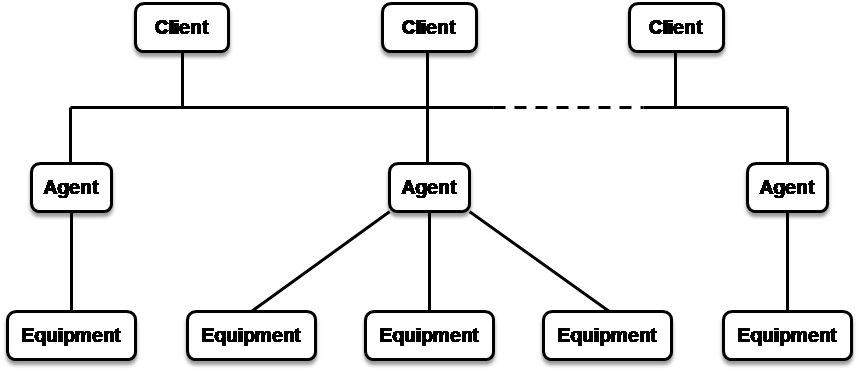
The three basic modules that comprise a software system implemented using MTConnect are:
Equipment: Any data source. In the MTConnect Standard, equipment is defined as any tangible property that is used to equip the operations of a manufacturing facility. Examples of equipment are machine tools, ovens, sensor units, workstations, software applications, and bar feeders.
Agent: Software that collects data published from one or more piece(s) of equipment, organizes that data in a structured manner, and responds to requests for data from client software systems by providing a structured response in the form of a response document that is constructed using the semantic data models defined in the Standard.
Note: The agent may be fully integrated into the piece of equipment or the agent may be independent of the piece of equipment. Implementation of an agent is the responsibility of the supplier of the piece of equipment and/or the implementer of the agent.
Client Software Application: Software that requests data from agents and processes that data in support of manufacturing operations.
Based on Basic MTConnect Implementation Structure, it is important to understand that the MTConnect Standard only addresses the following functionality and behavior of an agent:
the method used by a client software application to request information from an agent.
the response that an agent provides to a client software application.
a data dictionary used to provide consistency in understanding the meaning of data reported by a data source.
the description of the semantic data models used to structure response documents provided by an agent to a client software application.
These functions are the primary building blocks that define the base functional structure of the MTConnect Standard.
There are a wide variety of data sources (equipment) and data consumption systems (client software systems) used in manufacturing operations. There are also many different uses for the data associated with a manufacturing operation. No single approach to implementing a data communication system can address all data exchange and data management functions typically required in the data driven manufacturing environment. MTConnect has been uniquely designed to address this diversity of data types and data usages by providing different semantic data models for different data application requirements:
Data Collection: The most common use of data in manufacturing is the collection of data associated with the production of products and the operation of equipment that produces those products. The MTConnect Standard provides comprehensive semantic data models that represent data collected from manufacturing operations. These semantic data models are detailed in Device Information Model and Observation Information Model of the MTConnect Standard.
Inter-operations Between Pieces of Equipment: The MTConnect Standard provides an interaction model that structures the information required to allow multiple pieces of equipment to coordinate actions required to implement manufacturing activities. This interaction model is an implementation of a request and response messaging structure. This interaction model is called Interfaces which is detailed in Interface Interaction Model of the MTConnect Standard.
Shared Data: Certain information used in a manufacturing operation is commonly shared amongst multiple pieces of equipment and/or software applications. This information is not typically "owned" by any one manufacturing resource. The MTConnect Standard represents this information through a series of semantic data models – each describing different types of information used in the manufacturing environment. Each type of information is called an Asset. Assets are detailed in Asset Information Model, and its sub-Parts, of the MTConnect Standard.
Purpose of This Document
This document, Fundamentals of the MTConnect Standard, addresses two major topics relating to the MTConnect Standard. The first sections of the document define the organization of the documents used to describe the MTConnect Standard; including the terms and terminology used throughout the Standard. The balance of the document defines the following:
Operational concepts describing how an agent should organize and structure data that has been collected from a data source.
Definition and structure of the response documents supplied by an agent.
The protocol used by a client software application to communicate with an agent.
Terminology and Conventions
This section provides a dictionary of terms, reserved language, and document conventions used in the MTConnect Standard.
{{printglossarytitle=General Terms, type=general}} {{printglossarytitle=Information Model Terms, type=informationmodel}} {{printglossarytitle=Protocol Terms, type=protocol}} {{printglossarytitle=HTTP Terms, type=http}} {{printglossarytitle=XML Terms, type=xml}} {{printglossarytitle=MTConnect Terms, type=conceptmodel}}
{{printbibliographytitle=MTConnect References,keyword=MTC}}
{{printbibliographytitle=Other References,notkeyword=MTC}}
- Swing (class)
Asset Information Model / Pallet / Measurements
swing of the PhysicalAsset
- SwingAngle (class)
Observation Information Model / Observation Types / Event Types
SWING_ANGLE
- SwingDiameter (class)
Observation Information Model / Observation Types / Event Types
SWING_DIAMETER
- SwingRadius (class)
Observation Information Model / Observation Types / Event Types
SWING_RADIUS
- Switch (class)
Device Information Model / Components / Component Types
leaf
Componentthat turns on or off an electric current or makes or breaks a circuit.- System (class)
Device Information Model / Components / Component Types
abstract
Componentthat is permanently integrated into the piece of equipment.- System (class)
Observation Information Model / Observation Types / Condition Types
SYSTEM
- Systems (class)
Device Information Model / Components / Component Types / Component Organizer Types
Componentthat organizesSystemtypes.
T
- Table (class)
Device Information Model / Components / Component Types
leaf
Componentcomposed of a surface for holding an object or material.- table (class)
Glossary
two dimensional set of values given by a set of key-value pairs table entrys.
- Table (package)
Observation Information Model / Representations
This section provides semantic information for the Representation type
Table.- Table (class)
Observation Information Model / Representations / Table
Representation for an
Observationcomposed of two-dimensional sets of key-value pairs where theEntryrepresents rows containing sets of key-value pairs given by Cell entities.Description
Tablefor anObservationis defined by the associatedrepresentationasTABLE.representationasTABLEMUST havecategoryasSAMPLEorEVENT.WorkOffsetTable shows the model for WorkOffset (
Eventtype) with a Representation type ofTable.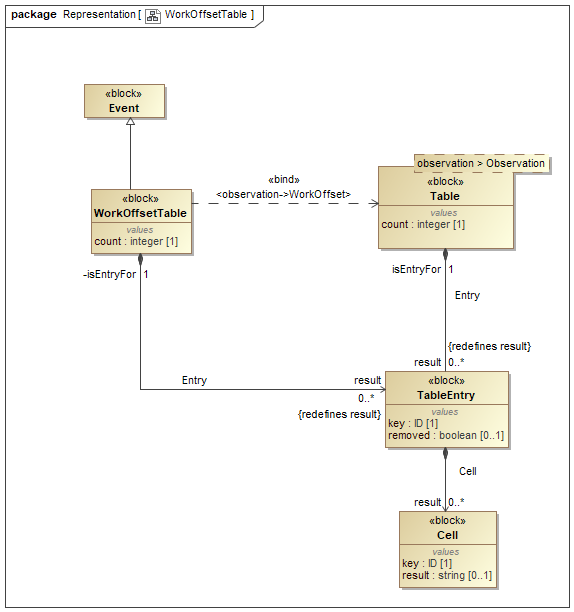
Note: See Representation Schema Diagrams for XML schema.
Tablehas the same behavior as theDataSetfor change tracking, clearing, and history. When anEntrychanges, all Cell entities update at the same time; they are not tracked separately likeEntry.The meaning of each
Entryand Cell MAY be provided as theDataItemEntryDefinition and CellDefinition.keyMUST be the unique identity of theEntrywithin anObservation. key MUST be the unique identity of the Cell within anEntry.Table Example shows
EventObservationtype WorkOffset with a Representation type ofTable.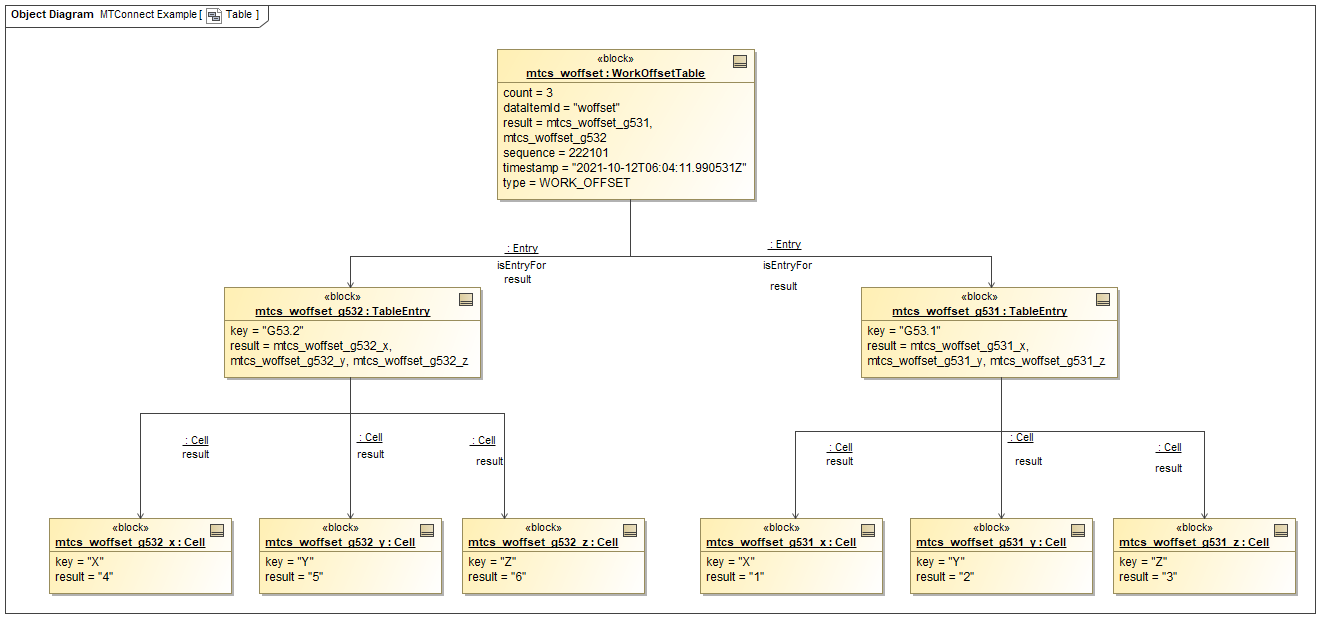
Note: See table-example for the XML representation of the same example.
- Table (class)
Reference Agent Architecture / InformationModel
Review the MTConnect definition and model details for Table, an MTConnect class.
- table cell (class)
Glossary
subdivision of a table entry representing a singular value.
- table entry (class)
Glossary
subdivision of a table containing a set of key-value pairs representing table cells.
- Tank (class)
Device Information Model / Components / Component Types
leaf
Componentgenerally composed of an enclosed container.- Target (package)
Asset Information Model / Process
Review the MTConnect definition and model details for Target, an MTConnect package.
- Target (class)
Asset Information Model / Process / Target
information related to a
DeviceorComponentthat may implement aProcessor a Task- TargetDevice (class)
Asset Information Model / Process / Target
reference to a
Devicethat is required to implement aProcessor a Task- TargetGroup (class)
Asset Information Model / Process / Target
reference to a group of
Devices that have the capability to implement aProcessor a Task- TargetRef (class)
Asset Information Model / Process / Target
reference to an existing Target
- TargetRequirementTable (class)
Asset Information Model / Process / Target
list of requirements a
Deviceor aComponentMUST satisfy to implement aProcessor a Task- Task (package)
Asset Information Model
This section provides semantic information for the Task model.
- Task (class)
Asset Information Model / Task
Assetthat defines a goal that needs to be achieved- Task Archetype (package)
Asset Information Model / Task
This section provides semantic information for the TaskArchetype model.
- TaskArchetype (class)
Asset Information Model / Task / Task Archetype
Assetthat defines common data for all derived Tasks- TaskAssetId (class)
Observation Information Model / Observation Types / Event Types
TASK_ASSET_ID
- TaskStateEnum (enumeration)
DataTypes
Review the MTConnect definition and model details for TaskStateEnum, an MTConnect enumeration.
- Temperature (class)
Observation Information Model / Observation Types / Sample Types
TEMPERATURE
- Temperature (class)
WIP: Device Examples / Mill w/SmoothG / Representation
Review the MTConnect definition and model details for Temperature, an MTConnect class.
- Tension (class)
Observation Information Model / Observation Types / Sample Types
TENSION
- Tensioner (class)
Device Information Model / Components / Component Types
leaf
Componentthat provides or applies a stretch or strain to another mechanism.- TextValue (class)
Reference Agent Architecture / InformationModel
Review the MTConnect definition and model details for TextValue, an MTConnect class.
- Thermostat (class)
Device Information Model / Components / Component Types
Componentcomposed of a sensor or an instrument that measures temperature.Thermostat was DEPRECATED in MTConnect Version 1.2 and was replaced by
Temperature.- Thickness (class)
Observation Information Model / Observation Types / Event Types
THICKNESS
- Thickness.Actual (class)
Observation Information Model / Observation Types / Event Types
THICKNESS that is ACTUAL.
- Thickness.Commanded (class)
Observation Information Model / Observation Types / Event Types
THICKNESS that is COMMANDED.
- Thickness.Programmed (class)
Observation Information Model / Observation Types / Event Types
THICKNESS that is PROGRAMMED.
- Thickness.Target (class)
Observation Information Model / Observation Types / Event Types
THICKNESS that is TARGET.
- Thing (class)
Glossary / Industrial Terms
property holder.
Note 1 to entry: Property holders are used to define properties that have no specific owner, or “top level” properties. These properties are generally referenced by other properties. https://www.omg.org/spec/NIEM-UML/1.0
Note 2 to entry: Property holder is equivalent to one topmost class of which all other classes are subclasses.
!MTConnect Terms.png!
- Tilt (class)
Observation Information Model / Observation Types / Sample Types
TILT
- TimeSeries (class)
Observation Information Model / Representations
Representation for an
Observationcomposed of a series of sampled data.Description
TimeSeriesfor anObservationis defined by the associatedrepresentationasTIME_SERIES.representationasTIME_SERIESMUST havecategoryofSAMPLE.TemperatureTimeSeries shows the model for
Temperature(Sampletype) with a Representation type ofTimeSeries.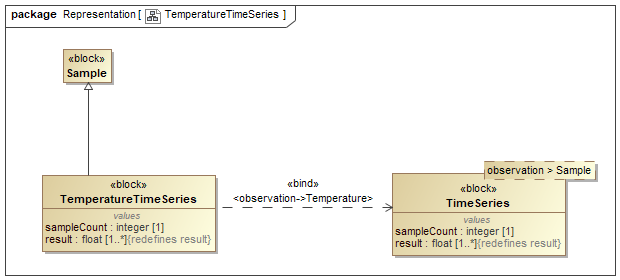
Note: See Representation Schema Diagrams for XML schema.
TimeSeriesMUST report multiple values at fixed intervals in a singleObservation. At minimum, one ofsampleRateorsampleRateMUST be specified. When both are specified, thesampleRatesupersedes thesampleRate.timestampMUST be set to the time the last value was observed. ThedurationMAY indicate the time interval from the first to the last value in the series.Value Properties of TimeSeries defines additional attributes for an
ObservationwithTimeSeriesRepresentation type.- TimeSeries (class)
Reference Agent Architecture / InformationModel
Review the MTConnect definition and model details for TimeSeries, an MTConnect class.
- Timestamped (class)
Reference Agent Architecture / Pipelines
Review the MTConnect definition and model details for Timestamped, an MTConnect class.
- Tokens (class)
Reference Agent Architecture / Pipelines
Review the MTConnect definition and model details for Tokens, an MTConnect class.
- ToolAssetId (class)
Observation Information Model / Observation Types / Event Types
TOOL_ASSET_ID
- ToolCuttingEdgeAngle (class)
Asset Information Model / Cutting Tool / Cutting Item / Cutting Item Measurement Subtypes
angle between the tool cutting edge plane and the tool feed plane measured in a plane parallel the xy-plane.
- ToolCuttingItem (class)
Observation Information Model / Observation Types / Event Types
TOOL_CUTTING_ITEM
- ToolGroup (class)
Observation Information Model / Observation Types / Event Types
TOOL_GROUP
- ToolHolder (class)
Device Information Model / Components / Component Types
Systemthat securely interfaces aComponentwith aDeviceDescription
It is the part of a piece of equipment that interacts with the manufacturing process.
- ToolId (class)
Observation Information Model / Observation Types / Event Types
TOOL_ID
- ToolingDelivery (class)
Device Information Model / Components / Component Types
Auxiliary that manages, positions, stores, and delivers tooling within a piece of equipment.
- ToolingMeasurement (class)
Asset Information Model / Cutting Tool / Cutting Tool Life Cycle
constrained scalar value associated with a cutting tool.
Description
A Measurement is specific to the tool management policy at a particular shop. The tool zero reference point or gauge line will be different depending on the particular implementation and will be assumed to be consistent within the shop. MTConnect Standard does not standardize the manufacturing process or the definition of the zero point.
- ToolLeadAngle (class)
Asset Information Model / Cutting Tool / Cutting Item / Cutting Item Measurement Subtypes
angle between the tool cutting edge plane and a plane perpendicular to the tool feed plane measured in a plane parallel the xy-plane.
- ToolLife (class)
Asset Information Model / Cutting Tool / Cutting Tool Life Cycle
cutting tool life as related to the assembly.
Description
ToolLife MUST be defined only for the CuttingToolLifeCycle of CuttingTool and MUST NOT be defined for the CuttingToolLifeCycle of CuttingToolArchetype.
- ToolLifeEnum (enumeration)
DataTypes
Review the MTConnect definition and model details for ToolLifeEnum, an MTConnect enumeration.
- ToolMagazine (class)
Device Information Model / Components / Component Types
ToolingDelivery composed of a tool storage mechanism that holds any number of tools.
Description
Tools are located in Pots. Pots are moved into position to transfer tools into or out of the ToolMagazine by an AutomaticToolChanger.
- ToolNumber (class)
Observation Information Model / Observation Types / Event Types
TOOL_NUMBER
- ToolOffset (class)
Observation Information Model / Observation Types / Event Types
TOOL_OFFSET
- ToolOffset.Length (class)
Observation Information Model / Observation Types / Event Types
reference to a length type tool offset variable.
- ToolOffset.Radial (class)
Observation Information Model / Observation Types / Event Types
reference to a radial type tool offset variable.
- ToolOffsets (class)
Observation Information Model / Observation Types / Event Types
tabular representation of TOOL_OFFSETS
- ToolOrientation (class)
Asset Information Model / Cutting Tool / Cutting Item / Cutting Item Measurement Subtypes
angle of the tool with respect to the workpiece for a given process.
The value is application specific.
- ToolRack (class)
Device Information Model / Components / Component Types
ToolingDelivery composed of a linear or matrixed tool storage mechanism that holds any number of tools.
Description
Tools are located in Station entities.
- TooMany (class)
Fundamentals / MTConnect Protocol / MTConnectErrors Response Document / Error Types
countparameter provided in the request for information requires either of the following:streaming data that includes more pieces of data than the agent is capable of organizing in an MTConnectStreams Response Document.
Assetsthat include moreAssetin an MTConnectAssets Response Document than the agent is capable of handling.
- top level (class)
Glossary
element that represents the most significant physical or logical functions of a piece of equipment.
- Torque (class)
Observation Information Model / Observation Types / Sample Types
TORQUE
- Trace (class)
Fundamentals / MTConnect Protocol / MTConnectExceptionsReport Response Document
information about the characteristics of the exception.
- TransferArm (class)
Device Information Model / Components / Component Types
leaf
Componentthat physically moves a tool from one location to another.- TransferCount (class)
Observation Information Model / Observation Types / Event Types
TRANSFER_COUNT
- TransferCount.Aborted (class)
Observation Information Model / Observation Types / Event Types
accumulation of actions or activities that were attempted, but terminated before they could be completed.
- TransferCount.All (class)
Observation Information Model / Observation Types / Event Types
accumulation of all actions, items, or activities being counted independent of the outcome.
- TransferCount.Bad (class)
Observation Information Model / Observation Types / Event Types
accumulation of actions, items, or activities being counted that do not conform to specification or expectation.
- TransferCount.Complete (class)
Observation Information Model / Observation Types / Event Types
accumulation of actions, items, or activities that have been completed, independent of the outcome.
- TransferCount.Failed (class)
Observation Information Model / Observation Types / Event Types
accumulation of actions, items, or activities being counted that do not conform to specification or expectation.
- TransferCount.Good (class)
Observation Information Model / Observation Types / Event Types
accumulation of actions, items, or activities being counted that conform to specification or expectation.
- TransferCount.Remaining (class)
Observation Information Model / Observation Types / Event Types
accumulation of actions, items, or activities yet to be counted.
- TransferCount.Target (class)
Observation Information Model / Observation Types / Event Types
goal of the operation or process.
- TransferPot (class)
Device Information Model / Components / Component Types
leaf
Componentthat is a Pot for a tool that is awaiting transfer from a ToolMagazine to spindle or Turret.- Transform (class)
Reference Agent Architecture / Pipelines
Review the MTConnect definition and model details for Transform, an MTConnect class.
- Transformation (class)
Device Information Model / Configurations / CoordinateSystems
process of transforming to the origin position of the coordinate system from a parent coordinate system using
TranslationandRotation.Description
At a minimum, a
Translationor aRotationMUST be defined for aTransformation.- Transformation (package)
Reference Agent Architecture
Review the MTConnect definition and model details for Transformation, an MTConnect package.
- Transformation (class)
WIP: Device Examples / Kinematics Simulation / XArm7Model
Review the MTConnect definition and model details for Transformation, an MTConnect class.
- TransformationService (class)
Reference Agent Architecture
Review the MTConnect definition and model details for TransformationService, an MTConnect class.
- Transformer (class)
Device Information Model / Components / Component Types
leaf
Componentthat transforms electric energy from a source to a secondary circuit.- Transformtion (class)
Reference Agent Architecture
Review the MTConnect definition and model details for Transformtion, an MTConnect class.
- Translation (class)
Device Information Model / Configurations / CoordinateSystems
translations along X, Y, and Z axes are expressed as x,y, and z respectively within a 3-dimensional vector.
- Translation (class)
Observation Information Model / Observation Types / Event Types
TRANSLATION
- TranslationDataSet (class)
Device Information Model / Configurations / CoordinateSystems
translations along X, Y, and Z axes are expressed as x,y, and z respectively within a 3-dimensional vector represented as a dataset.
- TranslationVector (class)
WIP: Device Examples / Kinematics Simulation / XArm7Model
Review the MTConnect definition and model details for TranslationVector, an MTConnect class.
- transport protocol (class)
Glossary / Protocol Terms
set of capabilities that provide the rules and procedures used to transport information between an agent and a client software application through a physical connection.
- Turret (class)
Device Information Model / Components / Component Types
ToolingDelivery composed of a tool mounting mechanism that holds any number of tools.
Description
Tools are positioned for use in the manufacturing process by rotating the Turret.
- type (class)
Glossary
classification or categorization of information.
- TypeGuard (class)
Reference Agent Architecture / Pipelines
Review the MTConnect definition and model details for TypeGuard, an MTConnect class.
U
- Unauthorized (class)
Fundamentals / MTConnect Protocol / MTConnectErrors Response Document / Error Types
requester does not have sufficient permissions to access the requested information.
- uncertainty (class)
Glossary
uncertainty (of measurement) parameter, associated with the result of a measurement, that characterizes the dispersion of the values that could reasonably be attributed to the measurand. JCGM 100:2008 2.2.3
Note: Use of the term uncertainty refers to uncertainty of measurement.
- Uncertainty (class)
Observation Information Model / Observation Types / Event Types
UNCERTAINTY
- UncertaintyType (class)
Observation Information Model / Observation Types / Event Types
UNCERTAINTY_TYPE
- UncertaintyTypeEnum (enumeration)
DataTypes
Review the MTConnect definition and model details for UncertaintyTypeEnum, an MTConnect enumeration.
- UniqueIdentifier (class)
Asset Information Model / Part
unique serialized part identifier.
- Unit Imports (package)
Imports
Review the MTConnect definition and model details for Unit Imports, an MTConnect package.
- UnitEnum (enumeration)
DataTypes
Review the MTConnect definition and model details for UnitEnum, an MTConnect enumeration.
- UnloadCount (class)
Observation Information Model / Observation Types / Event Types
UNLOAD_COUNT
- UnloadCount.Aborted (class)
Observation Information Model / Observation Types / Event Types
accumulation of actions or activities that were attempted, but terminated before they could be completed.
- UnloadCount.All (class)
Observation Information Model / Observation Types / Event Types
accumulation of all actions, items, or activities being counted independent of the outcome.
- UnloadCount.Bad (class)
Observation Information Model / Observation Types / Event Types
accumulation of actions, items, or activities being counted that do not conform to specification or expectation.
- UnloadCount.Complete (class)
Observation Information Model / Observation Types / Event Types
accumulation of actions, items, or activities that have been completed, independent of the outcome.
- UnloadCount.Failed (class)
Observation Information Model / Observation Types / Event Types
accumulation of actions, items, or activities being counted that do not conform to specification or expectation.
- UnloadCount.Good (class)
Observation Information Model / Observation Types / Event Types
accumulation of actions, items, or activities being counted that conform to specification or expectation.
- UnloadCount.Remaining (class)
Observation Information Model / Observation Types / Event Types
accumulation of actions, items, or activities yet to be counted.
- UnloadCount.Target (class)
Observation Information Model / Observation Types / Event Types
goal of the operation or process.
- Unsupported (class)
Fundamentals / MTConnect Protocol / MTConnectErrors Response Document / Error Types
valid request was provided, but the agent does not support the feature or type of request.
- upper limit (class)
Glossary
upper conformance boundary for a variable.
- upper warning (class)
Glossary
upper boundary indicating increased concern and supervision may be required.
- UpperLimit (class)
Device Information Model / Configurations / Specifications
upper conformance boundary for a variable.
Note: immediate concern or action may be required.
- UpperWarning (class)
Device Information Model / Configurations / Specifications
upper boundary indicating increased concern and supervision may be required.
- UsableLengthMax (class)
Asset Information Model / Cutting Tool / Cutting Tool Measurement Subtypes
maximum length of a cutting tool that can be used in a particular cutting operation including the non-cutting portions of the tool.
- User (class)
Observation Information Model / Observation Types / Event Types
USER
- User.Maintenance (class)
Observation Information Model / Observation Types / Event Types
identifier of the person currently responsible for performing maintenance on the piece of equipment.
- User.Operator (class)
Observation Information Model / Observation Types / Event Types
identifier of the person currently responsible for operating the piece of equipment.
- User.SetUp (class)
Observation Information Model / Observation Types / Event Types
identifier of the person currently responsible for preparing a piece of equipment for production or restoring the piece of equipment to a neutral state after production.
V
- Vacuum (class)
Device Information Model / Components / Component Types
Systemthat evacuates gases and liquids from an enclosed and sealed space to a controlled negative pressure or a molecular density below the prevailing atmospheric level.- Value (class)
Observation Information Model / Representations
default Representation type for all
Observationtypes whereresulttype is an MTConnect data type. See DataTypes.- Valve (class)
Device Information Model / Components / Component Types
leaf
Componentthat halts or controls the flow of a liquid, gas, or other material through a passage, pipe, inlet, or outlet.- ValveState (class)
Observation Information Model / Observation Types / Event Types
VALVE_STATE
- ValveState.Actual (class)
Observation Information Model / Observation Types / Event Types
measured or reported value of an observation.
- ValveState.Programmed (class)
Observation Information Model / Observation Types / Event Types
directive value without offsets and adjustments.
- ValveStateEnum (enumeration)
DataTypes
Review the MTConnect definition and model details for ValveStateEnum, an MTConnect enumeration.
- Variable (class)
Observation Information Model / Observation Types / Event Types
VARIABLE
- Variable (class)
WIP: Device Examples / Mill w/SmoothG / Representation
Review the MTConnect definition and model details for Variable, an MTConnect class.
- Vat (class)
Device Information Model / Components / Component Types
leaf
Componentgenerally composed of an open container.- Vector (class)
WIP: Device Examples / Kinematics Simulation / XArm7Model
Review the MTConnect definition and model details for Vector, an MTConnect class.
- Velocity (class)
Observation Information Model / Observation Types / Sample Types
VELOCITY
- version (class)
Glossary
unique identifier of the administered item. ISO/IEC 11179-:2015
- Vibration (class)
Device Information Model / Components / Component Types
Componentcomposed of a sensor or an instrument that measures the amount and/or frequency of vibration within a system.Vibration was DEPRECATED in MTConnect Version 1.2 and was replaced by Displacement, Frequency etc.
- Viscosity (class)
Observation Information Model / Observation Types / Sample Types
VISCOSITY
- Voltage (class)
Observation Information Model / Observation Types / Sample Types
VOLTAGE
- Voltage.Actual (class)
Observation Information Model / Observation Types / Sample Types
measured or reported value of an observation.
DEPRECATED in Version 1.6.
- Voltage.Alternating (class)
Observation Information Model / Observation Types / Sample Types
alternating voltage or current.
If not specified further in statistic, defaults to RMS voltage.
DEPRECATED in Version 1.6.
- Voltage.Direct (class)
Observation Information Model / Observation Types / Sample Types
DC current or voltage.
DEPRECATED in Version 1.6.
- Voltage.Target (class)
Observation Information Model / Observation Types / Sample Types
goal of the operation or process.
DEPRECATED in Version 1.6.
- VoltageAC (class)
Observation Information Model / Observation Types / Sample Types
VOLTAGE_AC
- VoltageAC.Actual (class)
Observation Information Model / Observation Types / Sample Types
measured or reported value of an observation.
- VoltageAC.Commanded (class)
Observation Information Model / Observation Types / Sample Types
directive value including adjustments such as an offset or overrides.
- VoltageAC.Programmed (class)
Observation Information Model / Observation Types / Sample Types
directive value without offsets and adjustments.
- VoltageDC (class)
Observation Information Model / Observation Types / Sample Types
VOLTAGE_DC
- VoltageDC.Actual (class)
Observation Information Model / Observation Types / Sample Types
measured or reported value of an observation.
- VoltageDC.Commanded (class)
Observation Information Model / Observation Types / Sample Types
directive value including adjustments such as an offset or overrides.
- VoltageDC.Programmed (class)
Observation Information Model / Observation Types / Sample Types
directive value without offsets and adjustments.
- VoltAmpere (class)
Observation Information Model / Observation Types / Sample Types
VOLT_AMPERE
- VoltAmpereReactive (class)
Observation Information Model / Observation Types / Sample Types
VOLT_AMPERE_REACTIVE
- VolumeFluid (class)
Observation Information Model / Observation Types / Sample Types
VOLUME_FLUID
- VolumeFluid.Actual (class)
Observation Information Model / Observation Types / Sample Types
measured or reported value of an observation.
- VolumeFluid.Consumed (class)
Observation Information Model / Observation Types / Sample Types
reported or measured value of the amount used in the manufacturing process.
- VolumeFluid.Ended (class)
Observation Information Model / Observation Types / Sample Types
boundary when an activity or an event terminates.
- VolumeFluid.Part (class)
Observation Information Model / Observation Types / Sample Types
reported or measured value of amount included in the part.
- VolumeFluid.Start (class)
Observation Information Model / Observation Types / Sample Types
boundary when an activity or an event commences.
- VolumeFluid.Waste (class)
Observation Information Model / Observation Types / Sample Types
reported or measured value of the amount discarded.
- VolumeSpatial (class)
Observation Information Model / Observation Types / Sample Types
VOLUME_SPATIAL
- VolumeSpatial.Actual (class)
Observation Information Model / Observation Types / Sample Types
measured or reported value of an observation.
- VolumeSpatial.Consumed (class)
Observation Information Model / Observation Types / Sample Types
reported or measured value of the amount used in the manufacturing process.
- VolumeSpatial.Ended (class)
Observation Information Model / Observation Types / Sample Types
boundary when an activity or an event terminates.
- VolumeSpatial.Part (class)
Observation Information Model / Observation Types / Sample Types
reported or measured value of amount included in the part.
- VolumeSpatial.Start (class)
Observation Information Model / Observation Types / Sample Types
boundary when an activity or an event commences.
- VolumeSpatial.Waste (class)
Observation Information Model / Observation Types / Sample Types
reported or measured value of the amount discarded
W
- WaitState (class)
Observation Information Model / Observation Types / Event Types
WAIT_STATE
When result is not
WAIT,isUnavailableof WaitState MUST betrue.- WaitStateEnum (enumeration)
DataTypes
Review the MTConnect definition and model details for WaitStateEnum, an MTConnect enumeration.
- WasteDisposal (class)
Device Information Model / Components / Component Types
Auxiliary that removes manufacturing byproducts from a piece of equipment.
- Water (class)
Device Information Model / Components / Component Types
leaf
Componentcomposed of $$H_2 O$$.- WaterHardness (class)
Observation Information Model / Observation Types / Sample Types
WATER_HARDNESS
- Wattage (class)
Observation Information Model / Observation Types / Sample Types
WATTAGE
- Wattage.Actual (class)
Observation Information Model / Observation Types / Sample Types
measured or reported value of an observation.
- Wattage.Target (class)
Observation Information Model / Observation Types / Sample Types
goal of the operation or process.
- Weight (class)
Asset Information Model / Cutting Tool / Cutting Item / Cutting Item Measurement Subtypes
total weight of the cutting tool in grams.
The force exerted by the mass of the cutting tool.
- Weight (class)
Asset Information Model / Cutting Tool / Cutting Tool Measurement Subtypes
total weight of the cutting tool in grams.
The force exerted by the mass of the cutting tool.
- Weight (class)
Asset Information Model / Pallet / Measurements
weight of the PhysicalAsset
- Width (class)
Asset Information Model / Pallet / Measurements
width of the PhysicalAsset
- WIP: Device Examples (package)
Review the MTConnect definition and model details for WIP: Device Examples, an MTConnect package.
- WIP: Use Cases (package)
Review the MTConnect definition and model details for WIP: Use Cases, an MTConnect package.
- WiperEdgeLength (class)
Asset Information Model / Cutting Tool / Cutting Item / Cutting Item Measurement Subtypes
measure of the length of a wiper edge of a cutting item.
- Wire (class)
Device Information Model / Components / Component Types
leaf
Componentcomposed of a string like piece or filament of relatively rigid or flexible material provided in a variety of diameters.- Wire (class)
Observation Information Model / Observation Types / Event Types
WIRE
- WorkEnvelope (class)
Device Information Model / Components / Component Types
Systemcomposed of the physical process execution space within a piece of equipment.Description
WorkEnvelope MAY provide information regarding the physical workspace and the conditions within that workspace.
- WorkholdingId (class)
Observation Information Model / Observation Types / Event Types
WORKHOLDING_ID
- WorkOffset (class)
Observation Information Model / Observation Types / Event Types
WORK_OFFSET
- WorkOffsets (class)
Observation Information Model / Observation Types / Event Types
tabular representation of WORK_OFFSETS
- WorkOffsets (class)
WIP: Device Examples / Mill w/SmoothG / Representation
Review the MTConnect definition and model details for WorkOffsets, an MTConnect class.
- Workpiece (class)
Device Information Model / Components / Component Types
leaf
Componentcomposed of an object or material on which a form of work is performed.
X
- XArm7Instance (package)
WIP: Device Examples / Kinematics Simulation
Review the MTConnect definition and model details for XArm7Instance, an MTConnect package.
- XArm7Model (package)
WIP: Device Examples / Kinematics Simulation
Review the MTConnect definition and model details for XArm7Model, an MTConnect package.
- XDimension (class)
Observation Information Model / Observation Types / Sample Types
X_DIMENSION
- XML Document (class)
Glossary / XML Terms
structured text file encoded using XML.
- XML Schema (class)
Glossary / XML Terms
schema defining a specific document encoded in XML.
- XML Terms (package)
Glossary
Review the MTConnect definition and model details for XML Terms, an MTConnect package.
- XmlParser (class)
Reference Agent Architecture / Parser
Review the MTConnect definition and model details for XmlParser, an MTConnect class.
- XmlPrinter (class)
Reference Agent Architecture / Printer
Review the MTConnect definition and model details for XmlPrinter, an MTConnect class.
Y
- YDimension (class)
Observation Information Model / Observation Types / Sample Types
Y_DIMENSION
Z
- ZDimension (class)
Observation Information Model / Observation Types / Sample Types
Z_DIMENSION