MTConnect 2.8 package
Asset Information Model
The MTConnect Standard supports a simple distributed storage mechanism that allows applications and equipment to share and exchange complex information models in a similar way to a distributed data store. The Asset Information Model associates each MTConnectAssets entity with a unique identifier and allows for some predefined mechanisms to find, create, request, update, and delete these electronic documents in a way that provides for consistency across multiple pieces of equipment.
The protocol provides a limited mechanism of accessing Assets using the following properties: assetId, asset type (element name of asset root), and the piece of equipment associated with the asset. These access strategies will provide the following services and answer the following questions: What assets are from a particular piece of equipment? What are the assets of a particular type? What asset is stored for a given assetId?
Although these mechanisms are provided, an agent should not be considered a data store or a system of reference. The agent is providing an ephemeral storage capability that will temporarily manage the data for applications wishing to communicate and manage data as needed by the various processes. An application cannot rely on an agent for long term persistence or durability since the agent is only required to temporarily store the asset data and may require another system to provide the source data upon initialization. An agent is always providing the best-known equipment centric view of the data given the limitations of that piece of equipment.
The MTConnect Standard has two data item types to support change notification when an Asset is added, updated or removed. AssetChanged states the assetId of the Asset that has been added or updated. AssetRemoved states the assetId of the Asset that has been removed. See Observation Information Model for more details.
Assets Appendix
XML Schema Diagrams
See XML schemas for the MTConnect standard here: https://schemas.mtconnect.org/.
Assets Schema Diagrams
See Asset element in MTConnectAssets schema.
See Description element in MTConnectAssets schema.
CuttingTool Schema Diagrams
See CuttingTool element in MTConnectAssets schema.
See CuttingToolDefinition element in MTConnectAssets schema.
See CuttingToolArchetypeReference element in MTConnectAssets schema.
CuttingToolLifeCycle Schema Diagrams
See CuttingToolLifeCycle element in MTConnectAssets schema.
See CutterStatus element in MTConnectAssets schema.
See Location element in MTConnectAssets schema.
See Measurement element in MTConnectAssets schema.
See ProcessFeedRate element in MTConnectAssets schema.
See ProcessSpindleSpeed element in MTConnectAssets schema.
See ReconditionCount element in MTConnectAssets schema.
See ToolLife element in MTConnectAssets schema.
CuttingItem Schema Diagrams
See CuttingItems element in MTConnectAssets schema.
See CuttingItem element in MTConnectAssets schema.
See ItemLife element in MTConnectAssets schema.
ISO 13399 Diagrams
Measurement Diagrams
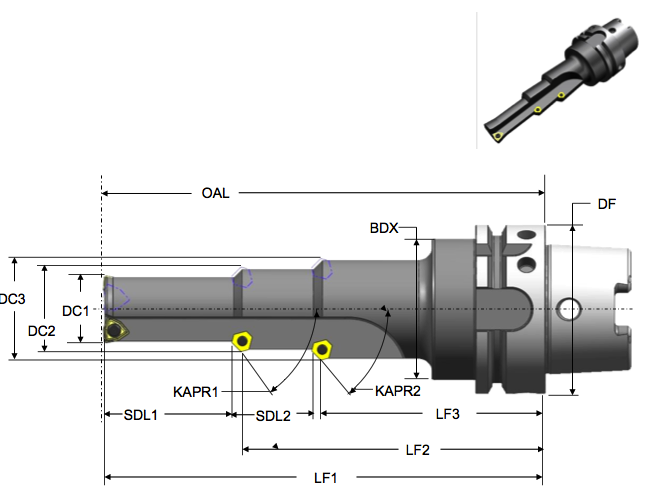
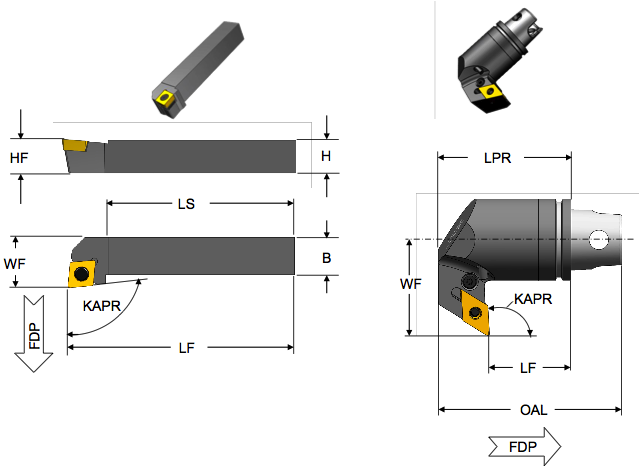
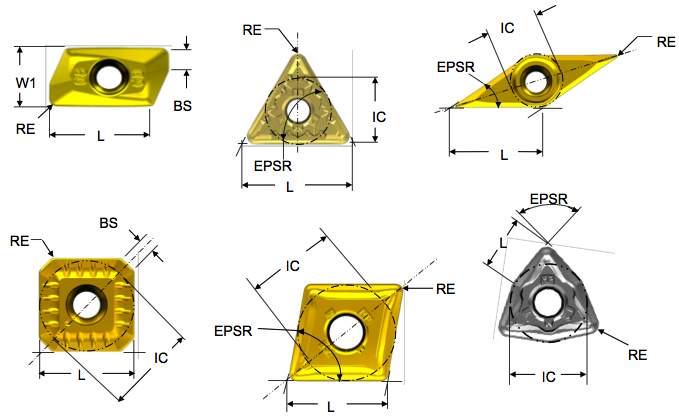
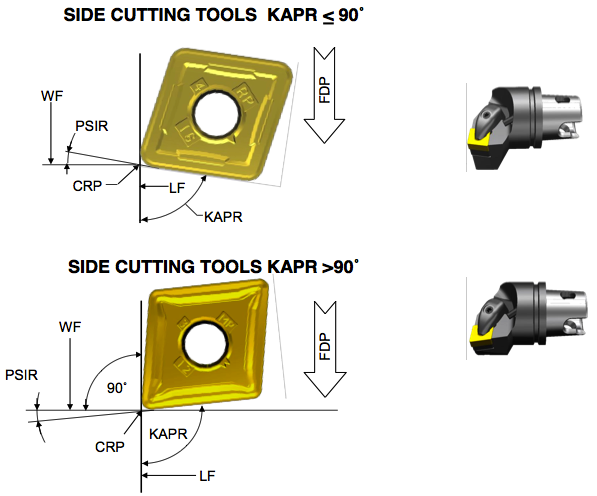
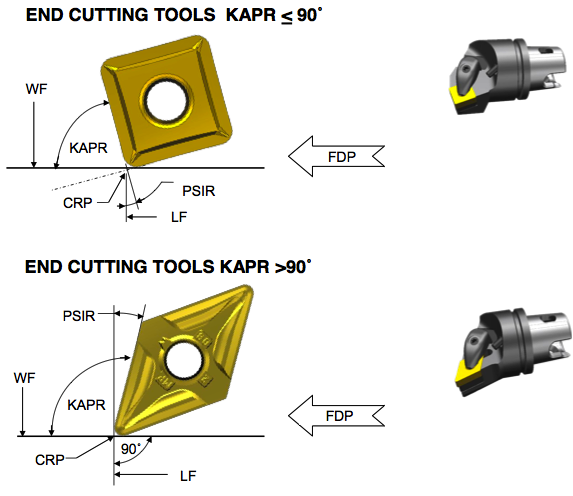
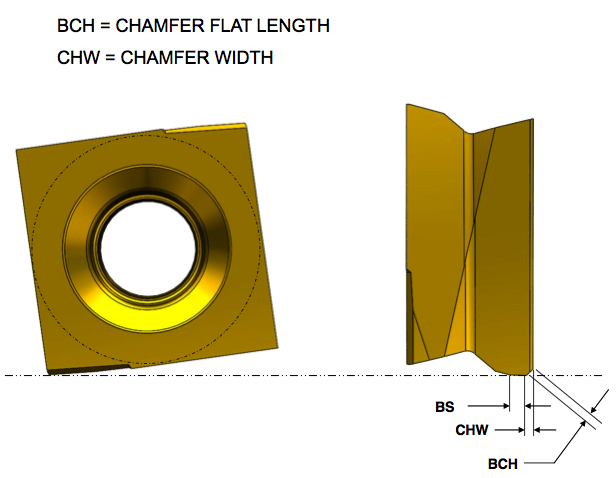
Cutting Tool Examples
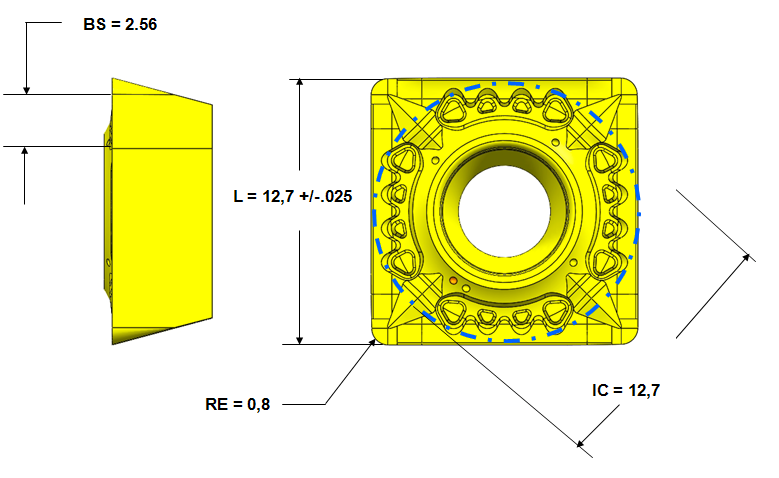
Shell Mill
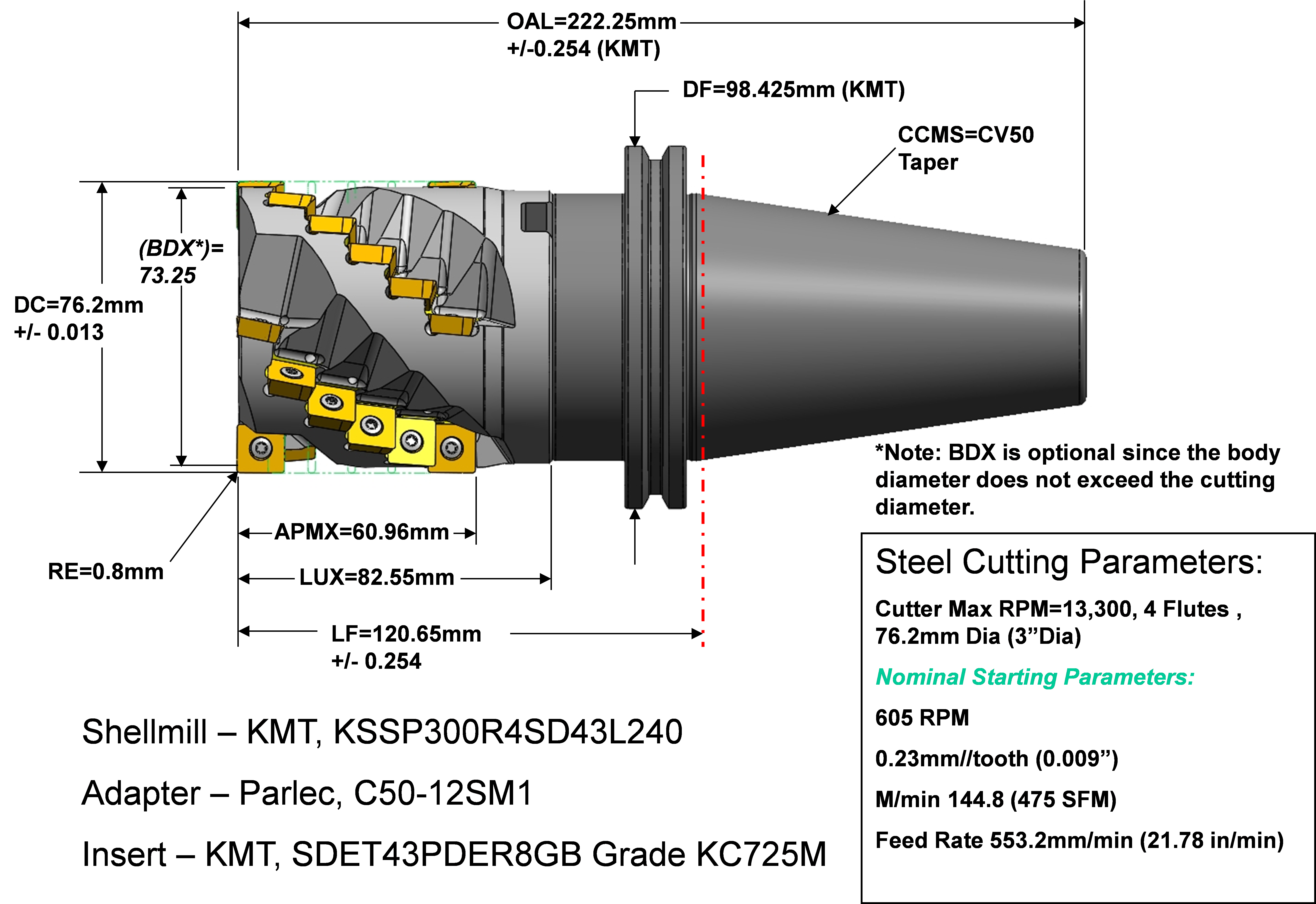
<?xml version="1.0" encoding="UTF-8"?>
<MTConnectAssets
xmlns:m="urn:mtconnect.org:MTConnectAssets:1.2"
xmlns="urn:mtconnect.org:MTConnectAssets:1.2"
xmlns:xsi="http://www.w3.org/2001/XMLSchema-instance"
xsi:schemaLocation="urn:mtconnect.org:MTConnectAssets:1.2
http://mtconnect.org/schemas/MTConnectAssets\\_1.2.xsd">
  <Header creationTime="2011-05-11T13:55:22"
  assetBufferSize="1024" sender="localhost"
  assetCount="2" version="1.2" instanceId="1234"/>
  <Assets>
  <CuttingTool serialNumber="1" toolId="KSSP300R4SD43L240"
  timestamp="2011-05-11T13:55:22" assetId="KSSP300R4SD43L240.1"
  manufacturers="KMT,Parlec">
    <CuttingToolLifeCycle>
    <CutterStatus><Status>NEW</Status></CutterStatus>
    <ProcessSpindleSpeed maximum="13300"
    nominal="605">10000</ProcessSpindleSpeed>
    <ProcessFeedRate
    nominal="9.22">9.22</ProcessSpindleSpeed>
    <ConnectionCodeMachineSide>CV50
    </ConnectionCodeMachineSide>
    <Measurements>
      <BodyDiameterMax code="BDX">73.25
      </BodyDiameterMax>
      <OverallToolLength nominal="222.25"
        minimum="221.996" maximum="222.504"
        code="OAL">222.25</OverallToolLength>
      <UsableLengthMax code="LUX" nominal="82.55">82.55
      </UsableLengthMax>
      <CuttingDiameterMax code="DC" nominal="76.2"
        maximum="76.213" minimum="76.187">76.2
      </CuttingDiameterMax>
      <BodyLengthMax code="LF" nominal="120.65"
        maximum="120.904" minimum="120.404">120.65
      </BodyLengthMax>
      <DepthOfCutMax code="APMX"
      nominal="60.96">60.95</DepthOfCutMax>
      <FlangeDiameterMax code="DF"
        nominal="98.425">98.425</FlangeDiameterMax>
    </Measurements>
    <CuttingItems count="24">
      <CuttingItem indices="1-24" itemId="SDET43PDER8GB"
        manufacturers="KMT" grade="KC725M">
        <Measurements>
          <CuttingEdgeLength code="L" nominal="12.7"
            minimum="12.675" maximum="12.725">12.7
          </CuttingEdgeLength>
        <WiperEdgeLength code="BS" nominal=
          "2.56">2.56</WiperEdgeLength>
        <IncribedCircleDiameter code="IC"
          nominal="12.7">12.7
        </IncribedCircleDiameter>
        <CornerRadius code="RE" nominal="0.8">
          0.8</CornerRadius>
      </Measurements>
      </CuttingItem>
    </CuttingItems>
    </CuttingToolLifeCycle>
    </CuttingTool>
  </Assets>
</MTConnectAssets>
Example for Indexable Insert Measurements
Step Drill
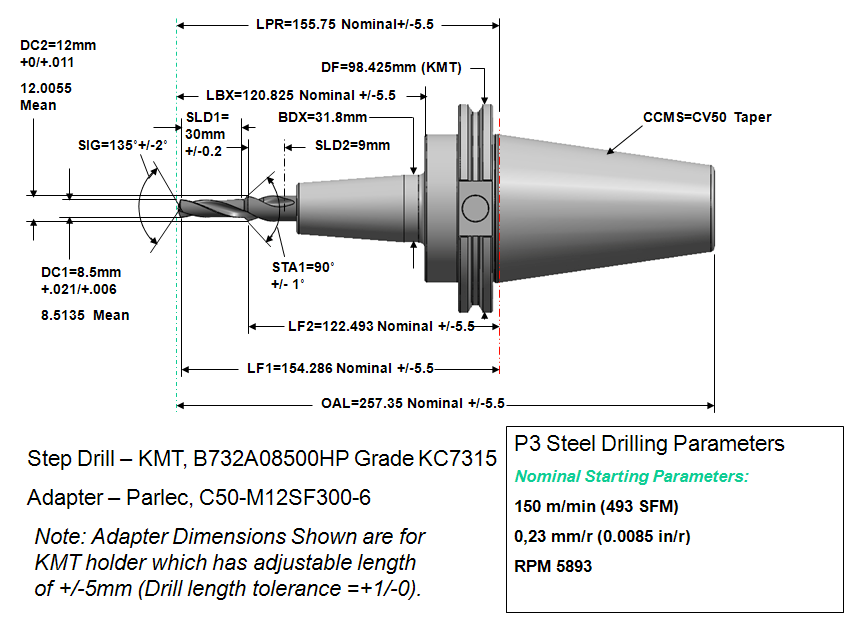
<?xml version="1.0" encoding="UTF-8"?>
<MTConnectAssets xmlns:m="urn:mtconnect.org:MTConnectAssets:1.2"
xmlns="urn:mtconnect.org:MTConnectAssets:1.2"
xmlns:xsi="http://www.w3.org/2001/XMLSchema-instance"
xsi:schemaLocation="urn:mtconnect.org:MTConnectAssets:1.2
http://mtconnect.org/schemas/MTConnectAssets\\_1.2.xsd">
  <Header creationTime="2011-05-
  11T13:55:22" assetBufferSize="1024"
  sender="localhost" assetCount="2" version="1.2" instanceId="1234"/>
  <Assets>
    <CuttingTool serialNumber="1 " toolId="B732A08500HP"
    timestamp="2011-05-11T13:55:22" assetId="B732A08500HP "
    manufacturers="KMT,Parlec">
      <Description>
        Step Drill - KMT, B732A08500HP Grade KC7315
        Adapter - Parlec, C50-M12SF300-6
      </Description>
      <CuttingToolLifeCycle>
        <CutterStatus><Status>NEW</Status></CutterStatus>
        <ProcessSpindleSpeed nominal="5893">5893</ProcessSpindleSpeed>
        <ProcessFeedRate nominal="2.5">2.5</ProcessFeedRate>
        <ConnectionCodeMachineSide>CV50 Taper</ConnectionCodeMachineSide>
        <Measurements>
          <BodyDiameterMax code="BDX">31.8</BodyDiameterMax>
          <BodyLengthMax code="LBX" nominal="120.825" maximum="126.325"
          minimum="115.325">120.825</BodyLengthMax>
          <ProtrudingLength code="LPR" nominal="155.75" maximum="161.25"
          minimum="150.26">155.75</ProtrudingLength>
          <FlangeDiameterMax code="DF"
          nominal="98.425">98.425</FlangeDiameterMax>
          <OverallToolLength nominal="257.35" minimum="251.85"
          maximum="262.85" code="OAL">257.35</OverallToolLength>
        </Measurements>
        <CuttingItems count="2">
          <CuttingItem indices="1" manufacturers="KMT" grade="KC7315">>
            <Measurements>
              <CuttingDiameter code="DC1" nominal="8.5" maximum="8.521"
              minimum="8.506">8.5135</CuttingDiameter>
              <StepIncludedAngle code="STA1" nominal="90" maximum="91"
              minimum="89">90</StepIncludedAngle>
              <FunctionalLength code="LF1" nominal="154.286"
              minimum="148.786"
              maximum="159.786">154.286</FunctionalLength>
              <StepDiameterLength code="SDL1"
              nominal="9">9</StepDiameterLength>
              <PointAngle code="SIG" nominal="135" minimum="133"
              maximum="137">135</PointAngle>
            </Measurements>
          </CuttingItem>
          <CuttingItem indices="2" manufacturers="KMT" grade="KC7315">>
            <Measurements>
              <CuttingDiameter code="DC2" nominal="12" maximum="12.011"
              minimum="12">12</CuttingDiameter>
              <FunctionalLength code="LF2" nominal="122.493"
              maximum="127.993"
              minimum="116.993">122.493</FunctionalLength>
              <StepDiameterLength code="SDL2"
              nominal="9">9</StepDiameterLength>
            </Measurements>
          </CuttingItem>
        </CuttingItems>
      </CuttingToolLifeCycle>
    </CuttingTool>
  </Assets>
</MTConnectAssets>
Example for Step Mill Side View
Shell Mill with Individual Loci
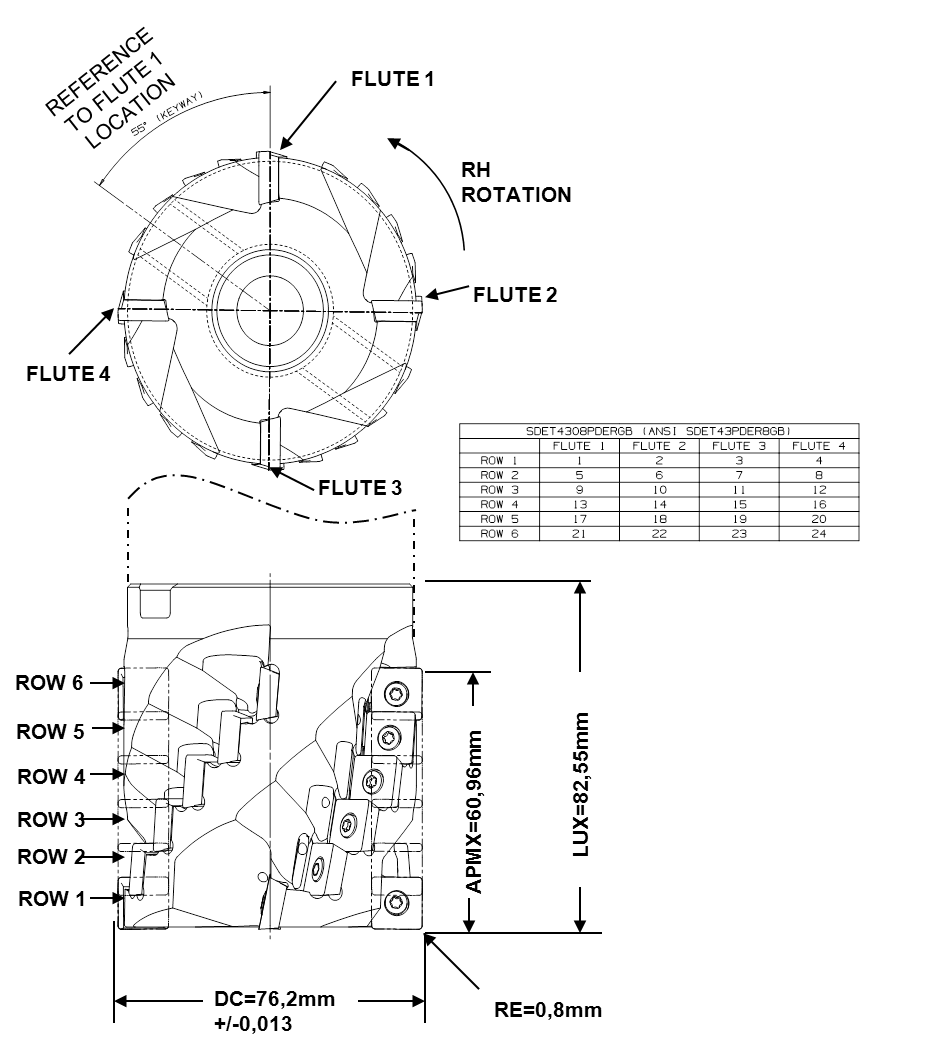
<?xml version="1.0" encoding="UTF-8"?>
<MTConnectAssets xmlns:m="urn:mtconnect.org:MTConnectAssets:1.2"
xmlns="urn:mtconnect.org:MTConnectAssets:1.2"
xmlns:xsi="http://www.w3.org/2001/XMLSchema-instance"
xsi:schemaLocation="urn:mtconnect.org:MTConnectAssets:1.2
http://mtconnect.org/schemas/MTConnectAssets\\_1.2.xsd">
  <Header creationTime="2011-05-11T13:55:22" assetBufferSize="1024"
  sender="localhost" assetCount="2" version="1.2" instanceId="1234"/>
  <Assets>
    <CuttingTool serialNumber="1" toolId="KSSP300R4SD43L240"
    timestamp="2011-05-11T13:55:22" assetId="KSSP300R4SD43L240.1"
    manufacturers="KMT,Parlec">
      <Description>Keyway: 55 degrees</Description>
      <CuttingToolLifeCycle>
        <CutterStatus><Status>NEW</Status></CutterStatus>
        <Measurements>
          <UsableLengthMax code="LUX"
          nominal="82.55">82.55</UsableLengthMax>
          <CuttingDiameterMax code="DC" nominal="76.2" maximum="76.213"
          minimum="76.187">76.2</CuttingDiameterMax>
          <DepthOfCutMax code="APMX" nominal="60.96">60.95</DepthOfCutMax>
        </Measurements>
        <CuttingItems count="24">
          <CuttingItem indices="1" itemId="SDET43PDER8GB"
          manufacturers="KMT">
            <Locus>FLUTE: 1, ROW: 1</Locus>
            <Measurements>
             <DriveAngle code="DRVA" nominal="55">55</DriveAngle>
           </Measurements>
          </CuttingItem>
          <CuttingItem indices="2-24" itemId="SDET43PDER8GB"
          manufacturers="KMT">
            <Locus>FLUTE: 2-4, ROW: 1; FLUTE: 1-4, ROW 2-6</Locus>
          </CuttingItem>
        </CuttingItems>
      </CuttingToolLifeCycle>
    </CuttingTool>
  </Assets>
</MTConnectAssets>
Example for Shell Mill with Explicate Loci
Drill with Individual Loci
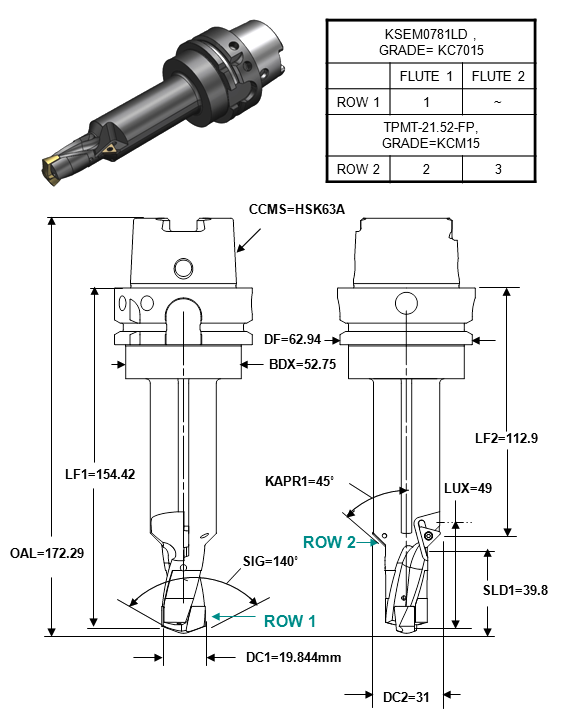
<?xml version="1.0" encoding="UTF-8"?>
<MTConnectAssets xmlns:m="urn:mtconnect.org:MTConnectAssets:1.2"
xmlns="urn:mtconnect.org:MTConnectAssets:1.2"
xmlns:xsi="http://www.w3.org/2001/XMLSchema-instance"
xsi:schemaLocation="urn:mtconnect.org:MTConnectAssets:1.2
http://mtconnect.org/schemas/MTConnectAssets\\_1.2.xsd">
  <Header creationTime="2011-05-11T13:55:22" assetBufferSize="1024"
  sender="localhost" assetCount="2" version="1.2" instanceId="1234"/>
  <Assets>
    <CuttingTool serialNumber="1" toolId="KSEM0781LD"
    timestamp="2011-05-11T13:55:22" assetId="KSEM0781LD.1" manufacturers="KMT">
      <CuttingToolLifeCycle>
        <CutterStatus><Status>NEW</Status></CutterStatus>
        <ConnectionCodeMachineSide>HSK63A</ConnectionCodeMachineSide>
        <Measurements>
          <BodyDiameterMax code="BDX">52.75</BodyDiameterMax>
          <OverallToolLength nominal="172.29"
          code="OAL">172.29</OverallToolLength>
          <UsableLengthMax code="LUX" nominal="49">49</UsableLengthMax>
          <FlangeDiameterMax code="DF"
          nominal="62.94">62.94</FlangeDiameterMax>
        </Measurements>
        <CuttingItems count="3">
          <CuttingItem indices="1" itemId="KSEM0781LD" manufacturers="KMT"
          grade="KC7015">
            <Locus>FLUTE: 1, ROW: 1</Locus>
            <Measurements>
         <FunctionalLength code="LF1" nominal="154.42">154.42</FunctionalLength>
         <CuttingDiameter code="DC1" nominal="19.844">19.844</CuttingDiameter>
         <PointAngle code="SIG" nominal="140">140</PointAngle>
         <ToolCuttingEdgeAngle code="KAPR1" nominal="45">45</ToolCuttingEdgeAngle>
         <StepDiameterLength code="SLD1" nominal="39.8">39.8</StepDiameterLength>
            </Measurements>
          </CuttingItem>
          <CuttingItem indices="2-3" itemId="TPMT-21.52-FP"
          manufacturers="KMT" grade="KCM15">
            <Locus>FLUTE: 1-2, ROW: 2</Locus>
            <Measurements>
         <FunctionalLength code="LF2" nominal="112.9">119.2</FunctionalLength>
         <CuttingDiameter code="DC2" nominal="31">31</CuttingDiameter>
            </Measurements>
          </CuttingItem>
        </CuttingItems>
      </CuttingToolLifeCycle>
    </CuttingTool>
  </Assets>
</MTConnectAssets>
Example for Step Drill with Explicate Loci
Shell Mill with Different Inserts on First Row
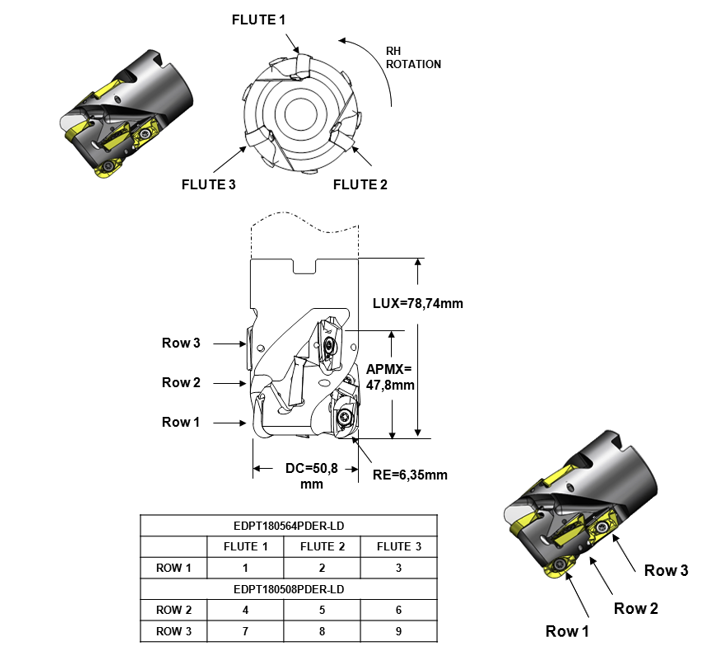
<?xml version="1.0" encoding="UTF-8"?>
<MTConnectAssets xmlns:m="urn:mtconnect.org:MTConnectAssets:1.2"
xmlns="urn:mtconnect.org:MTConnectAssets:1.2"
xmlns:xsi="http://www.w3.org/2001/XMLSchema-instance"
xsi:schemaLocation="urn:mtconnect.org:MTConnectAssets:1.2
http://mtconnect.org/schemas/MTConnectAssets\\_1.2.xsd">
  <Header creationTime="2011-05-11T13:55:22" assetBufferSize="1024"
  sender="localhost" assetCount="2" version="1.2" instanceId="1234"/>
  <Assets>
    <CuttingTool serialNumber="1" toolId="XXX" timestamp="2011-05-11T13:55:22"
    assetId="XXX.1" manufacturers="KMT">
      <CuttingToolLifeCycle>
        <CutterStatus><Status>NEW</Status></CutterStatus>
        <Measurements>
          <DepthOfCutMax code="APMX" nominal="47.8">47.8</DepthOfCutMax>
          <CuttingDiameterMax code="DC"
          nominal="50.8">50.8</CuttingDiameterMax>
          <UsableLengthMax code="LUX"
          nominal="78.74">78.74</UsableLengthMax>
        </Measurements>
        <CuttingItems count="9">
          <CuttingItem indices="1-3" itemId="EDPT180564PDER-LD"
          manufacturers="KMT">
            <Locus>FLUTE: 1-3, ROW: 1</Locus>
            <Measurements>
              <CornerRadius code="RE" nominal="6.25">6.35</CornerRadius>
            </Measurements>
          </CuttingItem>
          <CuttingItem indices="4-9" itemId="EDPT180508PDER-LD"
          manufacturers="KMT">
            <Locus>FLANGE: 1-4, ROW: 2-3</Locus>
          </CuttingItem>
        </CuttingItems>
      </CuttingToolLifeCycle>
    </CuttingTool>
  </Assets>
</MTConnectAssets>
Example for Shell Mill with Different Inserts on First Row
File Schema Diagrams
See File element in MTConnectAssets schema.
RawMaterial Schema Diagrams
See RawMaterial element in MTConnectAssets schema.
QIFDocumentWrapper Schema Diagrams
See QIFDocumentWrapper element in MTConnectAssets schema.
Classes
- Asset
abstract Asset.
Description
It is used in the manufacturing process, but is not permanently associated with a single piece of equipment. It can be removed from the piece of equipment without compromising its function, and can be associated with other pieces of equipment during its lifecycle.
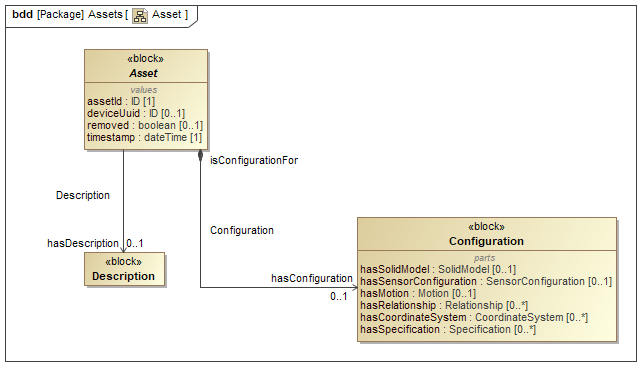
Note: See Assets Schema Diagrams for XML schema.
- PhysicalAsset
abstract physical
Asset.
Packages
- Component Configuration Parameters
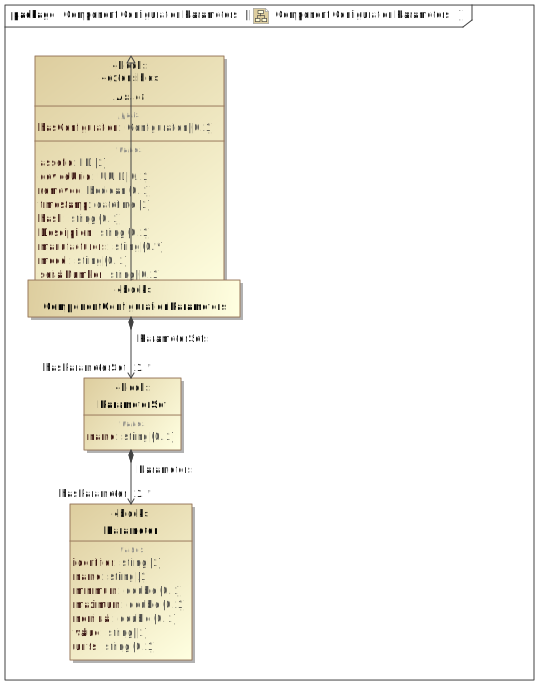
This section provides semantic information for the ComponentConfigurationParameters model.
- Cutting Tool
This section provides semantic information for the CuttingTool and CuttingToolArchetype models.
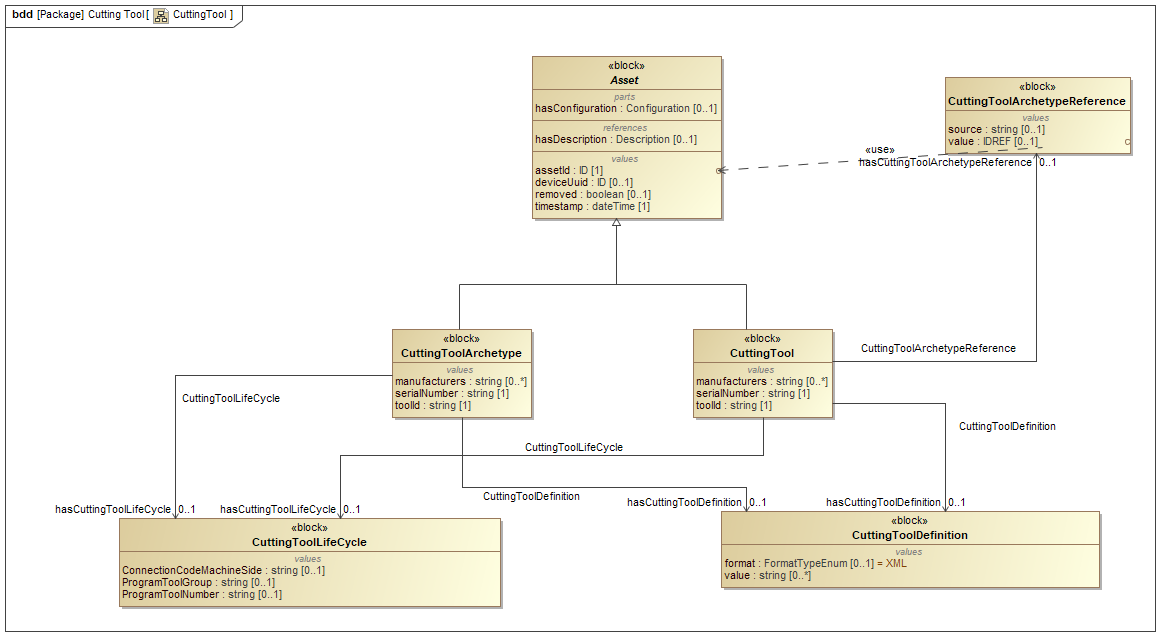
Note: See CuttingTool Schema Diagrams for XML schema.
Cutting Tool Asset Information Model
There are two information models used to represent a cutting tool, CuttingToolArchetype and CuttingTool. The CuttingToolArchetype represents the static cutting tool geometries and nominal values as one would expect from a tool catalog and the CuttingTool represents the use or application of the tool on the shop floor with actual measured values and process data. In Version 1.3.0 of the MTConnect Standard it was decided to separate out these two concerns since not all pieces of equipment will have access to both sets of information. In this way, a generic definition of the cutting tool can coexist with a specific assembly information model with minimal redundancy of data.
MTConnect Standard will adopt the ISO 13399 structure when formulating the vocabulary for Cutting Tool geometries and structure to be represented in the CuttingToolArchetype. The nominal values provided in the CuttingToolLifeCycle section are only concerned with two aspects of the Cutting Tool; the Cutting Tool and the cutting item. The tool item, Adaptive Item, and Assembly Item will only be covered in the CuttingToolDefinition section of this document since this section contains the full ISO 13399 information about a Cutting Tool.
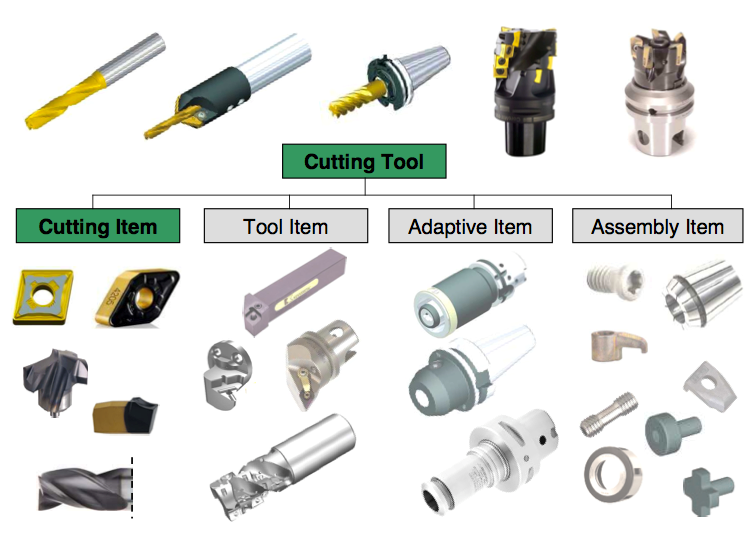
The Cutting Tool Parts illustrates the parts of a Cutting Tool. The Cutting Tool is the aggregate of all the components and the cutting item is the part of the tool that removes the material from the workpiece. These are the primary focus of the MTConnect Standard.
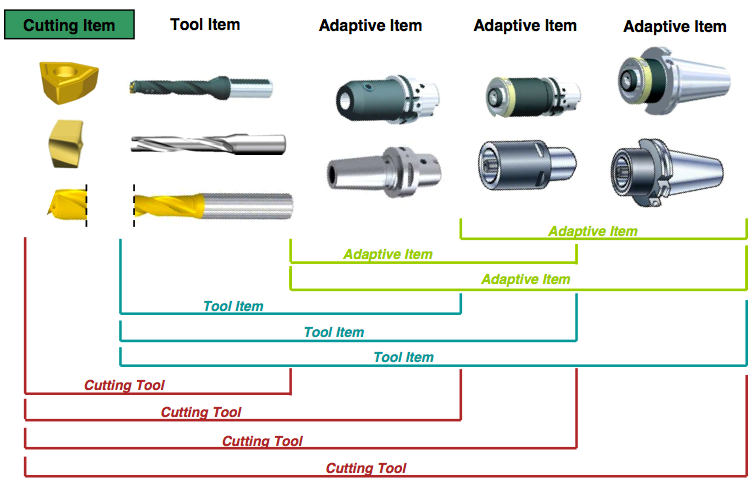
Cutting Tool Composition provides another view of the composition of a Cutting Tool. The Adaptive Items and tool items will be used for measurements, but will not be modeled as separate entities. When we are referencing the Cutting Tool we are referring to the entirety of the assembly and when we provide data regarding the cutting item we are referencing each individual item as illustrated on the left of the previous diagram.
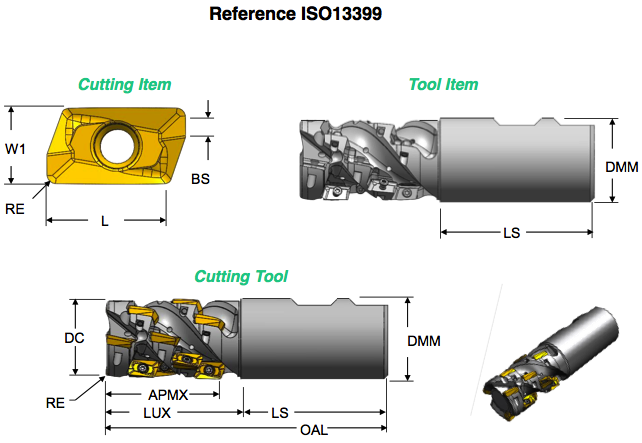
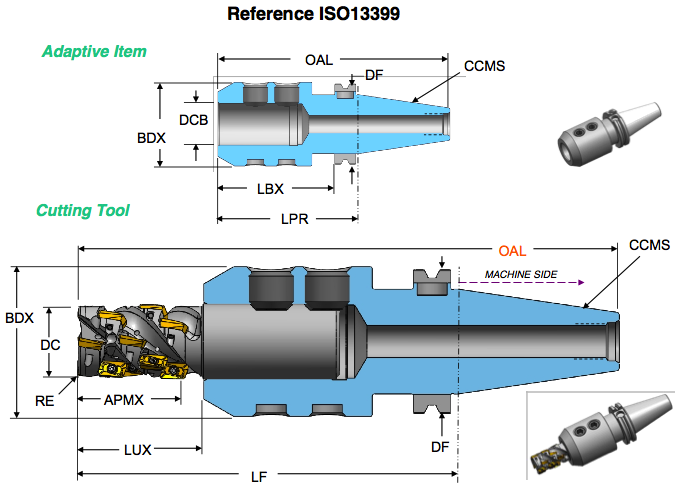
Cutting Tool, Tool Item, and Cutting Item and Cutting Tool, Tool Item, and Cutting Item 2 further illustrates the components of the Cutting Tool. As we compose the tool item, cutting item, Adaptive Item, we get a Cutting Tool. The tool item, Adaptive Item, and Assembly Item will only be in the CuttingToolDefinition section that will contain the full ISO 13399 information. These figures also use the ISO 13399 codes for each of the measurements. These codes will be translated into the MTConnect Standard vocabulary as illustrated below. The measurements will have a maximum, minimum, and nominal value representing the tolerance of allowable values for this dimension.
The MTConnect Standard will not define the entire geometry of the Cutting Tool, but will provide the information necessary to use the tool in the manufacturing process. Additional information can be added to the definition of the Cutting Tool by means of schema extensions.
Additional diagrams will reference these dimensions by their codes that will be defined in the measurement tables. The codes are consistent with the codes used in ISO 13399 and have been standardized. MTConnect Standard will use the full text name for clarity in the response documents.
- Files
This section provides semantic information for the File model.
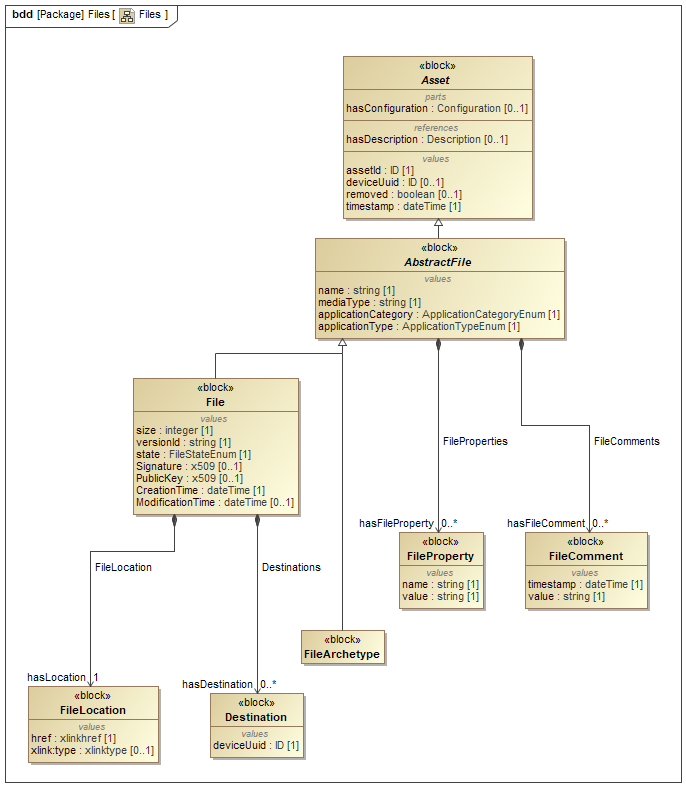
Note: See File Schema Diagrams for XML schema.
Files Asset Information Model
Manufacturing processes require various documents, programs, setup sheets, and digital media available at the device for a given process. The File and FileArchetype
Assets provide a mechanism to communicate specific "Files" that are relevant to a process where the media is located on a server and represented by a Universal Resource Locator (URL).The FileArchetype contains metadata common to all File
Assets for a certain purpose. The FileAssetreferences the file specific to a given device or set of devices. The FileAssetdoes not hold the contents of the file, it contains a reference to the location (URL) used to access the information. The metadata associated with the File provides semantic information about the representation (mime-type) and the application associated with the File. The application of the file is an extensible controlled vocabulary with common manufacturing uses provided.- Fixture
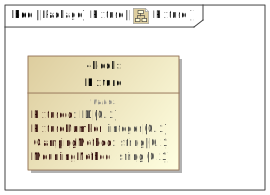
This section provides semantic information for the Fixture model.
- Pallet
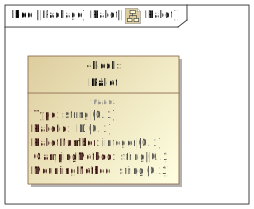
This section provides semantic information for the Pallet model.
- Part
This section provides semantic information for the
Partmodel.- Process
This section provides semantic information for the
Processmodel.- QIF
This section provides semantic information for the QIFDocumentWrapper model.
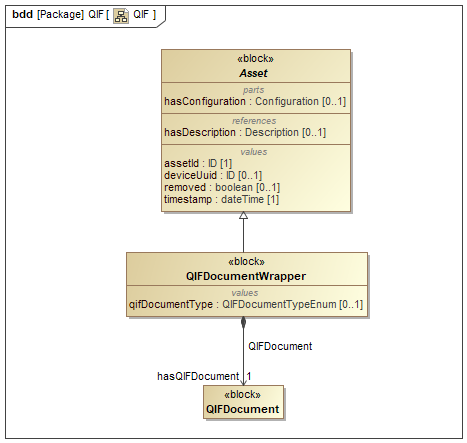
Note: See QIFDocumentWrapper Schema Diagrams for XML schema.
QIF Asset Information Model
The QIF is an American National Standards Institute (ANSI) accredited standard developed by the Digital Metrology Standards Consortium (DMSC) standards development organization. The DMSC is an A-liaison to the International Standards Organization (ISO) Technical Committee (TC) 184. QIF addresses the needs of the metrology community to have a semantic information model for the exchange of metrology data throughout the verification lifecycle from product design to execution, analysis, and reporting.
The MTConnect QIF Asset Information Model provides a wrapper around a QIF document (i.e., a dataset conforming to the QIF Information model) in its native XML representation. The MTConnect standard does not alter or extend the QIF standard and regards the QIF standard as a passthrough.
Information about the QIF standards is at the following location: https://qifstandards.org
- Raw Material
This section provides semantic information for the RawMaterial model.
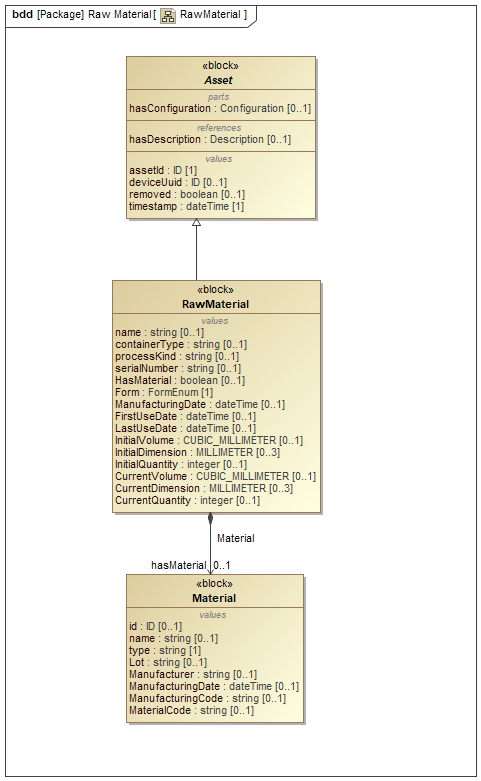
Note: See RawMaterial Schema Diagrams for XML schema.
Raw Material Asset Information Model
Raw material represents the source of material for immediate use and sources of material that may or may not be used during the manufacturing process.
The RawMaterial
Assetholds the references to the content stored in the actual RawMaterial container or derived about the RawMaterial by the system during operation.- Task
This section provides semantic information for the Task model.
Source: MTConnect Institute model documentation, version 2.8.
MTConnect term dictionary · TAMS Model-Aware MTConnect Browser