MTConnect 2.8 package
Fundamentals
The MTConnect Standard defines the normative information model and protocol for retrieving information from manufacturing equipment. This document specifies the agent behavior and protocol.
Agent
The MTConnect Standard specifies the minimum functionality of the agent. The functionality is as follows:
- Provides store and forward messaging middleware service.
- Provides key-value information storage and asset retrieval service.
- Implements the REST API for the MTConnect Standard (See REST Protocol).
- Device metadata.
- observations collected by the agent.
- assets collected by the agent.
There are three types of information stored by an agent that MAY be published in a response document. These are as follows:
- equipment metadata specified in Device Information Model.
- streaming data provides the observations specified in Observation Information Model.
- Assets specified in Asset Information Model.
Agent Instance ID
The agent MUST set the instanceId to a unique value whenever the sequence number in the agent is initialized to 1. (see Sequence Numbers and Persistence and Recovery below).
Storage of Equipment Metadata
An agent MUST be capable of publishing equipment metadata for the agent as specified in Device Information Model.
Storage of Streaming Data
The agent MAY implement a buffer with a fixed number of observations. If the bufferSize is fixed, the agent MUST store observations using a first-in-first-out pattern. The agent will remove the oldest observation when the buffer is full and a new observation arrives.

In first-in-first-out-buffer-management, the maximum number of observations that can be stored in the buffer of the agent is 8. The bufferSize in the header reports the maximum number of observations. This example illustrates that when the buffer fills up, the oldest piece of data falls out the other end.

Note: As an implementation suggestion, the buffer should be sized large enough to provide a continuous stream of observations. The implementer should also consider the impact of a temporary loss of communications when determining the size for the buffer. A larger buffer will allow more time to reconnect to an agent without losing data.
Sequence Numbers
In an agent, each occurrence of an observation in the buffer will be assigned a monotonically increasing unsigned 64-bit integer (sequence number) when it arrives. The first sequence number MUST be 1.
The sequence number for each observation MUST be unique for an instance of an agent identified by an instanceId.
instanceid-and-sequence illustrates the changing of the instanceId when an agent resets the sequence number to 1.
instanceId |
sequence |
|---|---|
| 5 234556 | 234 |
| 235 | |
| 236 | |
| 237 | |
| 238 | |
| 2 Agent Stops and Restarts | |
| 5 234557 | 1 |
| 2 | |
| 3 | |
| 4 | |
| 5 |
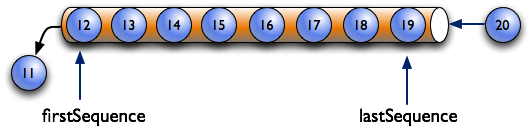
identifying-the-range-of-data-with-firstsequence-and-lastsequence shows two additional pieces of information defined for an agent:
firstSequence-- the oldest observation in the buffer. The agent removes this observation when it receives the next observationlastSequence-- the newest observation in the buffer
firstSequence and lastSequence provide the range of values for the REST API requests.
The agent MUST begin evaluating observations with sample request's from parameter. Also, the agent MUST include a maximum number of observations given by the count parameter in the response document.
In identifying-the-range-of-data-with-from-and-count, the request specifies the observations start at sequence number 15 (from) and includes a total of three items (count).
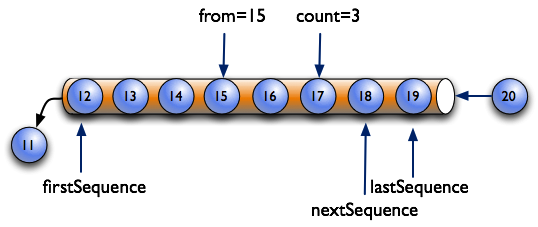
nextSequence header property has the sequence number of the next observation in the buffer for subsequent sample requests providing a contiguous set of observations. In the example in identifying-the-range-of-data-with-from-and-count, the next sequence number (nextSequence) will be 18.
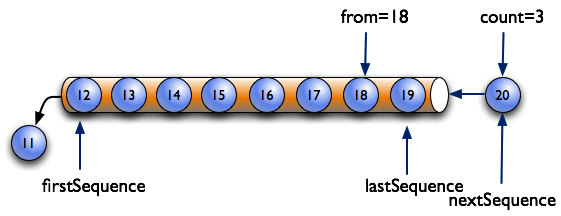
As shown in identifying-the-range-of-data-with-nextsequence-and-lastsequence, the combination of from and count defined by the request indicates a sequence number for data that is beyond that which is currently in the buffer. In this case, nextSequence is set to a value of $$ lastSequence + 1 $$.
Observation Buffer
An observation has four pieces of information as follows:
- sequence number associated with each observation -
sequence. - The
timestampthe observation was made. . - A reference to the
dataitemidfrom the Device Information Model. - The value of the observation.
data-storage-concept is an example demonstrating the concept of how data may be stored in an agent:
sequence |
timestamp |
dataItemId |
result |
|---|---|---|---|
101 |
2016-12-13T09:44:00.2221Z |
AVAIL-28277 |
UNAVAILABLE |
102 |
2016-12-13T09:54:00.3839Z |
AVAIL-28277 |
AVAILABLE |
103 |
2016-12-13T10:00:00.0594Z |
POS-Y-28277 |
25.348 |
104 |
2016-12-13T10:00:00.0594Z |
POS-Z-28277 |
13.23 |
105 |
2016-12-13T10:00:03.2839Z |
SS-28277 |
0 |
106 |
2016-12-13T10:00:03.2839Z |
POS-X-28277 |
11.195 |
107 |
2016-12-13T10:00:03.2839Z |
POS-Y-28277 |
24.938 |
108 |
2016-12-13T10:01:37.8594Z |
POS-Z-28277 |
1.143 |
109 |
2016-12-13T10:02:03.2617Z |
SS-28277 |
1002 |
Timestamp
observations MUST have a timestamp giving the most accurate time that the observation occurred.
The timezone of the timestamp MUST be UTC (Coordinated Universal Time) and represented using ISO 8601 format: e.g., "2010-04-01T21:22:43Z".
Applications SHOULD use the observation's timestamp for ordering as opposed to sequence number.
All observations occurring at the same time MUST have the same timestamp.
Recording Occurrences of Streaming Data
The agent MUST only place observations in the buffer if the data has changed from the previous observation for the same DataItem.
The agent MUST place every observation in the buffer, without checking for changes, in the following cases:
- The
discreteistrue. - The
representationisDISCRETE. - The
representationisTIME_SERIES.
Maintaining Last Value for Data Entities
An agent MUST retain the most recent observation associated with each DataItem, even if the observation is no longer in the buffer. This function supports the current request functionality.
Unavailability of Data
An observation with the value of UNAVAILABLE indicates the value is indeterminate.
The agent MUST initialize every DataItem, unless it has a constant value (see below), with an observation with the value of UNAVAILABLE. Aditionally, whenever the data source is unreachable, every DataItem associated with the data source must have an observation with the value of UNAVAILABLE and timestamp when the connection was lost.
An DataItem that is constrained to a constant value, as defined in Device Information Model, MUST only have an observation with the constant value and MUST NOT be set to UNAVAILABLE.
Persistence and Recovery
The agent MAY have a fixed size buffer and the buffer MAY be ephemeral.
If the buffer is recoverable, the agent MUST NOT change the instanceId and MUST NOT set the sequence number to 1. The sequence number MUST be one greater than the maximum value of the recovered observations. $$ max(sequence) + 1 $$
Storage of MTConnect Assets
An agent MAY only retain a limited number of Assets in the asset buffer. The Assets are stored in first-in-first-out method where the oldest Asset is removed when the asset buffer is full and a new Asset arrives.
first-in-first-out-asset-buffer-management illustrates the oldest Asset being removed from the asset buffer when a new Asset is added and the asset buffer is full:

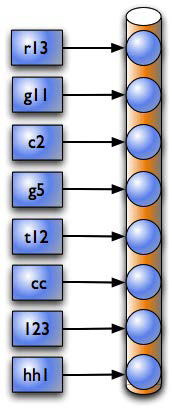
Assets are indexed by assetId. In the case of Assets, relationship-between-assetid-and-stored-asset-documents demonstrates the relationship between the key (assetId) and the stored Asset:
Note: The key (
assetId) is independent of the order of theAssetstored in the asset buffer.
When the agent receives a new Asset, one of the following rules MUST apply:
If the
Assetis not in the asset buffer, the agent MUST add the newAssetto the front of the asset buffer. If the asset buffer is full, the oldestAssetwill be removed from the asset buffer.If the
Assetis already in the asset buffer, the agent MUST replace the existingAssetand move theAssetto the front of the asset buffer.
The number of Asset that may be stored in an agent is defined by the value for assetBufferSize. An assetBufferSize of 4,294,967,296 or $$ 2^{32 } $$ MUST indicate unlimited storage.
The asset buffer MAY be ephemeral and the Asset entities will be lost if the agent clears the asset buffer. They must be recovered from the data source.
Asset Information Model provides additional information on asset management.
Response Documents
response documents are electronic documents generated by an agent in response to a request for data.
The response documents defined in the MTConnect Standard are:
MTConnectDevices Response Document: Describes the composition and configuration of the Device and the data that can be observed. See MTConnectDevices Response Document and Device Information Model for details on this information model.
MTConnectStreams Response Document: Observations made at a point in time about related DataItems. See MTConnectStreams Response Document and Observation Information Model for details on this information model.
MTConnectAssets Response Document: Assets related to Devices. See MTConnectAssets Response Document and Asset Information Model for details on this information model.
MTConnectErrors Response Document: Information in response to a failed request. See MTConnectErrors Response Document for details on this information model.
Request/Response Information Exchange
The transfer of information between an agent and a client software application is based on a request and response REST protocol. A client application requests specific information from an agent and an agent responds with a response document.
There are four types of MTConnect Requests. These requests are as follows:
probe request: Requests information about one more more Devices as an MTConnectDevices block.
current request: Requests the most recent, or snapshot at a sequence number, observations as an MTConnectStreams block.
sample request: Requests a series of observations as an MTConnectStreams block.
asset request: Requests a set of assets as an MTConnectAssets block.
If an agent is unable to respond to the request for information or the request includes invalid information, the agent will publish an MTConnectErrors Response Document. See MTConnectErrors.
See REST Protocol for the details on the normative requirements of the agent.
Fundamentals Appendix
Fundamentals of Using XML to Encode Response Documents
The MTConnect Standard specifies the structures and constructs that are used to encode response documents. When these response documents are encoded using XML, there are additional rules defined by the XML standard that apply for creating an XML compliant document. An implementer should refer to the W3C website for additional information on XML documentation and implementation details - http://www.w3.org/XML.
The following provides specific terms and guidelines referenced in the MTConnect Standard for forming response documents with XML:
tag: Atagis an XML construct that forms the foundation for an XML expression. It defines the scope (beginning and end) of an XML expression. The main types of tags are:start-tag: Designates the beginning on an XML element; e.g., <element name>end-tag: Designates the end on an XML element; e.g., </element name>.
Note: If an element has no child elements or CDATA, the
end-tagmay be shortened to />.
Element: An element is an XML statement that is the primary building block for a document encoded using XML. An element begins with astart-tagand ends with a matchingend-tag. The characters between thestart-tagand theend-tagare the element's content. The content may contain attributes, CDATA, and/or other elements. If the content contains additional elements, these elements are called child elements.
An example would be: <element name>Content of the Element</element name>.
child element: An XML element that is contained within a higher-level parent element. A child element is also known as a sub-element. XML allows an unlimited hierarchy of parent element-child element relationships that establishes the structure that defines how the various pieces of information in the document relate to each other. A parent element may have multiple associated child elements.
element name: A descriptive identifier contained in both the
start-tagandend-tagthat provides the name of an XML element.Attribute: A construct consisting of a name–value pair that provides additional information about that XML element. The format for an attribute is `name="value"; where the value for the attribute is enclosed in a set of quotation (“) marks. An XML attribute MUST only have a single value and each attribute can appear at most once in each element. Also, each attribute MUST be defined in a schema to either be required or optional.An example of attributes for an XML element is example-of-attributes-for-an-element:
<DataItem category="SAMPLE" id="S1load"
  nativeUnits="PERCENT"  type="LOAD"
  units="PERCENT"/>
Example of attributes for an element
In this example, DataItem is the element name. category, id, nativeUnits, type, and units are the names of the attributes. “SAMPLE", “S1load", “PERCENT", “LOAD", and “PERCENT" are the values for each of the respective attributes.
- CDATA: CDATA is an XML term representing Character Data. Character Data contains a value(s) or text that is associated with an XML element. CDATA can be restricted to certain formats, patterns, or words.
An example of CDATA associated with an XML element would be example-of-cdata-associated-with-element:
<Message id="M1">This is some text</Message>
Example of cdata associated with element
In this example, Message is the element name and This is some text is the CDATA.
- namespace: An XML namespace defines a unique vocabulary for named elements and attributes in an XML document. An XML document may contain content that is associated with multiple namespaces. Each namespace has its own unique identifier.
Elements and attributes are associated with a specific namespace by placing a prefix on the name of the element or attribute that associates that name to a specific namespace; e.g., x:MyTarget associates the element name MyTarget with the namespace designated by x: (the prefix).
namespaces are used to avoid naming conflicts within an XML document. The naming convention used for elements and attributes may be associated with either the default namespace specified in the header of an XML document or they may be associated with one or more alternate namespaces. All elements or attributes associated with a namespace that is not the default namespace, must include a prefix (e.g., x:) as part of the name of the element or attribute to associate it with the proper namespace. See Schema and Namespace Declaration Information for details on the structure for XML headers.
The names of the elements and attributes declared in a namespace may be identified with a different prefix than the prefix that signifies that specific namespace. These prefixes are called namespace aliases. As an example, MTConnect Standard specific namespaces are designated as m: and the names of the elements and attributes defined in that namespace have an alias prefix of mt: which designates these names as MTConnect Standard specific vocabulary; e.g., mt:MTConnectDevices.
XML documents are encoded with a hierarchy of elements. In general, XML elements may contain child elements, CDATA, or both. However, in the MTConnect Standard, an element MUST NOT contain mixed content; meaning it cannot contain both child elements and CDATA.
The semantic data model defined for each response document specifies the elements and child elements that may appear in a document. The semantic data model also defines the number of times each element and child element may appear in the document.
example-of-hierarchy-of-xml-elements demonstrates the hierarchy of XML elements and child elements used to form an XML document:
<Root Level>    (Parent Element)
  <First Level>  (Child Element to Root Level and
  Parent Element to Second Level)
    <Second Level>  (Child Element to First Level
    and Parent Element to Third Level)
      <Third Level name="N1"></Third Level>
      (Child Element to Second Level)
      <Third Level name="N2"></Third Level>
      (Child Element to Second Level)
      <Third Level name="N3"></Third Level>
      (Child Element to Second Level)
    </Second Level>   (end-tag for Second Level)
  </First Level>   (end-tag for First Level)
</Root Level>   (end-tag for Root Level)
Example of hierarchy of XML elements
In the example-of-hierarchy-of-xml-elements, Root Level and First Level have one child element (sub-elements) each and Second Level has three child elements; each called Third Level. Each Third Level element has a different name attribute. Each level in the structure is an element and each lower level element is a child element.
Schema and Namespace Declaration Information
There are four pseudo-attributes typically included in the header of a response document that declare the schema and namespace for the document. Each of these pseudo-attributes provides specific information for a client software application to properly interpret the content of the response document.
The pseudo-attributes include:
xmlns:xsi– Thexsiportion of this attribute name stands for XML Schema instance. An XML Schema instance provides information that may be used by a software application to interpret XML specific information within a document. See the W3C website for more details onxmlns:xsi.xmlns– Declares the default namespace associated with the content of the response document. The default namespace is considered to apply to all elements and attributes whenever the name of the element or attribute does not contain a prefix identifying an alternate namespace.
The value of this attribute is an URN identifying the name of the file that defines the details of the namespace content. This URN provides a unique identify for the namespace.
xmlns:m– Declares the MTConnect specific namespace associated with the content of the response document. There may be multiple namespaces declared for an XML document. Each may be associated to the default namespace or it may be totally independent. The:mdesignates that this is a specific MTConnect namespace which is directly associated with the default namespace.
Note: See Extensibility for details regarding extended namespaces.
The value associated with this attribute is an URN identifying the name of the file that defines the details of the namespace content.
xsi:schemaLocation- Declares the name for the schema associated with the response document and the location of the file that contains the details of the schema for that document.
The value associated with this attribute has two parts:
A URN identifying the name of the specific XML Schema instance associated with the response document.
The path to the location where the file describing the specific XML Schema instance is located. If the file is located in the same root directory where the agent is installed, then the local path MAY be declared. Otherwise, a fully qualified URL must be declared to identify the location of the file.
Note: In the format of the value associated with
xsi:schemaLocation, the URN and the path to the schema file MUST be separated by a “space”.
In example-of-schema-and-namespace-declaration, the first line is the XML declaration. The second line is a root element called MTConnectDevices. The remaining four lines are the pseudo-attributes of MTCconnectDevices that declare the XML schema and namespace associated with an MTConnectDevices Response Document.
<?xml version="1.0" encoding="UTF-8"?>
  <MTConnectDevices
   xmlns:xsi=http://www.w3.org/2001/XMLSchema-instance
   xmlns="urn:mtconnect.org:MTConnectDevices:1.3"
   xmlns:m="urn:mtconnect.org:MTConnectDevices:1.3"
   xsi:schemaLocation="urn:mtconnect.org:
    MTConnectDevices:1.3 /schemas/MTConnectDevices\\_1.3.xsd">
Example of schema and namespace declaration
The format for the values provided for each of the pseudo-attributes MUST reference the semantic data model (e.g., MTConnectDevices, MTConnectStreams, MTConnectAssets, or MTConnectError) and the version (i.e.; 1.1, 1.2, 1.3, etc.) of the MTConnect Standard that depict the schema and namespace(s) associated with a specific response document.
When an implementer chooses to extend an MTConnect data model by adding custom data types or additional structural elements, the schema and namespace for that data model should be updated to reflect the additional content. When this is done, the namespace and schema information in the header should be updated to reflect the URI for the extended namespace and schema.
Extensibility
MTConnect is an extensible standard, which means that implementers MAY extend the data models defined in the various sections of the MTConnect Standard to include information required for a specific implementation. When these data models are encoded using XML, the methods for extending these data models are defined by the rules established for extending any XML schema (see the W3C website for more details on extending XML data models).
The following are typical extensions that MAY be considered in the MTConnect data models:
Additional
typeandsubtypevalues for DataItems.Additional structural elements as containers.
Additional
Compositionelements.New
Assettypes that are sub-typed from the abstractAssettype.child elements that may be added to specific XML elements contained within the MTConnect Information Models. These extended elements MUST be identified in a separate namespace.
When extending an MTConnect data model, there are some basic rules restricting changes to the MTConnect data models.
When extending an MTConnect data model, an implementer:
MUST NOT add new value for category for DataItems,
MUST NOT add new root elements,
SHOULD NOT add new top level Components, and
MUST NOT add any new attributes or include any sub-elements to
Composition.
Note: Throughout the documents additional information is provided where extensibility may be acceptable or unacceptable to maintain compliance with the MTConnect Standard.
When a schema representing a data model is extended, the schema and namespace declaration at the beginning of the corresponding response document MUST be updated to reflect the new schema and namespace so that a client software application can properly validate the response document.
An XML example of a schema and namespace declaration, including an extended schema and namespace, is shown in example-of-extended-schema-and-namespace-in-declaration:
<?xml version="1.0" encoding="UTF-8"?>
  <MTConnectDevices
   xmlns:xsi=http://www.w3.org/2001/XMLSchema-instance
   xmlns="urn:mtconnect.org:MTConnectDevices:1.3"
   xmlns:m="urn:mtconnect.org:MTConnectDevices:1.3"
   xmlns:x="urn:MyLocation:MyFile:MyVersion"
   xsi:schemaLocation="urn:MyLocation:MyFile:MyVersion
     /schemas/MyFileName.xsd" />
Example of extended schema and namespace in declaration
In this example:
xmlns:xis added in Line 6 to identify the XML Schema instance for the extended schema. element names identified with an "x" prefix are associated with this specific XML Schema instance.
Note: The "
x" prefix MAY be replaced with any prefix that the implementer chooses for identifying the extended schema and namespace.
xsi:schemaLocationis modified in Line 7 to associate the namespace URN with the URL specifying the location of schema file.MyLocation,MyFile,MyVersion, andMyFileNamein Lines 6 and 7 MUST be replaced by the actual name, version, and location of the extended schema.
When an extended schema is implemented, each structural element, DataItem, and asset defined in the extended schema MUST be identified in each respective response document by adding a prefix to the XML element name associated with that structural element, DataItem, or asset. The prefix identifies the schema and namespace where that XML Element is defined.
Packages
- MTConnect Protocol
The agent MUST support the REST Protocol and produce XML representations of the information models.
All other protocols and representations are optional.
Source: MTConnect Institute model documentation, version 2.8.
MTConnect term dictionary · TAMS Model-Aware MTConnect Browser