MTConnect 2.8 package
Device Information Model
The Device Information Model provides a representation of the physical and logical configuration for a piece of equipment used for a manufacturing process or for any other purpose. It also provides the definition of data that may be reported by that equipment.
Using information defined in the Device Information Model, a software application can determine the configuration and reporting capabilities of a piece of equipment. To do this, the software application issues a probe request (defined in Fundamentals) to an agent associated with a piece of equipment. An agent responds to the probe request with an MTConnectDevices Response Document that contains information describing both the physical and logical structure of the piece of equipment and a detailed description of each Observation that can be reported by the agent associated with the piece of equipment. This information allows the client software application to interpret the document and to extract the data with the same meaning, value, and context that it had at its original source.
The MTConnectDevices Response Document is comprised of two sections: Header and Devices.
The Header section contains protocol related information as defined in Fundamentals.
The Devices section of the MTConnectDevices Response Document contains a Device entity for each piece of equipment described in the document. Each Device is comprised of two primary types of entities - Components and DataItems.
Components organize information that represents the physical and logical parts and sub-parts of a piece of equipment (See Components for more details).
DataItems describe data that can be reported by a piece of equipment. In the Device Information Model, DataItems are defined as DataItem entities (See DataItem Types).
The Components and DataItems in the MTConnectDevices Response Document provide information representing the physical and logical structure for a piece of equipment and the types of data that the piece of equipment can report relative to that structure. The MTConnectDevices Response Document does not contain values for the data types reported by the piece of equipment. The MTConnectStreams Response Document defined in Observation Information Model provides the data values that are reported by the piece of equipment.
Note: The MTConnect Standard also defines the information model for assets. An asset is something that is used in the manufacturing process, but is not permanently associated with a single piece of equipment, can be removed from the piece of equipment without compromising its function, and can be associated with other pieces of equipment during its lifecycle. See Asset Information Model for more details on assets.
Devices Appendix
XML Schema Diagrams
See XML schemas for the MTConnect standard here: https://schemas.mtconnect.org/.
Components Schema Diagrams
See Components element in MTConnectDevices schema.
See Description element in MTConnectDevices schema.
DataItems Schema Diagrams
See DataItems element in MTConnectDevices schema.
See Source element in MTConnectDevices schema.
See Constraints element in MTConnectDevices schema.
See Filter element in MTConnectDevices schema.
See Definition element in MTConnectDevices schema.
References Schema Diagrams
See References element in MTConnectDevices schema.
See ComponentRef element in MTConnectDevices schema.
See DataItemRef element in MTConnectDevices schema.
Configuration Schema Diagrams
See Configuration element in MTConnectDevices schema.
See CoordinateSystem element in MTConnectDevices schema.
See Motion element in MTConnectDevices schema.
See Relationships element in MTConnectDevices schema.
See ComponentRelationship element in MTConnectDevices schema.
See DeviceRelationship element in MTConnectDevices schema.
See SensorConfiguration element in MTConnectDevices schema.
See SolidModel element in MTConnectDevices schema.
See Specifications element in MTConnectDevices schema.
See ProcessSpecification element in MTConnectDevices schema.
XML Examples
Device Entity Hierarchy Example
<Devices>
  <Device id="d1" name="M12346" uuid="M80104K162N">
    <Components>
    <Axes id="a" name="base">
    <Components>
      <Linear id="x" name="X"/>
      <Linear id="y" name="Y"/>
      <Linear id="z" name="Z"/>
      <Rotary id="ar" name="B"/>
      <Linear id="w" name="Z3" nativeName="W"/>
      <Rotary id="c" name="C"/>
    </Components>
    </Axes>
    <Controller id="cont" name="controller">
    <Components>
      <Path id="path1" name="path"/>
    </Components>
    </Controller>
    <Door id="door1" name="door"/>
    <Systems id="systems" name="systems">
    <Components>
      <WorkEnvelope id="we1" name="workenv">
      <Compositions>
        <Composition type="WORKPIECE" id="wp"/>
        <Composition type="TABLE" id="tbl"/>
      </Compositions>
      </WorkEnvelope>
      <Electric id="elec" name="electric"/>
      <Hydraulic id="hydraulic" name="hydraulic"/>
      <Coolant id="coolant" name="coolant"/>
      <Pneumatic id="pneumatic" name="pneumatic"/>
      <Lubrication id="lubrication" name="lubrication"/>
    </Components>
    </Systems>
    <Auxiliaries id="Aux" name="auxiliaries">
    <Components>
      <Environmental id="room" name="environmental"/>
    </Components>
    </Auxiliaries>
    <Resources id="resources" name="resources">
    <Components>
      <Personnel id="personnel" name="personnel"/>
      <Materials id="materials" name="materials">
      <Components>
        <Stock id="procstock" name="stock"/>
      </Components>
      <Materials/>
    </Components>
    </Resources>
    </Components>
  </Device>
</Devices>
Device Entity Hierarchy Example
Component Example
<Devices>
  <Device id="d1" name="M12346" uuid="M80104K162N">
    <Description manufacturer="Example_Corporation"
      serialNumber="272237"> Mill w/SMooth-G
    </Description>
  <DataItems>
    <DataItem category="EVENT" id="avail" name="avail" type="AVAILABILITY"/>
    <DataItem category="EVENT" id="d1_asset_chg" name="asset_chg" type="ASSET_CHANGED"/>
    <DataItem category="EVENT" id="d1_asset_rem" name="asset_rem" type="ASSET_REMOVED"/>
  </DataItems>
    <Components>
    <Controller id="cont" name="controller">
      <DataItems>
      <DataItem category="EVENT" id="estop" name="estop" type="EMERGENCY_STOP"/>
      <DataItem category="CONDITION" id="logic_cond" type="LOGIC_PROGRAM"/>
      <DataItem category="CONDITION" id="cont_system" type="SYSTEM"/>
      <DataItem category="SAMPLE" id="cut_time" type="ACCUMULATED_TIME" units="SECOND"/>
    </DataItems>
    <Components>
      <Path id="path1" name="path">
        <DataItems>
        <DataItem category="EVENT" id="execution" name="execution" type="EXECUTION"/>
        <DataItem category="SAMPLE" id="cspeed" subType="ACTUAL" type="CUTTING_SPEED" units="MILLIMETER/SECOND"/>
        <DataItem category="CONDITION" id="path_system" type="SYSTEM"/>
        <DataItem category="EVENT" id="cvars" representation="DATA_SET" type="VARIABLE"/>
        <DataItem category="EVENT" id="woffset" representation="TABLE" type="WORK_OFFSET"/>
      </DataItems>
      </Path>
    </Components>
    </Controller>
  </Components>
  </Device>
</Devices>
Component Example
Component with Compositions Example
In XML, Composition types are represented differently than Component types. For Component types, the element name is Pascal Case of the Component type name. Whereas, the element name for all Compositiontypes is Composition and the type is defined by the type attribute of the element (see example below).
<WorkEnvelope id="we1" name="workenv">
  <DataItems>
    <DataItem category="CONDITION" id="hardware1" name="hardware1" type="HARDWARE"/>
  </DataItems>
  <Compositions>
  <Composition type="WORKPIECE" id="wp"/>
  <Composition type="TABLE" id="tbl"/>
  </Compositions>
</WorkEnvelope>
Component with Compositions Example
CoordinateSystem Example
<Devices>
  <Device id="d1" name="M12346" uuid="M80104K162N">
    <Description manufacturer="Example_Corporation"
      serialNumber="272237"> Mill w/SMooth-G
    </Description>
    <DataItems>
      <DataItem id="avail" type="AVAILABILITY" category="EVENT"/>
      <DataItem category="EVENT" id="d1_asset_chg" name="asset_chg" type="ASSET_CHANGED"/>
      <DataItem category="EVENT" id="d1_asset_rem" name="asset_rem" type="ASSET_REMOVED"/>
    </DataItems>
    <Configuration>
      <CoordinateSystems>
        <CoordinateSystem id="base" type="BASE">
          <Origin>0 0 0</Origin>
        </CoordinateSystem>
        <CoordinateSystem id="machcoord" type="MACHINE" parentIdRef="base">
          <Transformation>
            <Translation>210 275 1430</Translation>
            <Rotation>0 0 0</Rotation>
          </Transformation>
        </CoordinateSystem>
        <CoordinateSystem id="workcoord" type="OBJECT" parentIdRef="machcoord">
          <Transformation>
            <Translation>0 0 0</Translation>
            <Rotation>0 0 0</Rotation>
          </Transformation>
        </CoordinateSystem>
      </CoordinateSystems>
    </Configuration>
  </Device>
</Devices>
CoordinateSystem Example
Motion Example
<Devices>
  <Device id="d1" name="M12346" uuid="M80104K162N">
    <Description manufacturer="Example_Corporation"
      serialNumber="272237"> Mill w/SMooth-G
    </Description>
    <DataItems>
      <DataItem id="avail" type="AVAILABILITY" category="EVENT"/>
      <DataItem category="EVENT" id="d1_asset_chg" name="asset_chg" type="ASSET_CHANGED"/>
      <DataItem category="EVENT" id="d1_asset_rem" name="asset_rem" type="ASSET_REMOVED"/>
    </DataItems>
    <Configuration>
      <CoordinateSystems>
        <CoordinateSystem id="base" type="BASE">
          <Origin>0 0 0</Origin>
        </CoordinateSystem>
        <CoordinateSystem id="machcoord" type="MACHINE" parentIdRef="base">
          <Transformation>
            <Translation>210 275 1430</Translation>
            <Rotation>0 0 0</Rotation>
          </Transformation>
        </CoordinateSystem>
        <CoordinateSystem id="workcoord" type="OBJECT" parentIdRef="machcoord">
          <Transformation>
            <Translation>0 0 0</Translation>
            <Rotation>0 0 0</Rotation>
          </Transformation>
        </CoordinateSystem>
      </CoordinateSystems>
    </Configuration>
    <Components>
      <Axes id="a" name="base">
        <Components>
          <Linear id="x" name="X">
            <Configuration>
              <Motion id="xmotion" coordinateSystemIdRef="machcoord" type="PRISMATIC" actuation="DIRECT">
                <Transformation>
                  <Translaton>300 915 590</Translaton>
                  <Rotation>0 0 0</Rotation>
                </Transformation>
                <Axis>1.0 0 0</Axis>
              </Motion>
            </Configuration>
          </Linear>
          <DataItems>
            <DataItem id="xtravel" type="SYSTEM" category="CONDITION">
          </DataItems>
        </Components>
      </Axes>
    </Components>
  </Device>
</Devices>
Motion Example
Relationship Example
<Components>
  <Axes id="a" name="base">
    <Components>
      <Linear id="x" name="X">
        <Configuration>
          <Relationships>
            <ComponentRelationship id="xpar" type="PARENT" idRef="we1"/>
          </Relationships>
        </Configuration>
      </Linear>
      <DataItems>
        <DataItem id="xtravel" type="SYSTEM" category="CONDITION">
      </DataItems>
    </Components>
  </Axes>
  <Systems id="systems" name="systems">
    <Components>
      <WorkEnvelope id="we1" name="workenv">
        <Compositions>
          <Composition type="WORKPIECE" id="wp"/>
          <Composition type="TABLE" id="tbl"/>
        </Compositions>
        <DataItems>
          <DataItem id="we1cond" type="SYSTEM" category="CONDITION">
        </DataItems>
      </WorkEnvelope>
    </Components>
  </Systems>
</Components>
Relationship Example
SolidModel Example
<Devices>
  <Device id="d1" name="M12346" uuid="M80104K162N">
    <Description manufacturer="Example_Corporation"
      serialNumber="272237"> Mill w/SMooth-G
    </Description>
    <DataItems>
      <DataItem id="avail" type="AVAILABILITY" category="EVENT"/>
      <DataItem category="EVENT" id="d1_asset_chg" name="asset_chg" type="ASSET_CHANGED"/>
      <DataItem category="EVENT" id="d1_asset_rem" name="asset_rem" type="ASSET_REMOVED"/>
    </DataItems>
    <Configuration>
      <CoordinateSystems>
        <CoordinateSystem id="base" type="BASE">
          <Origin>0 0 0</Origin>
        </CoordinateSystem>
        <CoordinateSystem id="machcoord" type="MACHINE" parentIdRef="base">
          <Transformation>
            <Translation>210 275 1430</Translation>
            <Rotation>0 0 0</Rotation>
          </Transformation>
        </CoordinateSystem>
        <CoordinateSystem id="workcoord" type="OBJECT" parentIdRef="machcoord">
          <Transformation>
            <Translation>0 0 0</Translation>
            <Rotation>0 0 0</Rotation>
          </Transformation>
        </CoordinateSystem>
      </CoordinateSystems>
    </Configuration>
    <Components>
      <Structures id="struct">
        <Configuration>
          <SolidModel id="model" mediaType="OBJ" href="/objs/mazak.obj" coordinateSystemIdRef="base">
            <Transformation>
              <Translation>0 860 0</Translation>
              <Rotation>-90 0 0</Rotation>
            </Transformation>
            <Scale>0.001 0.001 0.001</Scale>
          </SolidModel>
        </Configuration>
        <Components>
          <Structure id="xaxis" name="X_AXIS">
            <Configuration>
              <SolidModel id="x_model" mediaType="OBJ" itemRef="xaxis" solidModelIdRef="model" coordinateSystemIdRef="base"/>
            </Configuration>
            <DataItems>
              <DataItem type="SYSTEM" category="CONDITION" id="struct_cond"/>
            </DataItems>
          </Structure>
        </Components>
      </Structures>
    </Components>
  </Device>
</Devices>
SolidModel Example
Specification Example
<Components>
  <Axes id="a" name="base">
    <Components>
      <Linear id="x" name="X">
        <Configuration>
          <Specifications>
            <Specification id="spec001" type="LENGTH" units="MILLIMETER">
              <Nominal>650</Nominal>
            </Specification>
            <Specification id="spec002" type="LINEAR_FORCE" units="NEWTON">
              <Maximum>5200</Maximum>
              <Minimum>0</Minimum>
            </Specification>
          </Specifications>
        </Configuration>
        <DataItems>
          <DataItem id="xtravel" type="SYSTEM" category="CONDITION">
        </DataItems>
      </Linear>
    </Components>
  </Axes>
</Components>
Specification Example
Example of sensing element provided as data item associated with a Component
<Components>
  <Axes id="a" name="base"
    <Components>
      <Rotary id="c" name="C">
        <DataItems>
          <DataItem type="TEMPERATURE" id="servotemp4"
            category="SAMPLE" nativeUnits="CELSIUS"
            compositionId="Bmotor" units="CELSIUS"/>
          </DataItems>
      </Rotary>
    </Components>
  </Axes>
</Components>
Example of sensing element provided as data item associated with a Component
Example of Sensor for rotary axis
<Components>
  <Axes id="a" name="base"
    <Components>
      <Rotary id="ar" name="B">
        <Components>
          <Sensor id="spdlm" name="Spindlemonitor">
            <DataItems>
              <DataItem type="DISPLACEMENT" id="cvib"
                category="SAMPLE" name="Svib"
                units="MILLIMETER"/>
            </DataItems>
          </Sensor >
        <Components>
      </Rotary>
    </Components>
  </Axes>
</Components>
Example of Sensor for rotary axis
Example of sensor unit with sensing element
<Axes id="a" name="base"
  <Components>
  <Sensor id="sens1" name="Sensorunit">
    <DataItems>
    <DataItem type="TEMPERATURE" id="sentemp"
      category="SAMPLE" name="Sensortemp"
      units="CELSIUS"/>
    </DataItems>
  </Sensor >
  <Linear id="x" name="X">
    <DataItems>
    <DataItem type="DISPLACEMENT" id="xvib"
      category="SAMPLE" name="xvib"
      units="MILLIMETER">
      <Source componentId="sens1"/>
    </DataItem>
    </DataItems>
  </Rotary>
  <Linear id="y" name="Y">
    <DataItems>
    <DataItem type="DISPLACEMENT" id="yvib"
      category="SAMPLE" name="yvib"
      units="MILLIMETER">
      <Source componentId="sens1"/>
    </DataItem>
    </DataItems>
  </Linear>
  <Components>
</Axes>
Example of sensor unit with sensing element
Example of configuration data for Sensor
<Sensor id="sensor" name="sensor">
  <Configuration>
    <SensorConfiguration>
      <FirmwareVersion>2.02</FirmwareVersion>
      <CalibrationDate>2010-05-16</CalibrationDate>
      <NextCalibrationDate>2010-05-16</NextCalibrationDate>
      <CalibrationInitials>WS</CalibrationInitials>
      <Channels>
        <Channel number="1" name="A/D:1">
          <Description>A/D With Thermister</Description>
        </Channel>
      </Channels>
    </SensorConfiguration>
  </Configuration>
  <DataItems>
    <DataItem category="CONDITION" id="sensorc"
      name="sensorc" type="SYSTEM" />
    <DataItem category="SAMPLE" id="senv" name="sensorc"
      type="VOLTAGE_DC" units="VOLT" subType="ACTUAL" />
  </DataItems>
</Sensor>
Example of configuration data for Sensor
Classes
- Device
Componentcomposed of a piece of equipment that produces observations about itself.Description
A
Deviceorganizes its parts asComponententities.A
DeviceMUST have anameanduuidto identify itself.A
DeviceMUST have the followingDataItems: Availability, AssetChanged, and AssetRemoved.See Components for more details on the properties of
Device.See Part Properties of Device for a list of top level
Componenttypes for aDevice.
Packages
- Components
This section provides semantic information for the
Componententity. Components shows theComponentmodel.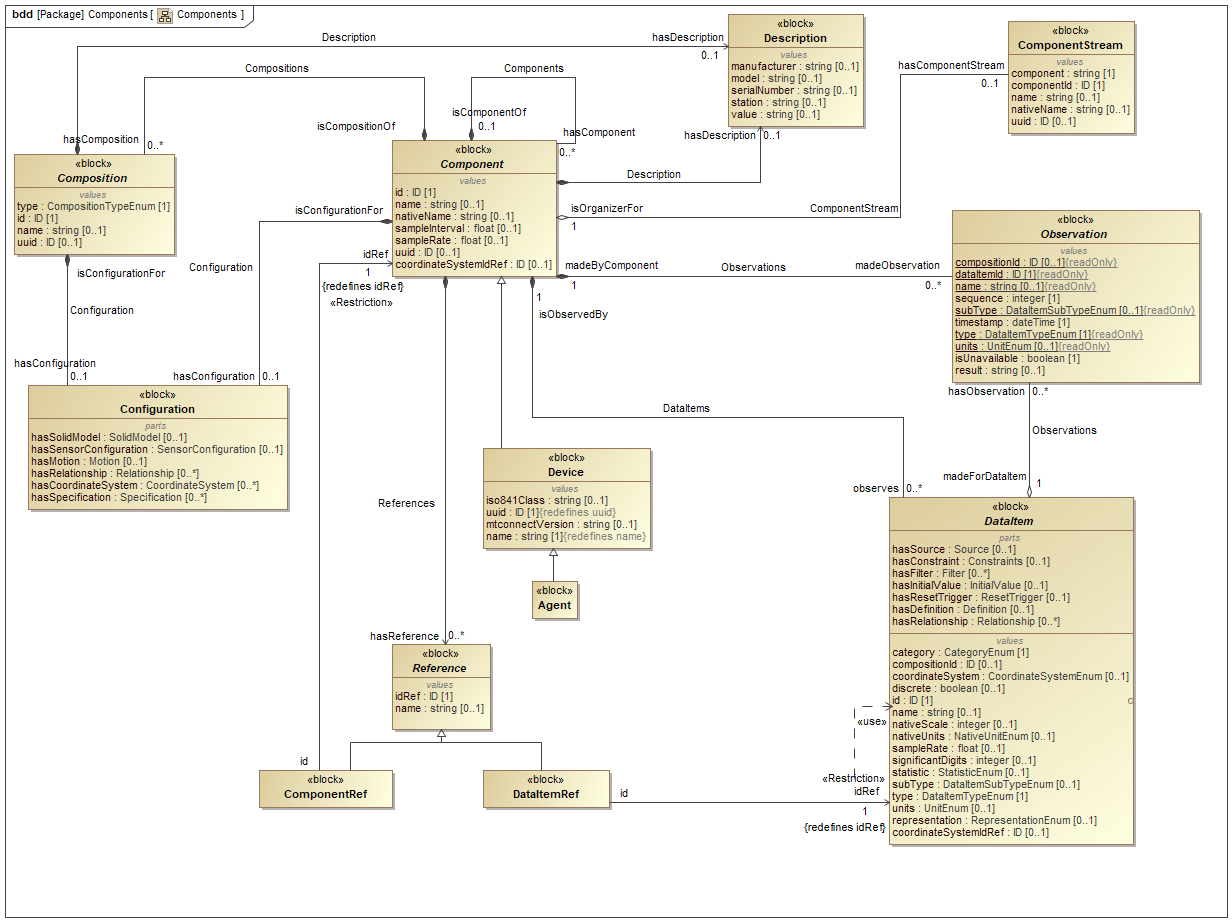
Note: See Components Schema Diagrams for XML schema.
Components Model
MTConnectDevices provides the physical and logical architecture of a piece of equipment. Device Entity Hierarchy Example provides an overview of the entities used in an example of an MTConnectDevices entity.
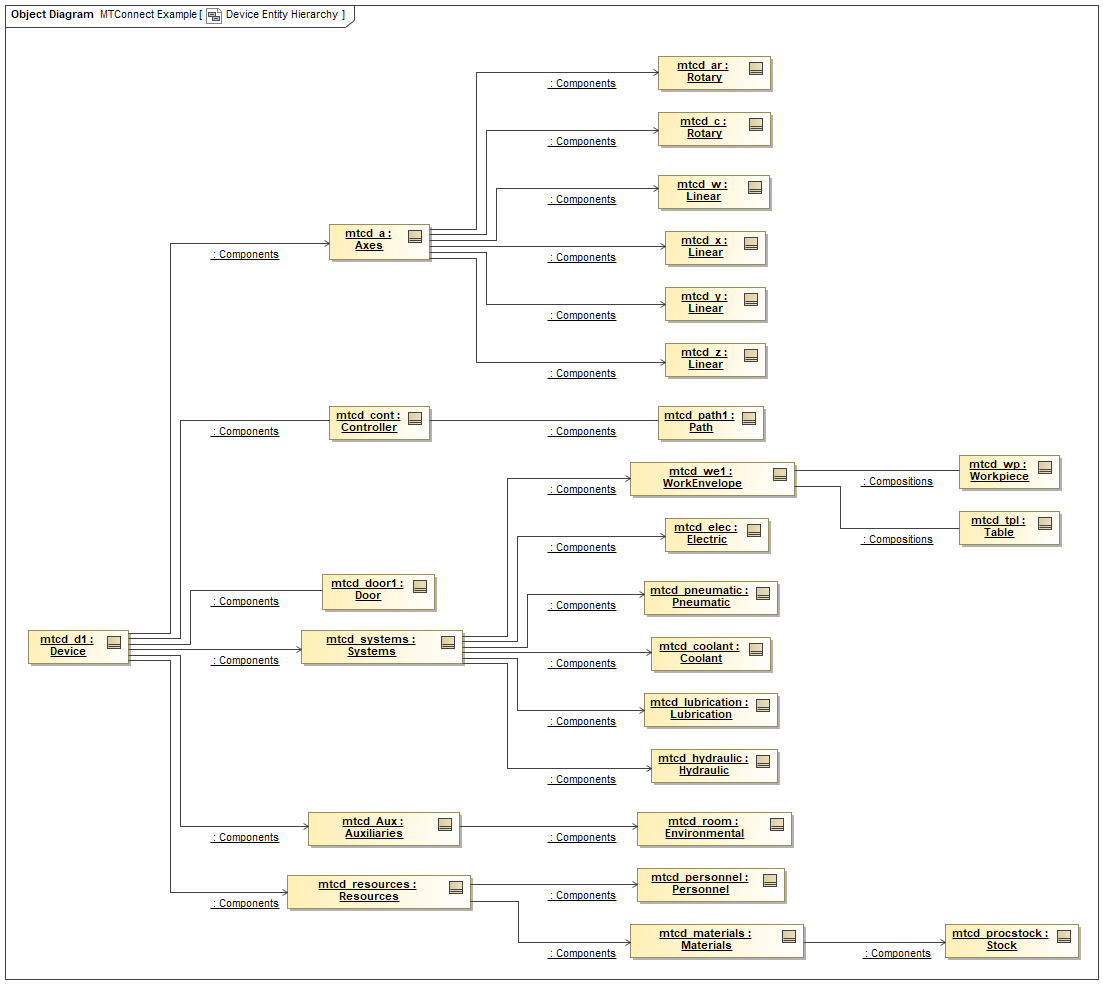
Note 1 to entry: See device-entity-hierarchy-example for the XML representation of the same example.
Note 2 to entry: Example above only shows the
ComponentandCompositionlevel hierarchy. For a complete semantics on each kind see Components and Compositions.A variety of entities are defined to describe a piece of equipment. Some of these entities MUST always be defined for an MTConnectDevices entity, while others are optional and MAY be used, as required, to provide additional structure.
The first, or highest level, entity defined for an MTConnectDevices entity is
Devices.Devicesis used to group one or more pieces of equipment into a single document.DevicesMUST always be defined for an MTConnectDevices entity.Deviceis the next entity defined for the MTConnectDevices entity. A separateDeviceentity is used to identify each piece of equipment for an MTConnectDevices entity. EachDeviceprovides information on the physical and logical structure of the piece of equipment and the data associated with that equipment.Devicecan also represent any logical grouping of pieces of equipment that function as a unit or any other data source that provides data through an agent.One or more
Deviceentities MUST always be defined for an MTConnectDevices entity.Componentsis the next entity defined for the MTConnectDevices entity.Componentsis used to group information describing lower level physical parts or logical functions of a piece of equipment.Componentis the next level of entity defined for the MTConnectDevices entity.Componentis both an abstract type entity and an organizer type entity.As an abstract entity,
Componentwill always be realized by a specificComponenttype defined in Component Types. EachComponentcan also be used to organize information describing lower level entities or DataItems associated with theComponent.If lower level entities are described, these entities are by definition child
Componententities of a parentComponent. At this next level, the lower level childComponententities are grouped byComponents.A
ComponentMAY be further decomposed intoCompositionentities that are grouped byCompositions. These describe the lowest level basic structural or functional building blocks contained within aComponent. Data provided for aComponentprovides more specific meaning when it is associated with one of theCompositionentities of theComponent. The differentCompositiontypes that MAY be defined for the MTConnectDevices entity are defined in Compositions.This parent-child relationship can continue to any depth required to fully define a piece of equipment.
Note: See Device Entity Hierarchy Example for an example.
- Compositions
This section provides semantic information for the
Compositionentity.See Components for the
Compositionmodel diagram.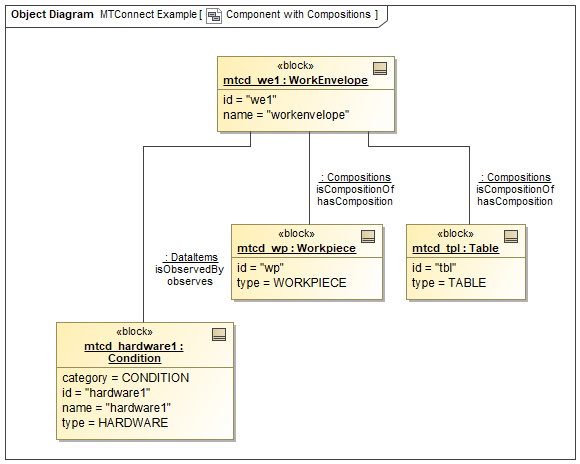
Note: See component-with-compositions-example for the XML representation of the same example.
Compositions Model
Compositionentities are used to describe the lowest level physical building blocks of a piece of equipment contained within aComponent. By referencing a specificCompositionentity, further clarification and meaning to data associated with a specificComponentcan be achieved.Both
ComponentandCompositionentities are lower level entities representing the sub-parts of the parentComponent. However, there are distinct differences betweenComponentandCompositiontype entities.Componententities may be further defined with lower levelComponententities and may have associated DataItems.Compositionentities represent the lowest level physical part of a piece of equipment. They MUST NOT be further defined with lower levelComponententities and they MUST NOT have DataItems directly associated with them. They do provide additional information that can be used to enhance the specificity of DataItems associated with the parentComponent.- Configurations
Configuration shows the abstract
Configurationand its types.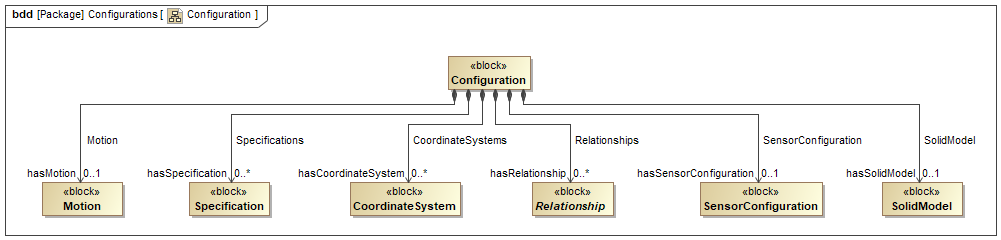
Note: See Configuration Schema Diagrams for XML schema.
Configurations Model
This section provides semantic information for the
Configurationentity that is used to model technical information about aComponent.- DataItems
This section provides semantic information for the
DataItementity. DataItems shows theDataItemmodel.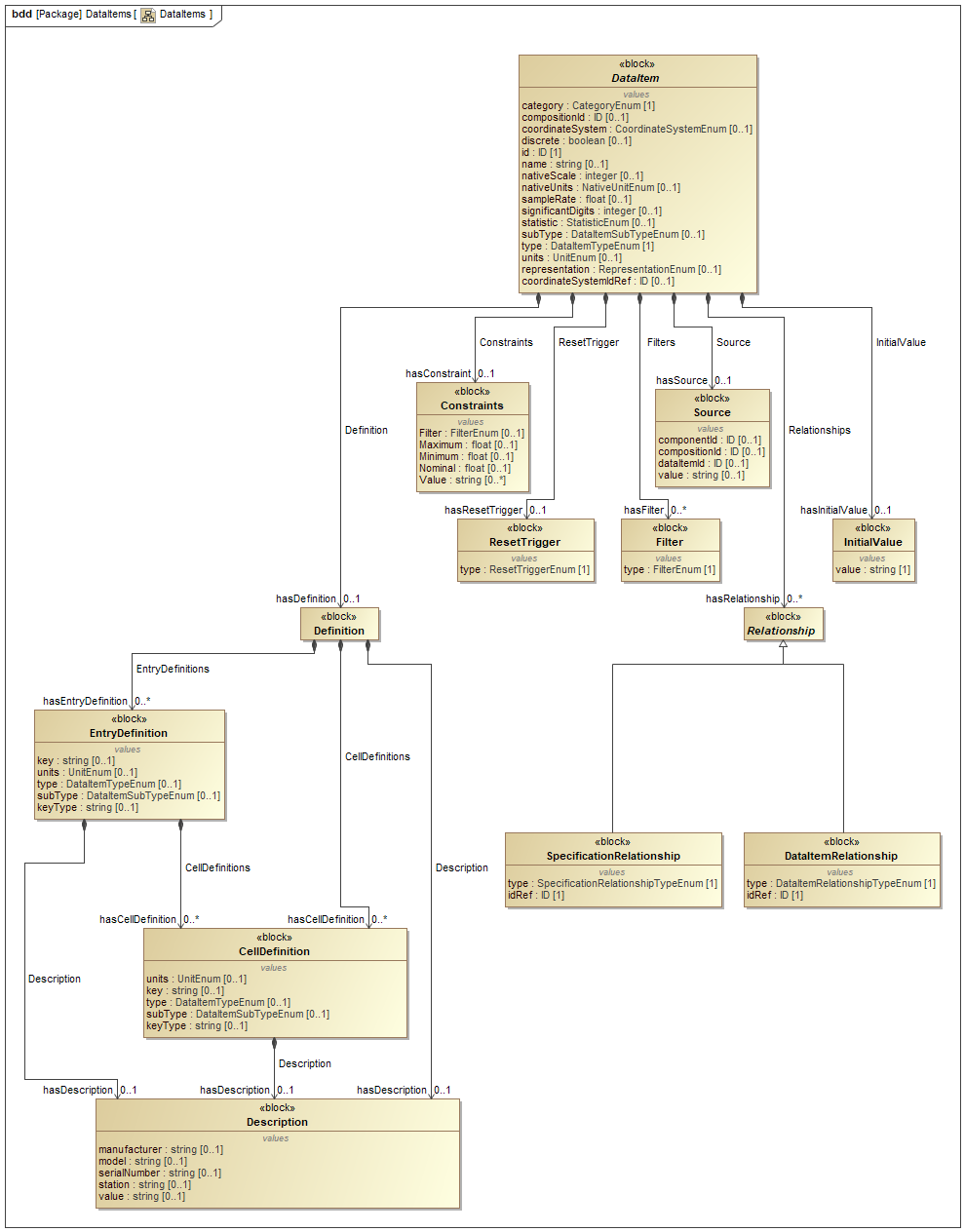
Note: See DataItems Schema Diagrams for XML schema.
DataItems Model
For an MTConnectDevices entity, DataItems describe data that can be reported by a piece of equipment and are associated with
DeviceandComponententities. While the DataItems describe the data that can be reported by a piece of equipment as an MTConnectDevices entity, the actual data values are provided by the MTConnectStreams entity in the MTConnectStreams Response Document. See Observation Information Model for detail on the reported values.Each DataItem SHOULD be modeled for the MTConnectDevices entity such that it is associated with the entity that the reported data directly applies.
DataItemdescribes specific types of DataItems that represent a numeric value, a functioning state, or a health status reported by a piece of equipment.DataItemprovides a detailed description for each DataItem that is reported; it defines the type of data being reported and an array of optional attributes that further describe that data. The different types ofDataItemelements are defined in DataItem Types.- References
This section provides semantic information for the
Referenceentity. References shows theReferencemodel.Referencemay be modeled as part of aDevice,ComponentorInterfacetype.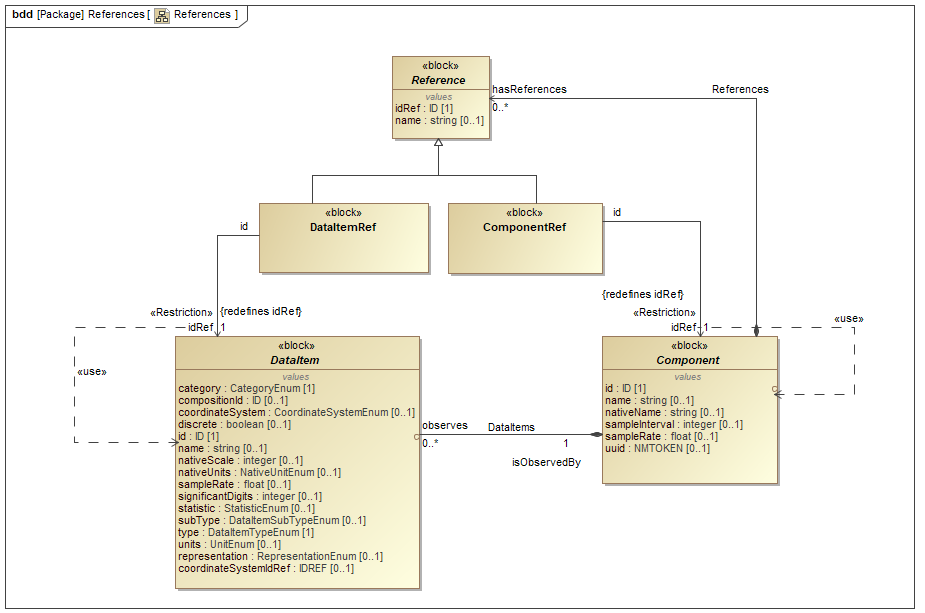
Note: See References Schema Diagrams for XML schema of
Referenceand its types.References Model
Referencesorganizes pointers to information defined elsewhere within the MTConnectDevices entity for a piece of equipment. It is an efficient method to associate information with an element without duplicating any of the data or structure.
Source: MTConnect Institute model documentation, version 2.8.
MTConnect term dictionary · TAMS Model-Aware MTConnect Browser