MTConnect 2.8 package
Observation Information Model
The Observation Information Model provides a representation of the data reported by a piece of equipment used for a manufacturing process, or used for any other purpose. Additional descriptive information associated with the reported data is defined by the MTConnectDevices entity, which is described in Device Information Model.
Information defined in the Observation Information Model allows a software application to (1) determine the Observations for DataItems returned from a piece of equipment and (2) interpret the data associated with those Observations with the same meaning, value, and context that it had at its original source. To do this, the software application issues one of two HTTP requests to an agent associated with a piece of equipment. They are:
sample: Returns a designated number of time stamped Observations from an agent associated with a piece of equipment; subject to any HTTP filtering associated with the request. SeeAgentin Fundamentals for details on thesampleHTTP request.current: Returns a snapshot of either the most recent values or the values at a given sequence number for all Observations associated with a piece of equipment from an agent; subject to any HTTP filtering associated with the request. SeeAgentin Fundamentals for details on thecurrentHTTP request.
An agent responds to either the sample or current HTTP request with an MTConnectStreams Response Document. This document contains information describing Observations reported by an agent associated with a piece of equipment. A client software application may correlate the information provided in the MTConnectStreams Response Document with the physical and logical structure for that piece of equipment defined in the MTConnectDevices entity to form a clear and unambiguous understanding of the information provided. (See details on the structure for a piece of equipment described in Device Information Model).
Streams for an MTConnectStreams entity contains a DeviceStream entity for each piece of equipment represented in the document. Each DeviceStream is comprised of two primary types of entities – Components and Observations. The contents of the DeviceStream container are described in detail in this document, Observation Information Model of the MTConnect Standard.
Components are defined for both the MTConnectDevices and the MTConnectStreams entities. These Components are used to provide a logical organization of the information provided in each entity.
For an MTConnectDevices entity: Components organize information that represents the physical and logical parts and sub-parts of a piece of equipment. (See
Componentin Device Information Model for more details on Components used in the MTConnectDevices entity).For an MTConnectStreams entity: Components provide the structure to organize the data returned from a piece of equipment and establishes the proper context for that data. The Components specifically defined for MTConnectStreams are DeviceStream (see DeviceStream) and ComponentStream (see ComponentStream).
DeviceStream and ComponentStream entities have a direct correlation to each of the Component defined in the MTConnectDevices entity.
Within each ComponentStream entity in the MTConnectStreams entity, Observations are modeled as Observation entities. The three types of Observation entity are Sample, Event, and Condition. (See Observation Types for more information on these entities.)
Observations Appendix
XML Schema Diagrams
Observations Schema Diagrams
See Streams element in MTConnectStreams schema.
See DeviceStream element in MTConnectStreams schema.
See ComponentStream element in MTConnectStreams schema.
See Sample element in MTConnectStreams schema.
See Event element in MTConnectStreams schema.
See Condition element in MTConnectStreams schema.
Representation Schema Diagrams
See AbsTimeSeries element in MTConnectStreams schema.
See PartCountDiscrete element in MTConnectStreams schema.
See VariableDataSet element in MTConnectStreams schema.
See Entry element in MTConnectStreams schema.
See WorkOffsetTable element in MTConnectStreams schema.
XML Examples
DeviceStream Example
<Streams>
  <DeviceStream name="M12346" uuid="M8010W4194N">
    <ComponentStream component="Device" name="M12346" componentId="d1">
      <Events>
        <Availability dataItemId="avail" sequence="156" timestamp="2021-10-01T14:26:38.668505Z">AVAILABLE</Availability>
        <AssetChanged assetType="CuttingTool" dataItemId="d1_asset_chg" sequence="75570" timestamp="2021-10-07T05:08:53.870206Z">M8010W4194N1.120</AssetChanged>
        <AssetRemoved assetType="CuttingTool" dataItemId="d1_asset_rem" sequence="140" timestamp="2021-10-01T11:40:08.101461Z">UNAVAILABLE</AssetRemoved>
      </Events>
    </ComponentStream>
    <ComponentStream component="Controller" name="controller" componentId="cont">
      <Events>
        <EmergencyStop dataItemId="estop" sequence="159" timestamp="2021-10-01T14:26:38.66869Z">ARMED</EmergencyStop>
      </Events>
      <Samples>
        <AccumulatedTime dataItemId="cut_time" sequence="75437" timestamp="2021-10-07T05:08:28.221704Z">1763070.0</AccumulatedTime>
      </Samples>
      <Condition>
        <Unavailable dataItemId="cont_system" sequence="72" timestamp="2021-10-11T21:04:03.251999Z" type="SYSTEM"/>
        <Warning dataItemId="cont_system" nativecode="313" nativeSeverity="50" sequence="75573" timestamp="2021-10-07T05:08:58.518317Z" type="LOGIC_PROGRAM">PALLET ARM DOWN RS. MALF.</Warning>
      </Condition>
    </ComponentStream>
    <ComponentStream component="Path" name="path" componentId="path1">
      <Events>
        <Execution dataItemId="execution" name="execution" sequence="222623" timestamp="2021-10-12T06:04:32.761198Z">INTERRUPTED</Execution>
        <VariableDataSet count="2" dataItemId="cvars" sequence="126513" timestamp="2021-10-12T03:57:31.106559Z">
          <Entry key="100">66.3314</Entry>
          <Entry key="101">167.2</Entry>
        </VariableDataSet>
        <WorkOffsetTable count="2" dataItemId="woffset" sequence="222101" timestamp="2021-10-12T06:04:11.990531Z">
          <Entry key="G53.1">
            <Cell key="X">1</Cell>
            <Cell key="Y">2</Cell>
            <Cell key="Z">3</Cell>
          </Entry>
          <Entry key="G53.2">
            <Cell key="X">4</Cell>
            <Cell key="Y">5</Cell>
            <Cell key="Z">6</Cell>
          </Entry>
        </WorkOffsetTable>
      </Events>
      <Samples>
        <CuttingSpeed dataItemId="cspeed" sequence="112" timestamp="2021-10-07T05:08:28.221704Z" subType="ACTUAL">UNAVAILABLE</CuttingSpeed>
      </Samples>
      <Condition>
        <Normal dataItemId="path_system" sequence="153" timestamp="2021-10-11T21:04:03.262845Z" type="SYSTEM"/>
      </Condition>
    </ComponentStream>
  </DeviceStream>
</Streams>
DeviceStream Example
Observations made for DataItem Example
<Components>
  <Controller id="cont" name="controller">
      <DataItems>
      <DataItem category="EVENT" id="estop" name="estop" type="EMERGENCY_STOP"/>
    </DataItems>
  </Controller>
</Components>
MTConnectDevices Response Document
<ComponentStream component="Controller" name="controller" componentId="cont">
  <Events>
    <EmergencyStop dataItemId="estop" sequence="159" timestamp="2021-10-01T14:26:38.66869Z">ARMED</EmergencyStop>
  </Events>
</ComponentStream>
MTConnectStreams Response Document
Sample Example
<Samples>
  <AccumulatedTime dataItemId="cut_time" sequence="75437" timestamp="2021-10-07T05:08:28.221704Z">1763070.0</AccumulatedTime>
  <CuttingSpeed dataItemId="cspeed" sequence="112" timestamp="2021-10-07T05:08:28.221704Z" subType="ACTUAL">UNAVAILABLE</CuttingSpeed>
</Samples>
Sample Example
Event Example
<Events>
  <Availability dataItemId="avail" sequence="156" timestamp="2021-10-01T14:26:38.668505Z">AVAILABLE</Availability>
  <AssetRemoved assetType="CuttingTool" dataItemId="d1_asset_rem" sequence="140" timestamp="2021-10-01T11:40:08.101461Z">UNAVAILABLE</AssetRemoved>
</Events>
Event Example
Condition Example
Condition types are represented differently in XML when compared to Sample and Event types. The element name is the condition state of the Condition type in Pascal Case. The name of the Condition type is represented by the attribute type.
If the condition state is unavailable then the element name is represented by Unavailable.
<Condition>
  <Unavailable dataItemId="cont_system" sequence="72" timestamp="2021-10-11T21:04:03.251999Z" type="SYSTEM"/>
  <Normal dataItemId="path_system" sequence="153" timestamp="2021-10-11T21:04:03.262845Z" type="SYSTEM"/>
  <Warning dataItemId="cont_system" nativecode="313" nativeSeverity="50" sequence="75573" timestamp="2021-10-07T05:08:58.518317Z" type="LOGIC_PROGRAM">PALLET ARM DOWN RS. MALF.</Warning>
</Condition>
Condition Example
DataSet Example
<Events>
  <VariableDataSet count="2" dataItemId="cvars" sequence="126513" timestamp="2021-10-12T03:57:31.106559Z">
    <Entry key="100">66.3314</Entry>
    <Entry key="101">167.2</Entry>
  </VariableDataSet>
</Events>
DataSet Example
Table Example
<Events>
  <WorkOffsetTable count="2" dataItemId="woffset" sequence="222101" timestamp="2021-10-12T06:04:11.990531Z">
    <Entry key="G53.1">
      <Cell key="X">1</Cell>
      <Cell key="Y">2</Cell>
      <Cell key="Z">3</Cell>
    </Entry>
    <Entry key="G53.2">
      <Cell key="X">4</Cell>
      <Cell key="Y">5</Cell>
      <Cell key="Z">6</Cell>
    </Entry>
  </WorkOffsetTable>
</Events>
Table Example
Classes
- ComponentStream
organizes the data associated with each
Componententity defined for aDevicein the associated MTConnectDevices Response Document.Description
At least one of
Sample,Event, orConditionMUST be organized by a ComponentStream entity.- Condition
Observationthat provides the condition of a piece of equipment or a Component.Description
It provides the information and data reported from a piece of equipment with
categoryasCONDITIONin the MTConnectDevices Response Document.Condition Example shows
Conditiontype examples for variousstate:Normal(dataItemId=path_system) andWarning(dataItemId=logic_cond). It also shows an example for when thestateis not available (dataItemId=cont_system).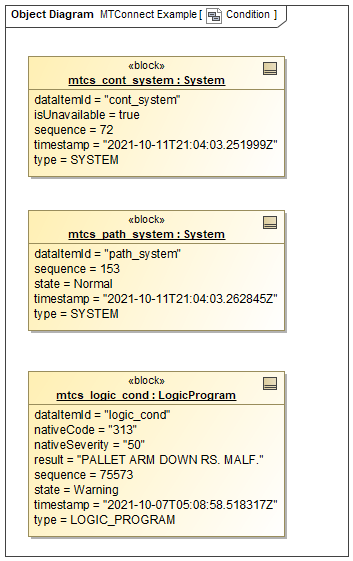
Note: See condition-example for the XML representation of the same example.
The following Value Properties of Condition lists the additional and/or updated attributes for
Condition.- DeviceStream
organizes data reported from a
Device.Description
DeviceStream MUST be provided for each
Devicereporting data in an MTConnectStreams Response Document.If the response to the request for data from an agent does not contain any data for a specific
Device, an empty DeviceStream entity MAY be created to indicate that theDeviceexists, but there was no data available.- Event
Observationthat is a discrete piece of information from a piece of equipment.Description
It provides the information and data reported from a piece of equipment for those
DataItementities defined withcategoryasEVENTin the MTConnectDevices Response Document.Event Example shows
Eventtype examples. It also shows an example for when theresultis not available (dataItemId=d1_asset_rem).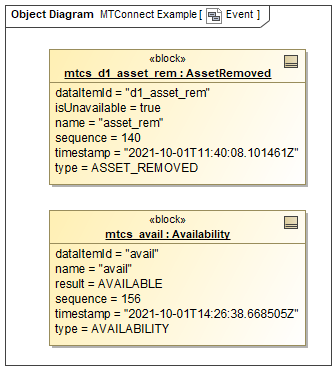
Note: See event-example for the XML representation of the same example.
The following Value Properties of Event lists the additional and/or updated attributes for
Event.- Observation
abstract entity that provides telemetry data for a
DataItemat a point in time.Description
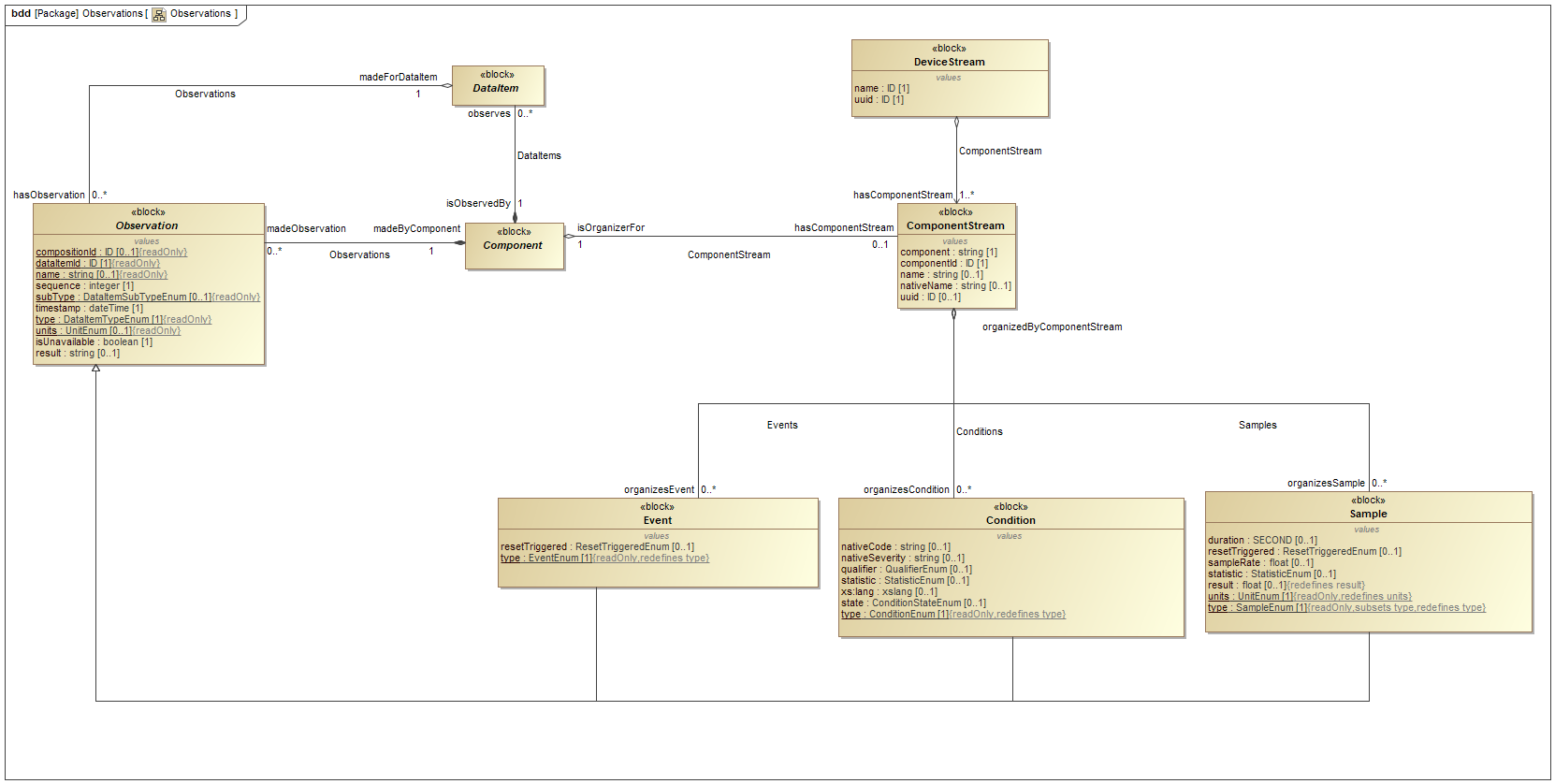
Note: See Observations Schema Diagrams for XML schema. The XML schema also shows differences in XML representation of certain MTConnect entities.
DeviceStream Example shows a complete example of DeviceStream for the
Deviceshown in Device Information Model.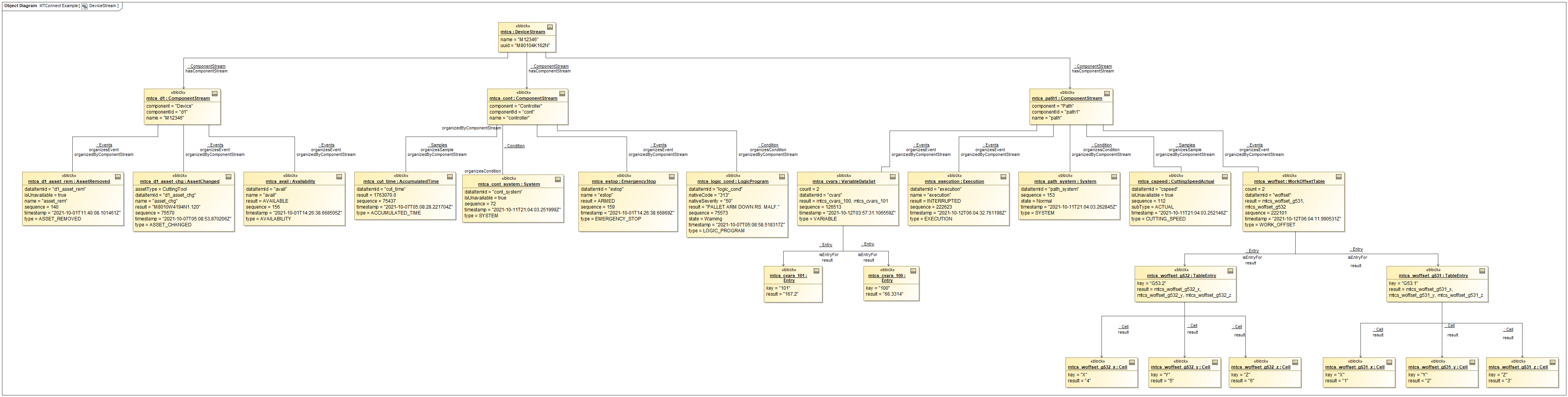
Note: See devicestream-example for the XML representation of the same example.
This section provides semantic information for the
Observationmodel.Note: See Observations Schema Diagrams for XML schema of
Observationtypes.Observations made for DataItem
ComponentobservesDataItementities and createsObservationentities for theDataItementities. See Observations.Observationentities made by aComponentare organized by a ComponentStream which is specifically created for thatComponent.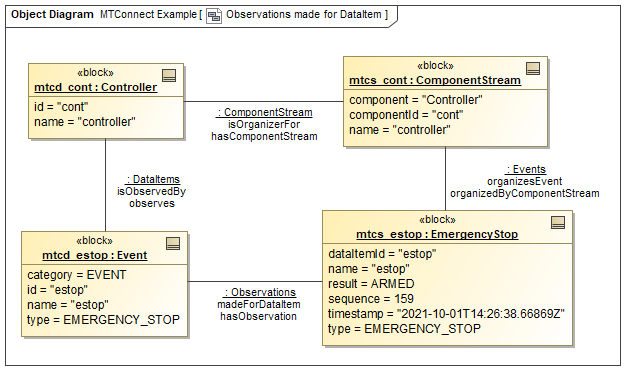
Note: See Observations made for DataItem Example for how XML representation of the same example is separated into MTConnectDevices Response Document and MTConnectStreams Response Document.
Observations made for DataItem Example is a subset of DeviceStream Example. It shows an example of the association between a
DataItemEventtype (EMERGENCY_STOP) and anObservationEventtype (EmergencyStop). See Naming Convention for Observation types.Observations made for DataItem Example also shows example of the association between a
Componenttype (Controller) and related ComponentStream.Naming Convention for Observation types
The name of an
Observationtype MUST derive from the associatedtypeconverted to Pascal-Case by removing underscores (_ ) and capitalizing each word. The conversion MUST NOT apply to the following abbreviated words:PH,AC,DCandURI.MTCONNECTMUST be converted toMTConnect. See Observations made for DataItem Example for an example.The name of an
Observationtype reported in the MTConnectStreams Response Document is extended when therepresentationis used to further describe thatDataItemin the MTConnectDevices Response Document. See Representations for more details.- Sample
Observationthat is continuously changing or analog data value.Description
It provides the information and data reported from a piece of equipment for those
DataItementities defined withcategoryasSAMPLEin the MTConnectDevices Response Document.SampleMUST always be reported infloat.Sample Example shows
Sampletype examples. It also shows an example for when theresultis not available (dataItemId=cspeed).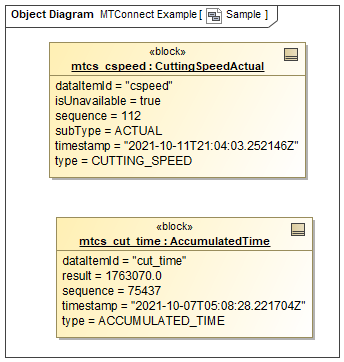
Note: See sample-example for the XML representation of the same example.
The following Value Properties of Sample lists the additional and/or updated attributes for
Sample.
Packages
- Observation Types
This section provides semantic information for the
Observationtypes.Observationentities are instantiated asSample,EventorConditionentities based upon thecategoryandtypedefined for the correspondingDataItem.See DeviceStream Example for examples on how the
Observationtypes are organized within ComponentStream.- Representations
This section provides semantic information for the Representation model.
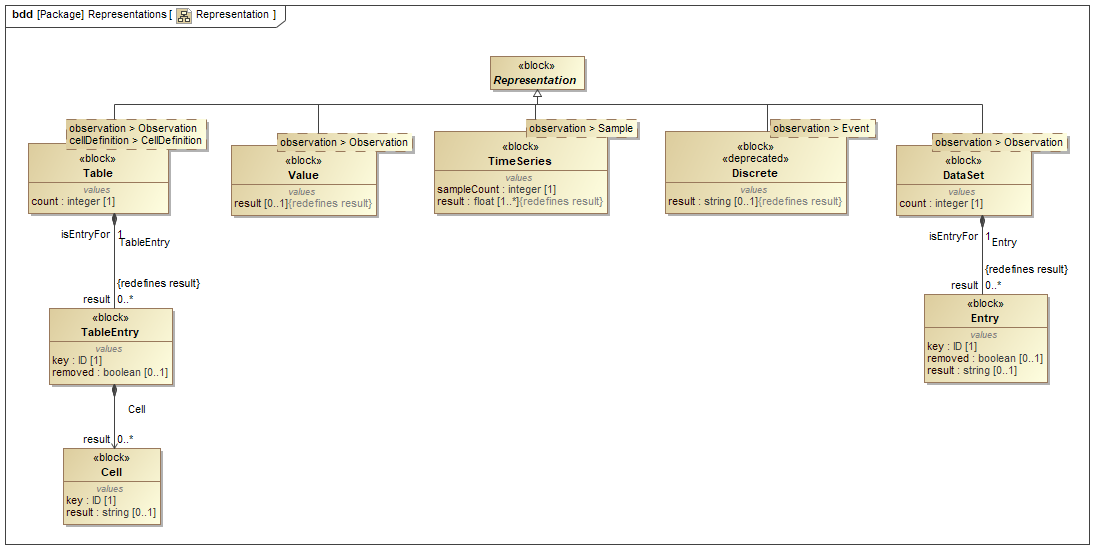
Note: See Representation Schema Diagrams for XML schema.
Source: MTConnect Institute model documentation, version 2.8.
MTConnect term dictionary · TAMS Model-Aware MTConnect Browser